 MetaTrader 5
 Experts
 지표
지표
 라이브러리
라이브러리
 유틸리티
유틸리티
 위젯
위젯
 규칙
규칙
MetaTrader 5용 트레이딩 유틸리티 - 45
 다음은 MetaTrader 5의 거래를 단순화하는 거래 프로그램입니다. 유틸리티의 설명과 목적을 읽으려면 유틸리티 위에 마우스를 놓으십시오.
As add-on to our professional divergence indicators we also created superb divergence scanners. These scanners give an overview of the different timeframes of the selected instruments and can save your tons of time. You can instantly see which instrument has a divergence on which timeframe. So no need to run through the charts manually anymore searching for good setups, with this scanner you see the whole market and you know where to look for a good trade opportunity. Even when you are not in fr

As add-on to our professional divergence indicators we also created superb divergence scanners. These scanners give an overview of the different timeframes of the selected instruments and can save your tons of time. You can instantly see which instrument has a divergence on which timeframe. So no need to run through the charts manually anymore searching for good setups, with this scanner you see the whole market and you know where to look for a good trade opportunity. Even when you are not in fr

As add-on to our professional divergence indicators we also created superb divergence scanners. These scanners give an overview of the different timeframes of the selected instruments and can save your tons of time. You can instantly see which instrument has a divergence on which timeframe. So no need to run through the charts manually anymore searching for good setups, with this scanner you see the whole market and you know where to look for a good trade opportunity. Even when you are not in fr

As add-on to our professional divergence indicators we also created superb divergence scanners. These scanners give an overview of the different timeframes of the selected instruments and can save your tons of time. You can instantly see which instrument has a divergence on which timeframe. So no need to run through the charts manually anymore searching for good setups, with this scanner you see the whole market and you know where to look for a good trade opportunity. Even when you are not in fr

Effortlessly calculate lot sizes and manage trades to save time and avoid costly errors
The Trade Pad Pro EA is a tool for the Metatrader Platform that aims to help traders manage their trades more efficiently and effectively. It has a user-friendly visual interface that allows users to easily place and manage an unlimited number of trades, helping to avoid human errors and enhance their trading activity. [ Installation Guide | Update Guide | Troubleshooting | FAQ | All Products ]
One of the k

Description
This is a utility tool for MT5, and it exerts a strong power for entry operations and fund management in discretionary trading. Although the standard trading panel provided by MT5 is very simple, it lacks some features that are considered particularly important for discretionary trading.
This tool compensates for the lack of functions, but we have paid close attention not to implement excessive functions.
Benefits of the Flexible Trading And Money Management MT5 Simple and Intuiti

Description
This is a Utility tool for MT5 which will keep us away from a chart in a nice manner, letting us know only a good trading opportunity. It is said that from novice to experts, one of the common and obviously the most important things to do is to “WAIT” for good trading opportunities to come. On the other hand, it is not always that case that we are sitting in front of the chart when the trading opportunity comes. Thinking about chart analysis, at the same time, major tools used to
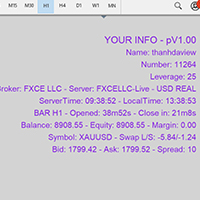
Show Account Information Custom showing your MT5 account information Indicators add account information to chart. Profit, Balance, Equity, Free Margin, Margin and Margin Level % Profit.... Hide account information: Click anywhere on account information text.
The hide/show response is dependent on incoming ticks or chart refresh. In tick scarce or closed markets the indicator hide/show click will appear not to function while waiting for a tick or chart refresh. It is only necessary to attac

Quando você abrir uma operação, mover o Stop Loss para o ponto de entrada (Break-Even) sempre que a operação andar favoravelmente 75 pontos, é uma obrigação! Isto significa que, quando sua operação atingir 75pts você moverá o Stop Loss para 10pts do ponto de entrada, desta forma, basicamente você vai colocar o Stop Loss em um preço 'melhor' que o preço de entrada (Break Even), ou seja, no lucro. Na pior das hipóteses, você sairá no “zero a zero”. A ideia é não deixar que uma operação parcialment
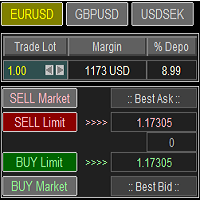
Trade Panel with Loss Breaking for MT5
Multi-instrumental trading panel with the function of transferring the stop loss of positions to loss breaking.
Has the following distinctive properties:
All trading parameters and panel operation are set in the settings. The traded position volume (lot size) is quickly changed. The required margin and the percentage of the required margin of the current deposit for the specified lot size are displayed. Shows profit when take profit is triggered and losses

This script is for changing all open tabs/charts at once on MetaTrader 5 using the drop-down box once the script has been initialized. It has all the standard timeframes available to be selected for MetaTrader 5. This is an individual script for all timeframes. You will need to select the timeframe you want all charts to go. Please watch the video for the installation instructions.
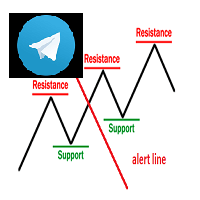
Keylevel and trendline Telegram reminder Having this EA, you do not need to standby on the screen to wait for price touch key level, trend line, or at 50 – 61.8 of Fibonacci retracement. All is automatic and it will notify you when need to take a look at the chart. EA will send you a screenshot through Telegram of the chart at the time of notification. This product can be used for every market, every instrument. The system auto draws and alerts when the price at a key level and at a Fibonacci r
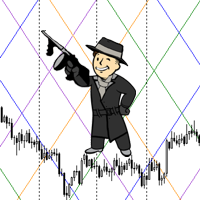
The script statistically reveals the main rate of movement (Gan angle) for the selected instrument. Using mathematical methods, it determines the speed of following the candles of the current timeframe against the background of the older one. Just place AutoGan on the graph and it will perform the required calculations and correctly draw the Gan grid.
The script is very easy to use, only the colors of the grid lines are set in the parameters.
Parameters:
GRID_COLORING : How many colors to us

Open Multiple Trades on MT5 in 1 click at one price. Enter the Symbol you want to trade Enter the Lot size Specify the number of trades you want to open Choose from a dropdown list whether you want to buy, sell, sell limit, sell stop, buy limit, buy stop If they are pending orders, state the number of pips away from the current price that you want to set the trades. Once you are done, click Ok and see the script open your trades in an instant What to Always Note Check the minimum stop levels f

Close all your trades or some of them with this script. If you have multiple trades open on a symbol and you want to close all of them just drag the script onto the chart and close the trades without delay. The Script will ask you how many trades you want to remain open... In case you want to close all trades just click OK Say you want to leave 1 position open out of 7, just type in 1 and click ok. Script closes trades faster than EA because it does not wait for the market to move but rather

PROMOTION!! $499 until 1 Mar. After that, EA will be $1,050 Developed and tested for over 3 years, this is one of the safest EAs on the planet for trading the New York Open. Trading could never be easier. Trade On NASDAQ US30 (Dow Jones Industrial Average) S&P 500 What Does The EA do? The EA will open a Buy Stop Order and a Sell Stop Order(With SL and TP) on either side of the market just a few seconds before the NY Open. As soon as 1 of the 2 trades is triggered, the EA automatically delete
Script that generates a report of possible ATM Straddle operations. It works for any asset on the spot market that has authorized stock options series on the B3 (Brazilian stock exchange).
Straddle operations presented in the report: Short Straddle operations Uncovered Short Straddle Covered Call Short Straddle Diagonal Covered Call Short Straddle (expiration of the covered call after the expiration of the short options) Iron Butterfly Iron Butterfly "Pozinho" Diagonal Iron Butterfly (diagonal
Script that generates a report of possible Calendar options structures .
It works for any asset on the spot market that has authorized series of options on the B3 (Brazilian stock exchange).
The report presents the alternatives for assembling calendars structures, for a defined range of strikes, with the long option expiring in a certain number of months.
The main structures of the report are:
Calendar Calendar Line Covered Calendar Line In addition, the report presents alternatives to cove

[Google Translation] Trader Trainer is a robot capable of supervising your operations depending on a series of configurable rules. The configurable rules are: Virtual Initial Capital It allows you to define the amount of capital with which you want to start the training. It must match the capital of the demo account on which the training will be carried out for correct operation.
Profit Target You must achieve at least the profit target set to pass the training.
Trailing Drawdown Your

Small tool that shows the number of current trades and pending trades.
An alarm threshold can also be activated and the user is informed if it is exceeded. This prevents the broker's limit for open trades from being exceeded. For example at IC Markets the limit is 200 trades at the same time. If you are not informed when this threshold is reached, the broker will no longer open new trades, which can lead to heavy losses. Must be applied to a chart.

Assistente para gerenciamento de ordens. Recursos: -> Definição de TP e SL -> Trailing Stop -> Breakeven -> Realização Parcial, manual ou automática -> Operação através de atalhos do teclado -> 3 setups possíveis, com acionamento através de atalho do teclado, permitindo níveis diferentes de TP, SL e Trailing Stop -> Definição automática ou manual do Lote -> Gerenciamento de Risco personalizável -> Contador regressivo para final do candle -> Informações sobre Resultado (em pontos), tanto no candl

Capture Spikes and hold for a long time. Let the Trailing stop follow the Price into profit. Not for Both Boom and Crash, Just for Boom Only. Once it spots a Setup, the EA will enter and you do not need to worry much about drawdown, this EA was tested on a $100 account and maximum drawdown was 9%, with the maximum consecutive losses recorded of $36. Those who ever bought from me know that I provide support promptly if you want to set up or need a Customized approach. Please note that the EA

This is a utility that helps you close market orders and pending orders (optional), using keyboard shortcuts. For me, it's more convenient and faster than clicking a button on the chart. You can set: Keyboard Shortcut Hotkey: You can change and use most of the keys on the keyboard.
Key combination (Ctrl, Shift) also available in case you want to use
(Note that not all combinations work). Magic Number Symbol: All Symbol, or Current Chart Symbol, or Select Symbol List Close Pending orde
The EA opens and closes new orders on time. It can be used to implement trading scenarios of any complexity by creating a list of tasks. There are two options for completing the task The task is executed on the specified date and time - it is executed once and is removed from the list. The task is executed with repetition on the specified day of the week and time - the task with repetitions is not removed from the list. Panel settings Symbol - select the symbol for the trade function. Time -
Automatic calculation and marking of resistance and price reversal levels. The script will perform statistical calculations and plot a regular grid on which the quote moves on the graph. These levels are very stable. Use them in trading planning and for placing pending orders.
Just select a timeframe and AutoLevels will indicate the important places of the chart in the form of horizontal lines.
Solid lines indicate more "dense" areas - areas of price reversal, where the quote happens more oft
The small control panel which includes an essential set of tools for major trading styles.
Key advantages: The most important tools for trading in one small app. Do not block your graph with large panels. Trading Essentials (TE) uses minimal design, can be dragged and shows important trading parameters. Quickly change trading parameters by using mouse wheel, keyboard, or +/- buttons on the panel. Did you know that, using 3:1 profit/loss ratio in order to breakeven, you have to be only 25% rig
Saving data from the order book. Data replay utility: https://www.mql5.com/en/market/product/71640 Library for use in the strategy tester: https://www.mql5.com/en/market/product/81409
Perhaps, then a library will appear for using the saved data in the strategy tester, depending on the interest in this development. Now there are developments of this kind using shared memory, when only one copy of the data is in RAM. This not only solves the memory issue, but gives faster initialization on each

DLT (Display Local Time) is an INDICATOR which displays local time using GMT timezone that can be easily switched. Support non standard timezones eg. -3:30, +4:45 Useful when you trade in your local market hours, or to evaluate candles in different time zone. This version is for MT5 terminal. For MT4 version click here: https://www.mql5.com/en/market/product/71187 Massive updates on version 3.0:
Choose to show current local time with optional date/GMT on chart's corner you want. Set your o
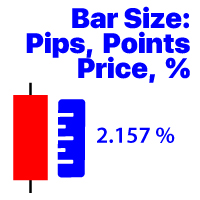
선택한 기간의 마지막 닫힌 막대의 변경 사항을 표시합니다 가격 가치; 백분율 값(%); 핍스; 시장 포인트; 내#1 조수 :66 개 이상의 기능 포함/ 질문이 있으면 저에게 연락하십시오 프로그램 파일은" Indicators "디렉토리에 배치해야합니다. 표시기의 설정에서 다음을 구성 할 수 있습니다: 글꼴 크기; 텍스트 색상; 차트에 위치 지정:왼쪽 하단 또는 오른쪽 하단 모서리에; 컴퓨터의 현재 시간 표시 켜기/끄기; 계산을위한 기간(현재를 설정할 수 있습니다:tf 가 변경되면 값이 변경됩니다); 계산 유형:
1=가격 가치;
2=백분율 값(%);
3=핍 크기;
4=포인트 단위의 크기; 값을 계산하는 방법:
true:높음-낮음 값이 사용됩니다;
false:열기-닫기 값이 사용됩니다;

Pyramid Order Manager is a utility based on the work of two indicators SM ZigZag and SM trend cloud .
With the help of this utility, the trader has the opportunity to set instant or pending orders on the chart in a short time with his lot, take profit and stop loss, as well as the number of orders in the grid, the coefficients of the lot and step change. The utility has two built-in indicators, listed above, with the ability to disable them.
A distinctive feature of this utility is the possib

Account Info Manager (AIM) 은 거래 계정에 대한 고문의 작업 결과에 대한 정보를 볼 수 있도록 설계된 유틸리티입니다. 유틸리티는 마법이나 댓글로 주문을 그룹화할 수 있으므로 계정에서 거래된 각 Expert Advisor의 작업 결과를 개별적으로 분석할 수 있습니다. 이 유틸리티를 사용하여 고문이 연 주문 수, 주문 성공률, 이익 가치, 이익 계수, 평균 주문 크기, 최대 인출 금액(드로우다운은 잔액에 따라 결정됨), 최고 및 최저 주문 등에 대한 정보를 볼 수 있습니다. 각 통화 쌍에 대한 고문의 작업 결과를 별도로 볼 수도 있습니다. 모든 정보는 추가 처리를 위해 Excel에서 열 수 있는 .csv 파일에 저장할 수 있습니다.
주목! 유틸리티는 전략 테스터에서 작동하지 않습니다. 유틸리티를 사용하기 전에 튜토리얼 비디오를 시청하는 것이 좋습니다.

TradeByTime Manager is a tool to trade based on time. It is semi auto trading. Trader define entry and exit time and EA will manage the rest. Helpful for trader who is usually trading with time range such as trading signal with entry and exit based on time or trading with news event time. Or trader who is familiar with trading binary option, this is another 'sense' of it. Only this is for trading on regular chart. 1. TakeProfit and Stoploss 2. Double time based : Local and Server 3. Time counte

This Expert Advisor is applicable to plot wave charts as per the NeoWave method (Neely Extension of Wave Theory). NeoWave is a scientific, objective and revolutionary style of Elliott Wave Theory that was invented by Glenn Neely in 1990 in the “Mastering Elliott Wave” book. To start analyzing with this method, we need a particular chart called the Wave Chart or Cash Data chart . This is the first step for a good wave analysis. To draw this chart, Highs and Lows should be plotted in the order t

Trade Dragon Pro An expert trade utility perfect for intraday, mid-term and long-term trading. Trade Dragon Pro generates stop-loss and take-profit levels for you based on the previous Tokyo-Sydney session.
In-built risk management Configurable number of entries On-the-fly risk and SL and TP adjustment (TP is based on SL) In-built trade manager for auto break-evens and trailing stop losses Per-day support and resistance levels Pending levels menu 3 MA trend signal Trade projection to show you
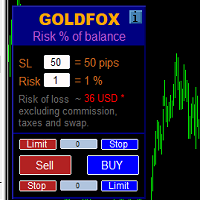
손절매(핍 단위) 및 계정 잔액의 위험 비율을 고려한 거래 로트의 자동 계산. Expert Advisor 패널은 왼쪽 상단의 차트에 있습니다. 어드바이저의 패널에서 스톱로스(핍 손실)의 크기와 잔액에서 위험 비율을 선택할 수 있습니다. 보류 중인 주문에 대해 현재 가격과의 편차를 핍 단위로 설정할 수 있습니다. 붉은 색은 손절매가 발동될 때 잃을 수 있는 예금 통화의 금액을 나타내며 이 금액에는 수수료, 스왑 및 세금이 포함되지 않습니다.
주요 외환 통화 쌍인, XAUUSD(금), BTCUSD, ETHUSD에 이 어드바이저를 사용하는 것이 좋습니다! 다른 기기의 경우 계산의 특성을 고려하여 오류가 발생할 수 있습니다! 대부분의 외환 상품에 대해 점 뒤에 5자리 숫자가 있는 계정을 권장합니다.
설명
- 손실 위험. 예금 통화의 위험 금액은 고문의 정보 패널에 빨간색으로 표시됩니다. 이 값은 미결제 주문(또는 보류된 주문)에 해당합니다. 단, 상품의 마진이 이 위
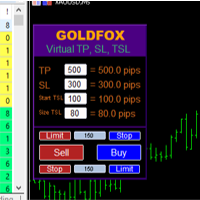
Forex Expert Advisor(유틸리티) "가상 중지 손실, 추적 중지"를 사용하면 가상(숨겨진) 중지 손실 및 추적 중지를 설정할 수 있습니다. 동시에 표준 중지 손실 및 추적 중지 주문을 사용하지 않습니다. 따라서 고문이 거래를 열면 귀하의 브로커와 Meta Trader 터미널은 손절매 또는 추적 손절매를 보거나 설정하지 않지만 고문은 귀하가 지정한 TP SL TSL의 매개변수를 제어하고 차트에 해당 선을 그립니다. ... 상품 가격이 이 수준 중 하나에 도달하면 거래가 종료됩니다. Meta Trader와 브로커 서버가 연결되어 있지 않거나 귀하의 계정에 대한 원격 호스팅 서비스가 없는 경우 어드바이저가 해당 기능을 수행할 수 없으므로 귀하의 거래가 가상 정지로 보호되지 않을 수 있으므로 주의하십시오. 많은 거래자들이 거래를 위한 가상 정지 기능을 필요로 하고 찾고 있습니다! 설명 - 많은. Advisor 메뉴에 표시됩니다. 기본값은 0.01입니다! - 손절매,
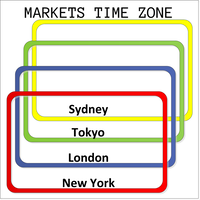
This product displays open and close time zones for four major markets New York, London, Sydney and Tokyo. It spares you the effort to manually check for market hours by conveniently displaying colored zones for different market hours. For serious traders it is essential to understand your preferred currency pair behavior with respect to major markets open and close times. This EA comes in handy when you want to integrate market hours with your other analysis tools all in one visual display. -Th
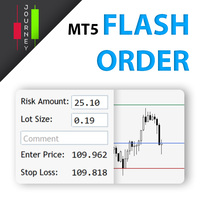
Trading has never been easier! Let's check this out! MT4 version: https://www.mql5.com/en/market/product/72118 The story: How I boost up my trading speed without any "Invalid SL or TP" error
NOW ALL YOU NEED TO DO IS Drag the lines Press Open Order button Enjoy! With this tool, you will no longer have to enter prices manually, which can cause many mistakes and you could miss the trade! From the board, we have: Risk Amount : the risk you want to apply for your trade Risk Unit : USD : If sele
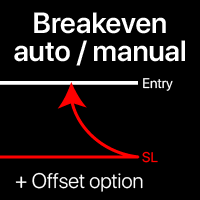
손익분기점 레벨: 수동 및 자동 이 유틸리티를 사용하면 단 1클릭으로 거래를 빠르게 손익분기점으로 이동시킬 수 있습니다: 단기 거래에서 특히 중요합니다. 또한 거래가 원하는 수익에 도달했을 때 자동 SL 이동을 설정할 수 있습니다. 오프셋 옵션도 사용 가능합니다. 다기능 유틸리티 : 66+ 기능, BE 레벨 확장 작업 포함 | 질문이 있으면 연락주세요 | MT4 버전 이 도구는 2개의 하위 섹션으로 구성됩니다: 1. [지금 SL을 BE로 이동]: 지정된 거래의 SL을 수동으로 손익분기점으로 이동합니다. 2. [자동 BE]: 거래가 수익으로 전환될 때 자동 손익분기점 기능.
수동 모드 [지금 SL을 BE로 이동]: 1. 특정 [심볼] 을 지정하거나 [모두] 심볼을 선택합니다. 2. 손익분기점을 적용할 거래 유형 을 선택합니다: [모두]: 모든 활성 거래용; [롱]: 매수 거래만; [숏]: 매도 거래만; 3. [이익 > 경우] 옵션: 활성화되면 SL은 이익이 지정 값

Auto SL and TP is a program that adds StopLoss and TakeProfit automatically, so you don't need to worry about it anymore. The program checks at any time if StopLoss and TakeProfit are set correctly!!! You can enter your values via the input parameter.
Input-Settings StopLoss: Boolean value, if set to true, will be executed. StopLoss in Points TakeProfit: Boolean value, if set to true, will be executed. TakeProfit in Points
빠른 작업: 1클릭으로 모든 거래를 닫거나 수정 이 유틸리티를 사용하면 , 선택한 카테고리의 모든 거래에 필요한 작업을 빠르게 적용할 수 있습니다. 특히 단기 거래자에게 유용하며 , 빠르게 행동해야 할 때 유용합니다. 다기능 유틸리티 : 66+ 기능, 이 도구 포함 | 질문이 있으면 연락주세요 | MT4 버전 1. [ALL] Symbols 을 선택하거나 관리할 특정 [Symbol] 을 지정하세요 . 또한 다른 심볼 그룹을 동시에 관리 할 수 있습니다. 예를 들어: ' GBP '를 입력하면 GBP /USD, EUR/ GBP 및 ' GBP '가 포함된 다른 심볼을 동시에 관리할 수 있습니다. 2. 아래에서 6가지 유형 으로 그룹화된 활성 거래 를 닫을 수 있습니다. 파란 스위치 를 사용하여 활성 거래의 어떤 부분을 닫을지 선택할 수 있습니다: [Close full] : 활성 거래가 완전히 닫힙니다; [Close %] : 닫을 현재 로트 크기의 % 를 지정하세요.
Auto set stop loss and take profit and trailing on any open position on chart , Wen you open positions manually it will manage the trade and set the stop loss/take profit and trailing stop based on Average true range calculation with risk reward factor default 1:3 . also you can use normal stop loss take profit and trailing . Inputs Stop Loss (in pips) Take Profit (in pips) Trailing Stop (in pips) Trailing Step (in pips) Use ATR = true ATR period Risk Reward
chart output f
이 스크리너를 사용하면 선택한 기간(시간 프레임) 내에 일반적으로 과매수(% 증가) 또는 과매도(% 하락)보다 많은 자산을 식별할 수 있습니다. 시장은 법에 의해 지배되고, 더 싸게 사거나 더 비싸게 팔지만, 자동 스캐너가 없으면 예를 들어 이번 주 내에 평소보다 더 많이 과매수 또는 과매도된 통화/주식을 식별하는 것이 매우 어려울 것입니다. 현재 시간 또는 월. 수십 또는 수백 개의 기기가 있을 수 있으며 때로는 물리적으로 모든 것을 수동으로 분석할 시간이 없을 수도 있습니다. 이러한 문제는 Screener를 사용하여 쉽게 해결할 수 있습니다.
스크리너가 할 수 있는 일 스캐너는 모든 TF에서 사용할 수 있습니다. 스캐너는 통화, 주식, 암호화폐, 상품, 지수 및 기타 도구와 함께 작동합니다. 자산을 식별하는 논리는 시장의 기본 법칙을 기반으로 하기 때문에 보편적입니다. 스크리너의 도움으로 다양한 전략에 따라 작업할 수 있습니다. 가장 일반적인 전략 중 하나는 펌프 앤 덤프입니

Ferramenta derivada do DR Assistant, a versão Lite conta com recursos semelhantes, mas sendo mais específica em sua aplicação, destina-se exclusivamente ao uso para gestão de ordens abertas a partir de suas funções. Deste modo, quaisquer outras negociações ou posições abertas por outras ferramentas ou manuais serão ignoradas pelo Assitant Lite. Os parâmetros e configurações disponíveis, bem como suas principais funções são: - Take Profit e Stop Loss: duas opções de Steps, em pontos, para ambas a

Open Risk Profit shows your current risk or possible profit of all open positions. Total open risk is your loss if all positions run into the stop loss.
Total open profit is your profit if all positions reach your take profit.
Total float is your current profit or loss of all positions. The program also breaks down the information into the individual symbols. For example, you can monitor how much is your current profit and your potential risk in EURUSD, no matter how many individual positions
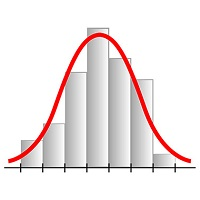
This expert advisor works on price volatility, it scans the market every single tick trying to find great opportunities for day trading. it has alarms, analisys and much more to provide great trades for you, give it a try.
It is a cross-over alarm which bips when standard deviation goes from low to very high so that you can surf the movement. It is all about volatility and high flow.

수동 무역 패널 EA MT5 는 MT5에서 찾을 수 있는 가장 간단하고 사용하기 쉬운 무역 패널입니다. 추가 창이나 패널을 열 필요 없이 한 표면에 모든 옵션과 기능이 있습니다. 그것은 인터페이스를 사용하기 매우 편리한 하나의 주문 관리, 위험 계산기, 부분 폐쇄 및 계정 보호 유틸리티 모두입니다!
수동 거래 패널 EA MT5 를 사용하면 기존 수동 거래 방법보다 몇 배 더 빠르고 정확하게 거래할 수 있으며 거래 결정에 더 많은 시간과 더 명확한 정신을 집중할 수 있습니다.
계정 보존은 우리의 최우선 순위이므로 Manual Trade Panel EA MT5 는 또한 계정 이익을 얻거나 중지한 후 모든 미결 주문을 닫고 보류 중인 모든 주문을 삭제하며 EA가 첨부된 모든 터미널 차트를 닫을 수 있는 훌륭한 계정 보호 유틸리티입니다. 손실 자산에 도달했습니다. 이것은 이익 조건에서 매우 편리할 수 있으며 자산이 원하는 손절매 수준 아래로 떨어질 때 추가 손실로부터 거래 계정을

This script is designed to download a long history of cryptocurrency quotes from the Binance exchange. You will find it perfectly suitable if you want once to download the history of cryptocurrencies for charts analyzing, collecting statistics or testing trading robots in the MetaTrader 5 strategy tester, or if you need to update the history not very frequently (for example, once a day or once a week). After running the script, you will have fully featured (but not automatically updated) cryptoc

1. What is this. This is a very rigorous indicator to show different market trading sessions. It shows the main markets: NewYork, London, Frankfurt, Sydney, Wellington, Tokyo. Very important: Different markets have different start and end dates for daylight saving time, and the trading session of a market can vary depending on daylight saving time and winter time. Also, the daylight saving time system is different for countries in the northern hemisphere and southern

1. What is this. This is a very rigorous indicator to show different market trading sessions. It shows the main markets: NewYork, London, Frankfurt, Sydney, Wellington, Tokyo. Very important: Different markets have different start and end dates for daylight saving time, and the trading session of a market can vary depending on daylight saving time and winter time. Also, the daylight saving time system is different for countries in the northern hemisphere and southern hemisphe

Binance Future용 Mt5 봇(전문가)
시스템은 Binance Future 시장에서 실행됩니다.
이를 자신의 코드에 쉽게 통합하여 작업을 자동화할 수 있습니다.
수동 조작 패널을 사용할 수 있습니다.
헤지 모드 호환.
모든 작업은 화면에서 수동으로 수행할 수 있습니다.
많은 암호화폐를 동시에 제어하는 가장 효과적인 방법입니다.
화면은 바이낸스 화면이 있는 템플릿 형식입니다. 링크에서 템플릿 파일을 다운로드할 수 있습니다.
https://drive.google.com/file/d/1WHqGhym0QIK31l7kwfit9_tXb7YbqSuT/view?usp=sharing
이 프로그램은 설치가 필요합니다.
https://www.mql5.com/tr/market/product/68694
https://www.mql5.com/tr/market/product/73887
매개변수
API 키 = 바이낸스 API 키
비밀 키 = 바이낸스 비밀 키
*도구

1. 이 EA는 출구 전략(역/헤지) 마틴게일을 사용하는 자동 이익 실현, 손절매, 추적 정지 및 이익 잠금입니다.
2. PC 차트 또는 모바일 거래에서 수동 거래에 적합(VPS일 때)
3. 변수 입력은 핍 단위입니다.
4. 1순위는 직접 오픈(매수/매도)합니다. 이후 TP, SL, TS 및 이익 잠금이 설정됩니다.
5. 첫 번째 수동 거래(실패)가 추세에 반하는 경우 2가지 출구 전략이 있습니다.
(a) 리버스 마틴게일(매도)은 첫 번째 수동 거래(매수)가 SL에 도달하면 활성화됩니다.
(b) 헤지 마틴게일(매수)은 첫 번째 수동 거래(매수)가 SL에 도달하면 활성화됩니다.
*첫 번째 수동 거래(매도)가 SL에 도달하면 그 반대의 경우도 마찬가지입니다.
6. 트레일링 스톱과 트레일링 스텝은 1차 수동 거래가 추세에 진입했지만 갑자기 반전될 때 활성화됩니다.
7. Profit Lock은 동일한 쌍의 현재 여러 주문에 대한

NFP Master its an scalper EA that trade the NFP monhtly news,here we locate an extraordinary oportunity to make flash money, even if the price rise down or pump up we will get profit anyway, the best part of this Expert Advisor is that we dont need any VPS, just run the EA 10 minutes before the Non Farming Payrolls new gonna be released and let the money comes, just test it on any NFP new that has been released in the past and you will see it works, the performance say it all. Preferly use ECN b

This is the Best Renko chart generator ever in the market you can set the box sizes based on ATR or Fixed Size: 1. Fixed Box Size 2. Current ATR Size 3. ATR size of the Chart Start Time. also you can set the Renko chart cut of date and time to start as reference of creating renko charts. you need to attach to a symbol chart that want the renko chart of it, then immediately a new chart will be opened which is based on renko, you can use this generated chart and attach your EA to trade on or you e

A utility to close all positions and orders with one simple click at once.
Various options are available to filter or select orders and positions : Type of orders/positions : Buy / Sell / Buy Limit / Sell Limit / Buy Stop / Sell Stop Symbol Selection : All / Chart Symbol / Custom Symbols. You can enter custom symbols separated by comma. (for example you can enter EURUSD,GBPUSD,AUDJPY) Order Open Type : Manual Opened / Opened by EA Magic Number : You can enter more than one magic number separate
MARUBOZU IS THE KEY.
Imagine finding a fantastic marubozu candle pattern in the 1H timeframe automatically and bips an alarm for your awareness?
The 1H Marubozu means trend and momentum in the 5M timeframe.
Find a momentum candlestick pattern with this great algorithm, it always considers the last closed candle.
it is simple to use, but if you want some support just get in touch via mql5.
Seconds time frame
In MT5 there are no second charts by default. Many of the presented options for creating such do not work fully - errors with extrema, inability to use indicators, etc. I present you a fully working variant. The script works as an Expert Advisor by creating a custom symbol. To work, the script is placed on the M1 chart of the instrument of interest, after which the window of the custom symbol will open automatically. The settings are minimal and intuitive - the timeframe inter

It may be true that “Time waits for no one [human],” but at least now you can control the marching time of all your robots. EA Schedule Launcher (ESL) can launch and close any number of your EAs and/or indicators at custom beginning and ending times. You save your EA and/or indicator to a template and input when to open and close them. The power to control your EAs trading time window can improve both strategy performance and terminal/computer performance.
Note: EA cannot be run with the visual

한 계정 또는 다른 계정으로 트랜잭션을 복사하는 유틸리티입니다. Demo-version can be downloaded here .
당신은 어떤 조합에서 그물 및 위험 회피 계정 사이의 위치를 복사 할 수 있습니다. 당신은 악기의 이름과 복사 할 위치의 매직 넘버에 의해 필터를 설정할 수 있습니다. 지금까지 소스는 시장 위치에 대한 정보 만 보냅니다. 보류중인 주문은 공개 시장 위치로 전환 할 때 처리됩니다.
한 터미널에서 고문은 보낸 사람 모드(보낸 사람),다른 하나는 수신기 모드(수신기)에서 시작됩니다.
터미널은 데이터를 교환하는 동일한 공유 데이터 폴더를 갖도록 동일한 서버에서 작동해야 합니다.
설치 절차
보낸 사람 계정의 터미널에서,우리는 일반 매개 변수를 구성,보낸 사람 모드에서 고문을 시작합니다. 수신자 계정의 터미널에서 수신자 모드에서 고문을 시작하고 수신자에 대한 일반 매개 변수 및 매개 변수를 구성합니다.
이 제품을 보낸 사람과 다른 제품으로 사
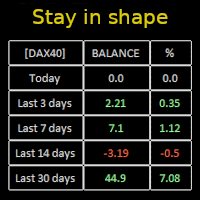
Constantly monitor the progress of your trading at daily intervals of your choice. For positive readings - maintain discipline and stick to your strategy. In case of gradually worsening results - react as soon as possible.
Be aware of the quality of your work!
The panel calculates the account balance You can track your progress for both the current instrument and the entire account The number of days back (5 items) - you set freely Learning to count days: if today is October 3 (day number

Pending Orders Grid Complete System opens any combination of Buy Stop, Sell Stop, Buy Limit and Sell Limit pending orders and closes all existing pending orders. Only one time of the pending order at the same time!!! You will have a possibility to put a legitimate Open Price for the first position in the grid. Usually it should in the area of Support/Resistance lines. You just need to drop this script on the chart of a desired currency pair.
Input Parameters Before placing all pending ord

Account Protector Meta Trader 5 This utility prevents risk of ruin per trading cycle. Retail forex trading accounts are designed with stop-out levels that make it nearly impossible to restore lost capital after a trader — human or algorithmic — blows an account . This is especially frustrating for traders who have grown their account to multiples of its starting value, only to suffer irreparable losses from a series of bad trade entries. The Account Protector solves this by enforcing a specified

Trading panel for manual trading. Has a fairly wide functionality. Allows you to automatically calculate the order size, open both market and pending orders. It has a wide range of options for closing orders, it is possible to partially close orders, close orders after reaching a certain profit or loss, separately close profitable and unprofitable, buy and sell, as well as pending orders. The panel also contains a simple implementation of a grid of pending orders, reverse and lock functions, tr

What Exactly Is A Smart Trading Tool? Smart Trading Tool was developed for fast and comfortable trading of the financial markets especially for ORDER BLOCKS TRADERS . It provides traders functionalities, such as: A Drawing Tool One-Click Trading Panel Automated Lot Sizes Calculation based on your risk appetite & Money Management ( Watch this video , how this tool can help manage your risk per trade better!) Built in PRICE LEVELS (Fibonacci, Round Numbers, Daily hi-low, etc) Shows Trading

MANAGING YOUR FOREX TRADING LIKE A PROFESSIONAL WITH POSITION SIZE CALCULATOR Position Size Calculator – an MT5 indicator, is a user-friendly tool that allows you to determine your required forex trading size for each trade based on how much you want to risk and available capital in your forex trading account. Load the calculator onto your chart and simply draglines to show your stop loss and take profit level. The calculator will automatically calculate the trade size instantly. This indica
Don’t you think you can get Candlestick Patterns alerts wherever you are?
This utility will send you a detailed notification on your mobile and alert on MT5 Terminal as soon as a Candlestick Pattern you want to see appears on chart. The notification contains the symbol, the Candlestick Pattern and the timeframe on which the pattern formed. You will need to link Metatrader 5 Mobile with your Windows Terminal. Here's how here . List of Candlestick Patterns that can be detected:
Three White Soldi

Multi Strategy Dashboard Utility MT5 Some functions of the MSD Utility can only be used on the full version. Multi instrument and multi time frame scanner, with the best indicators. Comes with an order management panel. The MSD Utility can be used for manual trading. Click on the '?' button on the dashboard to obtain information about the various elements of the MSD Utility. Uses ATR Take Profits, ATR Stop Losses and ATR Trailing Stops. Comes with an FX Currency Strength meter and a Mar

Currency Strength Trade Panel EA MT5 는 초보자 또는 전문가 트레이더를 위한 혁신적인 솔루션입니다! 8개 주요 통화의 일반적인 28개 조합을 제외하고 가격 조치와 결합하고 모든 기호/쌍에 적용할 수 있기 때문에 통화 강도 개념을 완전히 새로운 수준으로 끌어 올립니다. 즉, 모든 통화, 상품 및 암호화폐(인덱스 제외)를 포함하여 모든 쌍의 장단점을 거래할 수 있습니다. 복잡한 강도를 해독할 필요 없이 모든 쌍의 두 부분의 장/약 균형을 시각적으로 알려주는 컬러 막대를 사용하여 한 눈에 16/32 기호에 대한 명확한 통찰력을 제공하는 진정한 획기적인 제품입니다. 다른 전통적인 통화 강도 솔루션에서와 같이 선 또는 히스토그램.
통화 강도 무역 패널 EA MT5 는 또한 MT5에서 찾을 수 있는 가장 간단하고 사용하기 쉬운 무역 패널입니다. 추가 창이나 패널을 열 필요 없이 한 표면에 모든 옵션과 기능이 있습니다. 그것은 인터페이스를 사용하기 매우 편리한 하

이 유틸리티를 사용하면 마스터 설정이있는 한 터미널에서 슬레이브 설정이있는 다른 터미널로 모든 거래를 복사 할 수 있습니다
동시에 복사 할 쌍을 선택할 수 있으며 복사 된 순서의 크기를 여러 매개 변수로 설정합니다. 드로우 다운으로 한계 손실을 설정하거나 수익성있는 거래 만 복사하십시오
Mt4 또는 MT5 에서 mt4 또는 mt5 다른 브로커로 거래를 복사 할 수 있습니다
이제 mt4 에서 일하는 전문가 고문의 신호를 MT5 터미널 또는 뒤로 복사하는 것이 어렵지 않을 것입니다
복사 마스터를 사용하여 다른 신호,Eas,수동 거래에서 거래를 복사하십시오.
설정을 사용하여 로트 크기,무역 방향,이익 거래 만 복사 및 setdbvalue 를 변경하여 보증금을 절약 할 수 있습니다
복사 마스터는 하나의 계정에 서로 다른 가입 신호의 여러 전략을 결합 할 수 있습니다
복사 마스터 mt4 버전: 여기
복사 마스터 설정에 대한 추가 정보: https://www.mql5.c

A utility to close all orders automatically when conditions meet.
Various options are available to filter or select orders : Conditions : Closing conditions. 3 different conditions can be defined. EA will close orders anytime one or more defined conditions meet. Conditions can be defined based on account properties or selected orders properties. Also a fixed time to close orders is available.
Type of orders : Buy / Sell / Buy Limit / Sell Limit / Buy Stop / Sell Stop Symbol Selection : All / Ch
MetaTrader 마켓은 개발자들이 거래 애플리케이션을 판매할 수 있는 간단하고 편리한 사이트이다.
제품을 게시하고 마켓용 제품 설명을 어떻게 준비하는가를 설명하는 데 도움이 됩니다. 마켓의 모든 애플리케이션은 암호화로 보호되며 구매자의 컴퓨터에서만 실행할 수 있습니다. 불법 복제는 불가능합니다.
