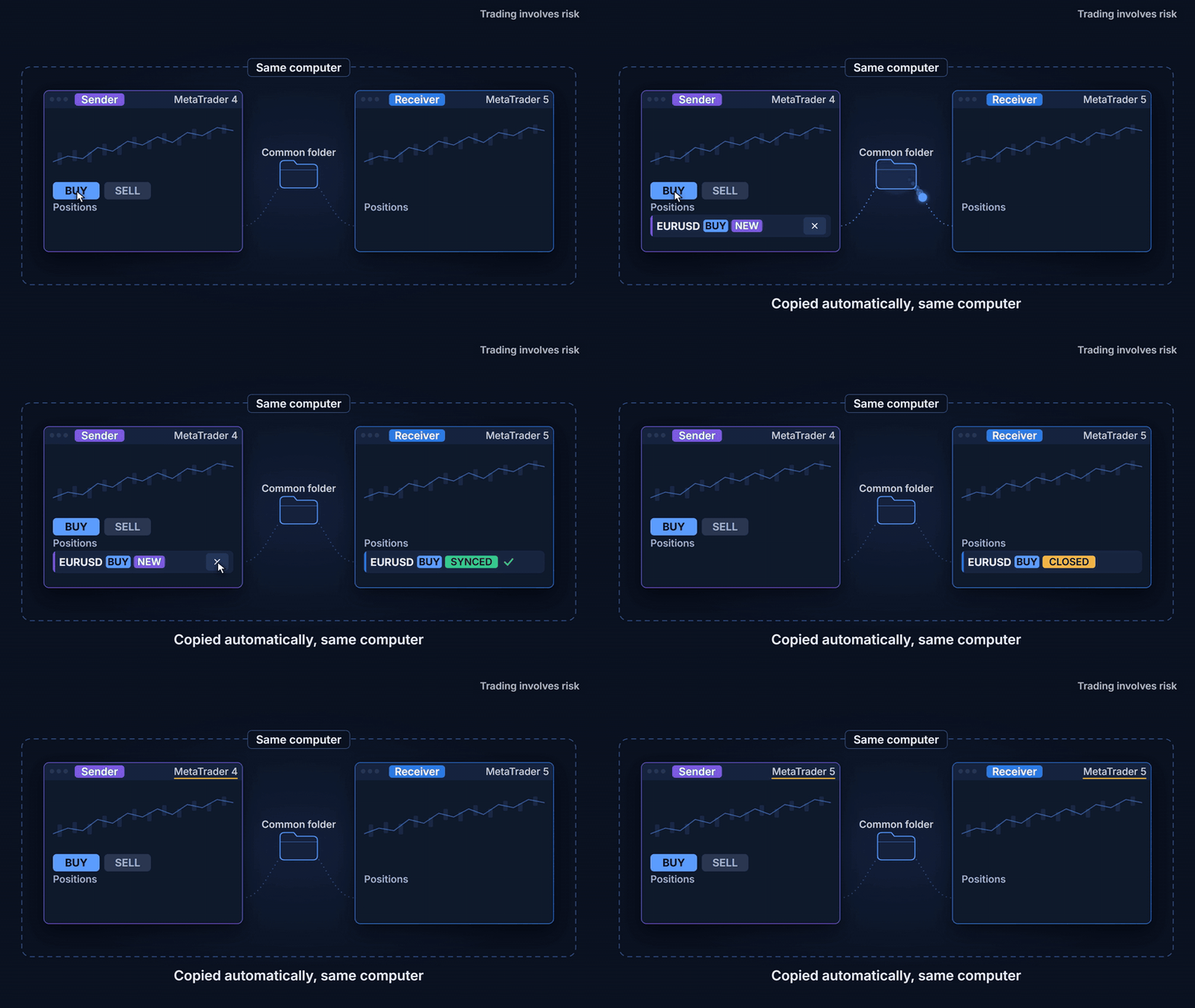


Copy trades between MT4 and MT5 on the same computer, and try it free for 4 hours
If you trade more than one account, you know the routine. The same order typed twice, a few seconds late on the second terminal, with a lot size worked out in your head. Or a strategy that runs on MT4 while your other account lives on MT5, and no simple way to mirror one into the other.
Local Trade Copier copies market positions from one Sender terminal to one or more Receiver terminals on the same computer or VPS. It works in every direction, MT4 to MT4, MT4 to MT5, MT5 to MT4 and MT5 to MT5. No DLL and no internet service are involved, because the terminals talk through the MetaTrader Common folder.
Setting it up
- On the Sender terminal, attach the EA to a dedicated chart, choose SENDER, set a channel name of your choice and press START.
- On each Receiver terminal, choose RECEIVER and the same channel, review the Risk and Advanced tabs, and press START.
- Start with Dry run ON. The Trades table shows what the copier would open, close, reduce or modify, and nothing is sent until you turn it off.
Accounts of different size, symbols with different names
On the Risk tab you choose how the volume is calculated, from the same lot to modes proportional to balance or equity, with limits on total volume, risk per trade and number of positions. Symbols are mapped automatically when brokers use different suffixes, and you can map them by hand or block them on the Mappings tab. Filters let you copy only manual trades or only some EAs, symbols or directions.
When the data is incomplete
Every file the terminals exchange carries a checksum. A partial, corrupt or stale state never opens, closes or modifies a trade, and the Diagnostics tab shows what each terminal sees. When something is blocked, the Trades table tells you why.
Try it for 4 hours
Attached to this post you will find the trial versions for MT4 and MT5. They are fully functional on demo and real accounts, with three conditions.
- The trial gives 4 hours of calendar time from its first start on your computer, even if the terminal is closed in between. Sender and Receiver share the same 4 hours.
- It can be used only once per computer. Downloading it again, reinstalling it or opening another terminal on the same computer does not restart the count.
- These files stop working on 19 November 2026, even if you have not used the 4 hours. The date is also shown in the panel.
When the trial ends, the copier stops copying and tells you so. Positions already copied stay open and are no longer synchronised, so closes, stop loss changes and reductions made on the Sender will not reach the Receiver and you will need to manage them manually. We recommend testing on a demo account first. To copy between MT4 and MT5 you need the MT4 version in the MT4 terminal and the MT5 version in the MT5 terminal.
Want to keep copying? Get the full version on the MQL5 Market, with a 3-month or a 12-month licence.
Local Trade Copier for MT5
https://www.mql5.com/en/market/product/198322
Local Trade Copier for MT4
https://www.mql5.com/en/market/product/198320
Questions are welcome in the product comments.
I am the developer of this utility. Local Trade Copier copies trades between accounts you own or are authorised to operate. Copied trades can be filled at different prices and times on each account, so results may differ between Sender and Receiver. It is not a signal service. Copying depends on your terminals, your computer and your broker execution, and cannot prevent losses caused by gaps, slippage or disconnections. Trading leveraged products involves a high risk of loss. This is not financial advice.
If you trade more than one account, you know the routine. The same order typed twice, a few seconds late on the second terminal, with a lot size worked out in your head. Or a strategy that runs on MT4 while your other account lives on MT5, and no simple way to mirror one into the other.
Local Trade Copier copies market positions from one Sender terminal to one or more Receiver terminals on the same computer or VPS. It works in every direction, MT4 to MT4, MT4 to MT5, MT5 to MT4 and MT5 to MT5. No DLL and no internet service are involved, because the terminals talk through the MetaTrader Common folder.
Setting it up
- On the Sender terminal, attach the EA to a dedicated chart, choose SENDER, set a channel name of your choice and press START.
- On each Receiver terminal, choose RECEIVER and the same channel, review the Risk and Advanced tabs, and press START.
- Start with Dry run ON. The Trades table shows what the copier would open, close, reduce or modify, and nothing is sent until you turn it off.
Accounts of different size, symbols with different names
On the Risk tab you choose how the volume is calculated, from the same lot to modes proportional to balance or equity, with limits on total volume, risk per trade and number of positions. Symbols are mapped automatically when brokers use different suffixes, and you can map them by hand or block them on the Mappings tab. Filters let you copy only manual trades or only some EAs, symbols or directions.
When the data is incomplete
Every file the terminals exchange carries a checksum. A partial, corrupt or stale state never opens, closes or modifies a trade, and the Diagnostics tab shows what each terminal sees. When something is blocked, the Trades table tells you why.
Try it for 4 hours
Attached to this post you will find the trial versions for MT4 and MT5. They are fully functional on demo and real accounts, with three conditions.
- The trial gives 4 hours of calendar time from its first start on your computer, even if the terminal is closed in between. Sender and Receiver share the same 4 hours.
- It can be used only once per computer. Downloading it again, reinstalling it or opening another terminal on the same computer does not restart the count.
- These files stop working on 19 November 2026, even if you have not used the 4 hours. The date is also shown in the panel.
When the trial ends, the copier stops copying and tells you so. Positions already copied stay open and are no longer synchronised, so closes, stop loss changes and reductions made on the Sender will not reach the Receiver and you will need to manage them manually. We recommend testing on a demo account first. To copy between MT4 and MT5 you need the MT4 version in the MT4 terminal and the MT5 version in the MT5 terminal.
Want to keep copying? Get the full version on the MQL5 Market, with a 3-month or a 12-month licence.
Local Trade Copier for MT5
https://www.mql5.com/en/market/product/198322
Local Trade Copier for MT4
https://www.mql5.com/en/market/product/198320
Questions are welcome in the product comments.
I am the developer of this utility. Local Trade Copier copies trades between accounts you own or are authorised to operate. Copied trades can be filled at different prices and times on each account, so results may differ between Sender and Receiver. It is not a signal service. Copying depends on your terminals, your computer and your broker execution, and cannot prevent losses caused by gaps, slippage or disconnections. Trading leveraged products involves a high risk of loss. This is not financial advice.