Trade Assistant Pro 36 in 1

59 USD
ダウンロードされたデモ:
709
パブリッシュ済み:
13 9月 2021
現在のバージョン:
6.54
Didn't find a suitable robot?
Order your own one
on Freelance
フリーランスにアクセス
Order your own one
on Freelance

取引の機会を逃しています。
- 無料取引アプリ
- 8千を超えるシグナルをコピー
- 金融ニュースで金融マーケットを探索
please please help
This expert says to disable my device
And he's disrupting my work instead of helping me to work
Please reply and solve
Is it possible to add something new to close a series of currencies, such as all currency pairs of the British pound
please please help
This expert says to disable my device
And he's disrupting my work instead of helping me to work
Please reply and solve
When I delete the expert and download it again, it works fine. sorry for the inconvenience. Hope to continue development
Is it possible to add something new to close a series of currencies, such as all currency pairs of the British pound
When I delete the expert and download it again, it works fine. sorry for the inconvenience. Hope to continue development
Is it possible to add something new to close a series of currencies, such as all currency pairs of the British pound
In the [Close > Close Grouped] and [Close > BE] sections, you can enter "GBP" into the search query:
then you will be able to manage all your positions with "GBP" in the Symbol.
For example, if you have positions with GBPNZD and EURGBP, then both Symbols will be found simultaneously.
Free Demo Version for AUD/USD (the standard demo version does not work in the strategy tester);
MT5 Version
If you have any ideas for improvement / notice any bugs - let me know via direct message
Hi, i am not able to use the expert.
Hi, i am not able to use the expert.
Hello! After initializing the Expert, you should see a smiling emoji in the upper right corner.
I see that you have only graphic objects left on your chart, but the Expert is deinitialized.
To solve the problem, open a new chart and start the assistant again. It should be located in the "Experts" directory.
If you have any more questions, you can always write me a personal message and I will help you.
The info shown for TP1 and TP2 I suppose they are "lots". Can we make it consistent to the setting "TP" if "R/R" is set then it can display the R:R, if %TP is set then so on?
Can we also choose what info to be displayed at those lines?
For example I'd love to see TP and SL lines showing price level + pips + dollars regardless what I choose at the panel (SL/TP in pips).
Hi, may I add in the below suggestions?
The info shown for TP1 and TP2 I suppose they are "lots". Can we make it consistent to the setting "TP" if "R/R" is set then it can display the R:R, if %TP is set then so on?
Can we also choose what info to be displayed at those lines?
For example I'd love to see TP and SL lines showing price level + pips + dollars regardless what I choose at the panel (SL/TP in pips).
Hello, thank you for your suggestions!
1) OK, I'll improve the visualization of the levels.
2) TP/SL prices is now visible above the Buy/Sell buttons, in the subsequent updates I will also make the prices visible on the chart buttons.
BTW, you can adjust the size of the interface/text to avoid overlapping labels: Settings [S] -> [Adjust the panel / text sizes]
Hello, thank you for your suggestions!
1) OK, I'll improve the visualization of the levels.
2) TP/SL prices is now visible above the Buy/Sell buttons, in the subsequent updates I will also make the prices visible on the chart buttons.
BTW, you can adjust the size of the interface/text to avoid overlapping labels: Settings [S] -> [Adjust the panel / text sizes]
Hello, thanks for making improvements this frequent always love to see what's new!
3) By the way do I need to remove and add whenever a new version is published?
4) Sorry if I'm asking too much, may I also ask to realign the TP and SL "bars" a bit to be of the same length (yellow vertical line as illustration) and also they don't overlap with the "Reverse" button (blue "R")?
5) Just to clarify, when you say "Buy/Sell buttons" do you mean these (pointed by red arrows)?
And when you say "Chart buttons" do you mean these (pointed by red arrows)?
Hello, thanks for making improvements this frequent always love to see what's new!
3) By the way do I need to remove and add whenever a new version is published?
4) Sorry if I'm asking too much, may I also ask to realign the TP and SL "bars" a bit to be of the same length (yellow vertical line as illustration) and also they don't overlap with the "Reverse" button (blue "R")?
5) Just to clarify, when you say "Buy/Sell buttons" do you mean these (pointed by red arrows)?
And when you say "Chart buttons" do you mean these (pointed by red arrows)?
3) Yes, you need to restart the utility to update. All settings will be saved
Hi,
I'm wondering if there is a way to set the Status Bar that shows "spread" to only show in the unit of "Pips" rather than default "Points"?
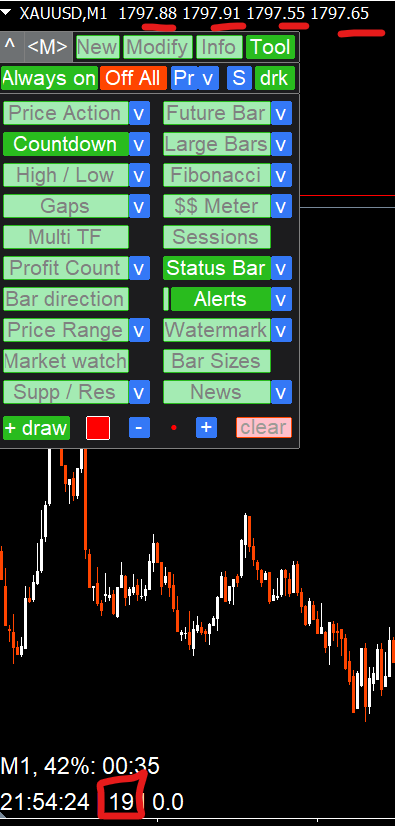
My broker has 2 decimals for all instruments for example for XAUUSD 1797.88.
And it is showing "19 points" when indeed the spread when I press "+s" for SL chart buttons it adds "1.9" only.
Hi,
I'm wondering if there is a way to set the Status Bar that shows "spread" to only show in the unit of "Pips" rather than default "Points"?
My broker has 2 decimals for all instruments for example for XAUUSD 1797.88.
And it is showing "19 points" when indeed the spread when I press "+s" for SL chart buttons it adds "1.9" only.
The spread value at the status bar is obtained from the value provided by the broker: it is always an integer.
Later I will add a calculation option in pips
Hi, may I add in the below suggestions?
The info shown for TP1 and TP2 I suppose they are "lots". Can we make it consistent to the setting "TP" if "R/R" is set then it can display the R:R, if %TP is set then so on?
Can we also choose what info to be displayed at those lines?
For example I'd love to see TP and SL lines showing price level + pips + dollars regardless what I choose at the panel (SL/TP in pips).
Hello Edward! The visualization of the Multi TP levels has been improved, please update (4.10)
Hello Edward! The visualization of the Multi TP levels has been improved, please update (4.10)
Oh man yes this is fantastic!! You're the best developer, very responsive to feedback <3
Speaking of feedback, I notice that we have that manual "+S" button to add spread manually.
Wondering if we can also be allowed to have an automatic adding of spread?
For buy logic:
- especially for buy limit or buy stop (as MT displays bid price and entry is using ask price)
- stoploss is using bid price, no factoring of spread is needed.
For sell logic:
- espeically for stoploss (as MT displays bid price and stoploss is using ask price)
- sell limit or sell stop is using bid price, no factoring of spread is needed.
It'd be a quality of life improvement for those who trade at lower timeframe and adding spread is vital to entry (buy) and stoploss (sell).
Oh man yes this is fantastic!! You're the best developer, very responsive to feedback <3
Speaking of feedback, I notice that we have that manual "+S" button to add spread manually.
Wondering if we can also be allowed to have an automatic adding of spread?
For buy logic:
- especially for buy limit or buy stop (as MT displays bid price and entry is using ask price)
- stoploss is using bid price, no factoring of spread is needed.
For sell logic:
- espeically for stoploss (as MT displays bid price and stoploss is using ask price)
- sell limit or sell stop is using bid price, no factoring of spread is needed.
It'd be a quality of life improvement for those who trade at lower timeframe and adding spread is vital to entry (buy) and stoploss (sell).
These features are already available: you can enable it when activating hidden SL levels / hidden orders on the [New] tab
Oh man yes this is fantastic!! You're the best developer, very responsive to feedback <3
Speaking of feedback, I notice that we have that manual "+S" button to add spread manually.
Wondering if we can also be allowed to have an automatic adding of spread?
For buy logic:
- especially for buy limit or buy stop (as MT displays bid price and entry is using ask price)
- stoploss is using bid price, no factoring of spread is needed.
For sell logic:
- espeically for stoploss (as MT displays bid price and stoploss is using ask price)
- sell limit or sell stop is using bid price, no factoring of spread is needed.
It'd be a quality of life improvement for those who trade at lower timeframe and adding spread is vital to entry (buy) and stoploss (sell).
There is also an option for profit taking at the Bid price, for Sell trades: available when activating Hidden TP levels
These features are already available: you can enable it when activating hidden SL levels / hidden orders on the [New] tab
Oh right thanks for letting me know.
I never used this function before. But no buy side? so entry price using ASK price is not existing in this version?
I'm also trying to execute a number of trades (say 5 altogether and manage them altogether). But the Manage tab only allows me to move SL and TP level but not allows me to set partial TPs (like what I'd do for 1 single trade). Also for buy/sell stop orders. I cannot manage the stop entry altogether?