Ultimate Machine
- エキスパート
- バージョン: 1.5
- アップデート済み: 31 3月 2026
- アクティベーション: 5

Ultimate Machine EA: Advanced Forex and Metals Trading Robot for MT5
The Ultimate Machine EA is a powerful and highly adaptable expert advisor designed for automated trading of metals (primarily XAUUSD) and major forex pairs on the MetaTrader 5 platform. Default settings are optimized for XAUUSD, EURUSD, and BTCUSD on the H1 timeframe, and GBPJPY on the M30 timeframe. The EA is fully customizable through optimization for other instruments and timeframes.
Key Features
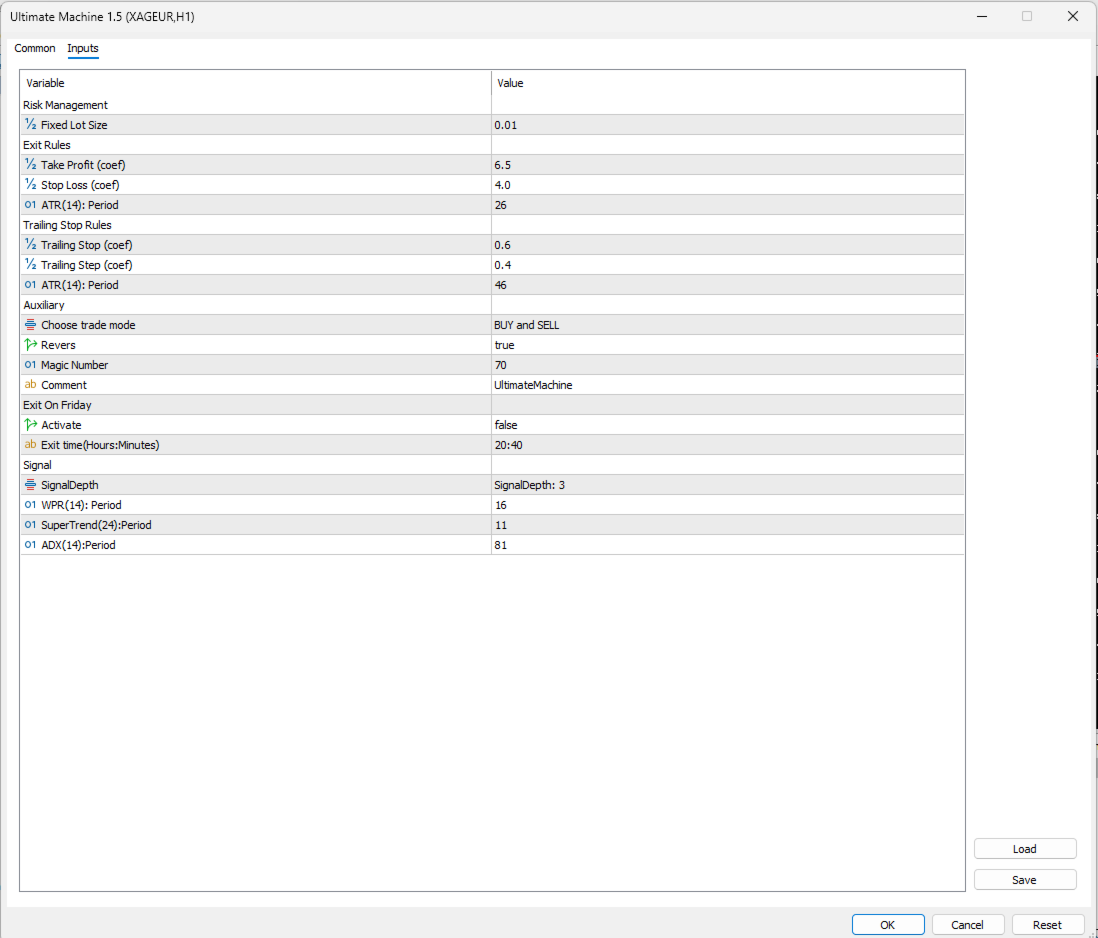
Risk Management The EA uses a simple and straightforward fixed lot system. You manually set the desired lot size in the input parameter Lot Size (default 0.01).
This minimalistic approach gives you complete control over your risk and makes the EA suitable for traders who prefer full manual lot management or who trade on accounts with specific lot restrictions (Cent, Micro, or Prop firm accounts).
Signal Generation and Trading Logic The EA generates high-probability entry signals using a combination of three technical indicators:
- Williams %R (WPR) – Period 16: Detects overbought and oversold conditions.
- SuperTrend – Period 11: Confirms trend direction and momentum.
- Average Directional Index (ADX) – Period 81: Filters weak signals by measuring trend strength.
The SignalDepth parameter (values 1, 2, or 3) determines how many of these indicator conditions must be satisfied before opening a trade. Higher Signal Depth results in fewer but higher-quality trades (recommended for H1 and M30), while lower values increase trading frequency.
ATR-Based Trade Management: Take profit, stop loss, trailing stop, and breakeven levels are calculated dynamically using the Average True Range (ATR). This ensures the EA automatically adapts to changing market volatility without the need to adjust fixed pip values for different instruments.
Default coefficients:
- Take Profit: 6.5 × ATR
- Stop Loss: 4.0 × ATR
- Trailing Stop: 0.6 × ATR
- Trailing Step: 0.4 × ATR
Separate ATR periods are used for main levels and trailing (26 and 46, respectively).
Flexible Order Execution The EA supports three types of orders with nearly identical performance:
- Market orders
- Stop orders
- Limit orders
Pending orders can have an expiration in bars (Expiration Orders parameter).
Trade Direction Control
- Only BUY
- Only SELL
- BUY and SELL
Additional Features
- Exit on Friday: Automatically closes all positions at 20:40 server time to avoid weekend gaps (highly recommended for prop accounts).
- Magic Number: Unique identifier for the EA (default 70).
- Custom Comment: Add your own text to trades.
- Reversals: Option to invert all trading signals for counter-trend strategies.
What’s New in the Latest Version
- Simplified fixed lot money management for maximum user control.
- Improved ATR-based dynamic trade management.
- Adjustable signal depth for better optimization flexibility.
- Consistent results across all order types.
Purchasers receive all future updates free of charge.
Installation, Testing & Optimization
- Platform: MetaTrader 5 (compatible with any account type).
- Installation: Follow the MQL5 guide → https://www.mql5.com/en/articles/498
- Testing & Optimization (highly recommended):
- Use the MT5 Strategy Tester.
- Start with OHLC on M1 for fast optimization.
- Validate final settings with every tick based on real ticks using high-quality historical data.
- Optimize SignalDepth, indicator periods, ATR coefficients, and lot size according to your broker’s spread, commission, and execution conditions.
- Results may vary significantly depending on the broker, account type, leverage, and market conditions.
- Demo Testing: Always test thoroughly on a demo account that matches your live broker conditions before going live. See official guide: https://www.mql5.com/en/articles/586
Recommendations for Best Results
- The EA has only fixed lot sizing. Carefully calculate and set the lot size parameter based on your account balance and acceptable risk per trade (e.g., 0.01 lot per $1,000–$2,000 depending on your risk tolerance).
- A stable VPS with low latency is strongly recommended (practically essential) for reliable 24/5 operation and timely order execution.
- Use a unique magic number if running multiple EAs on the same account.
- Default settings work well as a starting point for XAUUSD (H1), EURUSD (H1), and GBPJPY (M30). Always re-optimize for your specific symbol and timeframe.
- Choose a reliable broker with tight spreads and good execution, especially when trading gold (XAUUSD).
- Monitor the EA regularly, especially during major news releases.
Proven Technology
Built on experience from developing over 20 Expert Advisors for the MQL5 platform, Ultimate Machine EA combines a clean triple-indicator signal system with robust ATR-based exit management in a simple, reliable package.
Support
For questions or assistance, contact the developer via MQL5 direct message or visit the developer’s profile for additional resources and all available products.
Important Risk Warning: Trading foreign exchange and metals carries a high level of risk and may not be suitable for all investors. Past performance does not guarantee future results. Always test the EA extensively on a demo account before using real money.
WARNING: This EA is sold exclusively through the official MQL5 Marketplace. If you see it offered anywhere else, it is most likely a scam. Please purchase only from the verified MQL5 website.