AZ Vwap Dpoc
- インディケータ
-
Jose Antonio Valle Magana
 The profession of trader is something I love because once you learn a system, you do not need to be learning and learning new things, but all you have to do is apply the knowledge day by day with more and more discipline. I am an architect by profession and a trader at heart.
- バージョン: 1.43
- アクティベーション: 10
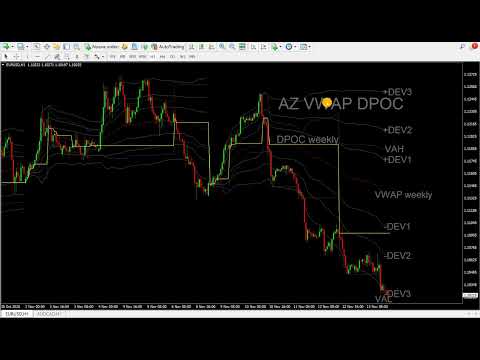
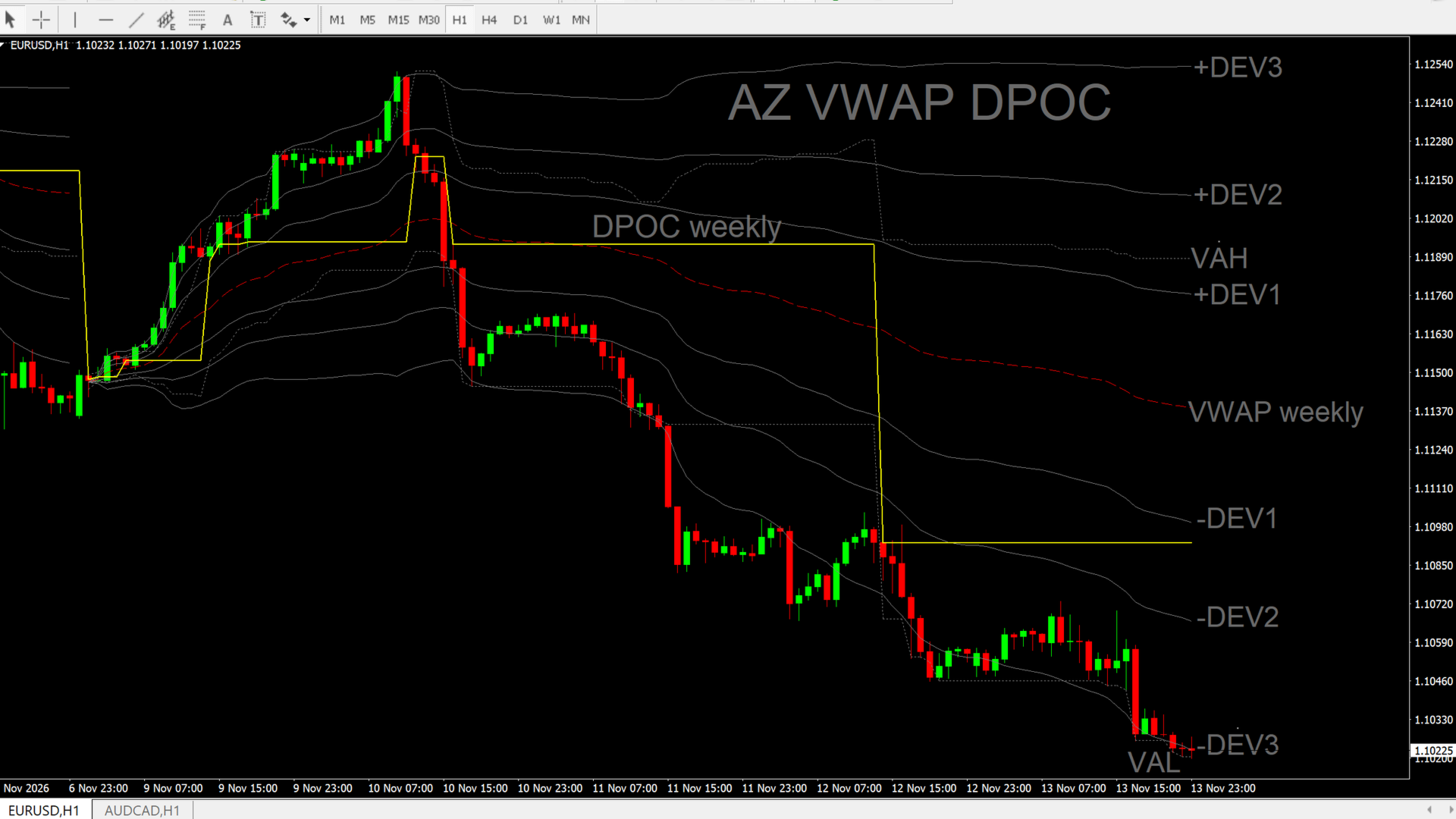
AZ VWAP + DPOC plots a volume-weighted average price (VWAP) with deviation bands, a dynamic DPOC and a dynamic Value Area (VAH / VAL) directly on the MetaTrader 4 chart. It also includes configurable cross alerts.
WHAT YOU GET
VWAP with deviation bands
• VWAP line with three upper and three lower deviation bands (volume-weighted standard deviation).
• Default deviations: 0.6, 1.12 and 1.8. Each one can be changed or hidden (0 = hide).
• Weekly or daily reset, with a configurable session start hour and week start day.
• Choice of price source: typical, close, median or weighted.
• Lines stay continuous between sessions by default, or can be broken at each new period.
• Choose how many VWAP periods to display.
Dynamic DPOC and Value Area
• DPOC (point of control): the price level with the highest volume in the selected period, drawn as a stepped line.
• VAH and VAL: the upper and lower limits of the Value Area, drawn as dotted lines.
• Value Area percentage is adjustable (default 70%).
• Weekly or daily DPOC period, and up to 30 periods can be displayed.
• The volume profile is built from M1 bars. The price step is automatic or can be set in points.
Cross alerts (each one can be switched on or off)
• VWAP line
• Deviation bands (+/- 1, 2 and 3)
• DPOC
• VAH / VAL
• Sound alert and push notification (a MetaQuotes ID is required for push).
• Minimum time between alerts on the same level, to avoid repeated notifications.
• No alert is sent when a new period starts or while the history is loading.
HOW IT WORKS
The VWAP, deviations, DPOC and Value Area are recalculated on every new bar and tick. The DPOC and Value Area are rebuilt from M1 data inside the selected period, so the volume profile adjusts as the period develops.
IMPORTANT NOTES
• The indicator uses the broker's tick volume, not real exchange or futures volume. Values may differ between brokers and from other platforms or data providers.
• The DPOC and Value Area need enough M1 history for the selected period. If the lines look incomplete, open the M1 chart of the symbol first so the terminal downloads the history.
• This is a charting and alert tool. It does not generate trade signals and does not guarantee any result.
• Trading involves risk. Not financial advice.
INPUT PARAMETERS
VWAP
• VWAP period – Daily or Weekly reset.
• VWAP price source – Price used in the calculation.
• Deviation 1 / 2 / 3 – Band multipliers (0 = hide). Defaults: 0.6, 1.12, 1.8.
• VWAP periods to show – Number of periods displayed (0 = all). Default: 5.
• Break VWAP lines between periods – Cut the lines at each new period.
DPOC
• Show DPOC – Show or hide the DPOC.
• DPOC period – Daily or Weekly.
• DPOC periods to show – Number of periods displayed (1–30). Default: 5.
• Show VAH / VAL – Show or hide the Value Area lines.
• Value area percentage – Default 70.
• Profile step in points – 0 = automatic.
• Build the profile from M1 bars – Use M1 data for the profile.
• VAH / VAL color – Color of the Value Area lines.
Alerts
• Sound alert – On/off.
• Push notification – On/off (MetaQuotes ID required).
• Alert on VWAP line cross – On/off.
• Alert on +/- deviation 1, 2 and 3 cross – On/off.
• Alert on DPOC cross – On/off.
• Alert on VAH / VAL cross – On/off.
• Sound file – File in the Sounds folder.
• Minimum seconds between alerts on the same level – Default 60.
Session
• Session start hour (SERVER time) – Default 1.
• Market break hours before session start to exclude – 0 = none.
• Week start day – Monday or Sunday.
Colors of the lines can be changed in the Colors tab of the indicator properties.
Developer: Jose Antonio Valle Magana (valletrading) – AZ Trading Tools.