SX Trade Journal
- インディケータ
-
Nikolett Gorjanacz Toth
 SizerX – risk and trade management tools for MetaTrader 5.
Built by a trader, for traders: position sizing, trade management, pyramiding and prop firm protection in one clean panel. Every feature is tested on live and Strategy Tester charts before release. - バージョン: 1.4
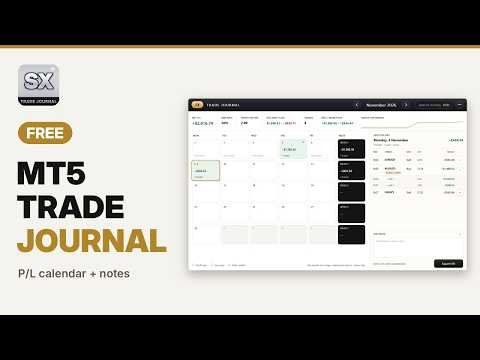
SX Trade Journal turns the history of your MT5 account into a clean monthly calendar. Drag it onto any chart and all your past trades are there at once: no import, no CSV files, no web account.
It is an indicator, so it never opens, changes or closes a trade. That also means you can use it on prop firm accounts where Expert Advisors are not allowed.
What you see
• Monthly P/L calendar: every trading day with its net result and number of trades, green for profit, red for loss. Weekly totals sit in their own column.
• Statistics for the month: net P/L, win rate, profit factor, average win and loss, number of trades, best and worst day, and a small equity curve.
• Day view: click a day to see its trades with time, symbol, side, lot and result.
• Partial closes stay one trade: a position closed in several parts counts once, with its full result. A badge marks it, and every exit is listed under it with its own time, lot and result.
• Any month: use the arrows to go back as far as your history goes. A click on the month name brings you back to the current month.
Notes
• Write a note for every day and for every single trade.
• No length limit. The note box grows over the trade list when you need room and scrolls when you write a lot.
• Notes are saved automatically, separately for each account number, in the Common\Files\SXJournal folder of your terminal.
• Export CSV writes all trades with their notes to a file you can open in Excel.
Stays out of your way
• The panel can be dragged anywhere and remembers its place on every chart.
• The minus button turns it into one small button in the corner of the chart. Before it places itself, it checks where your other tools, panels and buttons are, so it does not cover them.
• The panel stays on top of lines and drawings you add to the chart.
• It adapts to light and dark chart backgrounds by itself.
• The size can be Auto (fits the chart) or fixed at 100, 90, 80 or 70 %.
Inputs
• Panel size: Auto, 100 %, 90 %, 80 % or 70 %.
• Corner of the collapsed button: bottom right, bottom left, top right or top left.
• Always show Saturday / Sunday columns: for crypto traders. If a month has weekend trades, the columns appear anyway.
• CSV separator: ";" by default, which suits most European Excel settings. Use "," if your Excel expects commas.
Good to know
• Results are net: swap, commission and fees are included.
• A trade is counted on the day it was fully closed, in server time. Positions that are still open appear once they are closed.
• The journal shows the account the terminal is logged into. If you switch accounts, each one keeps its own notes.
• Copy and paste does not work in the note box, because MetaTrader 5 does not give indicators access to the clipboard.
Watch the short video on this page to see it in action.