MTF Simple Moving Average
- インディケータ
-
Jeffrey Lloyd Lauzon
 Welcome to themt4developer!
I am a C++ systems programmer and specialized MQL4 developer focused on building professional-grade trading utilities, custom indicators, automated Expert Advisors, and advanced chart dashboards for MetaTrader. - バージョン: 1.0
MTF Simple Moving Average (Free Institutional Moving Average Overlay)
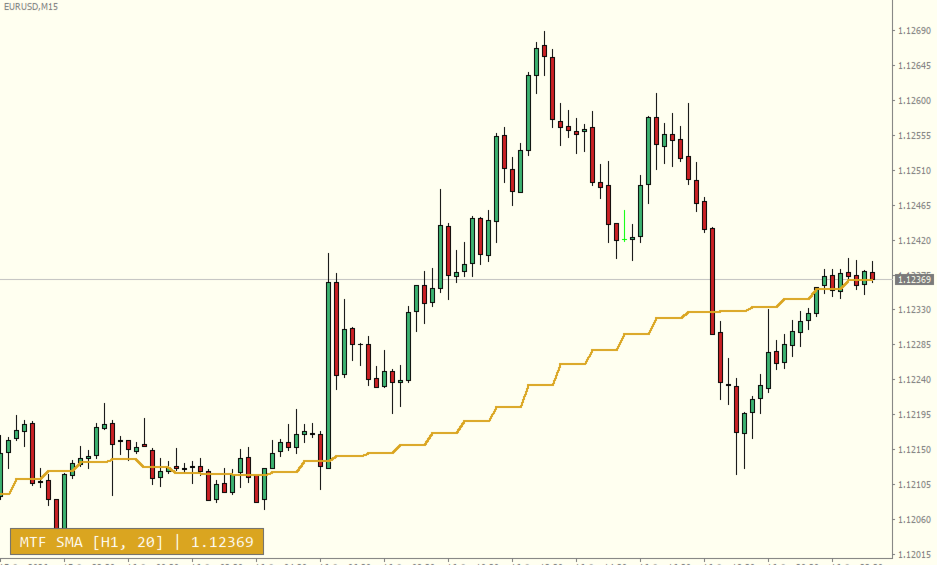
The Multi-Timeframe Simple Moving Average (MTF SMA) is an institutional-grade technical utility designed to project higher-timeframe trend baselines directly onto your lower-timeframe execution charts. Developed by a C++ systems programmer specializing in high-speed MQL4 architecture, this indicator provides traders with seamless market structure visibility without requiring multiple open windows or manual chart toggling.
By leveraging an optimized, low-overhead synchronization engine, this utility plots precise higher-timeframe moving average values while maintaining ultra-low CPU footprint and zero terminal lag.
💎 Core Technical Features
* True Multi-Timeframe Projection: Overlay moving averages from higher intervals (e.g., H1, H4, D1) directly on lower-timeframe execution charts (e.g., M5, M15).
* High-Speed O(1) Synchronization Engine: Uses an optimized iBarShift synchronization loop that recalculates efficiently without redundant historical iterations.
* Interactive HUD Banner Overlay: Features a dynamic, draggable visual status banner display in the bottom corner showing active higher timeframe parameters and live price readings.
* Fully Customizable Visual Options: Adjust moving average colors, line styles, width, font parameters, and background banner styling to match any template aesthetic.
* Clean & Lightweight Footprint: Automatically manages graphic UI objects upon cleanup, preventing chart clutter or object leaks during symbol/timeframe changes.
📈 Interactive Status & Interpretation Logic
The dynamic visual banner provides real-time operational metrics directly on your chart canvas:
* Selected Higher Timeframe & Period: Displays the current active higher timeframe and period setting (e.g., MTF SMA [H1, 20]).
* Live Price Tracking: Shows the current close price relative to the active trend baseline in real time.
* Custom Positioning: Drag or offset the status box vertically to align perfectly with your trading setup.
🛠️ Adjustable Input Parameters
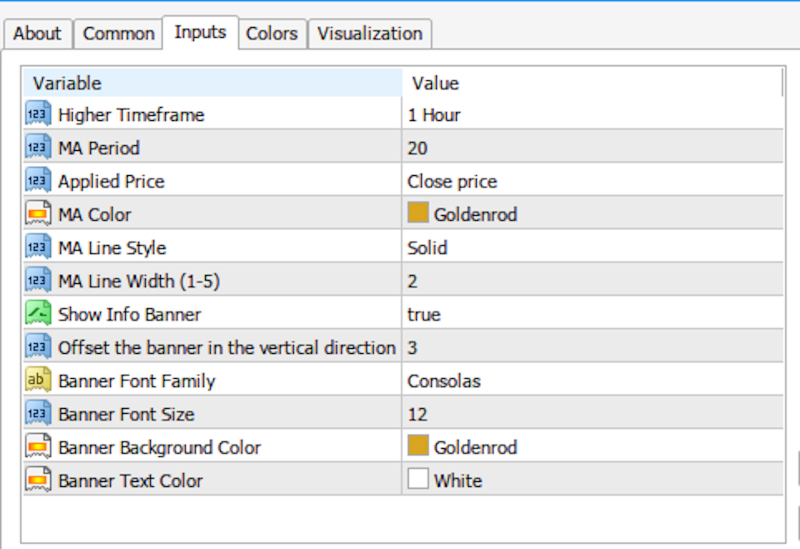
Tailor the calculation matrix completely to your personalized risk strategy directly through the input dashboard:
* InpTimeFrame (Default: PERIOD_H1): Sets the higher timeframe horizon used for moving average calculations.
* InpMAPeriod (Default: 20): Sets the lookback bar count for the Simple Moving Average.
* InpMAPrice (Default: PRICE_CLOSE): Determines the applied price array (Close, Open, High, Low, Median, Typical, Weighted).
* InpMAColor (Default: clrDodgerBlue): Defines the color of the moving average line on your chart.
* InpMAStyle (Default: STYLE_SOLID): Choose between solid, dashed, dotted, or custom line styles.
* InpMAWidth (Default: 2): Sets the thickness of the displayed line (1-5).
* InpShowBanner (Default: true): Enables or disables the interactive bottom HUD overlay.
* InpBannerYOffset (Default: 3): Fine-tunes the vertical pixel position offset of the info banner.
* InpFontName (Default: Consolas): Specifies the font family for the banner text.
* InpFontSize (Default: 10): Sets the font size for the HUD overlay text.
* InpBannerBgColor (Default: clrDodgerBlue): Customizes the background color of the banner box.
* InpBannerTxtColor (Default: clrWhite): Customizes the text color within the banner box.
The Multi-Timeframe Simple Moving Average (MTF SMA) is an institutional-grade technical utility designed to project higher-timeframe trend baselines directly onto your lower-timeframe execution charts. Developed by a C++ systems programmer specializing in high-speed MQL4 architecture, this indicator provides traders with seamless market structure visibility without requiring multiple open windows or manual chart toggling.
By leveraging an optimized, low-overhead synchronization engine, this utility plots precise higher-timeframe moving average values while maintaining ultra-low CPU footprint and zero terminal lag.
💎 Core Technical Features
* True Multi-Timeframe Projection: Overlay moving averages from higher intervals (e.g., H1, H4, D1) directly on lower-timeframe execution charts (e.g., M5, M15).
* High-Speed O(1) Synchronization Engine: Uses an optimized iBarShift synchronization loop that recalculates efficiently without redundant historical iterations.
* Interactive HUD Banner Overlay: Features a dynamic, draggable visual status banner display in the bottom corner showing active higher timeframe parameters and live price readings.
* Fully Customizable Visual Options: Adjust moving average colors, line styles, width, font parameters, and background banner styling to match any template aesthetic.
* Clean & Lightweight Footprint: Automatically manages graphic UI objects upon cleanup, preventing chart clutter or object leaks during symbol/timeframe changes.
📈 Interactive Status & Interpretation Logic
The dynamic visual banner provides real-time operational metrics directly on your chart canvas:
* Selected Higher Timeframe & Period: Displays the current active higher timeframe and period setting (e.g., MTF SMA [H1, 20]).
* Live Price Tracking: Shows the current close price relative to the active trend baseline in real time.
* Custom Positioning: Drag or offset the status box vertically to align perfectly with your trading setup.
🛠️ Adjustable Input Parameters
Tailor the calculation matrix completely to your personalized risk strategy directly through the input dashboard:
* InpTimeFrame (Default: PERIOD_H1): Sets the higher timeframe horizon used for moving average calculations.
* InpMAPeriod (Default: 20): Sets the lookback bar count for the Simple Moving Average.
* InpMAPrice (Default: PRICE_CLOSE): Determines the applied price array (Close, Open, High, Low, Median, Typical, Weighted).
* InpMAColor (Default: clrDodgerBlue): Defines the color of the moving average line on your chart.
* InpMAStyle (Default: STYLE_SOLID): Choose between solid, dashed, dotted, or custom line styles.
* InpMAWidth (Default: 2): Sets the thickness of the displayed line (1-5).
* InpShowBanner (Default: true): Enables or disables the interactive bottom HUD overlay.
* InpBannerYOffset (Default: 3): Fine-tunes the vertical pixel position offset of the info banner.
* InpFontName (Default: Consolas): Specifies the font family for the banner text.
* InpFontSize (Default: 10): Sets the font size for the HUD overlay text.
* InpBannerBgColor (Default: clrDodgerBlue): Customizes the background color of the banner box.
* InpBannerTxtColor (Default: clrWhite): Customizes the text color within the banner box.