BIAS Matrix Pro
- インディケータ
- バージョン: 9.0
- アクティベーション: 10

Overview
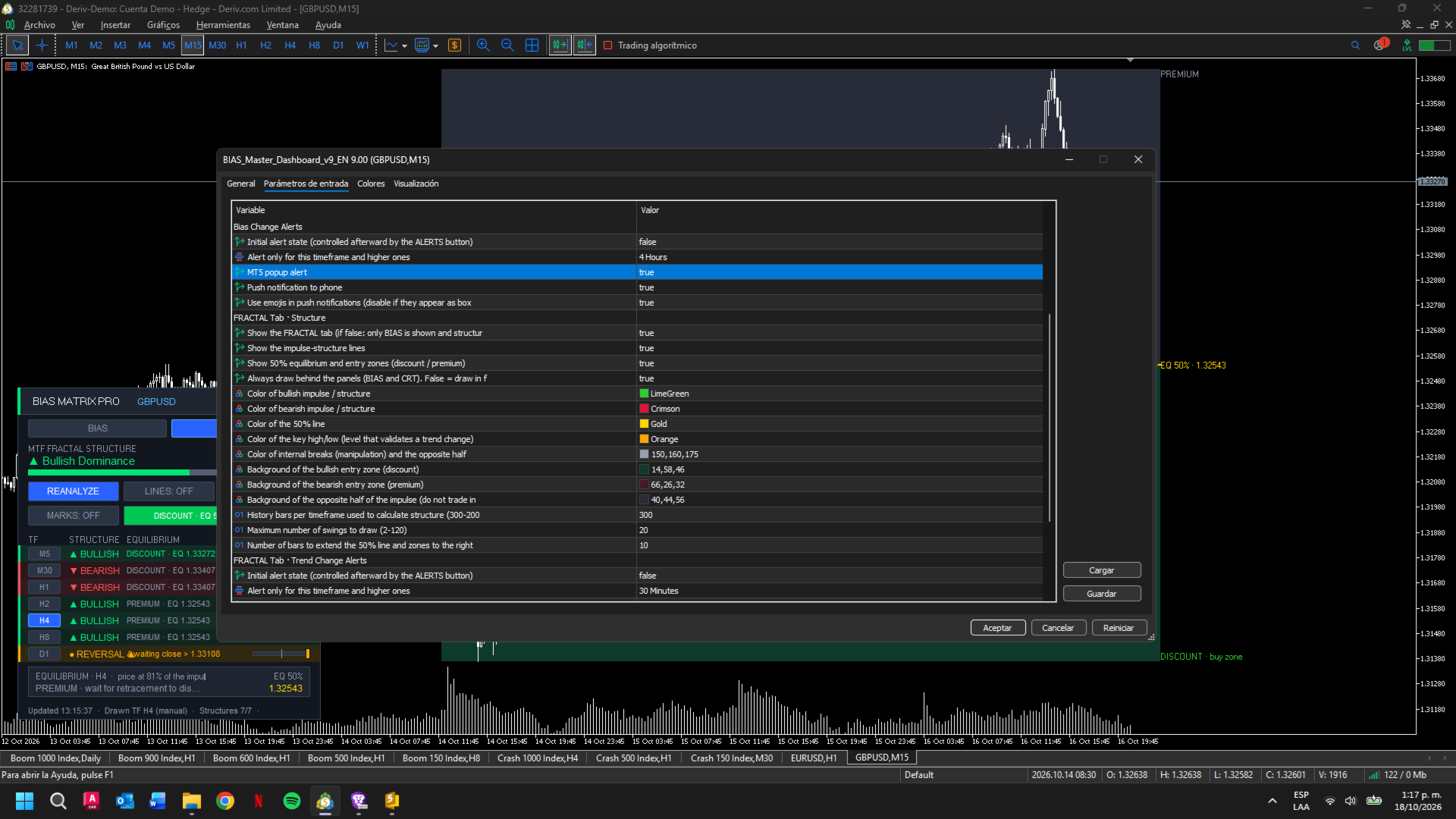
BIAS Matrix Pro is a technical analysis indicator for MetaTrader 5 that combines multi-timeframe market bias analysis with fractal market structure in a single interactive dashboard.
The indicator is designed to help traders review directional conditions across multiple timeframes, monitor changes in market structure, and visualize previous price levels and active price ranges without switching constantly between charts.
BIAS Matrix Pro is an analytical tool. It does not open, modify, or close trades.
Main Features
1. Multi-Timeframe Bias Matrix
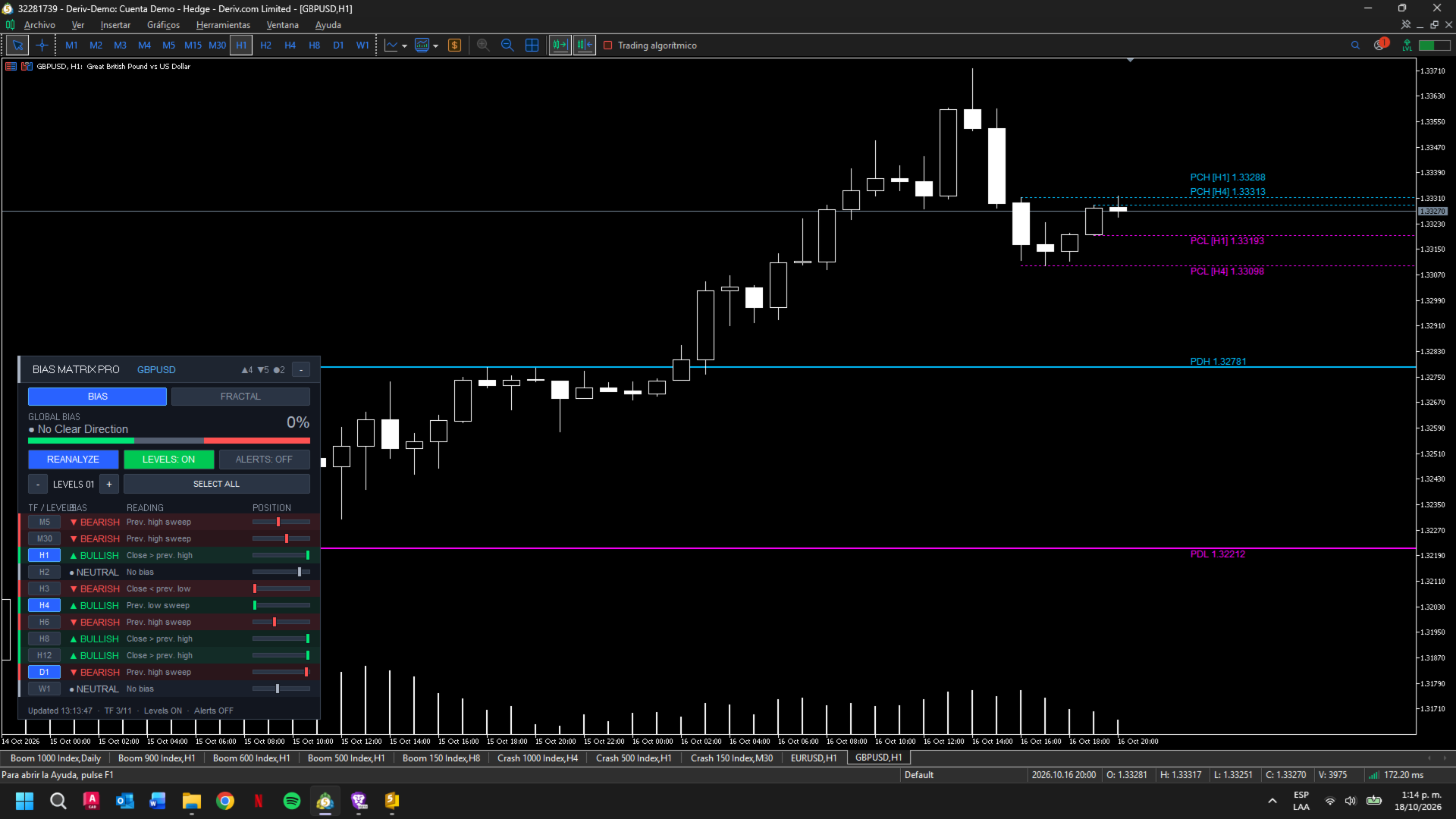
The BIAS module evaluates market direction across 11 timeframes, from M5 to W1.
Each timeframe is analyzed using the two most recently closed candles. The indicator evaluates the relationship between their highs, lows, and closing prices to classify the current bias as bullish, bearish, or neutral.
The analysis recognizes conditions such as:
-
A close above the previous candle's high.
-
A close below the previous candle's low.
-
A sweep of the previous low followed by a close back within the reference range.
-
A sweep of the previous high followed by a close back within the reference range.
The dashboard displays the individual result for each timeframe, together with a visual gauge showing where the latest close is positioned within the preceding candle's range.
2. Weighted Market Bias
Not all timeframes contribute equally to the overall assessment.
BIAS Matrix Pro applies configurable weighting logic through its indicator settings, allowing higher timeframes to have a greater influence on the overall result when weighted analysis is enabled.
The dashboard presents the combined bullish, bearish, and neutral contributions, together with an overall bias assessment and a confluence meter.
This provides a compact view of directional agreement across the selected timeframe structure.
3. Previous Highs and Lows
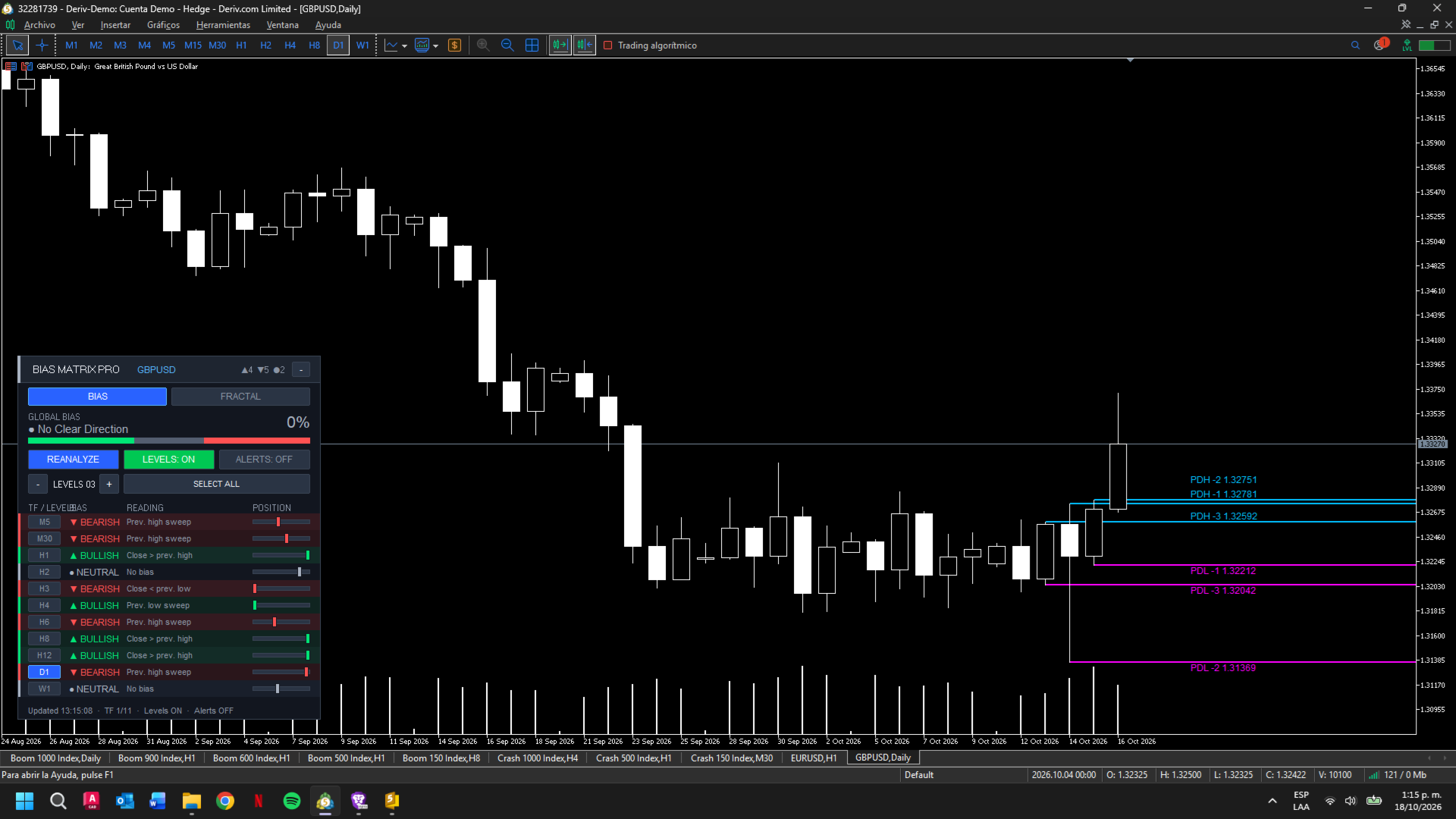
The BIAS module can display previous candle highs and lows on the chart.
These levels provide visual reference points for price analysis and help users observe how price interacts with previously established ranges.
The visibility of these levels can be controlled through the dashboard.
4. Fractal Market Structure
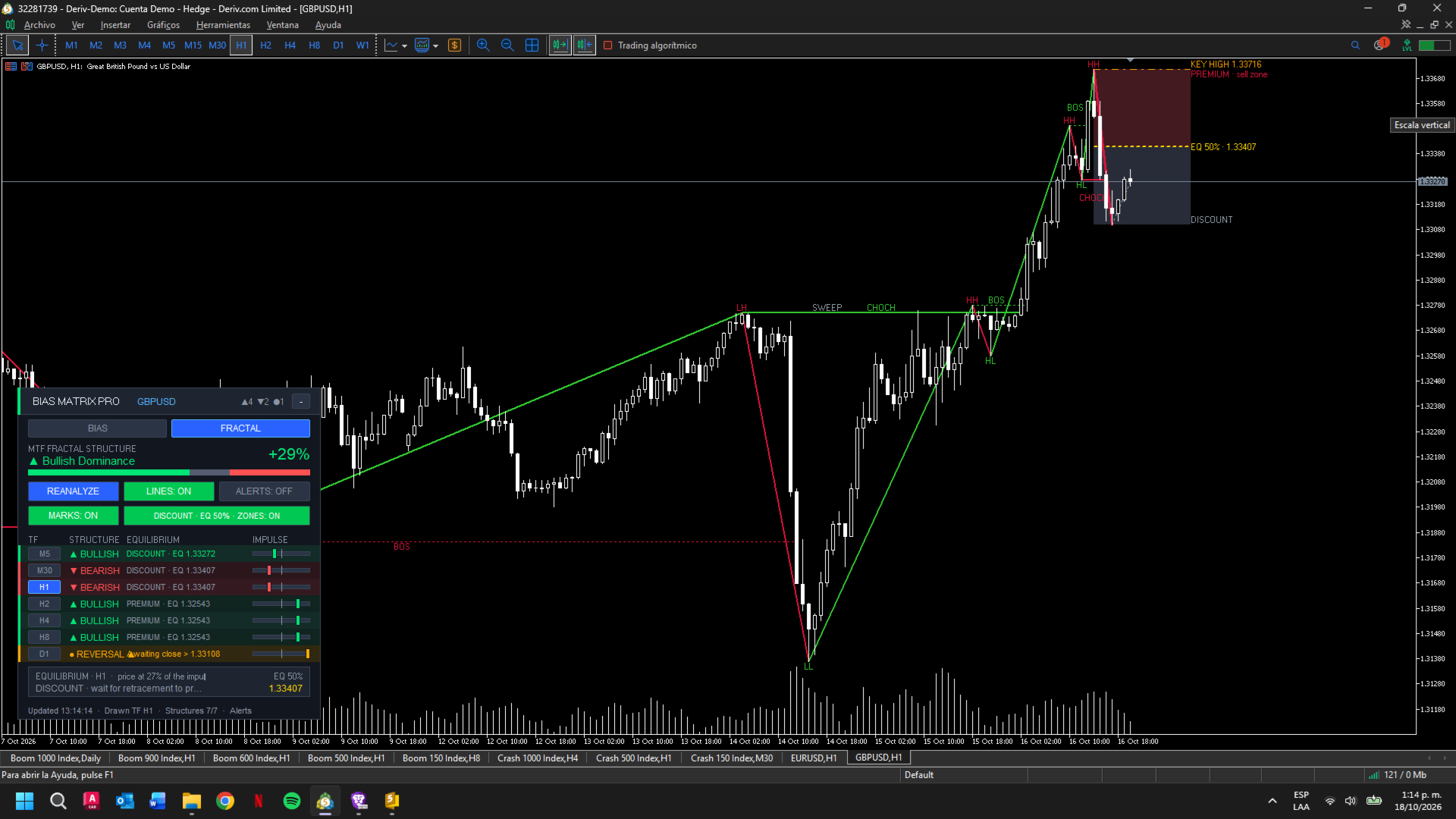
The FRACTAL module analyzes market structure using confirmed five-candle Williams fractals.
It evaluates structure across M5, M30, H1, H2, H4, H8, and D1.
The module identifies and displays three types of structural events:
-
BOS — Break of Structure: a confirmed close beyond a relevant structural extreme in the direction of continuation.
-
CHOCH — Change of Character: a confirmed close beyond a key level that indicates a possible change in structural direction.
-
SWEEP — Liquidity Sweep: a wick crosses a relevant level without a confirming close beyond it. A sweep alone does not change the tracked structural trend.
The distinction between a confirmed close and a wick-only sweep helps keep these events separate in the analysis.
5. Active Impulse and Equilibrium
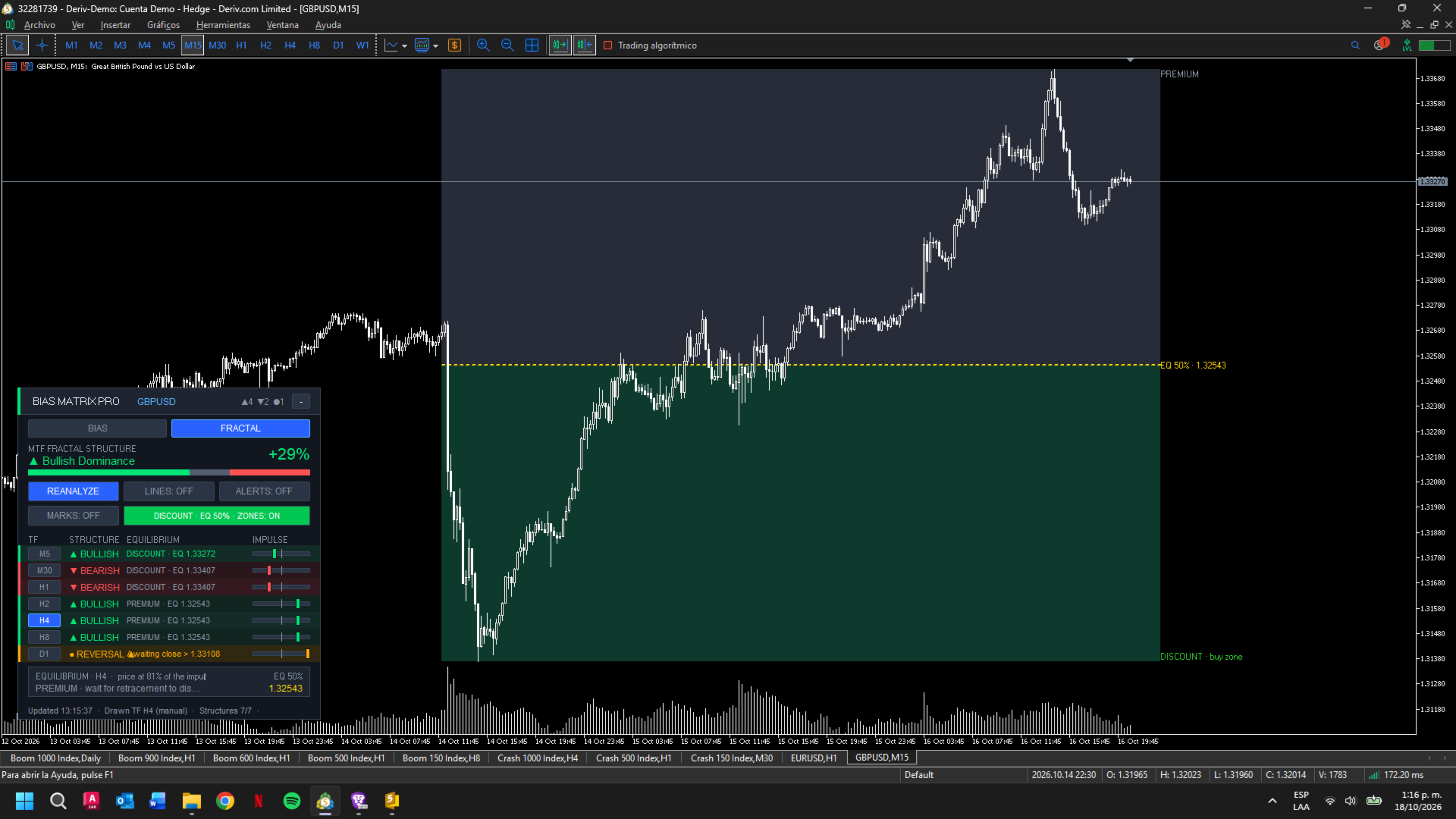
The FRACTAL module also tracks the active structural impulse and its 50% equilibrium level.
The equilibrium reference divides the impulse into two halves:
-
In a bullish impulse, the area below the 50% level is identified as the discount region.
-
In a bearish impulse, the area above the 50% level is identified as the premium region.
These regions provide additional context for studying price location within the active impulse. They are analytical references, not automatic entry instructions.
6. Selectable Structure Timeframe
The FRACTAL module can display the structure associated with the current chart timeframe or a manually selected supported timeframe.
The timeframe buttons allow the user to change which structure is drawn on the chart. Selecting the active timeframe again returns the display to the chart timeframe.
This makes it possible to inspect a selected structural timeframe without opening a separate chart for it.
7. Alerts and Notifications
The indicator includes alert options for relevant changes in market bias and fractal trend structure.
Depending on the enabled settings, notifications can be delivered through terminal alerts, push notifications, or email.
Push notifications require MetaTrader 5 notifications to be enabled and a valid MetaQuotes ID. Email alerts require the terminal's email settings to be configured.
8. Interactive Dashboard
BIAS Matrix Pro uses an on-chart dashboard with separate BIAS and FRACTAL tabs.
The interface provides access to the main analysis views and their visual controls, including level visibility, structural display options, and alert settings.
The dashboard is designed to keep the main information accessible while leaving the price chart available for analysis.
How to Use
-
Attach BIAS Matrix Pro to a chart in MetaTrader 5.
-
Allow the terminal to load the historical data required by the selected timeframes.
-
Open the BIAS tab to review the individual timeframe readings and the overall bias assessment.
-
Enable previous high and low levels if you want those references displayed on the chart.
-
Open the FRACTAL tab to inspect structural swings, BOS, CHOCH, SWEEP events, and the active impulse.
-
Select a supported timeframe to display its structure, or return to the chart timeframe.
-
Configure the available alert options and terminal notification settings according to your preferences.
The amount of information available depends on the symbol, timeframe, and historical data loaded by the terminal.
Important Notes
BIAS Matrix Pro provides technical analysis information and does not guarantee the direction of future price movements.
A bullish or bearish bias, a BOS, a CHOCH, a liquidity sweep, or a premium/discount region should not be interpreted as a guaranteed trading opportunity. Market conditions can change, and all analysis should be evaluated alongside the user's own trading plan and risk management.
The indicator does not execute trades.
Platform
MetaTrader 5
Indicator Type
Multi-timeframe market analysis and fractal structure visualization