PheonixZone
- エキスパート
-
Muhamad Ikhtiaruddin Bin Md Hussin
 I’m a performance-driven marketer and business strategist with a strong passion for leveraging automation, data, and digital systems to create scalable opportunities.
 - バージョン: 6.10
- アップデート済み: 6 8月 2026
- アクティベーション: 10
PhoenixZone – Expert Advisor
Next‑Generation Daily Zone Intelligence System for MT5**
Overview
PhoenixZone is a fully automated EA built on a refined BBMA strategy that combines Bollinger Bands with two pairs of Linear‑Weighted Moving Averages (MA5 High/Low, MA10 High/Low). It detects high‑probability breakouts and pullbacks, then manages trades with advanced stop‑loss, take‑profit, and trailing logic. A unique **trend engine** filters signals, while an optional sideways mode captures range‑bound crosses. All parameters are fully configurable, and an on‑chart dashboard provides live performance feedback.
Key Features
- Dual‑MA trend detection** – A trend is valid only when both High‑line and Low‑line MAs agree (MA5 > MA10 for uptrend, opposite for downtrend).
- Breakout & pullback entries** – Choose BREAK, PULLBACK, or BOTH. Break candles must cross Mid BB (CROSS mode) or simply close beyond it (CLOSE mode). Pullback retests of MA5, MA10, or Mid BB trigger re‑entries.
- Intelligent stop & target** – Stop modes include RETEST, BREAKBAR, MIDBB, MA10, SWING, and FIXED. Targets can be risk‑reward ratios (RR), outer Bollinger Band, or fixed points.
- Auto‑close on MA cross** – Optionally exit all positions when MA5/MA10 cross (High or Low).
- Sideways / range mode** – Trade MA crossovers when no clear trend is present.
- Reversal swap** – Close and reverse when price breaks Mid BB against an open position.
- Full risk management** – Fixed lot or %‑risk sizing, daily equity limits (% or absolute), break‑even (R‑based), trailing stop (multiple modes, R‑based or fixed), spread filter, session filter.
- Real‑time dashboard** – Displays symbol, trend, balance, P/L, win rate, next lot, spread, etc. (optional).
- Clean, Market‑ready code** – Zero warnings, strict compilation, clear comments.
Input Parameters (key groups)
| Group | Selected parameters | Description |
|---|---|---|
| Master | InpForceRecommended | Enforces the intended configuration at runtime, overriding stale saved settings |
| Indicator Settings | InpBBPeriod, InpBBDeviation, InpMA5Period, InpMA10Period | Bollinger Bands and LWMA periods (High and Low) |
| Entry Method | InpEntryMode (BREAK/PULLBACK/BOTH), InpBreakType (CROSS/CLOSE), InpBreakNeedSolid, InpBreakBodyRatio | Breakout mode and what qualifies as a Mid BB break |
| Re-entry | InpAllowContinuation, InpMaxContinuations, InpRetestMidBB, InpRetestMA5, InpRetestMA10, InpZoneBandPct | Which levels count as a retest and how many re-entries a break allows |
| Trend Engine | InpTrendEngine (MA/MIDBB/EITHER), InpSolidBodyRatio, InpBBAreaPct, InpTrendScanBars | How trend is determined and confirmed |
| Sideways Mode | InpAllowSidewaysEntry, InpSidewaysDirectional, InpSidewaysRRRatio | MA5/MA10 cross entries when no trend is live, with a tighter target |
| Reversal Swap | InpUseReversalSwap, InpReversalMinBars | Close and reverse on an opposing Mid BB break |
| Stop & Target | InpStopMode (RETEST/BREAKBAR/MIDBB/MA10/SWING/FIXED), InpTargetMode (RR/BAND/FIXED), InpRRRatio, InpMinStopBandPct | Structure-based stop placement and target logic |
| Money Management | InpUseFixedLot, InpFixedLot, InpRiskPercent, InpLotMultiplier | Fixed lot or risk-percent sizing against the actual stop |
| Trade Management | InpUseBreakEven, InpBEActivationR, InpBELockR, InpUseTrailingStop, InpTrailMode (MA10/MA5/PREVBAR/MIDBB/R), InpBEOnBarClose | R-based break-even and line-based trailing, judged on closed bars |
| Position Limits | InpMaxOpenPositions, InpMaxTradesPerDay, InpMagicNumber | Concurrent positions (3 by default, needed for re-entries to stack) |
| Risk Limits | InpUseMaxDailyLoss, InpUseMaxDailyProfit, InpMaxDailyLossPct, InpMaxDailyProfitPct, InpMaxSpreadPoints | Optional daily equity limits (off by default) and spread filter |
| Trade Direction | InpAllowBuy, InpAllowSell | Long only, short only, or both |
| Sessions | InpUseTradingHours, InpStartHour, InpEndHour, InpTradeMonday…Sunday | Trading schedule (server time) |
| Diagnostics | InpLogDecisions, InpWarnIfTargetFar | Per-bar decision log and configuration sanity warnings |
| Dashboard | InpShowDashboard, InpShowSetupSection, InpShowStatsSection, InpDashboardWidth, InpDashboardFontSize | On-chart panel content and layout |
| Chart Style | InpApplyChartStyle, InpRestoreChartStyle, candle and chart colours | Optional clean chart theme, restored on removal |
If the goal is a compact listing, you could fold Money Management into Stop & Target and drop Chart Style — that gets you to twelve rows without losing anything a buyer needs.
*Full list with all 80+ parameters available inside the product.*
Recommended Setup
- Chart:** M15, H1, or H4 on EURUSD, XAUUSD, or any major pair/index.
- Broker:** Low‑spread ECN/STP, no dealing desk.
- Deposit:** $500 minimum (use % risk for smaller accounts).
- Testing:** Every‑tick model, 99.9% data quality, M1 history downloaded.
- Sessions:** Works best during London and New York overlaps.
Dashboard Panel
The EA optionally shows a compact real‑time panel (upper‑left corner) with:
- Symbol / timeframe, trend state
- Balance, equity, net P/L, net P/L %
- Trade statistics (wins, losses, win rate)
- Next lot size, current spread, daily trades
It can be disabled via `InpShowDashboard`.
Disclaimer
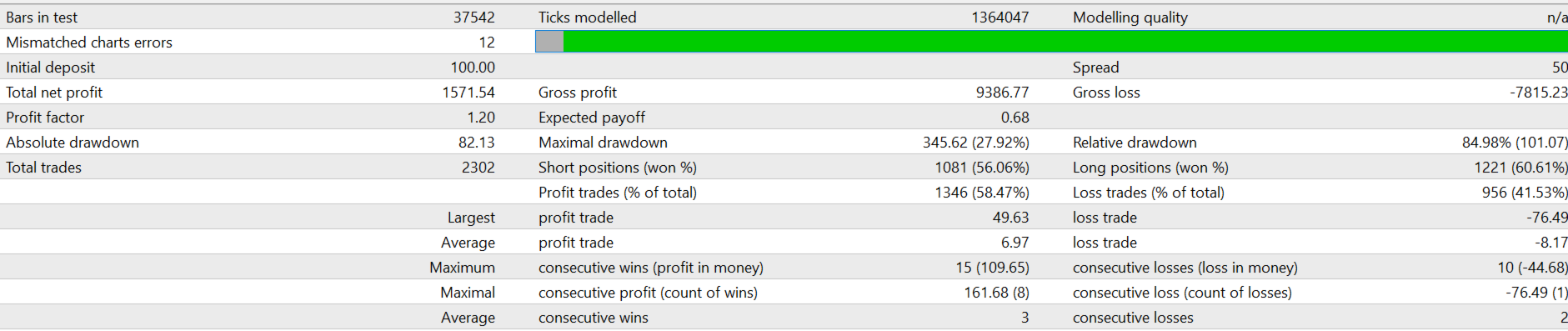
PhoenixZone is a systematic trading tool. Past backtest performance does not guarantee future results. Always test thoroughly on a demo account before deploying live capital. Start with the smallest lot size and scale only after consistent live performance is observed. The developer assumes no liability for financial losses.