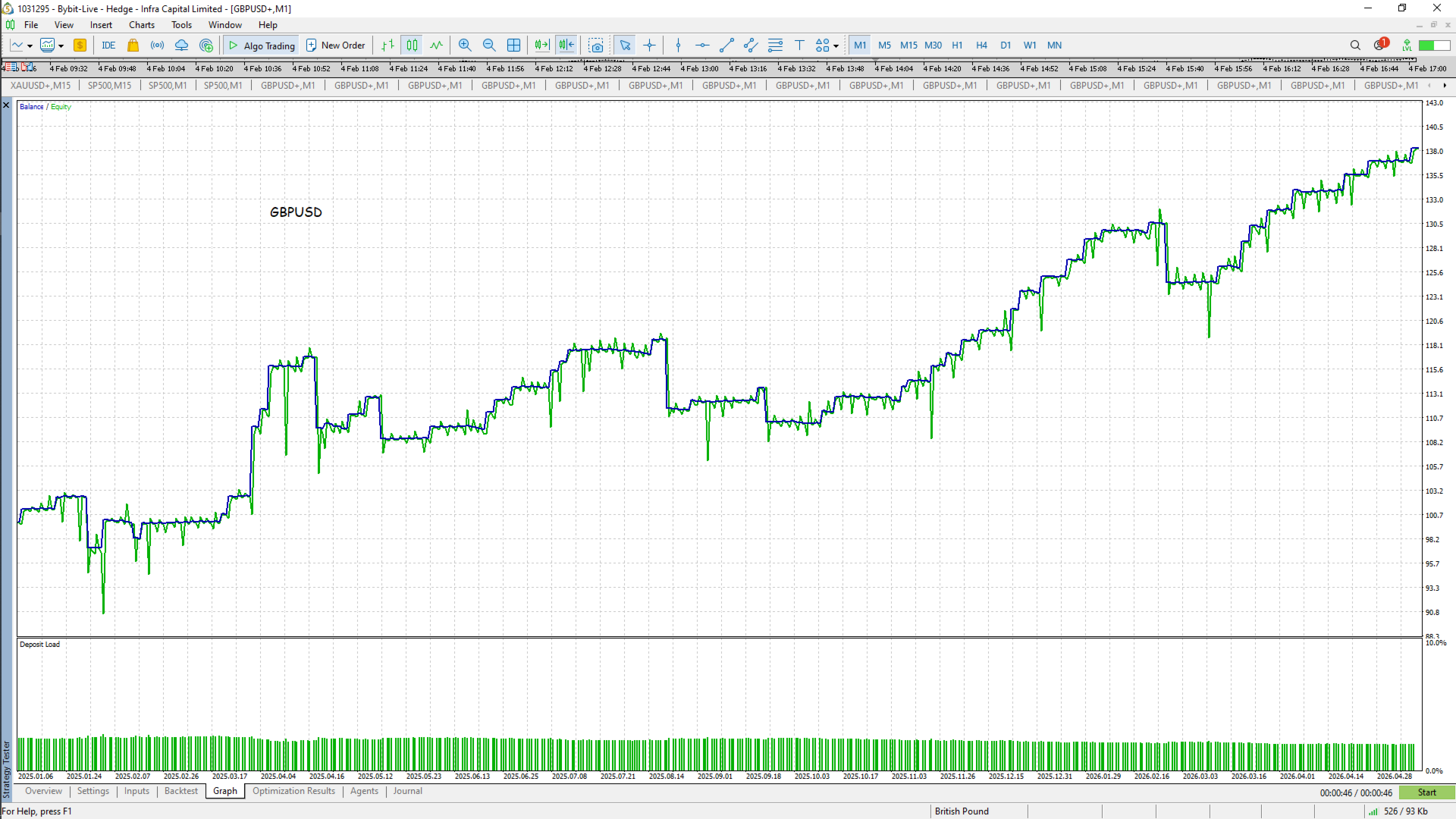
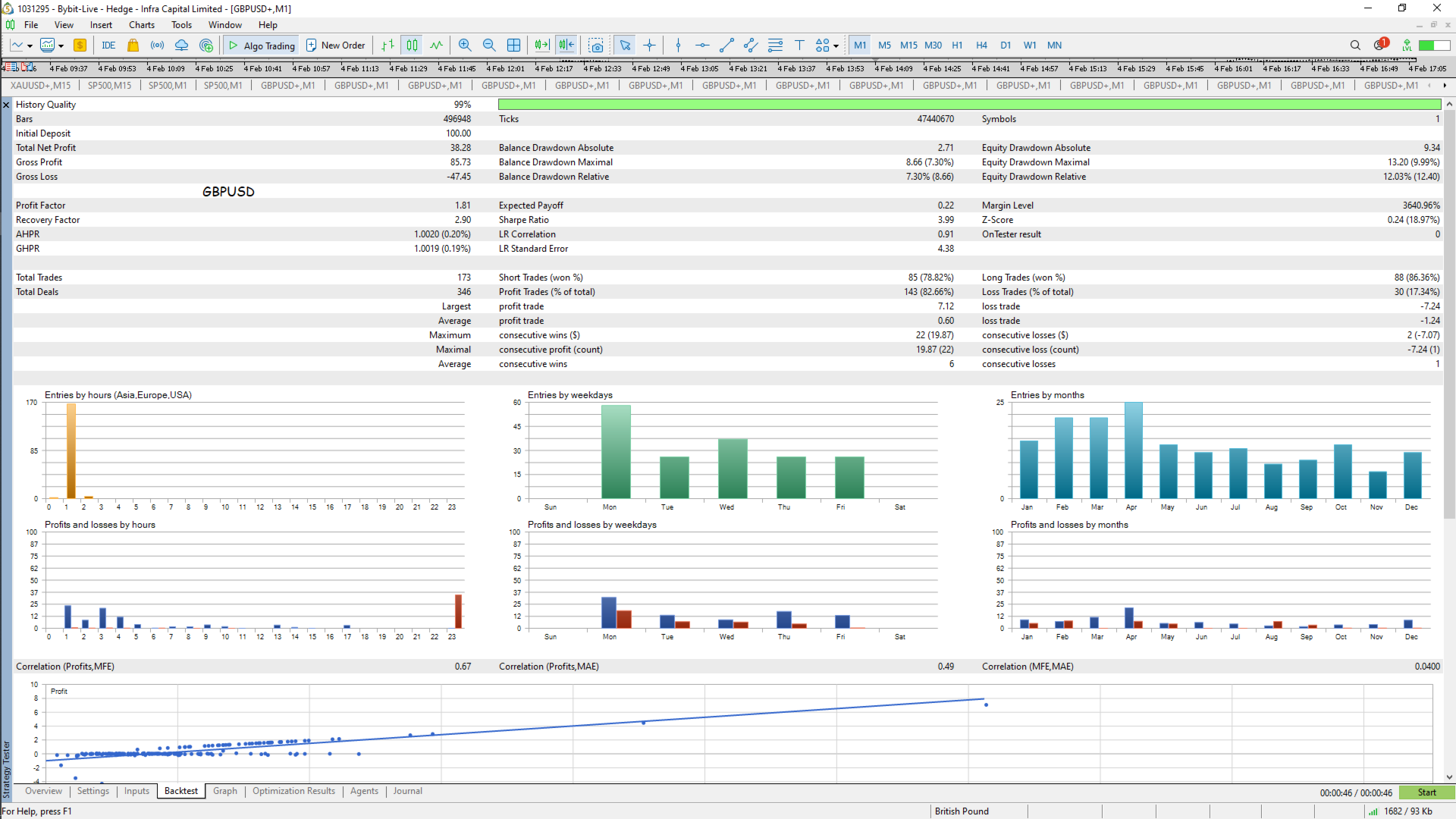
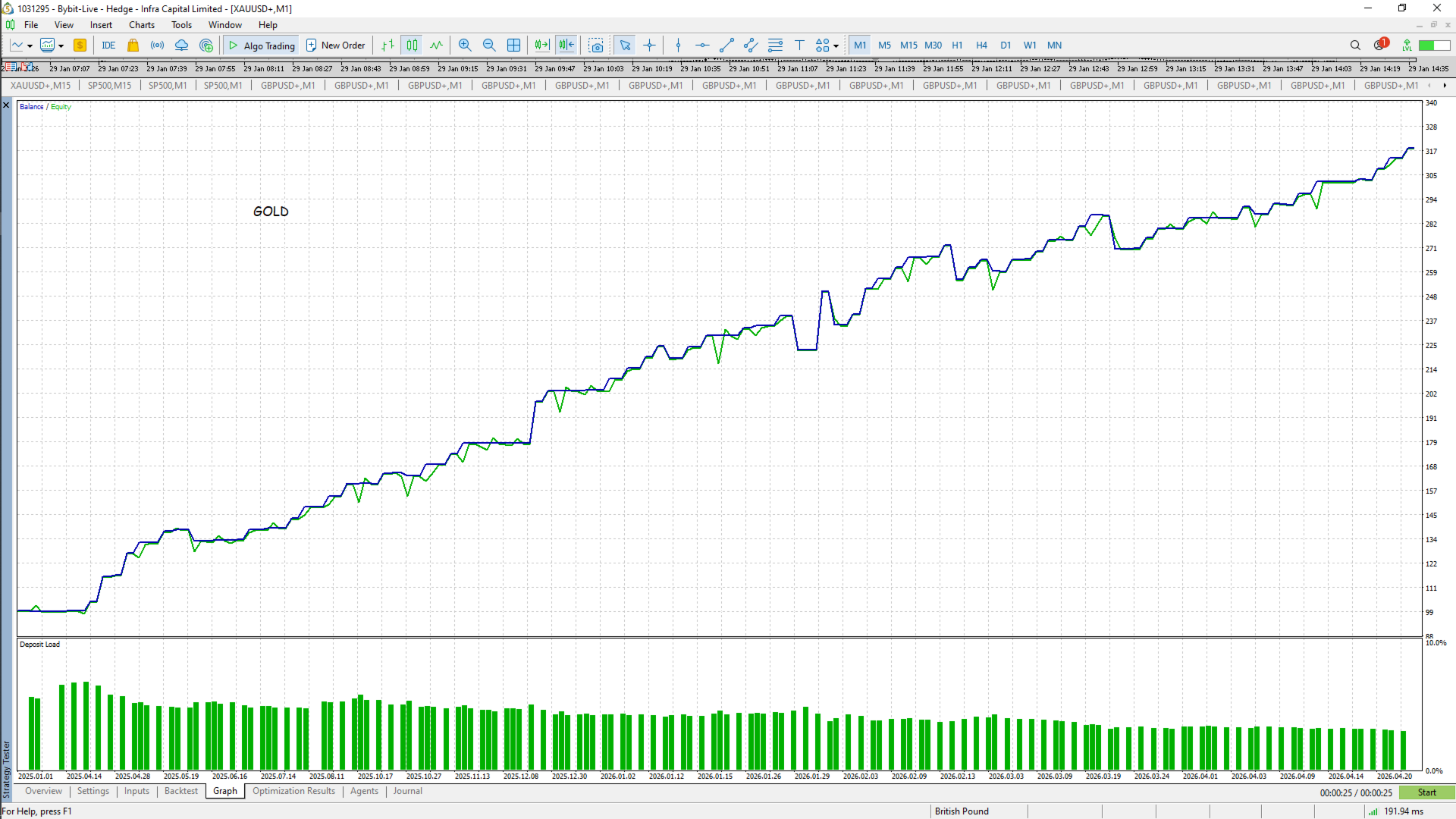
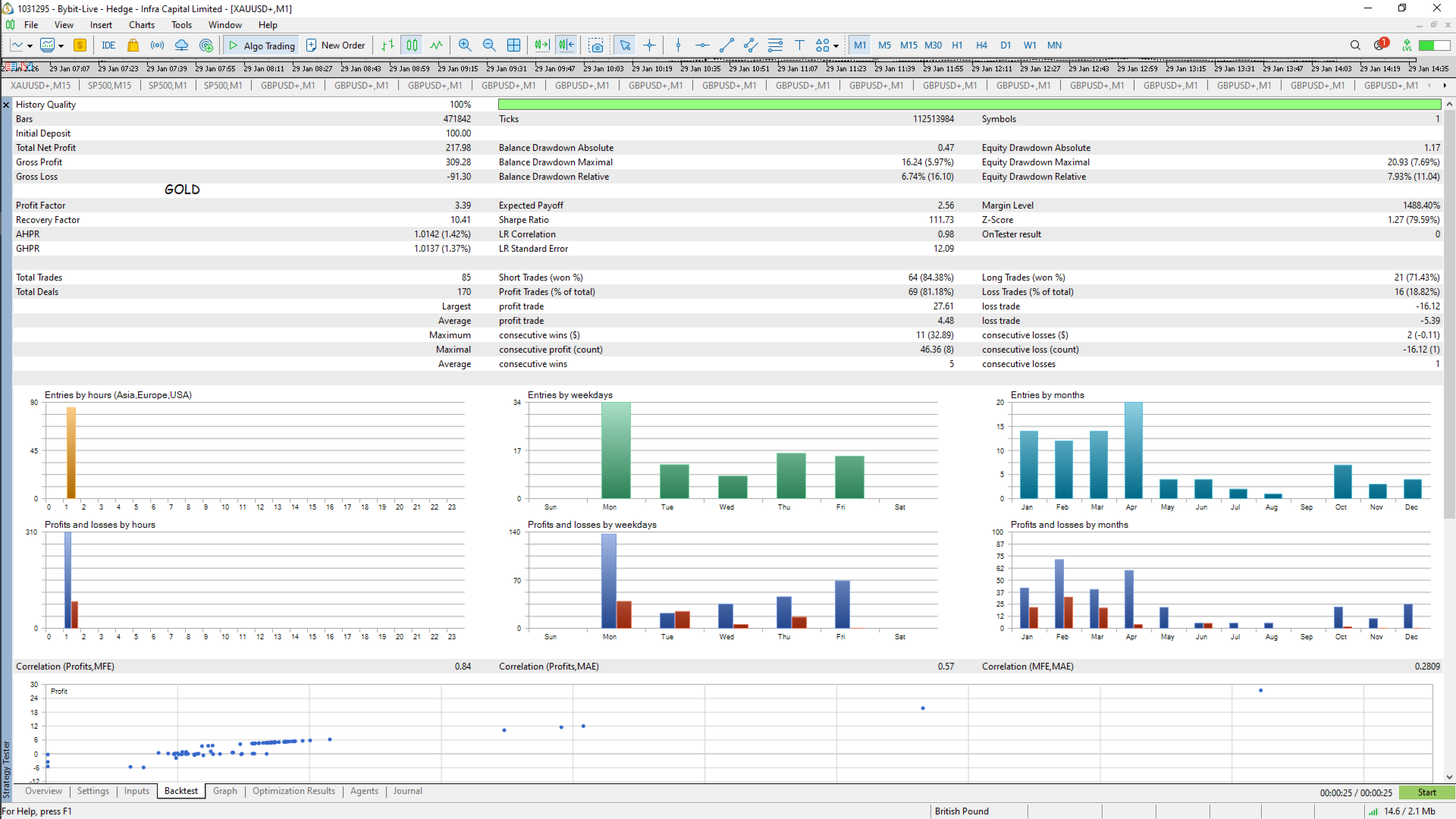
GapHunter EA — Gap Trading Expert Advisor for MT5
Overview
GapHunter EA is an automated trading system for MetaTrader 5 that specializes in trading price gaps at market open. The EA compares the previous day's D1 closing price with the current session's opening price, and if a gap of sufficient size is detected, it immediately enters a trade in the direction of the gap fill (i.e., expecting the price to return to the previous close level).
Gap fills are a well-documented market phenomenon: according to statistical research covering 797 weeks (2010–2025), weekend gaps in major forex pairs fill approximately 65–80% of the time, often within the first few hours of the trading session.
Key principle: The EA does NOT wait for a bar to close to detect a gap. Detection occurs on the very first tick with an acceptable spread after the session opens — this ensures the fastest possible entry.
Key Features
- Instant gap detection — compares prevDayClose vs. current Bid/Ask on first tick, no bar close needed
- Session-aware — reads broker trading sessions directly from MT5 symbol specification via SymbolInfoSessionTrade , no manual time settings required
- Virtual Breakeven (VBE) — moves SL to breakeven in memory only, avoiding broker stop-level restrictions on small distances
- Partial Close — closes a portion of the position at a configurable % of the path to TP, locking in profit while keeping the trade open
- 4 Take Profit modes — gap fill, fixed points, ATR-based, auto S/R level
- 3 Stop Loss modes — none, fixed points, ATR-based
- Day of week filter — trade all days, Monday only (weekend gaps), or skip Monday
- Reinvest mode — automatically scales lot size as free margin grows
- Auto lot by risk % — calculates lot based on SL distance and risk percentage of balance
- Margin check — always checks available free margin before opening, cancels trade with log message if insufficient
- Universal filling mode detection — automatically selects FOK, IOC, or RETURN based on broker specification
- Crash-safe state recovery — all state stored in memory; after any restart (connection loss, TF change, recompile) the EA recovers from terminal data without files
- Force close by schedule — closes position at a configurable server time (e.g., end of trading day)
- 1-trade-per-session discipline — gap is checked exactly once per session; no re-entries
Input Parameters
Set Info
| Parameter | Default | Description |
| SetInfo | "" | Free-text label for this set of parameters. Informational only — has no effect on trading logic. Useful for identifying configurations in screenshots or reports. |
Gap Settings
| Parameter | Default | Description |
| MinGapPoints | 100 | Minimum gap size in points to trigger a trade. Gaps smaller than this are ignored as market noise. |
| MaxSpreadPoints | 20 | Maximum allowed spread in points at the moment of entry. If the spread is wider, the EA waits for the next tick. This is the only "pause" mechanism — no timer-based delay. |
| GapWindowMinutes | 120 | How many minutes after session open the EA will still consider entering. If the spread remains wide for longer than this window, the session is skipped. |
| DayFilter | DAY_ALL | DAY_ALL — trade gaps on any day. DAY_MONDAY_ONLY — only trade Monday gaps (formed over the weekend; statistically the highest fill rate). DAY_SKIP_MONDAY — trade intra-week gaps, skip Monday. |
Take Profit / Stop Loss
| Parameter | Default | Description |
| TPMode | TP_GAP_FILL | TP_GAP_FILL — TP order placed at prevDayClose level + manual tick-by-tick check as backup. TP_FIXED_POINTS — fixed distance in points. TP_ATR_RR — ATR × ATR_TP_Multiplier . TP_AUTO_LEVEL — nearest swing high/low on AtrTimeframe ; falls back to gap fill if no level found. |
| SLMode | SL_ATR | SL_NONE — no stop loss (use with VBE for protection). SL_FIXED_POINTS — fixed distance. SL_ATR — ATR × ATR_SL_Multiplier . |
| TP_Points | 150 | TP distance in points. Used only when TPMode = TP_FIXED_POINTS . |
| SL_Points | 75 | SL distance in points. Used only when SLMode = SL_FIXED_POINTS . |
| AtrTimeframe | PERIOD_D1 | Timeframe used for ATR calculation and auto S/R level search. |
| ATR_Period | 14 | ATR indicator period. |
| ATR_TP_Multiplier | 2.0 | ATR is multiplied by this value to get the TP distance. |
| ATR_SL_Multiplier | 1.0 | ATR is multiplied by this value to get the SL distance. |
| AutoLevel_LookbackBars | 100 | Number of bars to look back when searching for the nearest swing high/low for auto TP. |
| AutoLevel_MinDistPts | 20 | Minimum distance in points from current price to the found S/R level. Levels closer than this are ignored. |
Partial Close
| Parameter | Default | Description |
| UsePartialClose | true | Enable or disable partial close. |
| PC_TriggerPct | 50.0 | When price has traveled this percentage of the distance from entry to TP, partial close is triggered. Example: entry at 1.1000, TP at 1.1100 → trigger at 50% = 1.1050. |
| PC_VolumePct | 50.0 | Percentage of the current position volume to close at the trigger level. Example: 0.02 lot position, 50% → close 0.01, keep 0.01. The remainder continues with VBE and TP. Fires exactly once per trade. |
Virtual Breakeven
| Parameter | Default | Description |
| UseVirtualBE | true | Enable or disable virtual breakeven. |
| VBE_ActivationPct | 50.0 | Percentage of path from entry to TP at which the VBE level is set. Can equal PC_TriggerPct — partial close fires first, then VBE is activated for the remainder. |
| VBE_CompensationPoints | 5.0 | Points added to (BUY) or subtracted from (SELL) the entry price to cover spread and commission costs. Set this to: spread in points + (commission per lot × 2) converted to points. Example: 2 pt spread + 1.5 pt commission each way = 5 points. |
How VBE works:
- No physical SL is moved. The EA stores the breakeven level in memory.
- BUY: VBE level = open_price (Ask) + VBE_CompensationPoints × point — monitors Bid
- SELL: VBE level = open_price (Bid) − VBE_CompensationPoints × point — monitors Ask
- If price returns to the VBE level, the EA closes the position manually via market order.
- After any EA restart (connection loss, TF change, recompile), VBE is re-armed: the EA waits for price to reach the threshold again before activating. This is safer than guessing the current context.
Money Management
| Parameter | Default | Description |
| LotSize | 0.01 | Fixed lot size. Used when UseAutoLot = false . Also serves as the base lot for reinvest scaling. |
| UseAutoLot | false | Calculate lot automatically based on risk % and SL distance. Requires SLMode ≠ SL_NONE . |
| RiskPercent | 1.0 | Risk per trade as a percentage of account balance. Used only when UseAutoLot = true . |
| UseReinvest | false | Enable reinvest mode. Multiplies the lot by floor(FreeMargin / StartDeposit) . |
| StartDeposit | 1000.0 | Reference free margin amount. When free margin doubles, the lot doubles. Multiplier is always ≥ 1 — lot never drops below base on drawdown. Compatible with both fixed and auto lot modes. |
Session Close
| Parameter | Default | Description |
| ForceCloseHour | 22 | Server time hour for forced position close. Set to 0 to disable (together with minute). |
| ForceCloseMinute | 0 | Server time minute for forced position close. |
System
| Parameter | Default | Description |
| MagicNumber | 77701 | Unique identifier for this EA's positions. Use different values when running multiple instances. Also included in the order comment: "GapHunter v2.5 #77701" . |
| SlippagePoints | 10 | Maximum price deviation (slippage) allowed when executing a market order. If the broker cannot fill within this range, the order is rejected. For gap trading at session open (wider spreads, lower liquidity), a value of 15–30 points is recommended for major pairs. |
How It Works — Step by Step
- Session opens — SymbolInfoSessionTrade detects the new broker session for the current symbol and day.
- Day filter — if DayFilter excludes today, the session is skipped immediately.
- Spread check — on the first tick with Spread ≤ MaxSpreadPoints , the EA proceeds. No timer wait.
- Gap detection — prevDayClose = D1 Close[1] is compared to current Bid (for gap up) or Ask (for gap down). If gap ≥ MinGapPoints , a trade is opened immediately. If no gap — session is marked done, no re-entry.
- Trade management — the EA monitors the open position each tick:
- Partial close fires at PC_TriggerPct % of the path
- VBE activates at VBE_ActivationPct % and closes if price reverses to the BE level
- Gap fill (TP_GAP_FILL): manual close when Bid/Ask reaches prevDayClose
- Force close — at ForceCloseHour:ForceCloseMinute all own positions are closed
- New session — state resets automatically on the next session open
Usage Examples
Example 1 — Conservative (Monday gaps, gap fill TP, ATR SL, VBE protection)
DayFilter = DAY_MONDAY_ONLY MinGapPoints = 150 MaxSpreadPoints = 15 TPMode = TP_GAP_FILL SLMode = SL_ATR ATR_Period = 14 ATR_SL_Multiplier = 1.0 UseVirtualBE = true VBE_ActivationPct = 50 VBE_CompensationPoints = 5 UsePartialClose = true PC_TriggerPct = 50 PC_VolumePct = 50 LotSize = 0.01 ForceCloseHour = 22
Best for: EURUSD, GBPUSD, USDCHF on Monday morning.
Example 2 — Balanced (all days, ATR TP and SL, partial close)
DayFilter          = DAY_ALL
MinGapPoints       = 100
TPMode             = TP_ATR_RR
ATR_TP_Multiplier  = 2.0
SLMode             = SL_ATR
ATR_SL_Multiplier  = 1.0
UsePartialClose    = true
PC_TriggerPct      = 50
PC_VolumePct       = 50
UseVirtualBE       = true
VBE_ActivationPct  = 60
UseAutoLot         = true
RiskPercent        = 1.0
Example 3 — Reinvest mode (growing account)
LotSize = 0.01 UseReinvest = true StartDeposit = 500.0 // Free margin $500 -> lot 0.01, $1000 -> lot 0.02, $1500 -> lot 0.03, etc.
Important Notes
- The EA is designed to run one instance per chart symbol. Use separate charts for each instrument.
- Attach the EA to any timeframe — it does not use the chart timeframe for gap detection (always D1).
- After any restart (connection loss, recompile, TF change), the EA automatically recovers its state from open positions in the terminal. No files are written.
- The order comment format is "GapHunter v2.5 #<MagicNumber>" , making positions identifiable in history and reports.
- For gap trading, always verify broker's session open times in the symbol specification. The EA reads these automatically.
Recommended Symbols (Forex)
| Priority | Symbols | Reason |
| ⭐⭐⭐⭐⭐ | EURUSD, GBPUSD, USDCHF | Highest gap fill rate (~75–80%), tight spreads |
| ⭐⭐⭐⭐ | USDJPY, AUDUSD | Good fill rate, moderate volatility |
| ⭐⭐⭐ | USDCAD, NZDUSD, EURJPY | Acceptable fill rate, wider gaps |
| ⭐⭐ | GBPJPY, XAUUSD | Large gaps but less predictable fill |