GridDuo Pro
- エキスパート
- バージョン: 1.0
- アクティベーション: 5

GridDuo Pro — Dual-Side Grid Martingale EA with Smart Pair Close
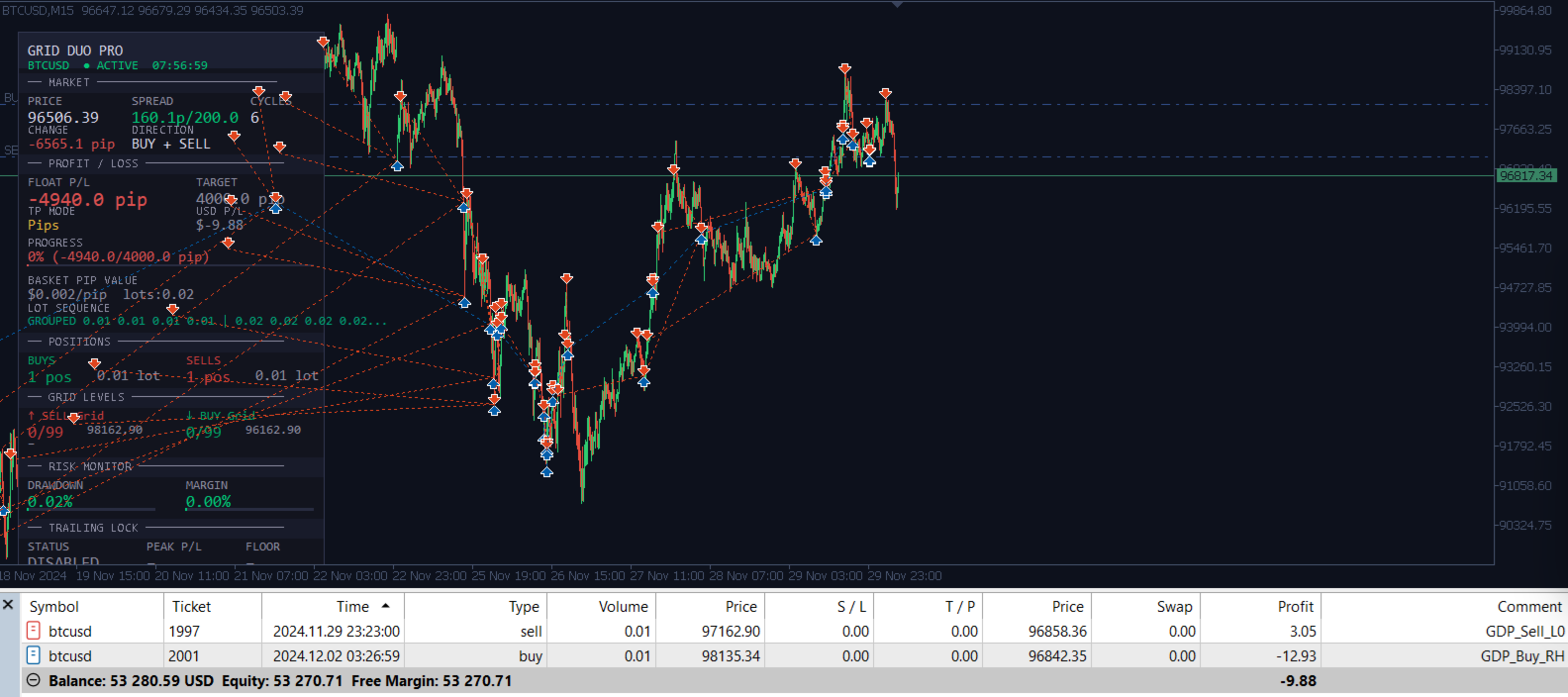
GridDuo Pro is a fully automated Expert Advisor built around a dual-sided grid strategy. It opens both BUY and SELL positions simultaneously at the init price, then uses Martingale to scale into the losing side as the price moves. Profitable positions are locked through an intelligent Batch Pair Close system that combines the oldest losing position with multiple profitable positions to offset the loss — inspired by the Sure-Fire hedging method.
⚠ WARNING: This EA uses Martingale and hedging techniques. These strategies involve significant risk. Past performance is not indicative of future results. Always test thoroughly on a demo account before using on a live account.
────────────────────────────────────────
KEY FEATURES
────────────────────────────────────────
✦ Dual-Side Grid
Opens BUY + SELL simultaneously. Martingale adds to the losing side as price moves, while the winning side acts as a natural hedge.
✦ Batch Pair Close
Closes the oldest (losing) position together with the top N most profitable positions. Combined profit must meet the MinPairProfit threshold before closing. This reduces drawdown progressively without waiting for a full basket recovery.
✦ Dynamic Grid Step
Automatically widens the grid spacing when total basket lot size exceeds a threshold — reducing order frequency and exposure as the position grows.
✦ Grouped Lot Mode
Alternative to classic Martingale: lots increase every N levels instead of every level. For example, 4 positions at 0.01 lot, then 4 positions at 0.02 lot. Produces a much lower drawdown curve.
✦ Rolling Hedge
After a pair close removes the hedge, the EA can immediately reopen a new hedge at the current price. Optionally, a profitable hedge can be closed (locking profit) and reopened at the current market price to reset entry closer to the action.
✦ Currency Strength Filter
Uses RSI-basket across 7 major pairs per currency to determine relative strength. Supports Dual Timeframe analysis (HTF bias + LTF timing) and Mean-Revert or Trend-Follow modes.
✦ Lock Profit / Trailing Stop
Activates a trailing profit floor once the basket reaches a target. The floor rises with each new peak — protecting accumulated gains without closing prematurely.
✦ News Filter
Uses the MT5 built-in Economic Calendar to pause trading before and after high-impact news events. Automatically disabled in Strategy Tester.
✦ Session Filter
Restrict trading to specific hours of the day.
✦ Live Dashboard
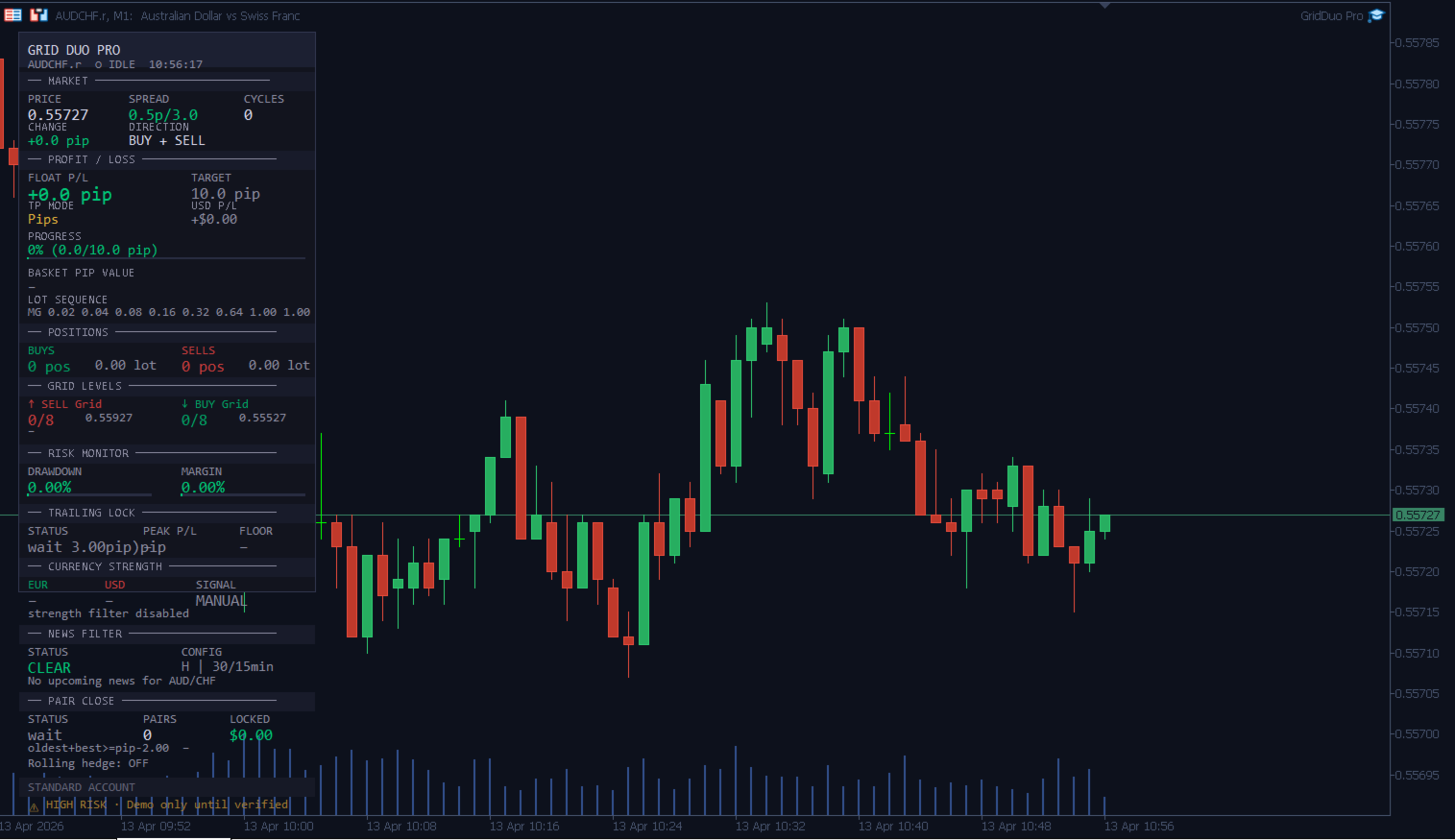
Detailed on-chart panel showing: market data, P/L in pips and USD, grid levels, risk metrics, trailing lock status, currency strength signal, news filter status, and pair close statistics.
✦ Orphan Recovery
If the EA is restarted or reattached while positions are open, it automatically detects and adopts those positions back into the grid — no manual intervention needed.
────────────────────────────────────────
RECOMMENDED SETTINGS
────────────────────────────────────────
EURUSD (conservative):
GridStep = 30, MaxGridLevels = 8, BaseLot = 0.01
LotMultiplier = 1.5, MaxLot = 0.5
MaxDrawdownPct = 20, MinCapital = $1,000
XAUUSD / Gold:
GridStep = 150, MaxGridLevels = 5, BaseLot = 0.01
LotMultiplier = 1.3, MaxLot = 0.10
MaxDrawdownPct = 10, PipSizeOverride = 0.1, MinCapital = $3,000
────────────────────────────────────────
INPUT PARAMETERS
────────────────────────────────────────
=== Grid Settings ===
GridStep
Grid spacing between levels (pip). Recommended: 20–40 for Forex, 150–200 for Gold.
MaxGridLevels
Maximum number of grid levels opened per side (BUY and SELL independently).
Recommended: 8–12. Higher values increase potential recovery but raise margin requirements.
PipSizeOverride
Manual override for pip size. Set to 0 for auto-detection.
Use 0.01 for JPY pairs, 0.10 for Gold if grid spacing appears incorrect.
UseDynamicStep
Enable automatic grid step expansion when total lot size grows.
DynStep_LotTrigger
Total basket lot size threshold that triggers the dynamic step expansion.
DynStep_Multiplier
Factor by which GridStep is multiplied once the trigger is reached (e.g. 2.0 = double the step).
=== Take Profit ===
TpMode
Choose between Dollar ($) or Pips (basket-weighted) profit target mode.
ProfitTargetUSD
Basket profit target in USD. Used when TpMode = Dollar.
ProfitTargetPips
Basket profit target in pips (basket-weighted). Used when TpMode = Pips.
=== Martingale Settings ===
BaseLot
Lot size for the first grid level (L0). All subsequent lots are derived from this.
LotMultiplier
Multiplier applied per level (Martingale mode) or per group (Grouped mode).
MaxLot
Hard cap on lot size per individual position. Prevents runaway lot escalation.
LotMode
LOT_MARTINGALE: lot increases every level (L0=0.01, L1=0.02, L2=0.04...).
LOT_GROUPED: lot increases every GroupSize levels (4×0.01, 4×0.02, 4×0.04...).
Grouped mode produces significantly lower drawdown.
GroupSize
Number of levels sharing the same lot size in LOT_GROUPED mode.
=== Trade Direction ===
TradeDirection
DIR_BOTH: open BUY and SELL simultaneously (recommended for hedging).
DIR_BUY: BUY only.
DIR_SELL: SELL only.
UseCurrStrength
Enable the Currency Strength filter to bias direction based on RSI basket analysis.
Automatically disabled for non-Forex symbols (Gold, Crypto, Indices).
CsMode
CS_MEAN_REVERT: buy when oversold, sell when overbought (recommended for grid).
CS_TREND_FOLLOW: buy when currency is strong, sell when weak.
StrengthRsiPeriod
RSI period used for each pair in the currency strength basket (default: 14).
UseDualTF
Use two timeframes for currency strength analysis: one for overall bias, one for entry timing.
StrengthTF_High
Higher timeframe for trend bias (default: H4).
StrengthTF_Low
Lower timeframe for entry timing (default: H1).
StrengthTF
Single timeframe used when UseDualTF = false.
HtfBiasWeight
Lot multiplier applied to the signal side when HTF and LTF signals conflict.
OversoldLevel
RSI level below which the currency is considered oversold → BUY signal (Mean-Revert mode).
OverboughtLevel
RSI level above which the currency is considered overbought → SELL signal (Mean-Revert mode).
StrengthThreshold
Minimum difference in strength values required to generate a Trend-Follow direction signal.
UseLotBias
Apply a lot multiplier to the signal side while still opening both sides.
BiasMult
Lot multiplier for the signal-side position (e.g. 1.5 = 50% larger lot on signal side).
UseReversalUnlock
Automatically unlock the direction bias when price reverses by ReversalPips.
ReversalPips
Pip distance required for a price reversal to unlock the direction lock.
=== Risk Management ===
MaxDrawdownPct
Maximum equity drawdown percentage. EA closes all positions when breached.
Recommended: 15–25% for Forex, 8–12% for Gold.
MaxMarginUsePct
Maximum margin usage percentage. New orders are blocked above this level.
CloseOnDD
Close all positions immediately when MaxDrawdownPct is reached.
MaxSpreadPips
Maximum allowed spread to open new positions. Protects against high-spread conditions.
=== Lock Profit / Trailing ===
UseLockProfit
Enable the trailing profit lock feature.
LockActivateAt
Profit level at which the trailing lock activates (in TpMode units).
LockMinProfit
Minimum profit floor that the trailing lock protects.
TrailingStep
Amount by which the profit floor rises with each new basket peak.
=== Partial Close ===
UsePartialClose
Enable the Batch Pair Close system.
MinPairProfit
Minimum combined profit ($) required to trigger a pair close.
Negative values (e.g. -2.0) allow closing at a small loss to free margin.
PairCloseCooldown
Seconds to wait after a pair close before ManageGrid can open new positions.
Prevents rapid reopening at the same price. Recommended: 30–60 seconds.
BatchSize
Maximum number of profitable positions combined with the oldest to meet the threshold.
BatchSize=1: classic pair close. BatchSize=3–5: recommended for large lot baskets.
ReHedgeAfterClose
When true: if a pair close removes all SELL positions, immediately open a new SELL
hedge at the current price (and vice versa). Uses BaseLot only.
UseRollingHedge
When true: if a hedge position reaches RollingHedgeProfit, close it (locking profit)
and reopen a new hedge at the current market price to reset the entry level.
RollingHedgeProfit
Profit threshold ($) at which a hedge position is rolled to the current price.
PairCloseOnce
Limit to one pair close event per grid cycle.
ShowPairCloseLog
Print pair close activity details to the MT5 journal.
=== Trade Settings ===
MagicNumber
Unique identifier for this EA's orders. Use a different number for each chart instance.
Slippage
Maximum allowed slippage in points when executing orders.
TradeEnabled
Master switch. Set to false to pause all new order activity while keeping monitoring active.
=== Dashboard ===
ShowDashboard
Show or hide the on-chart information panel.
DashX / DashY
Dashboard panel position on the chart (pixels from top-left corner).
ColBuy / ColSell / ColProfit / ColLoss / ColNeutral / ColHeader / ColBg / ColBorder
Color customization for the dashboard panel elements.
=== Chart Style ===
ApplyChartStyle
Apply a custom dark chart style (candle colors, background, grid).
CandleBullBody / CandleBullWick / CandleBearBody / CandleBearWick
Colors for bullish and bearish candlestick bodies and wicks.
ChartBg / ChartFg / ChartAxis / ShowChartGrid
Chart background, foreground, axis color, and grid line visibility.
=== Session Filter ===
UseSessionFilter
Restrict new order opening to a defined time window.
SessionStartHour / SessionEndHour
Trading session start and end hour (server time, 0–23).
=== News Filter ===
UseNewsFilter
Pause new order activity around high-impact economic news events.
Uses the MT5 built-in Economic Calendar. Automatically disabled in Strategy Tester.
NewsMinutesBefore
Minutes before a news event to stop opening new orders.
NewsMinutesAfter
Minutes after a news event before resuming new orders.
FilterHighImpact
Block trading around high-impact news events.
FilterMediumImpact
Block trading around medium-impact news events.
CloseOnNews
Close all open positions when the news filter activates.
────────────────────────────────────────
SUPPORTED SYMBOLS & RECOMMENDED SETTINGS
────────────────────────────────────────
GridDuo Pro works on any symbol available on your broker.
All parameters adapt automatically to the symbol's pip size and tick value.
Below are tested configurations for the most common instruments.
━━━━━━━━━━━━━━━━━━━━━━━━━━━━━━━━━━━━━━━
EURUSD — Standard Account
━━━━━━━━━━━━━━━━━━━━━━━━━━━━━━━━━━━━━━━
A well-ranging pair with moderate volatility (~70–90 pip/day).
Works well with default settings. Currency Strength filter
helps avoid strong USD or EUR trend days.
AccountPreset = STANDARD
GridStep = 20–30 pip
MaxGridLevels = 8–10
BaseLot = 0.01
LotMultiplier = 1.5
MaxLot = 0.50
TpMode = Dollar
ProfitTargetUSD = 5.0
MinPairProfit = -2.0
MaxDrawdownPct = 20
UseCurrStrength = true
CsMode = Contrarian (Mean-Revert)
Minimum capital = $500 (conservative) / $1,000 (recommended)
━━━━━━━━━━━━━━━━━━━━━━━━━━━━━━━━━━━━━━━
GBPUSD — Standard Account
━━━━━━━━━━━━━━━━━━━━━━━━━━━━━━━━━━━━━━━
Higher volatility than EURUSD (~100–130 pip/day). Wider grid
step recommended to avoid excessive order frequency.
AccountPreset = STANDARD
GridStep = 30–40 pip
MaxGridLevels = 8
BaseLot = 0.01
LotMultiplier = 1.5
MaxLot = 0.30
TpMode = Dollar
ProfitTargetUSD = 5.0
MinPairProfit = -3.0
MaxDrawdownPct = 20
Minimum capital = $800 (conservative) / $1,500 (recommended)
━━━━━━━━━━━━━━━━━━━━━━━━━━━━━━━━━━━━━━━
USDJPY / EURJPY — Standard Account
━━━━━━━━━━━━━━━━━━━━━━━━━━━━━━━━━━━━━━━
JPY pairs require PipSizeOverride = 0.01 if grid spacing
appears too tight or too wide after attaching the EA.
AccountPreset = STANDARD
PipSizeOverride = 0.01 ← required for JPY pairs
GridStep = 20–30 pip
MaxGridLevels = 8
BaseLot = 0.01
LotMultiplier = 1.5
MaxLot = 0.50
MaxDrawdownPct = 20
Minimum capital = $600
━━━━━━━━━━━━━━━━━━━━━━━━━━━━━━━━━━━━━━━
XAUUSD (Gold) — Standard Account
━━━━━━━━━━━━━━━━━━━━━━━━━━━━━━━━━━━━━━━
Gold moves 15–30 pip/minute during active sessions. A wide
grid step is essential. Currency Strength is automatically
disabled for Gold. Use a conservative lot multiplier and
strict drawdown limit.
AccountPreset = STANDARD
PipSizeOverride = 0.10 ← required for Gold
GridStep = 150–200 pip
MaxGridLevels = 4–5
BaseLot = 0.01
LotMultiplier = 1.3
MaxLot = 0.10
TpMode = Dollar
ProfitTargetUSD = 10.0
MinPairProfit = -5.0
MaxDrawdownPct = 10 ← tighter DD for Gold
BatchSize = 5
Minimum capital = $2,000 (conservative) / $5,000 (recommended)
━━━━━━━━━━━━━━━━━━━━━━━━━━━━━━━━━━━━━━━
XAUUSD (Gold) — Cent Account
━━━━━━━━━━━━━━━━━━━━━━━━━━━━━━━━━━━━━━━
A cent account lets you trade Gold with a much smaller real
capital while maintaining the same grid logic. All dollar-based
inputs are entered as if on a standard account — the EA
multiplies them by 100 internally to match the cent currency.
HOW IT WORKS:
You enter ProfitTargetUSD = 10
EA internally uses 1000 cents = $10 real money
AccountPreset = CENT ← key setting
PipSizeOverride = 0.10
GridStep = 150–200 pip
MaxGridLevels = 4–5
BaseLot = 0.01
LotMultiplier = 1.3
MaxLot = 0.10
TpMode = Dollar
ProfitTargetUSD = 10 (= 1000¢ = $10 real)
MinPairProfit = -5 (= -500¢ = -$5 real)
LockActivateAt = 5 (= 500¢ = $5 real)
LockMinProfit = 1 (= 100¢ = $1 real)
RollingHedgeProfit= 50 (= 5000¢ = $50 real)
MaxDrawdownPct = 10 (percentage — unchanged)
BatchSize = 5
Minimum capital = ¢20,000 ($200 real) to ¢50,000 ($500 real)
NOTE: Parameters that use pip or percentage (GridStep,
MaxDrawdownPct, MaxSpreadPips, LotMultiplier) are never
scaled — they work identically on both account types.
━━━━━━━━━━━━━━━━━━━━━━━━━━━━━━━━━━━━━━━
US30 / NAS100 / DAX — Indices
━━━━━━━━━━━━━━━━━━━━━━━━━━━━━━━━━━━━━━━
Indices have wide intraday ranges and can trend strongly.
Use a larger grid step and stricter drawdown limit.
PipSizeOverride depends on broker — check the pip value
shown in the dashboard after attaching.
AccountPreset = STANDARD
PipSizeOverride = 1.0 (verify after attach)
GridStep = 50–100 pip
MaxGridLevels = 4
BaseLot = 0.01
LotMultiplier = 1.3
MaxLot = 0.05
MaxDrawdownPct = 8
UseDynamicStep = true ← recommended for indices
DynStep_LotTrigger= 0.05
DynStep_Multiplier= 2.0
Minimum capital = $3,000
━━━━━━━━━━━━━━━━━━━━━━━━━━━━━━━━━━━━━━━
BTCUSD / ETHUSD — Crypto
━━━━━━━━━━━━━━━━━━━━━━━━━━━━━━━━━━━━━━━
Extremely volatile. Grid trading on crypto is high risk.
Use the widest grid step and lowest possible lot size.
Recommended for experienced users only.
AccountPreset = STANDARD
PipSizeOverride = 1.0
GridStep = 500–1000 pip
MaxGridLevels = 3
BaseLot = 0.01
LotMultiplier = 1.2
MaxLot = 0.02
MaxDrawdownPct = 5
Minimum capital = $5,000+
────────────────────────────────────────
UNDERSTANDING THE DASHBOARD
────────────────────────────────────────
The on-chart panel displays real-time information in sections:
MARKET Current price, spread, direction, grid cycle count
PROFIT / LOSS Float P/L in pip and USD, TP target, progress bar
POSITIONS Open BUY/SELL count and lot sizes
GRID LEVELS Filled levels per side, next trigger price, dynamic step status
RISK MONITOR Equity drawdown % and margin usage % with visual bars
TRAILING LOCK Lock status, current peak P/L and profit floor
CURRENCY STRENGTH EUR/USD strength values and direction signal
NEWS FILTER Filter status and next blocked event
PAIR CLOSE Status, number of pairs closed, total locked profit
Account type (STANDARD or CENT) is shown at the bottom of the panel.