
EmotionLock Psychology Manager EA
- エキスパート
- バージョン: 3.11
- アップデート済み: 16 11月 2026
- アクティベーション: 5

The Most Important Trading Tool You Will Ever Install
A powerful trading guardrail designed to protect you from the market, from your emotions, and from your own trading decisions.
Not because it finds entries. Not because it predicts the market. Because it helps solve the one problem that silently destroys more trading accounts than most traders care to admit. You.
How many times have you watched a winner turn into a loser because you moved your TP, or simply forgot to set one? How much capital have you let slip through your fingers on impulsive "just one more" trades? And be honest. How many trading opportunities have you taken even when you knew you should have stopped?
EmotionLock is designed for those moments.
It helps protect you from the three minutes after a losing trade when frustration overrides logic. From the winning position you hold too long because greed whispers "just a little more." From the seventh trade on a day you should have stopped at five. From the stop loss you move because you cannot accept being wrong. And from the setup that looks close enough even though it breaks your own trading rules.
Your trading rules should not depend on your emotions. EmotionLock helps make discipline part of your trading environment.
What EmotionLock Does
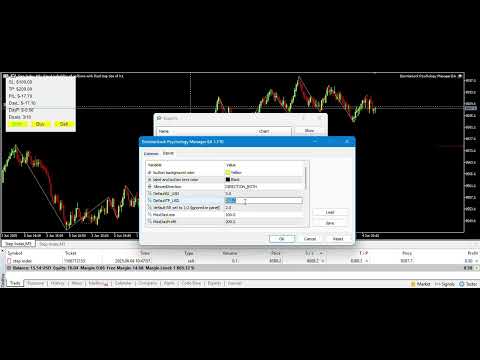
Attach EmotionLock to your MetaTrader 5 chart and configure your personal trading limits, risk settings, preferred trading direction and restrictions.
EmotionLock monitors your trading activity and applies your selected safeguards to governed trades, whether they originate from your manual trading or other Expert Advisors, depending on your chosen coverage settings.
Features
1. Daily Loss Shutdown
Set the maximum amount you are willing to lose in a trading day. Once your daily loss threshold is reached, EmotionLock automatically shuts down MT5 and maintains the daily restriction. No more continuing to trade after reaching your predefined loss limit.
2. Daily Profit Shutdown
Set your daily profit target. Once you reach it, EmotionLock automatically shuts down MT5 for the remainder of the trading day. Protect your progress and know when it is time to walk away.
3. Automatic SL & TP on Every Trade
Every governed position can receive your predefined Stop Loss and Take Profit automatically. Set your risk and reward levels in monetary amounts and let EmotionLock handle the consistency of your exit settings.
Prefer managing exits yourself? Disable automatic SL/TP management without turning off the other applicable trading restrictions.
4. Minimum Reward-to-Risk Enforcement
Set your minimum acceptable reward-to-risk ratio. EmotionLock checks your configured risk and reward settings and identifies trades that fall below your required ratio.
For example, with a 1:2 reward-to-risk setting, risking $3 to make $6 means you can lose six trades out of ten and still finish with a positive result, assuming those outcomes are achieved without additional costs.
Your trading discipline should respect the mathematics of your strategy, not your emotions.
5. Direction Bias Lock
Three options. Both, Buy or Sell.
When your analysis tells you the market is bearish, activate Sell Only. When your analysis indicates a bullish market, activate Buy Only.
EmotionLock applies your selected directional restriction to governed trades. Live colour indicators on the panel show your active direction so you can always see your current trading permission.
6. Pre-Trade Checklist
Your trading rules deserve more than a place in your memory.
Create your own checklist of up to eight conditions. Trend alignment, market structure, a clean high or low, a proper rejection candle or any other conditions your strategy requires.
EmotionLock checks that your selected conditions have been confirmed before accepting a trade. Enable automatic checklist reset to require fresh confirmation after every accepted trade.
7. Checklist Delay Timer
Discipline also means slowing down.
The optional checklist delay timer introduces a waiting period between confirming checklist conditions. It discourages rushing through your checklist just to get into the market.
Take your time. Confirm your conditions. Trade with intention.
8. Cooldown Timer
After an accepted trade, EmotionLock can enforce a waiting period before another entry is allowed.
Set your preferred cooldown duration in minutes. That pause gives you room to reassess the market instead of immediately jumping into another position.
9. Automatic Trailing Stop
Protect your floating profits with automatic trailing stop management.
Once your position reaches the configured profit threshold, EmotionLock starts adjusting your Stop Loss to follow the market and protect gains as the position moves in your favour.
10. Lock In Profit
Your profits deserve protection. EmotionLock includes a Lock In Profit setting intended to help secure gains once a position reaches your chosen floating profit level.
11. Maximum Trades Per Day
Set the maximum number of trades you are permitted to take in a day.
Once your daily trade allowance is exhausted, further entries are restricted. Stop chasing opportunities and respect your trading plan.
12. Maximum Simultaneous Positions
Control how many positions you can have open at the same time.
Whether you prefer one carefully selected position or several controlled opportunities, EmotionLock helps you stay within your chosen exposure limit.
13. No-Trade Days
Some days are better spent away from the charts.
Select the weekdays on which you do not want to trade. EmotionLock applies your selected restrictions so you can maintain a consistent trading schedule.
14. No-Trade Days Shutdown
Take your restrictions further by enabling automatic shutdown on selected no-trade days.
When an excluded day arrives, MT5 automatically shuts down. The daily restriction remains active until the next permitted day.
15. Trading Session Protection
Not every market session suits every trading strategy.
EmotionLock allows you to restrict trading during the Sydney, Tokyo, London and New York sessions.
You can also define your own custom restricted trading hours, including multiple time ranges.
Choose whether you want MT5 to automatically shut down during these restricted sessions. Session restrictions can also operate without enabling the full terminal shutdown.
The panel displays upcoming session restrictions and provides advance warnings before a restricted session begins.
16. Custom Daily Reset and City Time
Your trading day should reset according to the timezone you actually use.
Choose your preferred city to determine when your daily trading counters, limits and shutdowns reset.
Supported choices include Nairobi, London, Lagos, Johannesburg, Dubai, Karachi, Mumbai, Dhaka, Bangkok, Singapore, Hong Kong, Tokyo, Sydney, Auckland, Sao Paulo, New York and Chicago.
You can also retain your broker's server time.
17. Five-Second Shutdown Relaunch Countdown
Ever wondered how your trades ended after a shutdown?
EmotionLock includes an optional five-second countdown when MT5 is reopened during an active shutdown. This gives you a brief opportunity to view your trading panel and performance before the shutdown is enforced again.
18. Full Trade Coverage
EmotionLock is not restricted to positions opened through one particular trading method.
Choose whether it governs all trades on the chart symbol, including manually placed trades and positions opened by other Expert Advisors, or manual trades only.
Your trading restrictions can therefore extend beyond your own manual entries.
19. Real-Time P&L Panel
Know where you stand without having to calculate everything yourself.
Monitor your trading performance through a live on-chart panel displaying:
-
Daily realized profit or loss.
-
Current floating profit or loss.
-
Configured Stop Loss and Take Profit levels.
-
Daily trade count and maximum trade allowance.
-
Active trading direction.
-
Trading session status when session restrictions are enabled.
Daily realized P&L can include commissions, swaps and fees when the relevant setting is enabled.
The panel refreshes every second, giving you a clear picture of your trading activity throughout the session.
20. Combined Rejection Alerts
Instead of receiving a separate notification for every broken rule, EmotionLock brings detected violations together into one clear notification.
You can immediately understand why a position failed to meet your trading conditions.
The redesigned notification is calmer, easier to read and disappears automatically.
21. Customizable Trading Panel
Your chart should remain yours.
The EmotionLock panel is fully draggable and collapsible. Position it wherever it works best for your trading setup or minimize it when you want an unobstructed chart.
Your panel position, minimized state and checklist settings are remembered across terminal restarts and timeframe changes.
What's New in EmotionLock
The latest updates bring a stronger focus on trading discipline, protection and personal control.
-
Fully customizable pre-trade checklist with up to eight conditions.
-
Checklist delay timer for more deliberate trade preparation.
-
Automatic checklist reset after accepted trades.
-
Live colour indicators for active trading direction.
-
Combined rejection alerts showing multiple rule violations.
-
Automatic shutdown when daily loss, profit or maximum trade limits are reached.
-
No-Trade Days and optional No-Trade Days Shutdown.
-
Trading session restrictions for Sydney, Tokyo, London and New York.
-
Custom restricted trading hours.
-
Optional session-based MT5 shutdown.
-
City-based daily reset and timezone selection.
-
Five-second shutdown relaunch countdown.
-
Full trade coverage for manual trades and trades opened by other Expert Advisors.
-
Independent automatic SL/TP management toggle.
-
Automatic trailing stop management.
-
Redesigned and improved rejection notifications.
-
Fully draggable and collapsible trading panel.
-
Persistent panel and checklist settings across restarts.
Who Needs EmotionLock?
-
Strategy Traders: You have a working strategy but struggle with consistency, overtrading or emotional decisions.
-
Prop Firm Traders: You want additional safeguards around your daily trading limits and personal risk rules.
-
Money Managers: You need structured trading restrictions and additional oversight of managed positions.
-
Scalpers and Day Traders: You need limits on trading frequency, open positions and trading hours.
-
Discretionary Traders: You want your personal trading conditions reflected in your trading environment.
-
Anyone Who Has Ever Self-Sabotaged: You know what you should do, but sometimes struggle to follow your own rules.
Why EmotionLock Is Different
It focuses on the trader, not just the trade.
Most trading tools focus on identifying opportunities. EmotionLock focuses on helping you manage what happens after you decide to trade.
-
Protects your trading discipline with customizable safeguards.
-
Helps limit emotional overtrading and impulsive decisions.
-
Supports daily loss and profit restrictions.
-
Provides control over trading direction and frequency.
-
Adds structure to your personal trading checklist.
-
Helps protect open positions through automatic trade management.
-
Supports manual trading and other Expert Advisors.
-
Allows you to control when you trade and when you stay away.
-
Provides visibility into your daily performance.
-
Offers a lightweight on-chart experience.
Setup
Attach EmotionLock to your MT5 chart and configure your preferred settings.
Set your daily loss limit, profit target, Stop Loss, Take Profit, minimum reward-to-risk ratio, cooldown period and maximum number of trades.
Configure your checklist, trading direction, restricted weekdays and market sessions.
Choose your preferred daily reset timezone and decide which trade coverage settings you want active.
Once configured, trade normally within your selected restrictions.
Five activations included. Compatible with MetaTrader 5 brokers.
For multiple instruments, attach EmotionLock to each relevant symbol chart.
The Bottom Line
You do not need another trading signal. You need a better relationship with the rules you already know you should follow.
You do not need to become a different trader overnight. You need an environment that supports better trading decisions.
Consistency was never just about willpower. It is also about having the right safeguards in place.
EmotionLock. Your strategy deserves discipline. Your capital deserves protection.
Have a feature you'd like to see in the next version? Message us. EmotionLock keeps growing with the traders who use it.























I liked this EA because it made my rules laws. It was not once I could be in profit and instead of waiting for a payout DAY, I could go back and trade again and my profit is gone before bi-weekly payout happens. But since I purchased it, It is impossible to break this rule.