Meta trader to Telegram Twitter and Facebook

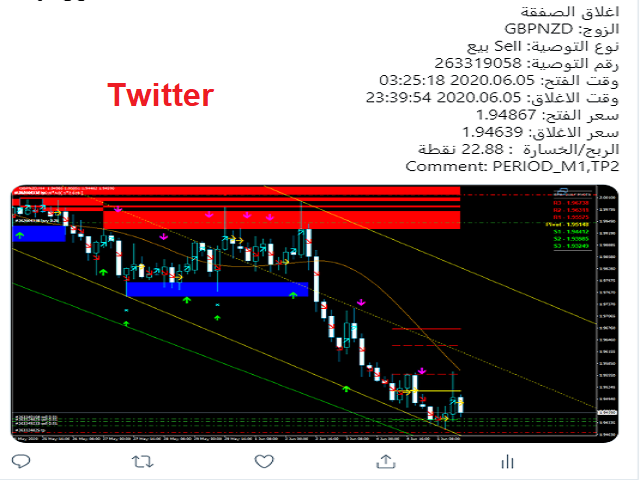
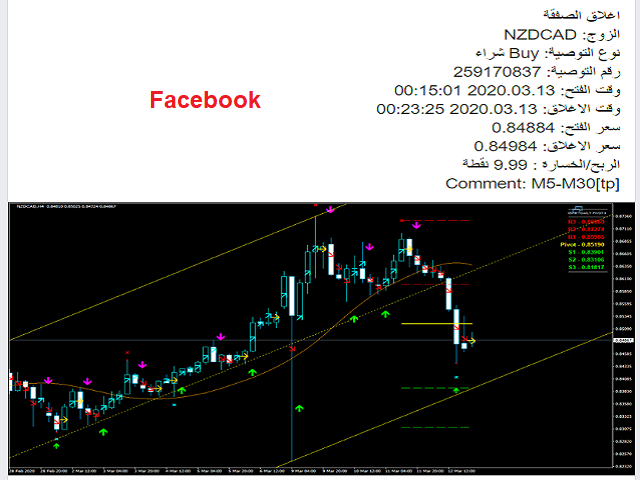
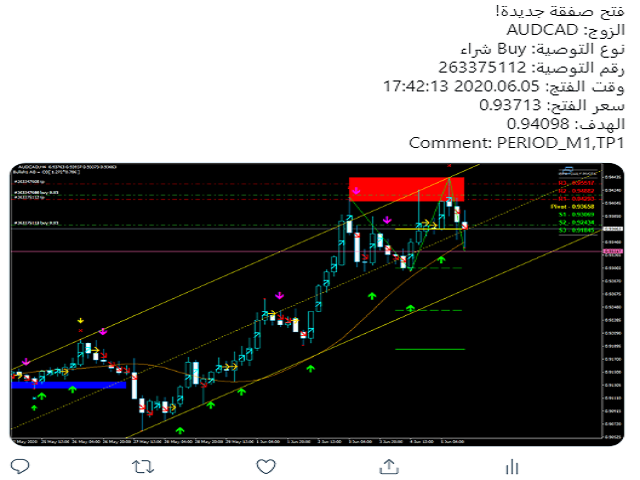
Tool sends trades when open and close with chart to telegram channel. 

Tool can send multiple charts and magic numbers and pairs from a single chart.

Send information of all type of orders: Opened (including Pending Orders), closed tiggered, and modified orders.


Telegram Setup instruction

  1. Open your Telegram APP and search for "BotFather".
  2. Type /start and click/type /newbot to create a new bot.
  3. Give your bot a nickname and username (e.g., nickname: Bestnavisignal and username: Bestnavisignalbot <-- username has to be ended by 'bot').
  4. Congratulations! You have created your Telegram bot.
  5. Save your bot API token (e.g. 742624432:AAGJPLFFqpdi6jYhO94Kihnyy77aR8opbTI) .
  6. If you don't have it already, create the channel or group
  7. Open the channel/group Info, then Manage, Add Administrators, type the bot username, and click Save
  8. Send any message to the channel/group like "TEST"
  9. Open the following URL in a browser to get channel ID
  10. Copy the chat ID
  11. Back in Meta Trader 4, go to Tools > Options > Expert Advisers > tick 'Allowed Web Request for listed URL' and add 'https://api.telegram.org'.
  12. Attach the utility into your Meta Trader 4 chart and fill up the Token (from step 5) and ChatID (from step 11).
  13. Fill in the magic number separated with comma "," on utility chart window. So you can select trades which should be sent to Telegram (Important! not shown on video look images please)
  14. Your utility is ready to work for you.
  15. sends to multiple channels and users just enter channels like @chan1,@chan2 and users id in Inp Users ChatID like 111111,2222222,3333333 etc to find user IDs you can use @chatid_echo_bot bot, search for it on telegram
  16. You can select Pairs in whit or Black list 
  17. you can show or hide TP, SL
  18. sends messages to Twitter and Facebook.
  19. You can specific Daily report summary in 2 times per day
  20. You can Add weekly report also
  21. You can specific profit in Pips or Currency
  22. You can add chart frame to each order you do it 
  23. Send your signals to MANY CHANNELS: Multi-Telegram channelsEmail, and send push notifications to the  Mobile Terminal.
  24. Send information of ALL TYPE ORDERS: Opened (including Pending Orders), Cancel, ClosedTriggered, and Modified Orders.
  25. FULLY CUSTOMIZE your Signal Text, Daily Report & Weekly ReportDesign your signal text, daily report and weekly report by the way you want, add pre-text, post-text, emojis... show profit or in currency or add any order trade information. 
  26. FULLY CUSTOMIZE Pip unit: Calculate exactly pip unit for any symbol, in any broker.
  27. Now you can send it to twitter aslo
  28. Now we cam semd it to Facebook Page (you should create application on FB amd then create page for your app)
  29. Support Arabic Language
  30. you can select English edition from here

Prodotti consigliati
Plain MT4
Ahmed Alaaeldin Abdulrahman Ahmed Elherzawi
This is a semi-automatic Expert Advisor that opens trades automatically based on the direction you set using the trade sell / buy on the panel. The magic of this EA is that it recognizes the objects that you draw on the chart by closing the open positions at key levels, it will notify you through the mobile notification, then it will wait for the next direction. It opens orders continuously regardless of the time frame of the chart. So you don't have to stay on a lower time frame. Instead, you c
North Star EA is a trend EA, not  a Martin  EA,  non optimized EA.  just use fix lot size, auto get fix stop loss and take profit value, Max 3 open positions.EA has passed multiple platform tests.  Small capital withdrawal and no risk of exposure !        North Star EA is a complex algorithm that uses Artificial Intelligence in combination with traditional technical analysis to predict market movements. This Expert Advisor makes use of Combination of Vector calculus and trend indicators an
ProfRoboTrading Dashboard MultiSymbol   is   Expert Advisor  a lightweight on-chart control panel that provides a clear overview of your trading account and open positions across multiple symbols. The dashboard displays key account metrics, summarizes open BUY/SELL orders and lots per symbol, calculates profit for Day/Week/Month, and offers quick manual close actions directly from the table. Key features Multi-symbol table   (symbols list configurable). Account metrics panel:   Balance, Equity,
SnowyOwlFree
RODION SLOTIN
3 (2)
The free version of the snowyowl trend adviser, which is based on determining combinations of candle patterns. A virtual trailing stop tracks each open order and groups open orders to close them simultaneously. In the free version, you can only work on one timeframe, while in the paid version, opening orders on the selected TF is a signal to open orders on lower TF.
FREE
1.Determine the trend size based on the chart cycle.   An uptrend near the highest price in a period of time.   A trend down near the lowest price in a period of time. 2.   short-term trends.   Oversold and long;   Overbought, short. 3. Unwind positions based on overbought and oversold and profit points. real-time signal: https://www.mql5.com/zh/signals/1538661?source=Site+Signals+My EA Settings: You need to load EA into the currency pair to trade (M15 time range). The best performing symbol : E
Tool sends trades when open and close with chart to telegram channel.  Tool can send multiple charts and magic numbers and pairs from a single chart. Send information of all type of orders: Opened (including Pending Orders), closed tiggered, and modified orders. Telegram Setup instruction Open your Telegram APP and search for "BotFather". Type  /start  and click/type  /newbot  to create a new bot. Give your bot a nickname and username (e.g., nickname: Bestnavisignal and username: Bestnavisignal
ENGLISH DESCRIPTION (MQL5 Standard Optimized) Product Name: Aether Elliott Wave Zigzag Pro (MT4) [Subtitle: Wave 3 Hunter | Fib 0.618 Retracement | Margin Guard] Introduction Aether Elliott Wave Zigzag Pro is a lightweight, market-compliant scalping system designed to automate the classic Elliott Wave theory. Instead of complex wave counting, it uses a precision ZigZag algorithm to identify the high-probability 1-2-3 Structure and targets the Wave 3 impulse. Engineered for MT4 stability, it feat
FREE
Extra Martingale
Vladimir Pokora
5 (1)
Is your trade at a loss? Does not matter ! You can use this Extra martingale tool.  In the set loss of your trade or your EA's trade , this tool will open another trade at a better price. It can also open multiple trades at different distances and with different lot sizes. Each trade will be assigned a TakeProfit. This tool has a lot of settings. You can set variable lot sizes, variable trade distances, variable TakeProfit sizes, maximum total profit or loss in money. You can also close trades
Destiny Master
Victor Adhitya
Your destiny is in your hand, This EA design to control your RISK PER TRADE so even you using the martingale system you can control your drawdown. Every failure of your entry will partial hedge with this ea, so the floating loss will reduce and the drawdown can be controlled. You need Broker with this requirement spesification : - Hedging Account (dont use Netting Account) - Big leverage  - NO SWAP  - NO COMMISION - NO Hidden Cost - Margin Hedge = 0 - Low spread  - Low slippage
CCI and ATR Trader
Evgeniia Terekhova
2.33 (3)
Советник работает на двух индикаторах CCI и ADX. Условия для входа в BUY: 1. ADX пересекает уровень 20 2. CCI пересекает уровень 100 снизу вверх 3. Выставляем фиксированный StopLoss и TakeProfit 4. Закрываем позицию по рыночной цене, когда CCI пересекает уровень 100 сверху вниз. Условия для входа в SELL: 1. ADX пересекает уровень 20 2. CCI пересекает уровень -100 сверху вниз 3. Выставляем фиксированный StopLoss и TakeProfit 4. Закрываем позицию по рыночной цене, когда CCI пересекает уровень -10
FREE
Live Bot Maker
Nabeel Zafar
5 (4)
Let Your Ideas Earn For You. Convert your Ideas and Strategies in to automated trading bots directly on MT4. Visual Strategy Builder with Instant Results on the chart. This One of a kind strategy builder, allows you to specify rules and visually see the signals based on those rule as you create them. Visit the link for Group, User Manual, Video Examples Why Use LBM LBM is an essential tool for traders of all levels. It allows traders to create strategies quickly and easily, and to test them i
Aureus Quantum Surge
Ren Cheng Yao
5 (1)
Aureus Quantum Surge-H1: sblocca il potenziale del trading automatizzato dell'oro Limited Time Offer: Special Offer: Current Price $799 (Limited Time)! Next price: $899 Segnale del conto reale: https://www.mql5.com/en/signals/2297864?source=Site +Profilo+Venditore Panoramica Aureus Quantum Surge-H1 è un consulente esperto all'avanguardia progettato per il trading di XAUUSD (Oro) nel periodo H1. Integra più indicatori tecnici con solide tecniche di gestione del rischio per fornire prestazion
MirrorEA
Eugenio Bravetti
The new version of  MirrorSoftware 2021  has been completely rewriten and optimized.  This version requires to be loaded only on a single chart because  it can detect all actions on every symbol and not only the actions of symbol where it is loaded. Even the  graphics and the configuration mode  have been completely redesigned. The MirrorSoftware is composed of two components (all components are required to work):  MirrorController  (free indicator): This component must be loaded into the MASTER
Simple RSI Forex Trading Strategy
Victor Manuel Valderrama Zamora
4 (1)
Diversify the risk in your trading account by combining our Expert Advisors. Build your own custom trading system here:   Simple Forex Trading Strategies The expert advisor opens trades when RSI indicator enter in oversold or overbought areas. The Stop Loss, Take Profit, and Trailing Stop are calculated based on the ATR indicator. The recommended currency pair is EURGBP and the recommended timeframe to operate and to do backtests is H4. This Expert Advisor can be profitable in any TimeFrame an
FREE
Wouldn't it be great if AI had a second look at your trading data — graphics, indicators, and beyond? Introducing AI Trading Station , a revolutionary utility seamlessly integrated with the MetaTrader platform. Powered by the advanced intelligence of OpenAI's ChatGPT, this complete solution covers every step of your trading journey, from data gathering to trade execution. The Complete Trading Process. Reinvented Data Gathering & Visualization: Collect and display vital market data on intuitive
PZ Goldfinch Scalper EA
PZ TRADING SLU
2.73 (41)
This is the latest iteration of my famous scalper, Goldfinch EA, published for the first time almost a decade ago. It scalps the market on sudden volatility expansions that take place in short periods of time: it assumes and tries to capitalize of inertia in price movement after a sudden price acceleration. This new version has been simplified to allow the trader use the optimization feature of the tester easily to find the best trading parameters. [ Installation Guide | Update Guide | Troublesh
FREE
News Panel
Radek Reznicek
5 (2)
News Panel  is a fully adjustable utility for Forex News. It can show upcoming news in InfoPanel as well as lable for upcoming and past news labels on the chart.  This utility also enables Upcoming news Alerts and Push notification. User can change number of upcoming news displayed, colors and many others. Instructions Alow WebRequest for Listed URLS in Metatrader Tools -> Options -> Expert Advisors tab (see screen or watch the video) Add " https://ec.forexprostools.com/ " to the list of allo
Buy The Dip Util
Heiko Kendziorra
Buy The Dip Util is an  halfautomatic  expert advisor (EA), to   buy on dips (days lows) and sell on spikes (days highs). A profit can exceed a loss trade up to 10 times , so the user can have several loss trades and still make profit. Orders are opened at the change of the hour , if a button in the chart is pressed. The  Buy The Dip as EA  does this automaticly. The order stoploss is automaticly set right below the low of the former hour (buy) or right over the high (sell). The position size
Lo script UZFX - Set Stop Loss to Breakeven Instantly per MetaTrader 4 (MT4) è un potente strumento che consente ai trader di spostare rapidamente lo stop loss di tutte le posizioni aperte al loro prezzo di entrata, assicurando operazioni prive di rischio. Questo script è particolarmente utile per gestire in modo efficiente le operazioni attive, assicurando che una volta che una posizione si muove favorevolmente, il trader sia protetto da potenziali perdite. (Visitate il profilo e controllate
FREE
Gold Trader 310
Davide Martinazzo
PLEASE READ DESCRIPTION BEFORE BUY OR RENT EA This EA is NOT the result of an optimization of historical data. In fact it is easy to achieve a “super” equity curve (as I call it “go to the space equity curve”) with parameters optimization and overfitting on historical data: it is always possible to find a set of parameters that over-optimize the historical data. But it is the PAST data. The point is to find a strategies that will   work in the future.   For these reasons my strategies have good
I will support only my client. สำหรับลูกค้า Gold M15 timeframe, Price Movement Trading , Fund Min 500$  Lot0.01 with 30 Seconds next open trade, XAUUSD and Major Currency pairs. Parameters General Trade Settings Money Management  Lot : Fixed (can change) Strategies  - Current timeframe Strategies it is fixed with MA, Bollinger band, Candlestick Levels Close Functions  - Current Strategies MagicNumber  - individual magic number. The EA will only manage position of the chart symbol with this mag
MinWeekSize
Evgeniy Zhdan
The script analyzes the size of the extreme closed candles of the selected timeframe (by default - W1). If the candlestick size is higher than in the settings, the script opens the chart of this trading instrument. In addition, the script calculates the average candle size for the number of candles specified in the settings. An example of using the script: On Monday morning, activate the script on any trading instrument; Determine which instrument's weekly candle is above average; This week,
Harvest FX
Sayan Vandenhout
4.56 (9)
Harvest FX USES THE TREND WAVE INDICATOR AND IT CAN IDENTIFY THE BEGINNING AND THE END OF A NEW WAVE TREND MOVEMENT. AS AN OSCILLATOR, THE INDICATOR IDENTIFIES THE OVERBOUGHT AND OVERSOLD ZONES. IT WORKS GREAT TO CATCH THE SHORT TERM PRICE REVERSALS AND USES A MARTINGALE STRATEGY TO CLOSE ALL TRADES IN PROFIT. USE DEFAULT SETTINGS ON H1 OR HIGHER TIME FRAME ON ANY PAIR FOR MORE ACCURATE TRADES WHY THIS EA : Smart entries calculated by 3 great strategies The EA can be run on even a $30000 a
FREE
NAS100 Auto Sl And TP
Moustapha Boulouz
5 (2)
Vi presentiamo NAS100 Auto SL e TP Maker per MT4: Non perdete mai più l'impostazione di StopLoss e TakeProfit con il nostro NAS100 Auto SL e TP Maker, un assistente indispensabile per i trader che navigano sul mercato del Nasdaq 100 su MetaTrader 4. Questo strumento è stato progettato per coloro che cercano una soluzione perfetta per automatizzare la gestione dei livelli di StopLoss e TakeProfit. Questo strumento è stato progettato per coloro che cercano una soluzione perfetta per automatizzare
FREE
I speak in Hungarian. Magyarul beszélek benne. - You can find the indicator by my name. Which is in the picture and the video. On mql5.com.  " Utam MA High Low" - Megkeresheti az indikátort a nevemnél. Ami a képen és a videóban van. Az mql5.com-on.  " Utam MA High Low" Első felvétel. https://www.youtube.com/watch?v=YzmcyO50YdM&amp ;ab_channel=GyulaKlein (Első felvétel.   https://www.youtube.com/watch?v=FfqvT-i9TPk&feature=youtu.be Első felvétel. https://www.youtube.com/watch?v=MapbQrJ0uPU&t=
Various Trailing Manager EA Various Trailing Manager EA is a professional trader's tool that provides protection of floating profit on open trades. This EA Utility allows you to manage (with advanced filtering) unlimited open orders (manual or EA) with trailing stops based on 7 methods: percent, ATR, Moving Average, Candle, Parabolic, Fractal. The trailing stop can be either real or virtual, and you can exit fully or with a partial close percent on touch or bar close. Visualize all orders and t
Scalp Master is a very simple and smooth operation system that is designed to help traders facilitate trading and risk management. No Keyboard need to make, take profit or close orders. Every orders parameters are created automatically based on predefined risk and your strategy lines. Such parameters appear friendly on the screen and you just need 1 click to convert to order. The unique algorithm prevent common missed and hit taking profit strategy. Instead of very subjective partial closed by u
EA Introduction The EA we have carefully crafted was previously an internal proprietary stable strategy tool. It focuses on capturing market patterns specific to time zones, standing out with high-frequency orders and a robust win rate, suitable for flexible traders with small capital. Whether from backtesting or live trading perspectives, it has demonstrated excellent stability, making it particularly suitable for users who wish to gradually accumulate profits in the forex market. We speak wi
Cleopatra EA
Nestor Alejandro Chiariello
5 (1)
Ciao Commercianti! EA ha un track record dal vivo con 3,5 anni di trading stabile con bassi drawdown: Spettacolo dal vivo La versione MT4 può essere trovata qui Vi presento la strategia "Cleopatra EA", Cleopatra un design bello e intelligente, con una forma di recupero che si adatta costantemente dove il suo potere è la versatilità La sua strategia principale è quella di leggere il mercato nella sua elasticità, potremo analizzare il range di entrata in diversi modi. Questo può essere molto
Gli utenti di questo prodotto hanno anche acquistato
LIMITED OFFER - JUST FOR 2 DAYS | 50% BLACK FRIDAY DISCOUNT $640 -> $320 Your Smart Trading Assistant for the Forex Market Introducing a powerful MetaTrader tool designed to revolutionize the way you trade. This intelligent assistant goes beyond traditional indicators to provide a comprehensive, AI-driven market analysis — so you can trade with clarity and confidence. What It Does This advanced tool continuously monitors and analyzes a wide range of market data to deliver high-quality trading
The FFx Hidden Manager panel will help you to manage easily your orders directly on the chart. Below all features described: TP, SL and TrailingStop are hidden Each order has its own lines on chart Drag & Drop any line to change the TP/SL as per your need Option to move automatically the SL line at breakeven when TP #1 is reached Option to choose the TP/SL type (by pips or price) Option to choose the TrailingStop type (by pips, MA, Fractals, PSAR or ATR) Define which order(s) you want to manage
FFx Risk Calculator
Eric Venturi-Bloxs
FFx Risk Calculator panel will help you to calculate very easily your trades size, SL or the risk directly on the chart. All features are described below: Option to select which parameter to calculate: Risk, Stop Loss or Lot Size The panel will show if the lot size is allowed according to the current account free margin Button to maximize/minimize the panel Drag and Drop the panel anywhere on the chart How to use it? Select the parameter you want to be calculated. It will be based on the 2 other
FFx Watcher PRO
Eric Venturi-Bloxs
The FFx Watcher PRO is a dashboard displaying on a single chart the current direction of up to 15 standard indicators and up to 9 timeframes. It has 2 different modes: 1. Watcher mode: Multi Indicators User is able to select up to 15 indicators to be displayed User is able to select up to 9 timeframes to be displayed 2. Watcher mode: Multi Pairs User is able to select any number of pairs/symbols User is able to select up to 9 timeframes to be displayed This mode uses one of the standard indicat
This Stacker EA will: Automatically set Stop loss on a new order Automatically set Take profit on a new order Stack (or open up to 4 additional orders at the same time) when a new order is placed, the SL/TP can be preset individually for each order. Provides a transparent replacement for the standard 1-click trading buttons in MetaTrader 4 (1 click still works and SL/TP will automatically be set as well as Stacking). Automatically calculate lot order size according to preset risk management perc
Crypto Market Pro
Daniil Kurmyshev
5 (1)
New opportunities for analyzing cryptocurrency in the usual MetaTrader 4. For example : We select the symbol of the cryptocurrency and attach any indicators, Expert Advisors or scripts. Startup Mode View cryptocurrency; Data collection. Capabilities Work as with a standard currency chart; Automatic update of open charts; Selection of individual cryptocurrency for updating; Selection of individual timeframes for updating; Work on the desired timeframes; Open charts do not affect the work of Cry
Fibonacci Expansion and Retracement Analysis Fibonacci retracing and extended line tools for the MT4 platform, ideal for traders who use the DiNapoli point trading method and the Golden Section trading The main function: 1. You can draw multiple sets of Fibonacci retracements directly, and the relationship between important return points is clear at a glance. 2. Can draw Fibonacci extensions 3. The Fibonacci foldback and extension of the line can be moved left and right for easy observation
Risk manager x2
Andrii Malakhov
Советник риск-менеджер с огромным арсеналом возможностей защиты вашего депозита. Для инвесторов, которые решили передать капитал в доверительное управление. Когда у трейдера нет доступа к настройкам - нивелирует торговые риски. А также для трейдеров, которые осознали необходимость стороннего контроля за их торговлей для улучшения торговых результатов.  Для максимальных результатов - должен стоять на отдельном VPS сервере и у трейдера не должно быть возможности менять настройки в торговый период.
Grid Hero War Pad
Chock Hwee Ng
3.4 (5)
Grid Hero War Pad is a  GRAPHICAL MANUAL TRADER version of the original Grid Hero EA, designed and created for ADVANCED TRADERS who are experienced in plotting their own market entries. It is coded using ADVANCED GRAPHICAL INTERFACE programming, that combines the power of discretionary trading with Grid Hero algorithm in the form of a graphical console with button-click easy execution. It allows you to execute trades manually using Market Orders and Pending Orders, and then automatically uses th
Open charts
Maksim Slovakov
Скрипт открывает графики по всем инструментам находящимся в окне "Обзор рынка" и по желанию может задать для всех графиков один шаблон. Так-же можно удалить все графике открытые в терминале Мт4. В скрипте имеются следующие настройки: "Таймфрейм" по умолчанию M30;             (Можно поставить свой: M1, M5, M15, M30, H1, H4, D1, W1, MN.) "Задержка" по умолчанию "0";                  (Задержка перед открытием следующего графика в миллисекундах.) "Шаблон" по умолчанию "True";                (True=пр
Quantized Trend
Oleg Pechenezhskiy
This utility automatically draws the trend channel on the price chart. For the time interval from the specified date to the current bar, the drawn channel is almost optimal. Placing the beginning of the channel at a more distant historical price extremum, you get a visualization of a longer-term trend. Channel slope is not a continuous value, but takes one of discrete values (in AxB format, where A is the number of price points (points), and B is the number of timeframes). This program works ONL
NewsReady
Joel Protusada
NewsReady is a semi-automated Expert Advisor that uses a smart straddle methods It needs to be set in charts 2 to 10 minutes before Economic Data release with a red-flag impact on currencies related to the news. Then it run pending orders in specified number of minutes indicated in the time-period parameter. After the specified time, it will stop trading and will remove all pending orders. Important You can not backtest this tool because it is semi-automated and can only be set and run a few min
Advanced Smart Renko and Heiken Ashi Candle Trader is ONE STOP SOLUTION based semi/fully - automated multi-currency EA carefully engineered for traders to enter the trade based on their Analysis or in fully automated mode for scalping, trend trading, candle breakout trades and also automated news trading with inbuilt trade management solution.    Advantages    No grid / Martingale Works on Classic Renko, Renko Heiken Ashi charts and classic Heiken Ashi charts    Features Multi-Currency Ma
GRID for MT4
Volodymyr Hrybachov
The GRID for MT4 trading panel is equipped with the functions of opening, closing and tracking orders. Closing orders is a basket, either unidirectional - only BUY or SELL, or multidirectional BUY and SELL together. To close positions, you can use the functions of stop loss, take profit, breakeven and trailing stop. Stop loss and take profit can be set in% of the balance. It has the functions of minimum holding time and minimum interval between opening new orders in seconds. Parameters: MULTID
Binary expert
Dmitriy Konogorov
Expert for a binary options on mt4, he have  two built-in a indicators and many different settings. The expert has one a level of martingale, but it is recommended to use it on  the instruments with a yield of 85 percent. it can be used simultaneously on a variety of currency instruments. All settings have already been made, but you can also configure them yourself . Currency for do trading is a Russian ruble. Good trading to everyone.
This program is created by algorithm which economy based logic in the trading market. 1. The program able to work with all of currency and trading items  2. Take profit and loss are basically handled by EA program Recommendation: EUR_USD is the most preferred. Please use this program only for MT4. LOT should be managed depends on own deposit. Otherwise, high risk will be driven(e.g 0.1~0.2 lot is recommended when the deposit is 10,000 dollar)
1. Record the price data for each Tick transaction. Data file contents: "Tick time", "ASK price", "BID price", "SPREAD SPREAD", "Tick quoted quantity". 2. Meanwhile, generate a quotation data file with a 1-minute period. Content of 1min data file: "ASK time", "ASK OPEN price", "ASK HIGH price", "ASK LOW price", "ASK CLOSE price", "BID time", "BID OPEN price", "BID HIGH price", "BID LOW price", "BID CLOSE price", "Tick quoted quantity". 3. Save all quotation data in one file every day, which is c
Trade Control
Andrii Malakhov
Утилита-риск-менеджер для защиты вашего депозита от полной потери денег. Если вы инвестор и решили передать деньги в доверительное управление, вам нужен Trade Control. Так трейдер не нарушит свои же правила риск-менеджмента и не сольет все ваши деньги. Для этого Trade Control должен находится на вашем VPS. И у управляющего трейдера не должно быть доступа к настройкам данной улититы. В момент слабости, трейдер не сможет увеличить заложенные в торговлю риски. И не потеряет ваш депозит за один неуд
L   H E D G E R   S C A L P E R    A fully automated Expert Advisor that uses counter-trend scalping, managed semi-martingale strategy and lock hedging to execute a complete trading scheme from entry analysis to risk-calculated money management to exit analysis plan execution.         V E R Y  I M P O R T A N T    You can use only ECN type of account. Otherwise, it's a disaster. You can use only the GBPJPY currency pair. Open and attach with 1 chart only. Use a minimum of $5
PyramidExpert
Joel Protusada
P Y R A M I D   E X P E R T    This Forex utility is a complex exit strategy and order management tool that executes four trading methods; scalping, pyramid style, hedging, and scaling method to close trades with a profit.           V E R Y  I M P O R T A N T     This is not a stand alone expert advisor. Use it with your own volatility-based strategy. Once you found the currency pair to trade, you can just attach this tool to the chart of the chosen pair and it will do the
The EA Protection Filter ( MT5 version here ) provides a news filter as well as a stock market crash filter, which can be used in combination with other EAs. Therefore, it serves as an additional protective layer for other EAs that do provide such filters.  During backtest analysis of my own night scalpers, which already use a stock market crash filter, I noticed that the historic drawdown,  especially during stock market crash phases like 2007-2008, was reduced significantly by using such a fil
FiboPlusWaves
Sergey Malysh
5 (1)
FiboPlusWave Series products Ready-made trading system based on Elliott waves and Fibonacci retracement levels . It is simple and affordable. Display of the marking of Elliott waves (main or alternative option) on the chart. Construction of horizontal levels, support and resistance lines, a channel. Superposition of Fibonacci levels on waves 1, 3, 5, A Alert system (on-screen, E-Mail, Push notifications).    Features: without delving into the Elliott wave theory, you can immediately open one of
Split Lot
Ting Fung Ku
Monitor floating profit of trades and close half of the lot size when profit reach target. Can monitor either all trades in whole account or by specified magic number. Can set amount of slippage and spread tolerance. Can set retry times and sleep seconds if split order was rejected Can set max split order times. Able to close trades after split when floating profit goes down and near 0, to prevent lose.
A   rocket   (from   Italian :   rocchetto ,   lit. 'bobbin/spool') [nb 1] [1]   is a   projectile   that   spacecraft ,   aircraft   or other   vehicles   use to obtain   thrust   from a   rocket engine . Rocket engine exhaust is formed entirely from   propellant   carried within the rocket. [2]   Rocket engines work by   action and reaction   and push rockets forward simply by expelling their exhaust in the opposite direction at high speed, and can therefore work in the   vacuum   of space. In
ParabolicCCI
Evgeny Vlasov
Программа работает на сочетании двух индикаторов.   Set _ Lot = 0.01 – значение объема лота Set _ TP = 100 – значение тейкпрофит в пунктах Set _ SL = 100 – значение стоплосс в пунктах Up _ Limit _ CCI = 100 – верхний предел CCI Down _ Limit _ CCI = -100 – нижний предел CCI Delta _ CCI = 25 – отклонение CCI от первой свечи Set _ Time _ Frame _ CCI = 15 – значение таймфрейма для расчета CCI Set _ Period _ CCI = 14 – значение периода для расчета CCI Set _ Price _ CCI = 0 – тип цены, по которому вед
TsTriangularHedge
Salvatore Labriola
The utility allows you to open, monitor and manage open positions on the forex market and only on instruments in which it is possible to create triangulations or those instruments that share the same currency in the numerator or denominator: ex: EURSUSD --- GBPUSD --- EURGBP The help of operational lines and valuable information on the panel allow the trader to manage trades more easily. Recommended for novice and experienced traders. External variables CrossSymbol = choose the cross on which
PLEASE NOTE:   The "AUTO" function of the EA has NOT yet been activated . It's still ongoing testing. Once it becomes available, clients will get a free upgrade to EA 2.0                        Also .... PLEASE follow the instructions below in order for the functions to work properly. Introduction: The Phoenix Project (EA) Our Expert Advisor is both refined and practical. It is geared towards helping the traders be constantly aware of their risk PER trade while it helps them manage that risk.
MT4 Reinvented
Francis Bouchard
Welcome guys !  I offer to you this MT4 project I've been working on for the last 2 years ( roughly over 900h of work.. ).  This is a complete tool that will change the way you see MT4, because I almost recoded it entirely ! It will provides you a solid base for risk management, order positionning, hedging, account preservation and journaling. I wanted an all-in-one panel that covers both scalping and swing trading and that suits every type of trader.       Main goal was : NO INPUTS. Never
This EA is been tested on difference Prop firm including FTMO, MFF, TFF, Funding Next and E8.  The main focus of this EA is to provide you Risk Management, Trade Management.  It can calculate lot size for you in any market to make sure fix % risk per trade.  It has a partially close and brake even line you can place on the screen.  When the line is hit, EA will partially close the position can move the SL to entry to provide you a guarantee profit. One EA can trade all symbol.  Is a Prop Firm tr
Assassin Trading Assistant
Anthony Donald Dickenson Jr
The EA is used as an assistant for traders in the Trading Masters group.  The EA assists with identifying setups when taking trades using the strategies outline in the Trading Masters Group.  The EA has been developed and is intended for use by community members who understand the concepts and would like assistance navigating trade setups.  It is recommended to first understand the concepts presented in the Trading Masters group before purchasing this EA so the user can understand and benefit fr
Altri dall’autore
automatically sets a pre set take profit and stop loss on all orders that lack the selected stop(orders without sl/tp or both). This enables quicker opening of orders especially if you use a common take profit, stop loss or both for all orders of a current pair. You only need to open orders without having to calculate your stops and no matter how many orders you have opened the EA will set stops for you as long as you have attached the EA on the currency pairs chart. For pending orders the EA
Tool sends trades when open and close with chart to telegram channel.  Tool can send multiple charts and magic numbers and pairs from a single chart. Send information of all type of orders: Opened (including Pending Orders), closed tiggered, and modified orders. Telegram Setup instruction Open your Telegram APP and search for "BotFather". Type  /start  and click/type  /newbot  to create a new bot. Give your bot a nickname and username (e.g., nickname: Bestnavisignal and username: Bestnavisignal
Close MyOrders
Hussein Adnan Kadhim
questo Ea è utile per chiudere tutti i tipi di ordini contemporaneamente, sarai in grado di optare per tutti gli ordini chiusi immediatamente o per vittimizzare la regola di profitto/perdita. se il "profitto totale" o la "perdita totale" del conto sono maggiori del profitto/perdita nominale, questo Ea può chiudere meccanicamente tutta la tua posizione aperta. Chiusura: potrai scegliere di chiudere immediatamente quando esegui Ea, o utilizzare l'intera regola del profitto/perdita, o utilizzar
Evening Scalper Pro is the state-of-the-art mean-reversion trading system that operates during all trading session. It's very different from most other scalping systems, since it uses a unique trading logic on cross pairs that have a strong mean-reverting tendency with high profit targets. EA not enters the market with market orders, it does not open trades. In terms of a trade duration, it's classical scalping: in and out of the trade within a few hours at the most. The EA uses a number of adv
Support And Resistance Screener is in one level indicator for MetaTrader that provide multiple tools inside one indicator. The available tools are :  1. Market Structure Screener. 2. Bullish Pullback Zone. 3. Bearish Pullback Zone. 4. Daily Pivots Points 5. weekly Pivots Points 6. monthly Pivots Points 7. Strong Support and Resistance based on Harmonic Pattern and volume. 8. Bank Level Zones. Key Features All in one level indicator. All types of alerts ( Pop-up alert, puss notification alerts.
Alebrahimi EA
Hussein Adnan Kadhim
Grazie per il tuo interesse per " Alebrahimi EA ". Faccio trading dal 2015. Di solito faccio trading su modelli di inversione su base giornaliera e settimanale. Di solito non uso "Stop Loss" o "Take Profit" nelle mie operazioni, ma prendo perdite quando il mio motivo di negoziazione iniziale è cambiato. Ci saranno alcuni scambi tenuti per lunghi periodi di tempo, come settimane, persino mesi. Non preoccuparti, fa parte del mio sistema di trading. Non uso la martingala o la griglia o qualsiasi
Export Pairs name
Hussein Adnan Kadhim
Questo prodotto è progettato per esportare tutte le coppie che hai nel tuo meta trade se hai troppe coppie, azioni, indicatori, CFD ecc. ti basta 1 clic per esportarli tutti o in un file txt Funziona come uno script, leggendo tutte le coppie. Non c'è alcuna opzione per cambiare. Non c'è nessuna richiesta web. Non c'è uso di DLL. Posizione del file: MQL5\File . con nome broker name._Symbols.txt
Evening Scalper Pro is the state-of-the-art mean-reversion trading system that operates during all trading session. It's very different from most other scalping systems, since it uses a unique trading logic on cross pairs that have a strong mean-reverting tendency with high profit targets. EA not enters the market with market orders, it does not open trades. In terms of a trade duration, it's classical scalping: in and out of the trade within a few hours at the most. The EA uses a number of adv
Pivot Points for MT5
Hussein Adnan Kadhim
Novice or Expert, our top of the line multi-time span Turn Prof will upgrade your exchanging and carry you extraordinary exchange amazing open doors with the Help and Obstruction levels that experts use. Turn exchanging is a straightforward compelling technique for entering and leaving the market at key levels and has been utilized by experts for quite a long time and chips away at all images: Forex, Crypto, Stocks, Indicies and so on. Turn Prof carries premium levels to the broker where the


TradeMetrics Pro
Hussein Adnan Kadhim
The TradeMetrics Pro indicator enhances trade analysis and performance evaluation by presenting trade history and metrics directly on the chart. It accomplishes this through three key features: Summary Trade Panel: The Summary Trade Panel provides a concise overview of open and closed trades. It organizes trade summaries by symbol, lots traded, pips gained or lost, profit, and advanced statistics. This panel enables quick assessment and comparison of trade performance across different symbols.
Trading Session Map
Hussein Adnan Kadhim
Indicator Description: Market Session Overlay The Market Session Overlay indicator for MT5 visually highlights the key global trading sessions — Asian, European, and American — directly on your chart. It allows traders to clearly identify the time ranges of each session and their respective highs, lows, and opening levels, improving session-based analysis and strategy execution. Features: Draws colored rectangles for each session (Asian, European, American) on the chart. Configurable se
Filtro:
Nessuna recensione
Rispondi alla recensione