Take a Break MT5

70 USD
Versione demo scaricata:
278
Pubblicato:
9 gennaio 2020
Versione attuale:
9.11
Non hai trovato un robot adatto?
Ordina il tuo
su Freelance
Vai alla sezione Freelance
Ordina il tuo
su Freelance
Come acquistare un Robot di Trading o un indicatore
Esegui il tuo EA
hosting virtuale
hosting virtuale
Prova un indicatore/robot di trading prima di acquistarlo
Vuoi guadagnare nel Market?
Come presentare un prodotto per venderlo con successo

Ti stai perdendo delle opportunità di trading:
- App di trading gratuite
- Oltre 8.000 segnali per il copy trading
- Notizie economiche per esplorare i mercati finanziari
Registrazione
Accedi
Accetti la politica del sito e le condizioni d’uso
Se non hai un account, registrati
Hello Eric,
I have set up TAB, and it seems to be "on".
I post here so that your answer can bebefits to everyone.
A few questions :
1/ I understand that the TAB indicator must be set up in each chart that we want to control with TAB EA. in the case that we do not use "group name", but EA magic, do we still need to set up the TAB incator in each chart that we want to control ?
2/ In the case of multicurency EA, will TAB work the same ? And then control each currency of that particular EA ?
3/ I really do not understand if the values used for calculation, or limits to reach are for "selected EA" of that particular group or for the entire account ?
If it is for the entire account, then how do we do to allow a specific DD to a specific chart or EA ? As an example :
EA1 : allow drawdown : 1 %
EA2 : allow drawdown : 3 %
4/ It seems that this %GROUP%Trade will replacer group name . I do not understand how to use the templates such as : %GROUP%Trade . Where and how to use them ?
5/ I have seen your formulas : Formula: ("Daily Profit/Loss" or "Minimum value until trading IS allowed") <= Limit * Deviation
Shall we enter them somewhere ? Do you have ready made templates, or setfiles ?
Thanking your in advance,
Romain
Hi Eric,
in : Account protection :
This mean "pause trading" or "close trades" . Open trades or pending trades ?
Because it seems to me that this section Account protection only "pause EA", and the closing of "open Trades" more in Dradown control.
Let me know,
Romain
Hi Romain,
I'm really sorry but today is an unexpected busy day at work for me. I will get back to all your (very valid) questions tomorrow.
Cheers,
Eric
Hi Romain,
thanks for reaching out.
1/ I understand that the TAB indicator must be set up in each chart that we want to control with TAB EA. in the case that we do not use "group name", but EA magic, do we still need to set up the TAB incator in each chart that we want to control ?
> You will need to put the indicator on all charts that should be managed by TaB and also enter the Chart Group names accordingly. TaB uses them to determine the EAs and symbols it should manage. As a general rule of thumb, you should set up a different chart group for each different EA (setting) you use. Charts that use the same EA (setting) can also share the same chart group.
2/ In the case of multicurency EA, will TAB work the same ? And then control each currency of that particular EA ?
> Correct. However note that if you want to use the "close trades before news" feature for multicurrency EAs, you should set up (dummy) charts for each currency it trades and put them under TaB's control. That is to ensure that only trades of the currencies affected by the news will be closed. Otherwise, all trades would be closed.
3/ I really do not understand if the values used for calculation, or limits to reach are for "selected EA" of that particular group or for the entire account ?
If it is for the entire account, then how do we do to allow a specific DD to a specific chart or EA ? As an example :
EA1 : allow drawdown : 1 %
EA2 : allow drawdown : 3 %
> That always depends on the setting for the parameter "Which trades should be managed?".
If that is set to "All trades (entire account)", all limits will apply to the entire account.
If it's set to "Only trades with specific Magic Numbers or Order Comments", it will only apply to specific trades.
So in your example, you would set up 2 TaB EA instances, configure both to manage "Only trades with specific Magic Numbers or Order Comments" and put the magic number of EA1 in the first TaB EA instances and that of EA2 in the second TaB EA instance.
Also note that all parameters work in combination. E.g. if you would also set the parameter "Trade Management Mode: Pending Orders only" in the TaB EA instance for EA1, then TaB would only manage pending orders of EA1.
4/ It seems that this %GROUP%Trade will replacer group name . I do not understand how to use the templates such as : %GROUP%Trade . Where and how to use them ?
> This parameter is a relic from the early days of TaB, really technical and can actually be ignored. It will likely be removed in some future TaB version, to avoid further confusion :)
5/ I have seen your formulas : Formula: ("Daily Profit/Loss" or "Minimum value until trading IS allowed") <= Limit * Deviation
Shall we enter them somewhere ? Do you have ready made templates, or setfiles ?
> The deviation can be kept to the default value of 1 to start with. Should you experience any issues with that, e.g. in case of high slippage, you can adjust this value accordingly so that TaB would still pause your EAs even though the limit was not reached 100%. As for the .set files, there are some in the comments sections, but given TaB's custom nature, no general ones.
Hi Eric,
in : Account protection :
This mean "pause trading" or "close trades" . Open trades or pending trades ?
Because it seems to me that this section Account protection only "pause EA", and the closing of "open Trades" more in Dradown control.
Let me know,
Romain
> You can use both sections, as TaB's filters all work in combination. In the "Account Protection" section, it depends on the settings for "Close trades when ...: true/false" whether TaB will only pause trading or also close the trades in this case.
I know that TaB is not the easiest tool to configure. That's why I usually advise to familiarize with its settings on a demo account first. Also, you will finally be able to backtest TaB in one of the upcoming versions.
I hope that I have answered everything. If not, feel free to reach out again.
Cheers,
Eric
Dear Eric,
Thank you for your detailed answer.
This helped a lot but I still need help concerning the account control + DD control section.
Please check my screenshots.
At first, I want TAB to "pause" the trading of specific EA, and not to close trades of those EA.
1/ I understood that I have to set Force stop trading and pause external EA (?), and not choose "entire account".
2/ But I am lost with account control + DD control section. It seems the same ..
I made an example in the 3 screenshots. Can you correct me ?
I want those specific EA to pause trading when the total amount (in currency) of the trades placed by those specific EA reach 1,5 % of the account balance.
I want the those specific EA to pause trading when the account equity reach 3000 USD.
I don't want TAB to close opened trades.
I want TAB to restart the EA once the DD is back to normal. By the way, how will it works ? Will it restart when DD is 1.499 % (according to the 1,5% of my example)? In that case is there a risk that it start-pause-start-pause all the time ? Can we set a condition restart ? for example restart when DD is 1 % ? just to undestand the way it works..
Thanks again for your great support !
Romain
Dear Eric,
Thank you for your detailed answer.
This helped a lot but I still need help concerning the account control + DD control section.
Please check my screenshots.
At first, I want TAB to "pause" the trading of specific EA, and not to close trades of those EA.
1/ I understood that I have to set Force stop trading and pause external EA (?), and not choose "entire account".
2/ But I am lost with account control + DD control section. It seems the same ..
I made an example in the 3 screenshots. Can you correct me ?
I want those specific EA to pause trading when the total amount (in currency) of the trades placed by those specific EA reach 1,5 % of the account balance.
I want the those specific EA to pause trading when the account equity reach 3000 USD.
I don't want TAB to close opened trades.
I want TAB to restart the EA once the DD is back to normal. By the way, how will it works ? Will it restart when DD is 1.499 % (according to the 1,5% of my example)? In that case is there a risk that it start-pause-start-pause all the time ? Can we set a condition restart ? for example restart when DD is 1 % ? just to undestand the way it works..
Thanks again for your great support !
Romain
Hi Romain,
I have attached a .set file which should fit your needs. These are the relevant changes (compared to TaB's default values):
Basically, you can completely ignore the "Drawdown Control" section for your use case. The main difference between the "Drawdown Control" and "Account Protection" section is that the former will always close the trades when a certain threshold (drawdown) is reached, while the latter can be configured to only pause your external EA while keeping the trades open.
In terms of the configured thresholds, both work exactly as you described: once the DD is below -1.5% (e.g. -1.49%), trading will resume and paused again when this limit is exceeded. There is currently no other condition you can set additionally to that. Also note that you should always specify drawdown values as negative (-1.5 instead of 1.5).
Hope that helps.
Cheers,
Eric
Hi Romain,
I have attached a .set file which should fit your needs. These are the relevant changes (compared to TaB's default values):
Basically, you can completely ignore the "Drawdown Control" section for your use case. The main difference between the "Drawdown Control" and "Account Protection" section is that the former will always close the trades when a certain threshold (drawdown) is reached, while the latter can be configured to only pause your external EA while keeping the trades open.
In terms of the configured thresholds, both work exactly as you described: once the DD is below -1.5% (e.g. -1.49%), trading will resume and paused again when this limit is exceeded. There is currently no other condition you can set additionally to that. Also note that you should always specify drawdown values as negative (-1.5 instead of 1.5).
Hope that helps.
Cheers,
Eric
Hi Eric,
I will now set it up on my VPS, and keep you informed.
Thank you for everything,
Romain
Hi Romain,
I have attached a .set file which should fit your needs. These are the relevant changes (compared to TaB's default values):
Basically, you can completely ignore the "Drawdown Control" section for your use case. The main difference between the "Drawdown Control" and "Account Protection" section is that the former will always close the trades when a certain threshold (drawdown) is reached, while the latter can be configured to only pause your external EA while keeping the trades open.
In terms of the configured thresholds, both work exactly as you described: once the DD is below -1.5% (e.g. -1.49%), trading will resume and paused again when this limit is exceeded. There is currently no other condition you can set additionally to that. Also note that you should always specify drawdown values as negative (-1.5 instead of 1.5).
Hope that helps.
Cheers,
Eric
Dear Eric,
I could not get it to work
I put it on a demo account to make sure everything is OK.
I could check that TAB EA and TAB indicator are well linked, as it did remove the EA during the News, and put it back after the News.
I loaded your setfile, and just modifyed the percentage, in order to have it to pause EA at -50 € of DD.
But the EA is still here and not removed, thought we have a DD on that EA of more of -100 € ..
I tried to upload the TAB indicator again, in case it does not like modifying ..
Do you have any idea ?
Thanks,
Romain
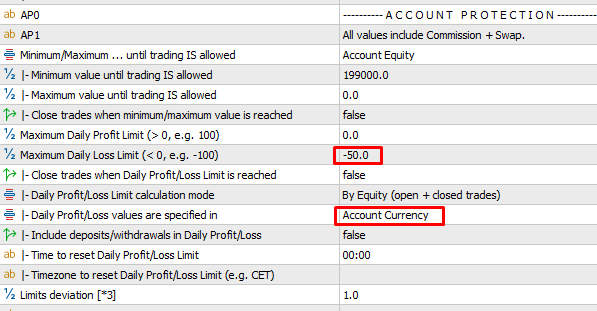
Dear Eric,
I could not get it to work
I put it on a demo account to make sure everything is OK.
I could check that TAB EA and TAB indicator are well linked, as it did remove the EA during the News, and put it back after the News.
I loaded your setfile, and just modifyed the percentage, in order to have it to pause EA at -50 € of DD.
But the EA is still here and not removed, thought we have a DD on that EA of more of -100 € ..
I tried to upload the TAB indicator again, in case it does not like modifying ..
Do you have any idea ?
Thanks,
Romain
Hi Romain,
can you please attach a screenshot of the chart with the TaB EA + another one of the chart with your other EA? That should bring some clarity already.
You can also send them to me by PM, if you don't want to expose your trading setup to the world :)
Thanks in advance,
Eric
Hi Romain,
can you please attach a screenshot of the chart with the TaB EA + another one of the chart with your other EA? That should bring some clarity already.
You can also send them to me by PM, if you don't want to expose your trading setup to the world :)
Thanks in advance,
Eric
I set many TAB at the same time, and mixed, going to fast ..
It works now perfectly.
No problem about showing that account as it is demo account -:)
Good work !
Thanks, about your quick support,
Romain
Dear Erik,
I set many TAB at the same time, and mixed, going to fast ..
It works now perfectly.
No problem about showing that account as it is demo account -:)
Good work !
Thanks, about your quick support,
Romain
Hey Romain,
problems that solve themselves automatically are the best - glad to read that everything is working now :)
I already suspected a hiccup/mismatch in the template setup. That's why I added this info panel in the bottom right corner of each chart having the TaB indicator on it:
It reflects TaB's current trading/no trading status and hopefully helps to identify the correct chart mode to add your EAs on.
In general, it is advisable to first add the indicator to all charts that you want to have under TaB's control. And to set up the TaB EA as a very last step, to prevent it from changing the chart mode unintentionally during the setup.
If there's anything else I can help with, just reach out to me. And many thanks for your kind review :)
Have a nice weekend,
Eric
Hey there,
if you're looking for a hard stop loss, you may use the Drawdown Control section instead and configure it like this:
Hope that helps.
Regards,
Eric
Hey there,
the setting is there :)
Hey there,
the setting is there :)
Danke…wer lesen kann ist deutlich im Vorteil ;)
HI,
i have just purchased the product, but i don´t get it working because of the "default" group error. Do i need another TAB indicator? On your site i see only one for MT4. Do i need this or how can i create chart groups fro using the tool?
thanks in advanced
Alex
HI,
i have just purchased the product, but i don´t get it working because of the "default" group error. Do i need another TAB indicator? On your site i see only one for MT4. Do i need this or how can i create chart groups fro using the tool?
thanks in advanced
Alex
Hey there & thank you for your purchase!
The MT5 indicator can be found here: https://www.mql5.com/en/market/product/51828
Hope that helps.
Hello
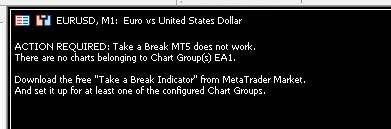
I use Take A Break since a long time
but i have this problem today
the indicator is install correctly
Hello
I use Take A Break since a long time
but i have this problem today
the indicator is install correctly