
100 USD
Versione demo scaricata:
6 405
Pubblicato:
29 gennaio 2019
Versione attuale:
19.3
Non hai trovato un robot adatto?
Ordina il tuo
su Freelance
Vai alla sezione Freelance
Ordina il tuo
su Freelance
Come acquistare un Robot di Trading o un indicatore
Esegui il tuo EA
hosting virtuale
hosting virtuale
Prova un indicatore/robot di trading prima di acquistarlo
Vuoi guadagnare nel Market?
Come presentare un prodotto per venderlo con successo

Ti stai perdendo delle opportunità di trading:
- App di trading gratuite
- Oltre 8.000 segnali per il copy trading
- Notizie economiche per esplorare i mercati finanziari
Registrazione
Accedi
Accetti la politica del sito e le condizioni d’uso
Se non hai un account, registrati
Regarding yo screenshots, i don't know if it's possible or not but it would be great if adviser could take screenshot from multiple timeframes
Hello, the screenshot saves what is visible on the screen, so the screenshot can only save the current timeframe of the current symbol.
Hello,
1) so that the sl and tp labels do not move with the price when opening a position, you need to uncheck this checkbox:
https://www.mql5.com/en/blogs/post/756483#open_label
2) if you mean how to set Partial closing for an open position (that's how I understood it), then you need to look at the instructions, it is described there, and there is a short video with an example:- https://www.mql5.com/en/blogs/post/760897#46
Hi thank you I left a positive review for you. Yes this helped me. The SL is no longer moving when I enter line buy/sell I unchecked the box this helped a lot.
Now I need the entry line to stop moving. I use pending orders only. When I click "line buy" for example the entry line is moving too fast (as I trade 1 min chart and smaller) is there a way when I click line buy/sell that the entry line is not moving either. I know I can click on it and it will stop moving and turn into buystop sellstop but it's moving to fast when the NY market opens when I am trading under 1min time frame. It would be great if there was an option when you click line buy/sell that the entry line also does not move with price it automatically goes to buy stop or sell stop than you can move the lines as you need. Is this option available? thanks
Hi thank you I left a positive review for you. Yes this helped me. The SL is no longer moving when I enter line buy/sell I unchecked the box this helped a lot.
Now I need the entry line to stop moving. I use pending orders only. When I click "line buy" for example the entry line is moving too fast (as I trade 1 min chart and smaller) is there a way when I click line buy/sell that the entry line is not moving either. I know I can click on it and it will stop moving and turn into buystop sellstop but it's moving to fast when the NY market opens when I am trading under 1min time frame. It would be great if there was an option when you click line buy/sell that the entry line also does not move with price it automatically goes to buy stop or sell stop than you can move the lines as you need. Is this option available? thanks
Hello, there is no such function. This has already been requested to be added, I will write it down in the list again. Now I am working on updating the panel, if this function does not take much time, I will try to add this function to this update.
Hello, there is no such function. This has already been requested to be added, I will write it down in the list again. Now I am working on updating the panel, if this function does not take much time, I will try to add this function to this update.
Update 18.2
Added the ability to add an indent for the "Breakeven" hotkey:
The "ALL SL TP = 0" button has been added to the "Move Sl Tp" section, which allows you to set the SL and TP of all orders to zero:
Added the ability to change button colors for the "Move Sl Tp" section:
Starting from this version, to manage all orders on the account, you need to set the Magic number = -1 (was 0):
For the "Grid" function, for the "Type" variable, the "Duplicate" option has been added:
Duplicate - allows you to duplicate the opening of an order. The panel will open a specified number of orders, the order type and price will be the same as the master order.
To calculate the lot by risk, the ability to set the risk accuracy (from 2 to 4) has been added (only for methods where %) is used.:
Added a hotkey for collapsing the "Chart Control" panel:
For the "Breakeven" section, the "Virtual SL and TP" checkbox has been added:
To calculate the lot, the parameters "Max lot" and "Min lot" have been added:
Added a section for opening orders for several symbols at the same time:
The list of symbols is specified in the settings:
ユーティリティツール購入しました。
追加機能可能かどうかわかりませんが、hotKey にLot Sizeを追加また減るキーを追加する可能でしょうか?
もう一つ、現在表示されてる通貨でもいいので、ロースカットまでどれぐらいPips維持できるか表示できますか?それによりどれぐらいのロットで取引できるか判断できるので、確認します。
ユーティリティツール購入しました。
追加機能可能かどうかわかりませんが、hotKey にLot Sizeを追加また減るキーを追加する可能でしょうか?
もう一つ、現在表示されてる通貨でもいいので、ロースカットまでどれぐらいPips維持できるか表示できますか?それによりどれぐらいのロットで取引できるか判断できるので、確認します。
こんにちは、
1) ホットキーに関しては、検討して、将来のアップデートで追加するかもしれません。
2) 2 番目の質問に関しては、残念ながらこの質問は理解できませんでした。
こんにちは、
1) ホットキーに関しては、検討して、将来のアップデートで追加するかもしれません。
2) 2 番目の質問に関しては、残念ながらこの質問は理解できませんでした。
2番目の質問について、例:現在チャットに表示する通貨USDJPYの場合、現在lot 1で取引されて、Balanceが10万の場合、ロースカット例20%の場合、ロースカットまで((10万 × 20%=2万)まで、500Pips(表示してほしい機能)
を表示してほしい機能です。取引上で、ロースカットまでPipsの状況により、取引のロット数を追加したりできると思います。できるかどうかわかりませんが、ただ、私の考えです。
2番目の質問について、例:現在チャットに表示する通貨USDJPYの場合、現在lot 1で取引されて、Balanceが10万の場合、ロースカット例20%の場合、ロースカットまで((10万 × 20%=2万)まで、500Pips(表示してほしい機能)
を表示してほしい機能です。取引上で、ロースカットまでPipsの状況により、取引のロット数を追加したりできると思います。できるかどうかわかりませんが、ただ、私の考えです。
わかりました。あなたの提案について検討します。
上記のパネルでACCOUNT_EQUITY、ACCOUNT_MARGIN_LEVELを表示できると嬉しく思います。
実際取引する時、このパネルをよく見ると思いますので、上記情報を載せると安心できると思います。
SL,TPも0に設定したのに下記のようなエラーが発生しました。
どう解消できるのでしょうか?(ホットキーで注文し場合)
すみません。上記のコメント解決しました。
ご迷惑かけました。
上記のパネルでACCOUNT_EQUITY、ACCOUNT_MARGIN_LEVELを表示できると嬉しく思います。
実際取引する時、このパネルをよく見ると思いますので、上記情報を載せると安心できると思います。
わかりました。あなたの提案について検討します。
Hello: First, congratulations on the good work in developing a truly excellent tool for day-to-day operational and risk management. I'd like to suggest two options in the tool that I think could further enhance the tool and would also be very useful, at least I miss them. The first suggestion would be to display a line on the chart that reflects the BREAKEVEN in real time. That is, a button that, when clicked, would indicate the breakeven point of all orders placed on an asset. Currently, there is a button that tells us the breakeven value at that moment, but if, in addition to that numerical value, a visual line could be included on the chart, that would be great.
As a second and very important suggestion, once the orders are placed, there should be an option where orders cannot be closed before, for example, 60 seconds, or whatever time period is determined. That is, an option where this option is enabled or not, and if enabled, the tool does not allow closure, either manually or by the tool itself, during the specified time period. MT5 could even be blocked so that it would not allow trading during that previously established minimum time period. Why do I suggest this? because I operate with funding accounts, also with personal accounts, but especially in funding accounts, one of the consistency rules they have is that if operations are closed before 60 seconds once opened, in other companies it is 120 seconds, in others 5 minutes, each one sets its rules, well it is a penalty, really this penalty is designed to avoid the massive use of orders with EA bots, especially scalping ones, but in this case, the tool is for management and the funding companies include the closing time per operation as a penalty, regardless of whether the operation is opened manually, with a scalping EA, or with the panel, so if this function were in the tool, it would be a much more complete tool in terms of operations and management.
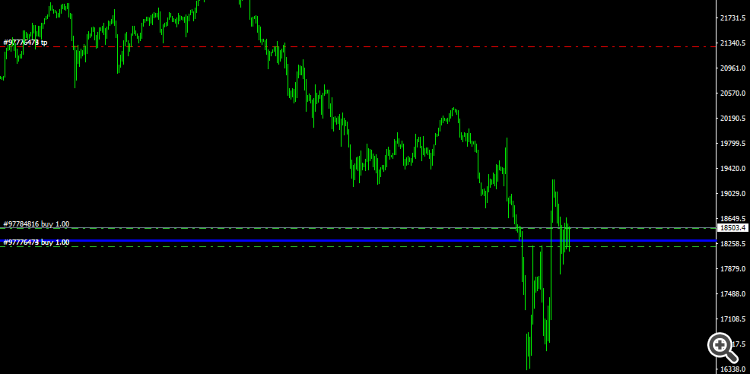
Attached is an image of a sample of the line as it would be represented in the graph, blue lineHello: First, congratulations on the good work in developing a truly excellent tool for day-to-day operational and risk management. I'd like to suggest two options in the tool that I think could further enhance the tool and would also be very useful, at least I miss them. The first suggestion would be to display a line on the chart that reflects the BREAKEVEN in real time. That is, a button that, when clicked, would indicate the breakeven point of all orders placed on an asset. Currently, there is a button that tells us the breakeven value at that moment, but if, in addition to that numerical value, a visual line could be included on the chart, that would be great.
As a second and very important suggestion, once the orders are placed, there should be an option where orders cannot be closed before, for example, 60 seconds, or whatever time period is determined. That is, an option where this option is enabled or not, and if enabled, the tool does not allow closure, either manually or by the tool itself, during the specified time period. MT5 could even be blocked so that it would not allow trading during that previously established minimum time period. Why do I suggest this? because I operate with funding accounts, also with personal accounts, but especially in funding accounts, one of the consistency rules they have is that if operations are closed before 60 seconds once opened, in other companies it is 120 seconds, in others 5 minutes, each one sets its rules, well it is a penalty, really this penalty is designed to avoid the massive use of orders with EA bots, especially scalping ones, but in this case, the tool is for management and the funding companies include the closing time per operation as a penalty, regardless of whether the operation is opened manually, with a scalping EA, or with the panel, so if this function were in the tool, it would be a much more complete tool in terms of operations and management.
Attached is an image of a sample of the line as it would be represented in the graph, blue lineHello,
1) the display of the breakeven line can be configured from the Info panel. Try to enable it from the settings - https://www.mql5.com/en/blogs/post/756483#info
Perhaps this option will suit you:
2) regarding not 60 seconds - the panel cannot prohibit you from closing an order using the tools that are in the terminal itself. The panel can only block the closing of orders using its buttons. Therefore, I think that this will not be a particularly useful feature.
I want to know is there a way to keep the SL and TP levels from moving when price is fluctuating it makes it harder for me to set them
I want to know is there a way to keep the SL and TP levels from moving when price is fluctuating it makes it harder for me to set them
Hello, yes, look here - https://www.mql5.com/en/blogs/post/756483#open_label
This has happened many times. I add the panel, configure the settings, but within a few days (sometimes even a few hours), it is gone.
Then I have to repeat the process all over again. For this reason, I stopped using it. This night, I decided to use it again. But less than an hour after setting it up, same thing happened.