
100 USD
Versione demo scaricata:
6 404
Pubblicato:
29 gennaio 2019
Versione attuale:
19.3
Non hai trovato un robot adatto?
Ordina il tuo
su Freelance
Vai alla sezione Freelance
Ordina il tuo
su Freelance
Come acquistare un Robot di Trading o un indicatore
Esegui il tuo EA
hosting virtuale
hosting virtuale
Prova un indicatore/robot di trading prima di acquistarlo
Vuoi guadagnare nel Market?
Come presentare un prodotto per venderlo con successo

Ti stai perdendo delle opportunità di trading:
- App di trading gratuite
- Oltre 8.000 segnali per il copy trading
- Notizie economiche per esplorare i mercati finanziari
Registrazione
Accedi
Accetti la politica del sito e le condizioni d’uso
Se non hai un account, registrati
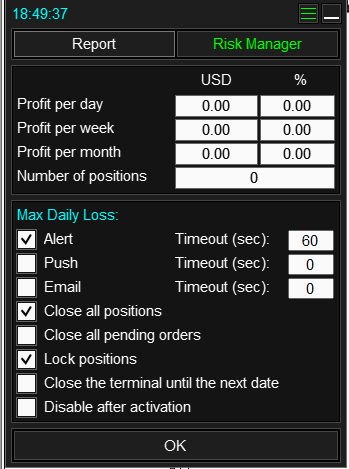
1) I am writing for the third time, show the settings. This means that the settings need to be shown as a screenshot, not as text.
2) Maximum daily loss - 600:
you set it like this:
or like this:
I remind you, if you want to enter a negative number, you need to enter a number with a minus sign! And this is written in the instructions, which I gave you a link to above:
The value of $ 600 without a minus sign can only be set if your account has open positions with a current profit of more than $ 600,
for example $ 1200, and you want to perform some actions when the profit drops to $ 600. Of course, this is a one-time function, and not for your case.
3) If you read what I gave above, and looked at the instructions, then you should know that "Lock positions" is a function that makes the volumes of Sell and Buy positions equal.
This means that the ones you set:
- Lock positions
- Close all positions
First, an additional position will open,
Then the panel will close all positions, including yours.
I think you've already guessed that you don't need to enable these two parameters together.
1) I am writing for the third time, show the settings. This means that the settings need to be shown as a screenshot, not as text.
2) Maximum daily loss - 600:
you set it like this:
or like this:
I remind you, if you want to enter a negative number, you need to enter a number with a minus sign! And this is written in the instructions, which I gave you a link to above:
The value of $ 600 without a minus sign can only be set if your account has open positions with a current profit of more than $ 600,
for example $ 1200, and you want to perform some actions when the profit drops to $ 600. Of course, this is a one-time function, and not for your case.
3) If you read what I gave above, and looked at t
he instructions, then you should know that "Lock positions" is a function that makes the volumes of Sell and Buy positions equal.
This means that the ones you set:
- Lock positions
- Close all positions
First, an additional position will open,
Then the panel will close all positions, including yours.
I think you've already guessed that you don't need to enable these two parameters together.
This helps. Thank you. These are the settings that caused a loss of 477 on a 25K account, after opening a trade for 1.25% of equity.
I tried to reproduce the issue on a demo but it did not always reproduce.
- Max daily loss:
- Max weekly loss:

- Max positions settings:

This helps. Thank you. These are the settings that caused a loss of 477 on a 25K account, after opening a trade for 1.25% of equity.
I tried to reproduce the issue on a demo but it did not always reproduce.
- Max daily loss:
- Max weekly loss:
- Max positions settings:
Yes, these settings are wrong. Perhaps this will be useful for other users:
1) Correct settings:
2) Before using any function, you need to read the instructions for it. If you use the application without reading its instructions, then to avoid losses, start doing this with a demo account.
Hello Master,
Could you please include this utility in the partial close.... section? obviously also for stop losses
Hello Master,
Could you please include this utility in the partial close.... section? obviously also for stop losses
Hello, I didn't understand the question.
Hello, I didn't understand the question.
hi, master ...
insert in the label of the various partial closes, in addition to the usd value of the fraction, also the sum of the previous partial closes + the tp of the level. in the photo I have given you an example of the label format with the three valorisations.
A big hug from Italy
hi, master ...
insert in the label of the various partial closes, in addition to the usd value of the fraction, also the sum of the previous partial closes + the tp of the level. in the photo I have given you an example of the label format with the three valorisations.
A big hug from Italy
Hello, ok, I will try to add this in the future.
Доброго времени! Не перестаю удивляться Вашему совершенствованию! Браво! Возможно ли в будущем сделать учет комиссии в процентах (установку комиссии в процентах в USD за лот)?
Здравствуйте, для начала нужно понять как рассчитать эту комиссию, например комиссия 0.1%, мы открываем Buy с лотом 1.0, какая будет комиссия в USD? Если у вас есть формула расчета, которое дает точный результат на любом символе, с любым объемом и до закрытия позиции, то я думаю что добавить можно будет.
Здравствуйте, для начала нужно понять как рассчитать эту комиссию, например комиссия 0.1%, мы открываем Buy с лотом 1.0, какая будет комиссия в USD? Если у вас есть формула расчета, которое дает точный результат на любом символе, с любым объемом и до закрытия позиции, то я думаю что добавить можно будет.
Конечно, брокер не дает точную формулу. Но, по косвенным признакам, можно предположить следующее. Цена актива (биткоин) = 103700 USD * 0,01%= 103,7 USD. Брокер при открытии позиции сразу снимает эту комиссию у меня, исчисляя из цены открытия 0,01%. Не срочно, т.к. ставлю по последней сделке, но было бы удобно. Спасибо!
Конечно, брокер не дает точную формулу. Но, по косвенным признакам, можно предположить следующее. Цена актива (биткоин) = 103700 USD * 0,01%= 103,7 USD. Брокер при открытии позиции сразу снимает эту комиссию у меня, исчисляя из цены открытия 0,01%. Не срочно, т.к. ставлю по последней сделке, но было бы удобно. Спасибо!
0,1%
Конечно, брокер не дает точную формулу. Но, по косвенным признакам, можно предположить следующее. Цена актива (биткоин) = 103700 USD * 0,01%= 103,7 USD. Брокер при открытии позиции сразу снимает эту комиссию у меня, исчисляя из цены открытия 0,01%. Не срочно, т.к. ставлю по последней сделке, но было бы удобно. Спасибо!
Ок.
На скриншоте указано что комиссия начисляется на сделку выхода, если рассчитываем по цене, то точный размер комиссии можно будет рассчитать только после закрытия позиции, так как цены сделок входа и выхода могут отличаться.
Ок.
На скриншоте указано что комиссия начисляется на сделку выхода, если рассчитываем по цене, то точный размер комиссии можно будет рассчитать только после закрытия позиции, так как цены сделок входа и выхода могут отличаться.
Ок! Заранее благодарю!
Ок.
На скриншоте указано что комиссия начисляется на сделку выхода, если рассчитываем по цене, то точный размер комиссии можно будет рассчитать только после закрытия позиции, так как цены сделок входа и выхода могут отличаться.
Т.е. реализация затруднена. Спасибо! Понял. Логично, что будущее нельзя знать! Ваш продукт - точно один из лучших среди лучших!!!
Т.е. реализация затруднена. Спасибо! Понял. Логично, что будущее нельзя знать! Ваш продукт - точно один из лучших среди лучших!!!
Да, это затруднительно. В мт5 много видов комиссий, например есть комиссии которые зависят от срока жизни позиции или например зависят от того когда позиция была открыта и закрыта. Поэтому невозможно заранее знать какая комиссия будет начислена, кстати об этом писал и один из разработчиков терминала- https://www.mql5.com/ru/forum/42420#comment_1476488
Поэтому остается только два варианта:
рассчитать среднюю комиссию за лот используя закрытые позиции,
или использовать фиксированный размер.
Оба этих варианта в панели есть.
У меня 4 окна: 1-ое только для инструментов, остальные 3 это графики с разными ТФ.
Хочу добавить еще одно окно с графиком, но чтобы оно было независимо от 1-го, т е переключая инструменты на 1-ом окне на 4-м окне график не менялся. Можно ли это настроить?
У меня 4 окна: 1-ое только для инструментов, остальные 3 это графики с разными ТФ.
Хочу добавить еще одно окно с графиком, но чтобы оно было независимо от 1-го, т е переключая инструменты на 1-ом окне на 4-м окне график не менялся. Можно ли это настроить?
Здравствуйте, да, можно, нажмите на эту кнопку:
далее выберите из списка какие графики нужно переключать, и повторно нажмите на эту кнопку.
Здравствуйте, да, можно, нажмите на эту кнопку:
далее выберите из списка какие графики нужно переключать, и повторно нажмите на эту кнопку.
Спасибо!
Hi my friend !
Long time no talk, i see that you have added the grid system as I had described to you, and the occasion again to tell you that your panel is the best one in the world. Thanks
Small question : In risk manager I have set that if i reach the max daily loss my mt5 will not open lol ... How i can open it without waiting ! .. Is there any config file i can check ? Thx bro