
100 USD
Versione demo scaricata:
6 403
Pubblicato:
29 gennaio 2019
Versione attuale:
19.3
Non hai trovato un robot adatto?
Ordina il tuo
su Freelance
Vai alla sezione Freelance
Ordina il tuo
su Freelance
Come acquistare un Robot di Trading o un indicatore
Esegui il tuo EA
hosting virtuale
hosting virtuale
Prova un indicatore/robot di trading prima di acquistarlo
Vuoi guadagnare nel Market?
Come presentare un prodotto per venderlo con successo

Ti stai perdendo delle opportunità di trading:
- App di trading gratuite
- Oltre 8.000 segnali per il copy trading
- Notizie economiche per esplorare i mercati finanziari
Registrazione
Accedi
Accetti la politica del sito e le condizioni d’uso
Se non hai un account, registrati
Hello friend,
What a fantastic tool...! congratulations... :)
Can you help me to check if its correctly instaled?
On PC, on mt5: using instaling the expert in 6 different charts/instruments at the same time. For each one I set one different ID (1, 2, 3, 4, 5 and 6). For each one I have different comment (oil, gold, sp500...). Then I have a diferent maggic number again for aech one. I have done likek this because I use different parameters to trade each instruments.
First can you confirm If this is the right instalation set up? If not, please tell me and example of the right way to set this correctly.
And secondly, in the risk manager Im going to limit the daily max loss with a negative amount of $$ in there, and a positive for the daily max profit...
I check: alert for the terminal, push to be alerted in my mobile too, then close all the positions and close the pending orders too.
I dont know if like this is correctly set, or If I need to check another option... like the last two (you can see in the image)
Those 2 options must/should be activate or not? Can you explain a little what is the meaning of both?? (9/10, close the terminal and disable after activation).
9, close the terminal, literally close MT5??
10, disable after activation: I dont know what thing will keep disabled.
Thanks a lot <3
Hello friend,
What a fantastic tool...! congratulations... :)
Can you help me to check if its correctly instaled?
On PC, on mt5: using instaling the expert in 6 different charts/instruments at the same time. For each one I set one different ID (1, 2, 3, 4, 5 and 6). For each one I have different comment (oil, gold, sp500...). Then I have a diferent maggic number again for aech one. I have done likek this because I use different parameters to trade each instruments.
First can you confirm If this is the right instalation set up? If not, please tell me and example of the right way to set this correctly.
And secondly, in the risk manager Im going to limit the daily max loss with a negative amount of $$ in there, and a positive for the daily max profit...
I check: alert for the terminal, push to be alerted in my mobile too, then close all the positions and close the pending orders too.
I dont know if like this is correctly set, or If I need to check another option... like the last two (you can see in the image)
Those 2 options must/should be activate or not? Can you explain a little what is the meaning of both?? (9/10, close the terminal and disable after activation).
9, close the terminal, literally close MT5??
10, disable after activation: I dont know what thing will keep disabled.
Thanks a lot <3
Hello,
Regarding the Panel ID and Magic Number - everything is correct, they should be different for each panel, since each panel should work only with its own settings, and only with its own orders and positions.
regarding the risk manager parameters:
Close the terminal until the next date (9) - if the specified profit or loss is formed on your account (which, as I understand, you have enabled), the terminal will be forcibly closed, and you will not be able to open it until the next date. That is, you will not be able to trade using this terminal until the next date.
Disabling after activation (10) -
For example, this parameter is enabled: if the specified profit or loss is formed on your account, the panel will perform the specified tasks, and then disable this condition. That is, this condition will be one-time.
This parameter is disabled: if the specified profit or loss is formed on your account, the panel will perform the specified tasks. Next, after the profit or loss on the account decreases and returns to the specified values, the panel will again perform the specified tasks. That is, this condition will work constantly until you disable it.
And also note that all these parameters are configured for each condition separately:
I have a question. I've rented the tool for three months to test it before making a final purchase.
I'm currently trading locally on the MT5 on my laptop, but my plan is to move my ecosystem (MT5, same mql5 user, same trading account, same positions...) to a VPS so the expert can manage positions when I'm away from my computer.
Is it possible to install my rented expert on the second MT5 that I'm going to replicate (to work with the same account, with the same charts, everything exactly the same) on the virtual VPS? I'd be in the same MQL5 account, trading the same account/orders/positions, but on two different computers... I don't know if this is possible.
I want to use locally when im using pc and leave in VPS too 24h
Thanks!
I have a question. I've rented the tool for three months to test it before making a final purchase.
I'm currently trading locally on the MT5 on my laptop, but my plan is to move my ecosystem (MT5, same mql5 user, same trading account, same positions...) to a VPS so the expert can manage positions when I'm away from my computer.
Is it possible to install my rented expert on the second MT5 that I'm going to replicate (to work with the same account, with the same charts, everything exactly the same) on the virtual VPS? I'd be in the same MQL5 account, trading the same account/orders/positions, but on two different computers... I don't know if this is possible.
I want to use locally when im using pc and leave in VPS too 24h
Thanks!
Hello,
1) When buying or renting, 20 activations are provided, so you can use the rented application on 20 computers or VPS.
2) You can transfer the panel settings from your home computer to the VPS. To do this, you need to copy the TradePanel folder from the home computer terminal to the VPS terminal. This folder is located at the following address:
"File" button in the terminal menu > "Open data folder" > MQL5 > Files > TradePanel
But please note that for this to work, the "Trade Panel ID" of the panel must be a number not equal to -1 (minus 1). You will need to copy the folder and run TradePanel with the same "Trade Panel ID" that it had on your home computer.
3) It is technically impossible to synchronize panels on a home computer and on a VPS. That is, on a home computer and on a VPS these will be two separate panels that will work independently of each other. I would use only one panel, which is installed on the VPS.
4) Also keep in mind that the panel will not work on the VPS from mql5, since this VPS does not support working with the interface. This VPS cannot be adapted to work with utilities at all, this VPS is only suitable for trading robots that work in automatic mode. Use any other VPS, where there is a desktop, and on which you can install the terminal.
Hello,
1) When buying or renting, 20 activations are provided, so you can use the rented application on 20 computers or VPS.
2) You can transfer the panel settings from your home computer to the VPS. To do this, you need to copy the TradePanel folder from the home computer terminal to the VPS terminal. This folder is located at the following address:
"File" button in the terminal menu > "Open data folder" > MQL5 > Files > TradePanel
But please note that for this to work, the "Trade Panel ID" of the panel must be a number not equal to -1 (minus 1). You will need to copy the folder and run TradePanel with the same "Trade Panel ID" that it had on your home computer.
3) It is technically impossible to synchronize panels on a home computer and on a VPS. That is, on a home computer and on a VPS these will be two separate panels that will work independently of each other. I would use only one panel, which is installed on the VPS.
4) Also keep in mind that the panel will not work on the VPS from mql5, since this VPS does not support working with the interface. This VPS cannot be adapted to work with utilities at all, this VPS is only suitable for trading robots that work in automatic mode. Use any other VPS, where there is a desktop, and on which you can install the terminal.
I understood everything perfectly. Thank you very much!
Congratulations on the tool, extremely useful. I will recommend it!
I understood everything perfectly. Thank you very much!
Congratulations on the tool, extremely useful. I will recommend it!
Thanks!
Hello,
Last configurations... Here, if I select the numbers 8 and 9... Then I open market trade from mobile or another MT5 (without the panel), how can I set the max loss for this trade?? (I tryied opening trades from mobile or clicking right button from the mouse to enter a random position directly in the graphic (not using the panel) but the SL has been appearing with diffetent distances from the opening, so different amount of cash risking there... I dont know what Im doing wrong... Do you know what can be the problem? thanks a lot!
Hello,
Last configurations... Here, if I select the numbers 8 and 9... Then I open market trade from mobile or another MT5 (without the panel), how can I set the max loss for this trade?? (I tryied opening trades from mobile or clicking right button from the mouse to enter a random position directly in the graphic (not using the panel) but the SL has been appearing with diffetent distances from the opening, so different amount of cash risking there... I dont know what Im doing wrong... Do you know what can be the problem? thanks a lot!
Hello,
if checkbox 8 is enabled, then TradePanel will set Stop Loss and Take Profit for other people's orders and positions, which are specified here:
For this to work, checkbox 7 must also be enabled, and other people's orders and positions must have Stop Loss = 0, and Take Profit = 0
Hello,
if checkbox 8 is enabled, then TradePanel will set Stop Loss and Take Profit for other people's orders and positions, which are specified here:
For this to work, checkbox 7 must also be enabled, and other people's orders and positions must have Stop Loss = 0, and Take Profit = 0
Ill check today. Thanks a lot <3
Hello,
how do i keep my RR fixed even when there is slippage, becus i use quite a lot of stop order and sometimes my entry get slipped and resulted in the widening of the SL and i have to adjust manually afterwards.
So how do i keep it fixed even with slippage?
Hello,
how do i keep my RR fixed even when there is slippage, becus i use quite a lot of stop order and sometimes my entry get slipped and resulted in the widening of the SL and i have to adjust manually afterwards.
So how do i keep it fixed even with slippage?
Hello,
1) if you open a Pending order, the panel will not be able to fix this, since the execution of a pending order does not occur at the moment of opening the order.
2) if you open a Position, this can be avoided by enabling the "Market" parameter:
When this parameter is enabled, the panel will first open a position with SL=0 and TP=0. After the position is opened, the panel will set the SL and TP positions (provided that the initial parameters of the position were SL and TP). But here you need to take into account that this will work if you set SL and TP in points, and not in price. Because the panel will postpone SL and TP from the opening price only if SL and TP are set in points.
Так же когда были установлены виртуальные ТР и SL они не сработали цена ушла в минус я не стал закрывать хотел подождать, убрал ТР и SL, но случано закрыл програму МТ5 , а когда открыл, Панель сама закрыла мне сделку , мне ето не понравилось! Надо ето решить!
Привет, у меня проблема с виртуальными ТР и SL , иногда они исполняются иногда нет ....
Так же когда были установлены виртуальные ТР и SL они не сработали цена ушла в минус я не стал закрывать хотел подождать, убрал ТР и SL, но случано закрыл програму МТ5 , а когда открыл, Панель сама закрыла мне сделку , мне ето не понравилось! Надо ето решить!
Здравствуйте,
1) виртуальный ТР и SL активируется ценой Ask, Bid или (Ask+Bid)/2 (график рисуется по цене Bid). Убедитесь что в вашей панели установлен тот тип цены, на которую вы ориентируетесь. настройки здесь - https://www.mql5.com/ru/blogs/post/756076#tp_sl
2) виртуальные ТР и SL установленные для позиции не удаляются при перезагрузке терминала. То есть, если вы закрыли терминал, и потом запустили терминал, все включенные виртуальные ТР и SL продолжат свою работу, и если при запуске терминала цены будут находиться в зоне активации виртуального ТР или SL, то панель закроет эту позицию.
3) Виртуальные ТР и SL исполняются панелью, поэтому при исполнении могут быть проскальзывание цены. То есть с момента формирования запроса на закрытие позиции в терминале, и до момента исполнения его торговым сервером проходит определенное время, и за это время цена может измениться, и соответственно реальная цена закрытия позиции может отличаться от той цены, которая была установлена на виртуальном ТР и SL. Если в момент срабатывания виртуального ТР и SL рынок волантилен, движется с гепами (например вышла новость) то закрытие практически на 100% будет с проскальзыванием цены. Это недостаток Виртуальных ТР и SL, и это проблема, которую технически невозможно решить.
4) При активации Виртуального ТР и SL панель делает запись с параметрами на вкладке Эксперт, вы можете проверить эти записи, и выяснить насколько правильно сработал Виртуальный ТР или SL.
Здравствуйте,
1) виртуальный ТР и SL активируется ценой Ask, Bid или (Ask+Bid)/2 (график рисуется по цене Bid). Убедитесь что в вашей панели установлен тот тип цены, на которую вы ориентируетесь. настройки здесь - https://www.mql5.com/ru/blogs/post/756076#tp_sl
2) виртуальные ТР и SL установленные для позиции не удаляются при перезагрузке терминала. То есть, если вы закрыли терминал, и потом запустили терминал, все включенные виртуальные ТР и SL продолжат свою работу, и если при запуске терминала цены будут находиться в зоне активации виртуального ТР или SL, то панель закроет эту позицию.
3) Виртуальные ТР и SL исполняются панелью, поэтому при исполнении могут быть проскальзывание цены. То есть с момента формирования запроса на закрытие позиции в терминале, и до момента исполнения его торговым сервером проходит определенное время, и за это время цена может измениться, и соответственно реальная цена закрытия позиции может отличаться от той цены, которая была установлена на виртуальном ТР и SL. Если в момент срабатывания виртуального ТР и SL рынок волантилен, движется с гепами (например вышла новость) то закрытие практически на 100% будет с проскальзыванием цены. Это недостаток Виртуальных ТР и SL, и это проблема, которую технически невозможно решить.
4) При активации Виртуального ТР и SL панель делает запись с параметрами на вкладке Эксперт, вы можете проверить эти записи, и выяснить насколько правильно сработал Виртуальный ТР или SL.
Ask, Bid здесь не причем, цена ушла значительно выше и стоп не сработал , потом я удалил ТР и SL с графика, (синие линии) и после перезагрузки терминала сделка закрыта была не мной
Ask, Bid здесь не причем, цена ушла значительно выше и стоп не сработал , потом я удалил ТР и SL с графика, (синие линии) и после перезагрузки терминала сделка закрыта была не мной
+
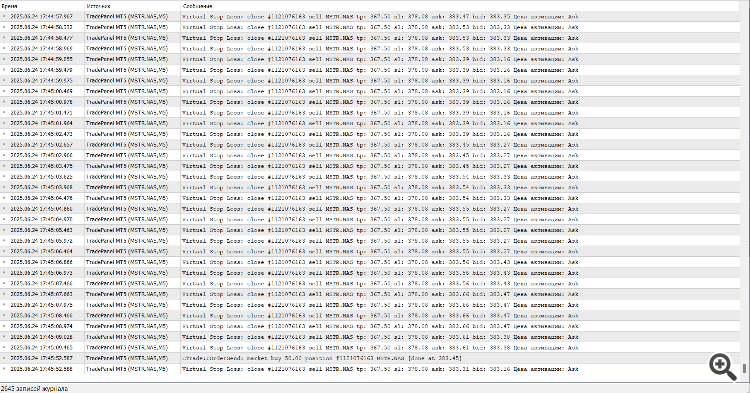
+
Покажите вкладку Журнал терминала.
Ask, Bid здесь не причем, цена ушла значительно выше и стоп не сработал , потом я удалил ТР и SL с графика, (синие линии) и после перезагрузки терминала сделка закрыта была не мной
Удаление синих линий не удаляет виртуальный ТР и SL . виртуальный ТР и SL можно удалить из настроек ордера, нажав на кнопки с крестиком, или введя в поле 0:
Покажите вкладку Журнал терминала.
.
+
Все строки в журнале, это попытки закрыть позицию по виртуальному стоп лосс,
две последние строки - позиция в итоге была закрыта.
столько попыток закрыть позицию, это конечно не норм, я это проверю, возможно возникает какая то торговая ошибка, которую она не описывает.
.
ок, спасибо, я это все проверю.
И еще раз обращаю внимание, удаление линий не удаляет Виртуальные сл и тп - но я думаю что это можно будет реализовать, постараюсь добавить в следующей версии.