Magic Profile Exit Manager

Applies a separate R-based exit plan to each position by its magic number: break-even, two partial exits, ATR or R-step trailing, time stop and an optional protective stop. It does not open trades.

Magic Profile Exit Manager manages the exits of positions that are already open on your account. You can open them by hand, through another Expert Advisor, or with a trade panel. The utility looks at each position's magic number and assigns it to one of three exit profiles. Each profile has its own plan, measured in R. One R is the distance between the entry price and the first stop-loss the utility sees on the position.

The problem it solves

Most exit tools apply one set of rules to every trade on a chart. Many traders run manual trades and one or more Expert Advisors on the same account, and each needs different handling. A scalping EA may need an early break-even and a tight trail. Manual swing trades may need partial exits and a wider ATR trail. Another EA's positions may need only a protective stop. This utility applies the right plan to each position from one chart.

How a profile works

Each profile has a list of magic numbers. Use 0 for manual trades, * for any magic number, or a comma-separated list such as 1001,1002. A number written in a list takes priority over *. For each matched position the utility can:

  • Move the stop-loss to break-even plus a small lock when profit reaches a set number of R.
  • Close a percentage of the initial volume at a first and a second R target.
  • Trail the stop-loss by an ATR multiple or by a fixed distance in R. The ATR uses the last closed bar, so the trail level does not repaint. The stop only moves in your favour.
  • Close the position after a set number of bars if it has not reached a minimum profit in R.
  • Add a protective stop-loss at an ATR multiple to positions opened without one.

Broker conditions

Before each request, the utility checks the stops level and freeze level. It skips requests that would not change anything. It rounds volumes down to the volume step and never leaves less than the minimum volume open. If a partial exit is too small to send, it is skipped and written to the log. If a request is rejected, the utility waits a set number of seconds before trying again. Completed stages are saved in terminal global variables, so a restart does not repeat a partial exit. Netting accounts are supported: there, a partial exit is sent as an opposite deal.

View only mode

In View only mode the utility sends no orders. It writes each action it would take to the Experts log, so you can check your settings on a live account before you switch to Live.

Panel

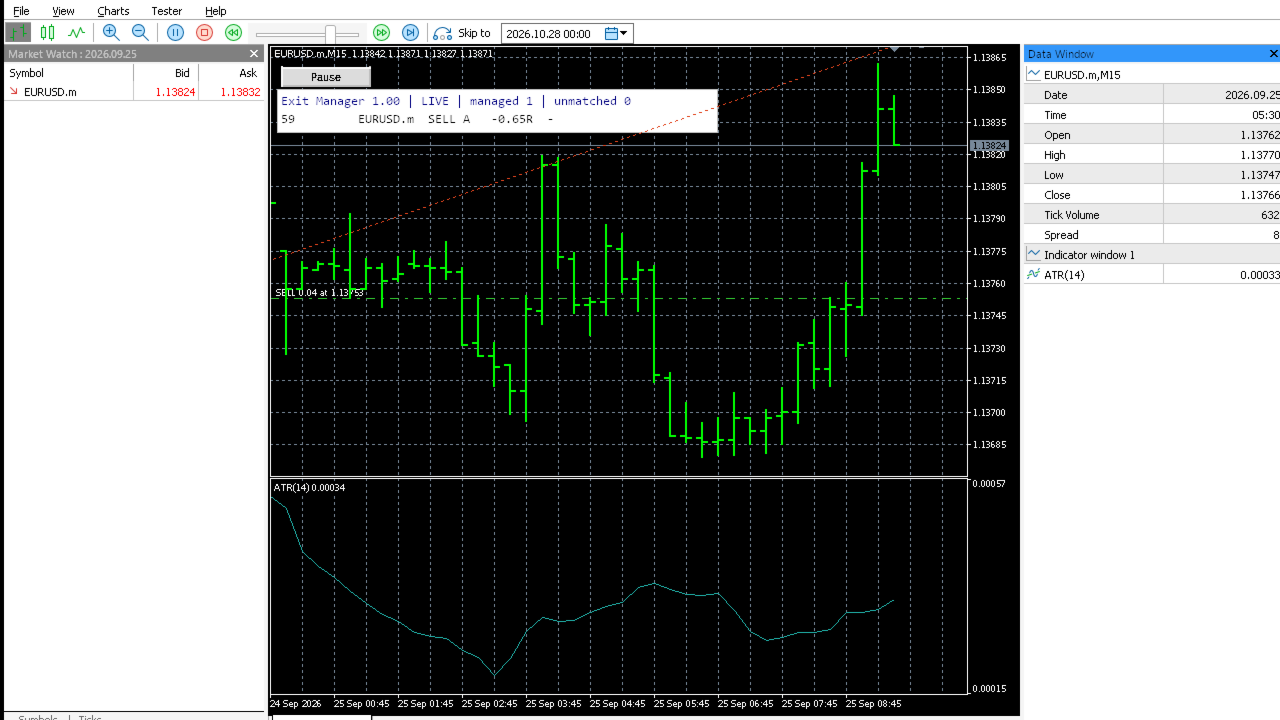
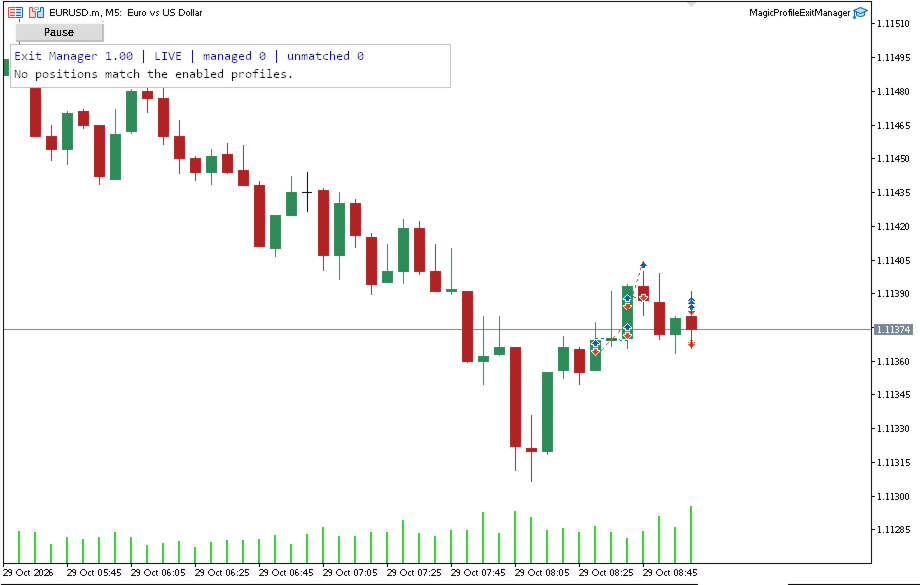
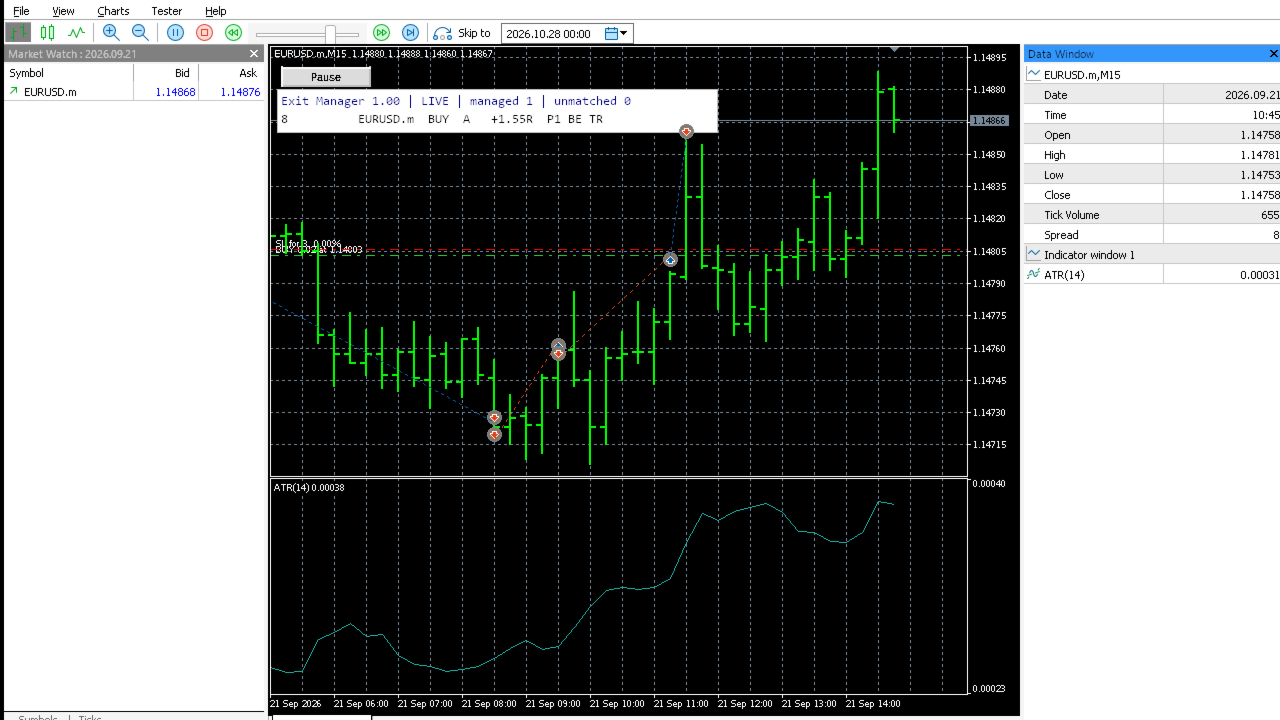
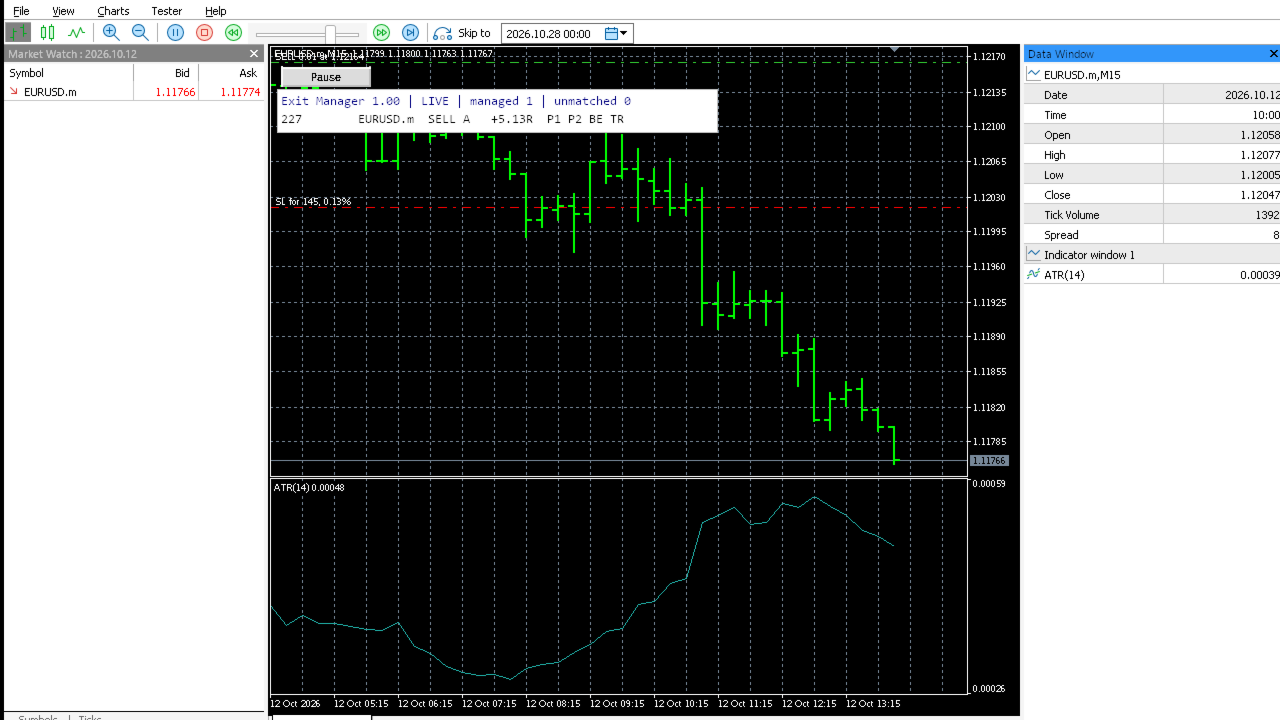
A small table lists each managed position with its profile, current profit in R and the stages already done. A Pause button stops all actions until you press it again.

Installation and setup

  1. Download the product from the Market into MetaTrader 5.
  2. Attach it to one chart only (any symbol). It manages all symbols unless "Symbols to manage" is set to Chart symbol only.
  3. Turn on Algo Trading and allow algorithmic trading in the program settings.
  4. Set the magic numbers and rules for each profile. Start in View only mode and read the Experts log.
  5. When the logged actions match your plan, switch to Live.

Strategy Tester demonstration

The demo version only runs in the Strategy Tester. In the tester, the utility opens a sample position on the test symbol with a stop-loss (minimum lot or four times the minimum lot, after a margin check), so you can watch break-even, partial exits and trailing in visual mode. On a live chart it never opens positions.

Limitations

  • If a position's stop-loss is already at or past the entry when the utility first sees it, R cannot be measured and the position is not managed. The panel shows this.
  • On netting accounts, adding to a position changes its average entry. The stored R distance and initial volume do not change.
  • Partial exits cannot be carried out on positions at the minimum volume.
  • Execution depends on your broker, connection and terminal. Requests can be rejected or filled at a different price. The utility does not work while the terminal is closed.

Testing performed

Version 1.00 compiles with no errors or warnings (MetaEditor build 6292). Helper and input-validation logic passed 22 offline unit tests. In the MetaTrader 5 Strategy Tester, using the sample positions the utility opens there, it completed runs on EURUSD H1 (OHLC on M1 and every tick), EURUSD M1, GBPUSD M30 and XAUUSD D1, plus EURUSD M1 and H1 with a 1 USD deposit. All runs finished normally with no errors in the journal. Separate tester runs checked the time stop, the R-step trail, the protective stop on positions opened without one, and View only mode (no orders sent). On a hedging demo account the utility loaded, recognised manual and EA positions and assigned them to the correct profiles. It has not been tested on a netting account.

Risk disclosure

Trading leveraged products carries a high level of risk and may not be suitable for all investors. This utility changes stop-loss levels and closes positions automatically according to your settings. Wrong settings can close positions earlier or later than you intend. Test it on a demo account first. Past results do not predict future results. The utility does not generate trade entries and does not promise any profit.

Inputs

General

  • Execution mode: Live sends orders. View only logs intended actions.
  • Symbols to manage: All symbols, or Chart symbol only.
  • Scan interval, milliseconds: how often positions are checked (100 to 5000).
  • Max deviation for closes, points: allowed slippage for close requests.
  • Wait before retrying a failed action, seconds.
  • Popup alert / Push notification on each executed action.

Profile A, B and C (the same set of inputs in each)

  • Enabled.
  • Magic numbers: 0 = manual, * = any, or a comma list.
  • Break-even trigger (R), break-even lock (R beyond entry), extra points added to the lock.
  • Partial 1 trigger (R) and size (% of initial volume). Partial 2 trigger (R) and size (%).
  • Trailing mode (Off, ATR distance, Fixed distance in R), trailing start (R), ATR timeframe, ATR period, ATR multiplier, R-step distance, minimum SL improvement in points.
  • Time stop after N bars, its timeframe, and the R level below which it closes.
  • Add SL to positions without SL: ATR multiplier (0 = off).

Panel

  • Show panel, X/Y offset, font size, maximum rows, text, header, warning and background colours.

Strategy Tester demonstration

  • Tester only: open sample positions to show management.
  • Tester only: sample SL distance as a multiple of ATR(14).
  • Tester only: open samples without SL (used to show the protective stop).

Keywords

trade manager, exit manager, break even, partial close, trailing stop, ATR trailing, R multiple, magic number, risk management, position management, time stop, MT5 utility
Prodotti consigliati
Prop Firm Shield Full
Pablo Adolfo Cantos
Prop Firm Shield is a risk management panel for MetaTrader 5, built for prop firm traders who need control over their daily limits. You configure each limit and the tool watches the account around the clock, acting automatically when a limit is reached: closing positions, deleting pending orders and blocking new trading until the next day. Features: - Daily Take Profit - three modes: fixed USD, percent of the day-start balance, or target balance - Daily Stop Loss - three modes: fixed USD, percen
Equinox Gold
Dmitriq Evgenoeviz Ko
Equinox Gold is a high-tech trading expert advisor (EA) specifically designed for the gold market ( XAUUSD ). The system is based on a unique Market Equilibrium algorithm that identifies areas of imbalance between supply and demand during extreme volatility. Unlike most robots that use dangerous sit-and-wait methods, Equinox Gold relies on mathematical momentum confirmation and strict risk control for every trade. MAIN ADVANTAGES VRP Filter (Volatility Range Filter): The robot automatically ada
Streak Trader Pro
Carlos Dante Diaz
Come far crescere il tuo capitale velocemente, senza esporsi a rischi eccessivi o bruciare il conto Streak Trader Pro · Descrizione del prodotto Ogni trader che utilizza una gestione del rischio fissa conosce bene questa sensazione: ti riprendi da una perdita, ricominci a vincere... e continui a rischiare esattamente la stessa cifra di prima, come se non fosse successo nulla. Streak Trader Pro cambia questa logica: capitalizza automaticamente le tue fasi di recupero, senza mai perdere il co
BTC Trend Scalper MT5 Trend Capture Edition — Trading di Precisione basato sul Momentum per BTCUSD Ciao, trader! Sono il   BTC Trend Scalper MT5   — un Expert Advisor intelligente per il trading su Bitcoin, progettato per catturare i movimenti di momentum con una gestione del rischio disciplinata. Non   sono una martingala. Non   sono un sistema a griglia. Non   sono un robot da gioco d'azzardo. Sono uno   scalper che segue il trend , costruito specificamente per trader che capiscono che prote
**Forex Trade Manager Pro MT5** **Trade Manager MT5** è un utility completa per la gestione delle operazioni di trading per MetaTrader 5 che ti offre il controllo totale su ogni aspetto della tua posizione, dal momento in cui pianifichi un'operazione al momento in cui la chiudi. È progettato per i trader che prendono sul serio il rischio, dal principiante che costruisce disciplina allo scalper professionista che necessita di esecuzione immediata su più posizioni. Lo strumento si aggancia a qu
L'indicatore costruisce le quotazioni attuali, che possono essere confrontate con quelle storiche e su questa base fanno una previsione del movimento dei prezzi. L'indicatore ha un campo di testo per una rapida navigazione fino alla data desiderata. Opzioni: Simbolo - selezione del simbolo che visualizzerà l'indicatore; SymbolPeriod - selezione del periodo da cui l'indicatore prenderà i dati; IndicatorColor - colore dell'indicatore; HorisontalShift - spostamento delle virgolette disegnate d
The market can do anything. Your prop firm's limits cannot. Prop Firm Guard makes sure you never cross them: it watches your account in real time and closes everything BEFORE your daily-loss or maximum-loss limit is touched, whatever opened the trades: you, an EA, or a copied signal. It never trades a strategy of its own and promises no profit. It does one thing, reliably: keep you on the safe side of the wall. In short - Closes every position and blocks new trades BEFORE your daily-loss or m
Veron Link Slave – Synchronized Grid, Martingale & Breakout Management Short Description Advanced synchronization tool designed to manage Grid, Martingale, and Breakout EAs. Automatically sends close-basket signals to the Master account upon profit target completion, minimizing slippage across different brokers. Full Description Veron Link Slave is a specialized utility developed to enhance the execution efficiency and risk management of multi-account or multi-broker trading setups. It is desig
Time-Based Auto-Close Order Management Tool (MT5) — Technical Description Overview This is an automated order management EA based on time-algorithm logic. Its core function is to automatically execute preset closing operations when user-defined holding periods expire, aiming to help traders enforce predetermined rules mechanically and reduce emotional interference. Core Closing Modes Closing Mode Functional Definition Close All Closes all eligible positions when the set time is reached. Close
UniversalDashboard
Stanislav Korotky
The Universal Dashboard is a tool for multidimension technical analysis of the market. It allows you to collect a customizable set of trading signals and important performance indicators, and display them in a single table. Multiple symbols, timeframes, and conditions can be monitored and alerted at once. The conditions are specified as expressions which support all built-in indicators, custom indicators, math functions, arithmetic operators and more. The dashboard is implemented as a non-tradi
Orphira Gold
Mohammad Reza Rezaei
Orphira Gold is an automated trading system developed specifically for gold trading in MetaTrader 5. It combines adaptive trade management, equity-based position sizing and several layers of portfolio protection in one straightforward Expert Advisor. The system continuously evaluates market conditions and opens trades only when its internal requirements are met. When a position moves against the expected direction, Orphira Gold may use carefully spaced recovery positions. Every additional order
Flexible receiver with lot scaling, symbol mapping and filters. Ideal receiver for MT4 → MT5 trade copying. Receive trades automatically from MT4 or MT5 master accounts. Designed for fast, flexible and reliable multi-account copying. Main Features • MT4 Master → MT5 Slave • MT5 Master → MT5 Slave • Lot size management: Same Lot Fixed Lot Multiply Lot Balance Based Lot • Symbol Mapping Example: XAUUSD = GOLD EURUSD = EURUSD.a • Include Symbols filter • Include Magics filter • Reverse Trades mode
TradeManager Control Suite Manual trading with structured planning and controlled risk TradeManager Control Suite is a comprehensive trading panel for MetaTrader 5. It helps you prepare trades directly on the chart, calculate position size, place orders and manage open positions according to a plan defined in advance. You remain responsible for every entry. The application does not trade independently and does not use an automated trading strategy. It performs the calculations, sends the orde
Crash5 EA ,I s a automatic robot that has the level of professional decision when to take a trade without any emotion. The bot will help in your scalping decision making with its own TP (take profit) and SL (stop loss) with the trail stop when in profit. This is a trend based spike catching ,looking on whats happening in real time charts no repainting of any signals. The robot helps in making decisions on the candle stick pattern opened and closed lat price with the help of RSI ,MACD and the EMA
Supply demand arrows
Smaylle Rafael Coelho Mariano
The   "Supply Demand Arrows"   indicator for MetaTrader 5 (MT5) is a powerful trading tool designed to help traders identify critical supply and demand zones in the market. By visually marking these zones with arrows, the indicator enhances trading precision and decision-making. Key Features Identification of Supply and Demand Zones : The indicator effectively highlights key supply and demand zones on the price chart, allowing traders to see where significant buying or selling pressure exists. T
FREE
Divergent Stochastic Filter II Catch Reversals Early, Filter Noise, Trade with Confidence The Edge: Why This Stochastic is Different  Every trader knows the Stochastic oscillator. But knowing when to trust its signals, that's the real challenge. The Divergent Stochastic Filter II transforms this classic indicator into a precision reversal detection system by adding critical elements: divergence intelligence, signal filtering and exhaustion detection.  While standard Stochastic oscillators fire s
PatternDetector
Thien Thanh Tran
PatternScope — Multi-Pattern Recognition for MT5 PatternScope is a multi-pattern recognition indicator for MetaTrader 5. It scans price action for classic chart patterns, confirms breakouts, and draws clear   Entry, Stop Loss and Take Profit   levels. A compact dashboard shows the latest pattern, bias and Risk:Reward. Patterns:   Double Top/Bottom, Triple Top/Bottom, Head and Shoulders (and inverted), Bullish & Bearish Flag, Pennant, Rising & Falling Wedge, Triangle, Rectangle, Cup and Handle —
COMPLETE USER MANUAL Apex Trade Terminal is a professional visual order entry and dynamic risk management suite engineered for MetaTrader 5. Designed for prop-firm traders, scalpers, and day traders, Apex combines manual visual control with algorithmic capital protection directly on your charts. ________________________________________ 5 KEY STRENGTHS THAT DISTINGUISH APEX FROM THE COMPETITION 1. ️‍️ Proprietary Stealth V-Orders (Trigger+Stop) Never reveal your breakout levels to broker o
FREE
Capital Manager
Pham Cong Chinh
Capital Management EA – Smart Risk Management & Profit Optimization for MT5 Take control of your trading capital with smart, automated strategies — fully optimized for MetaTrader 5 (MT5). Looking to protect your capital and maximize profits through automated money management strategies ? Capital Management EA is the all-in-one Expert Advisor for MetaTrader 5 (MT5) that helps you trade smarter, not harder. Core Features: 5-in-1 Capital Management Strategies – Built-in versatility Gr

SPECIAL LAUNCH OFFER: $30 (1-Month Rent) Limited time offer to build our community and gather feedback! AmbM GOLD Institutional Scalper A high-precision M5 algorithm for XAUUSD (Gold) , engineered to trade exclusively at Institutional Liquidity Levels ($5/$10 psychological marks). PERFORMANCE DATA (BUY ONLY) • Win Rate: 87.09%. • Safe Growth: +$4,113 profit on $10k (13.75% Max Drawdown). • Extreme Stress Test: Successfully generated +$22,997 in a 5-year stress test (2020-2026), proving
Sonic R Pro Enhanced EA - Versione 2025 249$ Solo per i primi 5 acquirenti! Segnale Live Verifica la performance live di Sonic R Pro Enhanced: Strategia di Trading Sonic R Pro Enhanced è una versione avanzata della strategia Sonic R, che automatizza le operazioni basate su Dragon Band (EMA 34 e EMA 89) e utilizza algoritmi avanzati per massimizzare le prestazioni. Timeframe: M15, M30 Coppie supportate: XAUUSD, BTCUSD, AUDJPY, USDJPY Stile di trading: Swing Trading - Pullback & Controten
The  SuperTrend Advance Trading  is a widely-used technical indicator based on  SuperTrend Strategy + Price Action + EMA . How it works: -  Buy/Sell Signals  can be generated when the trend reverses, the conditions of Price action, TrendLine and EMA are met. - After the  Signal  appears, be patient and wait until the candle closes, at that time place the order as soon as possible. You may have time to review your entry, consider whether it is a good entry or not. - Carefully review the entry, up
GridZone Alpha
Gooi Meng Liang
GridZone Alpha: The Ultimate Semi-Automated Grid & Zone Manager GridZone Alpha is an advanced, interactive trading panel designed for the modern manual trader. Stop staring at the charts waiting for the perfect entry, and stop relying on rigid, fully automated bots that cannot read market context. With GridZone Alpha, you provide the human analysis by identifying your support, resistance, or supply/demand zones. Once confirmed, the Limit Order Engine takes over, instantly deploying a precision,
Top Trade Manager per MT5 - Pannello di controllo delle operazioni, calcolatore della dimensione della posizione e gestore del rischio Top Trade Manager è un gestore di trading completo per MetaTrader 5 : un pannello di controllo, un calcolatore della dimensione della posizione e un gestore del rischio, tutto in uno. Trascina il punto di ingresso, lo stop loss e il take profit sul grafico e la dimensione del lotto, il rischio e il profitto verranno calcolati istantaneamente. Quindi gestisci la
DGem Trade Manager Panel
Damien Jean Michel Gremillet
Trade Manager Panel ## Short description  Manage your manual trades with one click: automatic break-even, trailing stop, two-level partial close and risk-based lot sizing — all from a single on-chart panel. --- ## Full description Trade Manager Panel is an on-chart utility that takes care of your open trades so you can focus on the market instead of the order ticket. Drop it on any chart and it manages every position on that symbol automatically, while an interactive panel lets you size new
Pyramiding Tool
Tautvydas Maceina
Pyramider  lets you visually build and manage a pyramid/grid of limit orders at multiple price levels. Rather than automated signal-based trading, it's a manual, interactive tool where you configure entries through on-chart UI elements. What it does You set a starting price, entry volume, and two ratio parameters — one controlling how far apart each price level is, and one controlling how aggressively volume scales up with each level. The EA then: Calculates  a pyramid of buy-limit or sell-limit
Based on the trading model/strategy/system of gold double-position hedging and arbitrage launched by Goodtrade Brokers, problems encountered in daily operations: 1. Account B immediately places an order immediately following account A. 2: After account A places an order, account B will automatically copy the stop loss and take profit. 3: Account A closes the position of Account B and closes the position at the same time. 4: When account B closes the position, account A also closes the position.
This   is   an   extended and modified    version   of   the   free   utility   Prop   Protector.   The   price   will   increase   as   more   users   join. Prop Protector   is a powerful trading assistant designed to solve the main problem traders face: maintaining discipline and managing risk. If you work with proprietary trading firms or simply want to adhere strictly to your trading plan, this tool will become your indispensable assistant. It takes care of routine calculations and monitor
Signal Strike
Murtadha Majid Jeyad Al-Khuzaie
Signal Strike is a professional trading indicator designed for MetaTrader 5 that delivers clear, high‑confidence entry signals directly on your chart. Built with advanced logic that combines trend, momentum, volatility, and volume confirmation, this tool helps traders identify precise BUY and SELL opportunities with confidence. Unlike generic indicators, Signal Strike is engineered to filter out indecision candles and weak setups. When conditions align, the indicator plots entry, stop loss, an
Inverted_Chart_EA Utility Expert Advisor Inverted_Chart_EA creates and maintains a mirror-inverted chart of any symbol and timeframe. It automatically generates a custom instrument (e.g. US30_INV ) and keeps its price history updated in real time, with bars mirrored around a chosen pivot. This utility gives traders a new way to analyze the market from a different perspective by flipping the chart upside down. Why use an inverted chart? Highlight hidden patterns – price formations that look ordin


Gli utenti di questo prodotto hanno anche acquistato
Dealer Panel
Mian Rameez Ali
Dealer's Panel No signal decides anything here — a hand does. One click, and the panel calculates what's underneath: lot size from risk, target from a 30-step balance ladder that remembers exactly how far an account has climbed. Toggle between market and pending without touching an input field. Set a stop, and the take-profit can write itself — a fixed share of the balance, translated into price with no arithmetic left for the trader to get wrong. One trade live at a time; it won't let a seco
FarmedHedge Pair Trading Dashboard
Tanapisit Tepawarapruek
5 (7)
Farmed Hedge Yield Farming | All Markets (Manual - Hybrid - Semi/Automated EA) VERIFIED TRADING RESULTS - Farmed Hedge Yield Axi Copy:  https://www.mql5.com/en/signals/2356376 - Farmed Hedge Yield Exn Copy:   https://www.mql5.com/en/signals/2356404 - Farmed Hedge Yield V Copy:  https://www.mql5.com/en/signals/2357156 IMPORTANT NOTICE: FarmedHedge is a MANUAL-FOCUSED TRADING UTILITY ,not a fully automated EA. Results shown on this Signal include manual trades and overall strategic management.
News Trade EA MT5
Konstantin Kulikov
4.55 (11)
Presento un utile robot che io stesso utilizzo da diversi anni. Questo robot può essere utilizzato sia in modalità semiautomatica che completamente automatica. >>> Chat <<< Il programma contiene le impostazioni flessibili per fare trading sulle notizie del calendario economico. Non può essere verificato nel tester delle strategie. Soltanto il vero lavoro. Nelle impostazioni del terminale è necessario aggiungere il sito delle notizie all’elenco degli URL consentiti. Fare clic su Strumenti > Opz
The Patch
Mian Rameez Ali
The Patch It never opens a trade. It walks behind the ones that did. Every open position, every pending order — checked twice a second for the one thing that's easy to forget: a stop, a target. Found bare, it doesn't ask. It writes the missing number in, measured in points from wherever the position began, and moves on to the next. No strategy, no opinion on direction. Just the quiet assumption that nothing should ever sit on the market unprotected — not because someone decided it shouldn't,
YuClusters
Yury Kulikov
4.93 (43)
Attention: You can view the program operation in the free version  YuClusters DEMO .  YuClusters is a professional market analysis system. The trader has unique opportunities to analyze the flow of orders, trade volumes, price movements using various charts, profiles, indicators, and graphical objects. YuClusters operates on data based on Time&Sales or ticks information, depending on what is available in the quotes of a financial instrument. YuClusters allows you to build graphs by combining da
Floor Watch
Syed Tauqeer Hussain Shah
Floor Watch One number, watched every thirty seconds: how far equity has fallen since the day began — or since its highest point, if it's told to trail the peak instead of the open. Cross the line and it doesn't argue. Every open position closes, every pending order vanishes, and anything that slips through afterward gets shut the moment it appears. Not asked. Removed. The floor holds until the clock turns 5 AM Pakistan time — then, and only then, does the day start over. One rule. No except
Un solo acquisto. Tutti i miei indicatori e robot di trading (EA) per MT4 e MT5, disponibili oggi e pubblicati in futuro, senza costi aggiuntivi. Dopo l’acquisto, contattami per sapere come riceverli. È previsto un aumento di 50$ ogni 10 acquisti, fino a 999$. Si applica il prezzo del Market al momento del pagamento. Mantieni l’indicatore di cui ti fidi. Automatizza il lavoro che lo circonda. Il tuo segnale. Le tue regole. La tua esecuzione. Hai già un indicatore MT5 su cui fai affidamento, ma
Master Your Trading Discipline   Stop losing your hard-earned gains to overtrading and emotional decisions. The Discipline Tool is your ultimate trading assistant, ensuring strict risk management in real-time. Key Protection Features: Advanced Drawdown Defense : Automatically halts trading if your daily drawdown exceeds a preset threshold (percentage or dollar amount). Real-Time Equity Lock : Safeguard profits by referencing peak equity, ensuring drawdown stays within control. Hard Profit Target
Quant AI Agents
Ho Tuan Thang
5 (1)
Quant AI Agents are independent trading Expert Advisors. Instead of trading using a fixed strategy like other conventional EAs, Quant AI Agents   is a   multi-agent AI trading framework   that turns natural-language strategy prompts into live.  WANT THE SAME RESULTS AS MY LIVE SIGNAL?   Use the exact same brokers I do:   IC MARKETS , IC TRADING   .  Unlike the centralized stock market, Forex has no single, unified price feed.  Every broker sources liquidity from different providers, creating un
Trading Chaos Expert
Hennadii Stanilevych
5 (11)
This software has no equals in the world and represents a universal trade "console" covering trading signals, automated market entry, setting of Stop Loss and Take Profit, as well as Trailing Profit for multiple trades at the same time in a single open window. Intuitive control of the Expert Advisor in "three clicks" ensures a comprehensive use of all its functions on different computers, including tablets PCs. Interacting with additional signal indicators that mark the chart to give a real mark
Copy your MT5 trades to Interactive Brokers You keep using MT5. Every order you open or close is sent to your IB account. In real time. No coding. No changes to your strategy or EA. Try it first Rent 1 month: $30. Test on a live or paper account. What it does Real-time copying: same direction, reverse, or one side only. Map any MT5 symbol to any IB symbol. Set a lot ratio for each. Forex, Futures, Stocks, CFDs, Metals and Crypto. Position sync: both accounts checked, any difference fixed. Optio
Easy Strategy Builder 5
Gheis Mohammadi
5 (4)
The  Easy Strategy Builder (ESB)  is a " Do It Yourself " solution that allows you to create a wide range of the automated trading strategies without any line of codes. This is the world’s easiest method to automate your strategies that can be used in STP, ECN and FIFO brokers. No drag and drop is needed. Just by set conditions of your trading strategy and change settings on desired values and let it work in your account. ESB has hundreds of modules to define unlimited possibilities of strategi
AI Arbitron — an MT5 Spot vs Future Gold Arbitrage Bot designed to capture price discrepancies between correlated Spot and Future instruments through hedged, non-directional trading. Platform: MT5 Use Swap Free Accounts, many of the regulated broker gives swap free accounts for 7 days, make use of it by only buying lower price asset and selling higher price asset, hold your position for 2-3 days. Asset: Mainly Gold (XAUUSD) using Spot + Future/CFD price feeds. Core strategy: It monitors the p
MT5 Trading Deck
Manuel Michiels
5 (2)
One button. One trade. MT5 Trading Deck is a hotkey trading panel for MetaTrader 5 that turns the platform into a keyboard-driven execution cockpit. Stop loss, take profit and lot size are pre-calculated for every key; the moment you press, a market order is live on the broker. A complete technical user manual is attached in the product Comments section. It documents every input parameter, the full hotkey map, the recommended Stream Deck XL layout, and the advanced workflows for Pre-Limit orders
HINN Lazy Trader
ALGOFLOW OÜ
5 (1)
The core idea: using the user interface, you configure the parameters the chart must meet before entering a position (or positions), choose which entry models to use, and set the rules for when trading and planning should end. Lazy Trader  handles the rest: it  takes over all the routine chart watching and execution! full description  :: 3 key videos [1] ->  [2]   ->  [3] What can it do? - Understands Larry Williams market structure - Understands swing market structure by Michael Huddleston
Features   With MT5 to Interactive Brokers(IB) Trader, you can: 1. Load chart data from IB to MT5, and Analyze with all standard or customer Indicators. 2. Place Orders to IB Account Directly in MT5. 3. Make your Own EAs upon IB Securities by only making minus changes of the trading function. Usage 1) Installation Copy the "Mt5ToIBTraderEn.ex4" and sample files to [MT5 Data Folder]->MQL5->Experts.  2)  MT5 Settings Add the IP Address to the MT5 Allowed URLs in 'Tools->Options->Expert Adviso
Unlimited Trade Copier Pro MT5 is a tool to copy trade remotely to multiple MT4, MT5 and cTrader accounts at different computers/locations over internet. This is an ideal solution for you if you are a signal provider and want to copy your trades to other receivers globally on your own rules. One provider can copy trades to multiple receivers and one receiver can get trade from multiple providers as well. The provider can even set the subscription expiry for each receiver, so that receiver will n
Adam FTMO MT5
Vyacheslav Izvarin
5 (2)
ADAM EA Special Version for FTMO Please use ShowInfo= false for backtesting ! Our 1st EA created using ChatGPT technology Trade only GOOD and checked PROP FIRMS  Default parameters for Challenge $100,000 Tested on EURUSD and GBPUSD only  Use 15MIN Time Frame Close all deals and Auto-trading  before Weekend at 12:00 GMT+3  Friday For Prop Firms MUST use special Protector  https://www.mql5.com/en/market/product/94362 --------------------------------------------------------------------------------
Mentfx Mmanage mt5
Anton Jere Calmes
4.25 (8)
The added video will showcase all functionality, effectiveness, and uses of the trade manager. Drag and Drop Trade Manager. Draw your entry and have the tool calculate the rest. Advanced targeting and close portions of a trade directly available in tool (manage trades while you sleep). Market order or limit order on either side with factored spread. Just draw the entry, the tool does the rest. Hotkey setup to make it simple. Draw where you want to enter, and the stop loss, the tool calculates al
QCML Assistant
Maxime Turcotte-lafreniere
QCML Assistant MT5 Your Trading. Our Assistant. Your Edge. Looking for a tool that completely transforms your experience on MetaTrader 5? QCML Assistant is the all-in-one solution built by traders, for traders. Just one tool installed on your chart, and you get access to an ultra-complete, ultra-fast, and ultra-simple trading platform. No more hours wasted setting up your workspace. No more complicated trade entries. With QCML Assistant, everything becomes simple, smooth, and efficient right fro
TradePad
Ruslan Khasanov
5 (1)
TradePad è uno strumento per il trading sia manuale che algoritmico. Ti presentiamo una soluzione semplice per operazioni di trading rapide e controllo delle posizioni su diversi strumenti di trading. Attenzione, l'applicazione non funziona nel tester di strategia! Versione di prova dell'applicazione per un conto demo e una descrizione di tutti gli strumenti L'interfaccia dell'applicazione è adattata per monitor ad alta risoluzione, semplice e intuitiva. Per un lavoro confortevole, al trader vie
Hedge Trimmer EA
Michael Sipho Bhiya
Hedge Trimmer & Roll-Over EA Managing a hedged position means carrying two opposing trades simultaneously. Over time, the losing side grows while the profitable side offsets it. The standard problem is that closing the loser costs money you may not have sitting in cash — it has to come from somewhere. Hedge Trimmer EA solves this by using the floating profit on your winning trades as the funding source to progressively close down the losing side. It identifies which trades are in profit, uses a
Gamma Edge Pro MT5
Xuan Nam Diep
1 (1)
Gamma Edge Pro MT5 — GexBot Classic API Integration Gamma Edge Pro brings institutional-grade Gamma Exposure (GEX) data directly onto your MetaTrader 5 chart — the same data used by professional options traders to anticipate price magnets, hedging flows, and dealer positioning. Powered by the GexBot Classic API, this indicator automatically maps options market data from US-listed instruments onto any MT5 CFD instrument — Forex pairs, Gold, indices, and more — with intelligent price conversion bu
News Trader Pro is a unique robot that allows you to trade the news by your predefined strategy. It loads every piece of news from several popular Forex websites. You can choose any news and preset the strategy to trade it, and then News Trader Pro will trade that news by selected strategy automatically when the news comes. News release gives opportunity to have pips since the price usually has big move at that time. Now, with this tool, trading news becomes easier, more flexible and more exciti
If you wish to draw Support and Resistance lines, view: daily market opening, classical pivot levels, Fibonacci pivot levels, trend lines, Fibonacci levels, the remaining time to candle closing, and current spread. If you seek to place your orders with the exact lot that meets your desired stop loss risk. If you wish to do all this and more with just one click, then this is the perfect tool to use. This tool will allow you to feel more relaxed when deciding to open orders, as well as predicting
Mirror EA for MT5
Eugenio Bravetti
The new version of  MirrorSoftware 2021  has been completely rewriten and optimized.  This version requires to be loaded only on a single chart because  it can detect all actions on every symbol and not only the actions of symbol where it is loaded. Even the  graphics and the configuration mode  have been completely redesigned. The MirrorSoftware is composed of two components (all components are required to work):  MirrorController  (free indicator): This component must be loaded into the MASTER
ClusterSecond
Rafil Nurmukhametov
4.78 (32)
The utility allows you to build different types of graphs: Seconds chart from 1 second to 86400 seconds Tick chart from 1 tick and above The volume chart Delta chart Renko chart Range chart Demo version of the utility https://www.mql5.com/ru/channels/clustersecond Built-in indicators for volumetric analysis: daily market profile and market profile of the selected timeframe, Cluster Search Imbalance VWAP Dynamic POC, VAH, VAL the profile depth of the market vertical volume with various display op
Corporate Report MT5
Pavel Verveyko
5 (1)
The script displays info about the share's corporate reports and dividends. The data is downloaded from   investing.com : Report date Profit per share (EPS) Revenue Market capitalization Amount of dividends Date of payment of dividends Dividend income The product cannot be tested in the tester (since it is not possible to receive data from the Internet). Before launching:  Add 2   URL   https://ru.investing.com/earnings-calendar/Service/getCalendarFilteredData  and   https://ru.investing.com/di
Telegram Notify MT5 Telegram Notify MT5 is an utility tool to bridge your MetaTrader 5 activities to your Telegram chat/channel. It is useful for monitoring your MetaTrader 5 account by sending a notification to your particular Telegram chat/channel when someone/EA is placing trades, modifying order's TP/SL, closing trades and etc. This EA does not place any trade for your account. This EA also could be a convenient tool for monitoring other's EA trading activities or a tool for publishing your
Telegram ChartSnap MT5 is an utility tool to bridge your MetaTrader 5 activities to your Telegram chat/group/channel. It will screen shot your MetaTrader 5 chart and send it to your dedicated Telegram chat/group/channel through a Telegram bot. The whole process will keep repeating based on a time cycle that predetermined by the user. It is a convenient tool for those who like to get access to their favorite system/dashboard that only available at MetaTrader Desktop. Beside that, trader can easi
Altri dall’autore
UT BoT
Suresh Pargunam
The UT Bot LineRegression Program is a fully automated trading system designed to bring precision, discipline, and consistency to short-term market execution. Built around the UT Bot concept and enhanced with advanced Line Regression logic, the program analyzes price structure, volatility, and momentum to identify high-probability trade setups—especially effective on pairs like XAUUSD .
UT Bot LineReg Expert Advisor is an advanced, fully automated trading system designed for MetaTrader 5. It combines the popular UT Bot trend logic with Linear Regression–based trend confirmation to identify high-probability market entries while filtering out sideways and low-quality signals. The Expert Advisor is built with a strong focus on risk control, execution safety, and stable performance , making it suitable for both beginners and experienced traders.
The Super Trend
Suresh Pargunam
The Supertrend indicator is a popular technical analysis tool that overlays on price charts to show market trends (up/down) and signal potential buy/sell points, using price action and volatility (Average True Range - ATR) to create a visual line that changes color (green for uptrend, red for downtrend) and acts as dynamic support/resistance, helping traders identify trend direction but requiring confirmation due to its lagging nature.  
UT Master
Suresh Pargunam
UT Bot LineReg EA (M5) – Strategy Description The UT Bot LineReg EA (v9.3.4) is an advanced trend-following and reversal-protected automated trading system developed in MQL5 , optimized for M5 timeframe trading . It combines Linear Regression price tracking , Adaptive ATR volatility control , and a Safe Reverse Engine to deliver controlled, risk-managed entries with strong trend confirmation. Core Trading Logic 1. Linear Regression Price Channel The EA calculates a Linear Regression baseline ove
UtB
Suresh Pargunam
STrend EA is a fully automated trend-following Expert Advisor designed for stable and disciplined trading in netting accounts. The system is based on a Moving Average crossover strategy combined with strict position control and broker-safe execution logic. STrend EA uses: • Fast Moving Average • Slow Moving Average • Previous candle confirmation A trade is opened when a confirmed crossover signal appears. The system avoids overtrading and maintains only one position per symbol (netting-safe logi
Sanju
Suresh Pargunam
UT Bot LineReg EA PRO Adaptive AI Trend Trading Expert Advisor for MetaTrader 5 UT Bot LineReg EA PRO is a professional automated trading system developed for MetaTrader 5. It combines Linear Regression , Adaptive ATR , Trend Confirmation , and Advanced Risk Management to identify high-probability trading opportunities while protecting trading capital. Designed for both Forex and Gold (XAUUSD), the EA automatically adapts to changing market volatility and manages trades using intelligent stop-lo
Quora
Suresh Pargunam
XAUUSD Swing PRO EA v1.0 is a professional MetaTrader 5 Expert Advisor designed specifically for Gold (XAUUSD) swing trading. The EA combines EMA trend analysis, breakout confirmation, ATR-based volatility management, and advanced trade protection features to deliver stable and disciplined trading performance. This EA is optimized for traders seeking controlled drawdown, high-quality entries, and long-term consistency in both personal and funded trading accounts.
RichEMA
Suresh Pargunam
Professional EMA ATR Expert Advisor for MT5 – Description Overview The Professional EMA ATR EA is an automated trading system developed for the MetaTrader 5 (MT5) platform using MQL5 language. The strategy is designed to trade based on market trend direction using Exponential Moving Average (EMA) crossover confirmation combined with ATR-based dynamic risk management. This Expert Advisor is suitable for Forex, Gold (XAUUSD), Crypto, and Indices trading with controlled risk management and automati
Uganda
Suresh Pargunam
Three Point Gold Pro EA – Product Description Overview Three Point Gold Pro EA is an automated trading system designed primarily for XAUUSD (Gold) on the M5 timeframe . The EA uses a multi-condition three-point confirmation strategy to identify higher-quality trading opportunities while incorporating dynamic risk management and trade protection. The system is designed to avoid relying on a single indicator. A trade is considered only when multiple independent conditions confirm the same market d
Oeax
Suresh Pargunam
QuantNomad Simple EA v1.10 Version: 1.10 Platform: MetaTrader 5 (MT5) Language: MQL5 Timeframe: M5 (Recommended) Symbols: XAUUSD, EURUSD, GBPUSD, USDJPY (or any Forex/CFD symbol) Description QuantNomad Simple EA is a lightweight trend-following Expert Advisor developed for MetaTrader 5. It uses a simple Exponential Moving Average (EMA) crossover strategy to identify market trends and automatically execute buy and sell trades. The EA is designed to be easy to understand, making it suitable for be
Trades failed breakouts of a recent range when the market is not trending. Signals come from closed bars only. Every trade has a stop-loss, and it holds one position at a time. Range Failure Reversal is an Expert Advisor that trades one idea. When price breaks out of a recent range but cannot stay outside it, and the market is not trending, it takes a position back towards the range. How a signal is formed Range: the high and low of the last N closed bars on the signal timeframe (H1 by default).
! MARTINGALE RISK WARNING – READ BEFORE USE This Expert Advisor uses a martingale / averaging strategy : when price moves against an open position it opens additional positions with larger lots in the same direction. This means: Many small winning baskets can be wiped out by one losing basket . In our default-settings real-tick backtest, the worst single basket lost -1,142.78 USD on a 10,000 USD account (about 10% of balance), while the average winning basket made only about +13 USD . With safet
Swing Structure Pullback is an Expert Advisor for MetaTrader 5 that holds trades for several days. It trades pullbacks in the direction of the higher-timeframe trend. Signals come from closed bars only, every trade has a stop-loss, and it holds one position at a time per symbol and magic number. It does not use martingale, grid, averaging or hedging. How a signal is formed - Trend filter (D1 by default): the 50 EMA must slope in the trade direction over the last 5 daily bars, and the last daily
Ratchet Flip SuperTrend is a SuperTrend-style trend indicator for MetaTrader 5, written from scratch. It draws an ATR-based trailing line that only moves in the trend direction. The line is blue while the trend is up and orange-red while it is down. Buy and sell arrows mark the bars where the trend flips. Arrows and alerts are created only after a bar has closed. They are never placed on the forming bar and do not move or disappear later. How it works - ATR (Wilder smoothing) around the median
Filtro:
Nessuna recensione
Rispondi alla recensione