LineLock Trade Manager
- Experts
- Versione: 1.0
- Attivazioni: 5

LineLock Trade Panel – drag-and-drop order entry and trade management for MT4
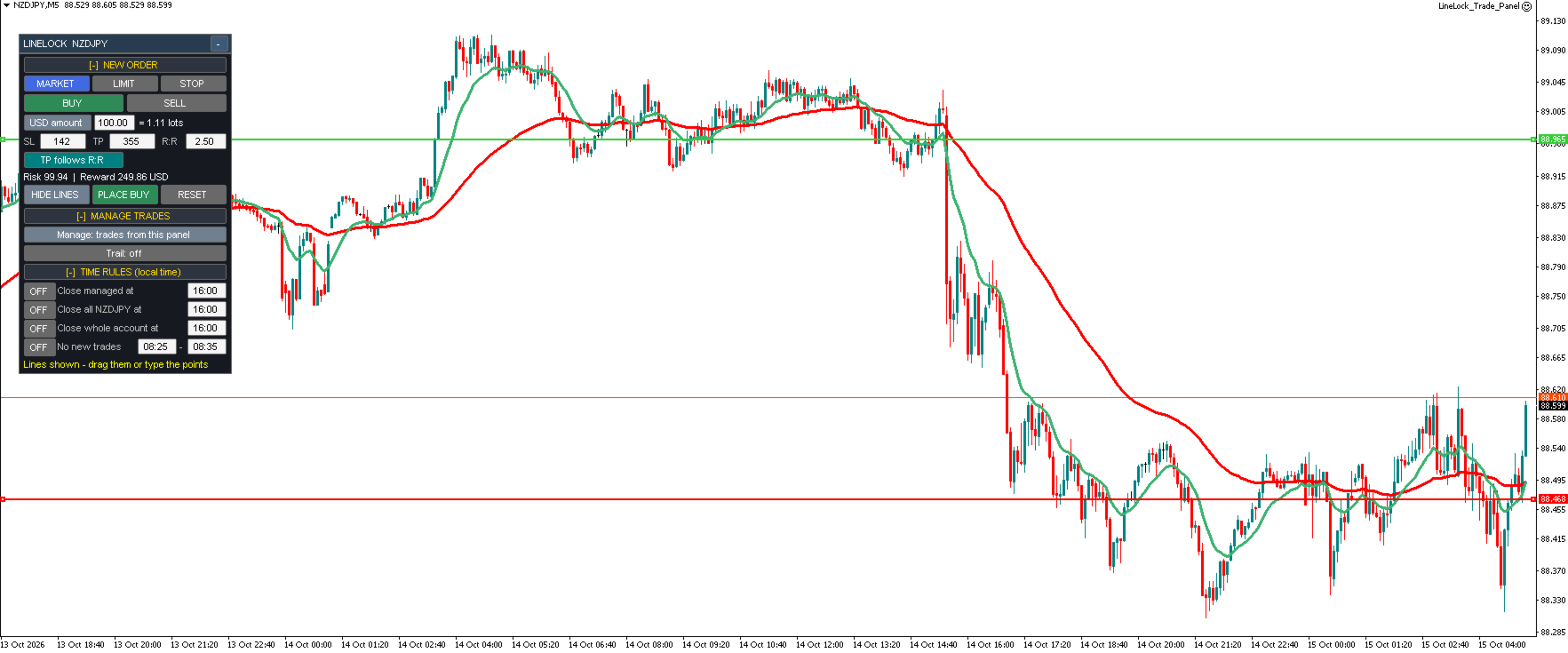
LineLock puts a compact, movable control panel on your chart so you can plan, place and manage trades visually – without doing lot-size math or babysitting your stops.
ORDER ENTRY
- Market, Limit and Stop orders, Buy or Sell, from one panel
- Click "Show Lines" and drag the Entry, Stop Loss and Take Profit lines exactly where you want them – or type the distance in points
- Lines you drag stay where you drop them; the panel updates the points, risk and reward for you
- Optional "TP follows R:R" mode keeps your take profit at your chosen risk:reward as you adjust the stop
- Checks entry side, stop distance and broker stop levels before sending, with clear on-panel messages
POSITION SIZING
- Risk as % of balance, % of equity, a fixed money amount, or a fixed lot size
- Lot size is calculated from your actual stop distance and shown before you place the trade, along with risk and reward in your account currency
- Warns you when the broker's minimum lot would risk more than your target
TRADE MANAGEMENT
- Manage only trades placed from the panel, or every trade on the symbol (including manual trades)
- Trailing stop options:
– Candle high/low (lowest low / highest high of the last N candles)
– Candle close
– Any indicator on your chart (by name and buffer)
– Moving average (any period, method and price)
- Three ways to exit on the trail:
– Move the broker stop loss (classic trailing stop – only ever tightens)
– Close only when a candle CLOSES beyond the trail (ignores wicks)
– Close as soon as live price breaks the trail by a set number of points
- Offset (distance beyond the trail) and "Start after" (only trail once the trade is a set number of points in profit)
- Trailing level drawn on the chart for every managed trade
TIME RULES
- Close managed trades at a set time
- Close all trades on the symbol at a set time
- Close all trades in the account at a set time
- Block new orders during a set time window (e.g. around news)
- Times are entered in your own local time
PANEL
- Collapsible sections – open only what you need
- Drag to move anywhere on the chart, or minimize to a single bar
- Remembers your settings per symbol between sessions and timeframe changes
NOTES
- This is a trading utility. It does not generate signals or trade on its own.
- The EA must stay running on the chart for trailing and time rules to work.
- Enable AutoTrading. If your broker rejects stops on market orders, set SendStopsAfterEntry = true.
- Please test on a demo account first.