LumaForge Crystal Edge
- Experts
- Versione: 1.0
- Attivazioni: 10

LumaForge Crystal Edge is a fully automated MetaTrader 5 Expert Advisor primarily developed for trading EURUSD.
The EA uses multi-timeframe price analysis to identify structured market conditions on the H4 and H1 timeframes before refining trade execution on lower timeframes. It does not need the user to manually identify entries, place pending orders, calculate trade targets or manage qualifying setups.
Once attached to a chart with Algo Trading enabled, Crystal Edge continuously monitors the market and waits for its complete set of trading conditions. When a valid setup is identified, the EA determines the trade direction, entry area, Stop Loss, Take Profit structure and position sizing according to its configured inputs.
The EA is selective by design. It does not need to remain continuously exposed to the market and can remain inactive while its required conditions are absent.
Primary Symbol: EURUSD
Platform: MetaTrader 5
Minimum Balance: $250
Recommended Account: Hedging account
Broker Compatibilty:
LumaForge Crystal Edge has been developed, backtested and forward tested on Headway using EURUSD. Headway is therefore the current recommended broker for this version.
Results may vary between brokers because of differences in price feeds, spreads, execution conditions, server time, commissions and historical data. Compatibility with additional brokers is being ealuated and optimized.
Operation: Fully automatic
VPS: Recommended for continuous operation
Trading Structure
Crystal Edge analyses two higher-timeframe structures independently.
H4 opportunities are refined using M15 price data, while H1 opportunities are refined using M5 price data. This allows the EA to use broader market structure for context while using lower-timeframe information for more precise execution.
The EA does not enter immediately simply because a higher-timeframe condition appears. A setup must pass several internal validation stages before an order can be placed.
These validations include market-structure requirements, range-quality filters, lower-timeframe confirmation, volatility measurements, spread conditions, entry-distance requirements and minimum trade-quality checks.
When all required conditions are present, the EA can automatically place the appropriate pending order at its calculated entry price.
Depending on the position of the calculated entry relative to current market price, Crystal Edge can automatically select between Stop and Limit pending-order execution. Advanced users can also force a specific pending-order type through the inputs.
If a setup becomes stale before execution, its pending orders can be cancelled automatically rather than remaining indefinitely in the market.
Every accepted setup is protected by a calculated Stop Loss.
Multi-Position Take Profit System
Crystal Edge uses a multi-position trade structure rather than treating every setup as one identical position.
Under the default configuration, the EA can divide exposure between a larger partial-target position and a smaller runner position.
The base lot size represents the runner position.
By default:
Partial-target position = Base Lot × 5
Runner position = Base Lot × 1
For example, with a Base Lot of 0.01, the standard initial structure can use:
0.05 lots for the larger partial-target position, and
0.01 lots for the runner position.
The larger position is designed to close at the strategy's calculated 50% target, while the smaller runner is allowed to continue toward the complete target when the setup permits it.
The 5× multiplier is adjustable through the inputs. It is therefore important to understand that increasing the Base Lot also increases the size of positions derived from it.
Crystal Edge can also activate additional trade legs as account balance reaches configured balance tiers. These additional legs are part of the EA's built-in position-management structure and are automatically checked against available margin before orders are submitted.
Under particular multi-timeframe conditions, the EA can automatically use the 50% target for all applicable positions instead of maintaining a full-target runner.
This behaviour is handled automatically and does not require manual intervention.
Hedging and Netting Accounts
Crystal Edge detects the account's margin mode automatically.
On a hedging account, the EA can maintain its individual trade legs as separate positions with their respective targets.
On a netting account, MetaTrader combines positions on the same symbol. Crystal Edge therefore adapts its management logic by combining the required volume into the net position and managing the partial-target component accordingly.
A hedging account is recommended because it provides the clearest representation of the EA's intended multi-position structure.
Position Sizing
Crystal Edge provides two methods of determining position size.
Fixed Base Lot
With InpUseRiskLots = false , position sizing begins with InpLotBase .
The default Base Lot is 0.02.
The runner lot is calculated from this Base Lot and the Runner Multiplier. Other trade legs are then calculated from the resulting runner size and their configured multiplier.
Because the default partial multiplier is 5.0, changing the Base Lot affects more than one position.
Users should therefore choose the Base Lot according to their account size, leverage and acceptable exposure.
Risk-Based Lot Sizing
With InpUseRiskLots = true , the EA can calculate the runner position from a percentage of current account equity and the distance between entry and Stop Loss.
InpRiskPercent controls the percentage used for this calculation.
The default value is 0.50%.
Broker minimum lot size, maximum lot size and volume step are automatically taken into consideration.
Before submitting orders, Crystal Edge also performs volume and margin checks and can reduce calculated order volume when necessary to fit the available trading conditions.
Minimum Balance
The minimum recommended balance for Crystal Edge is $100.
The minimum balance should not be interpreted as a recommended level of risk. The Base Lot and other money-management settings must still be appropriate for the account balance, leverage, broker contract specifications and the user's own risk tolerance.
Users trading close to the minimum balance should use conservative lot sizing.
Increasing the Base Lot increases the runner position as well as the larger multiplied trade legs.
Recommended Broker Conditions
Crystal Edge was primarily developed around EURUSD, where execution quality and spread can materially affect pending-order entries and overall trade behaviour.
Recommended brokers include:
Headway
Broker symbol suffixes such as EURUSDm or similar variations are generally not a problem because the EA operates on the symbol of the chart to which it is attached.
Spread Protection
Crystal Edge contains a maximum-spread filter.
InpMaxSpreadPips defines the maximum spread under which the EA is permitted to process new trading opportunities.
If the current spread exceeds this value, the EA temporarily stops processing new entries until spread conditions return within the configured limit.
This can help prevent new orders from being initiated during unusually wide spread conditions.
Trade Filtering
Crystal Edge contains several internal filters designed to prevent every detected market structure from becoming a trade.
The EA can reject narrow higher-timeframe ranges, evaluate range size relative to recent volatility, require additional structural confirmation, assess lower-timeframe price behaviour and require a minimum entry pattern before an order is prepared.
A setup that fails the required filters is ignored.
This is why the EA may sometimes remain inactive for extended periods. No trade is opened simply for the purpose of maintaining trading frequency.
Stop Loss and Trade Targets
Every accepted setup has a calculated Stop Loss based on the market structure identified by the EA.
InpSLBufferPips adds an additional configurable distance beyond the calculated structural invalidation level.
The default value is 15 pips.
Take Profit levels are calculated from the structure of each individual setup rather than using one universal fixed-pip target.
Depending on the setup and position leg, the EA can use an intermediate 50% target or the complete structural target.
Main Inputs
Core
InpMagic
Magic Number used to identify trades belonging to Crystal Edge. Change this when running separate configurations where independent trade identification is required.
InpTradeH4
Enables or disables the H4 trading engine.
When enabled, H4 structures are analysed and their entries are refined using M15 data.
InpTradeH1
Enables or disables the H1 trading engine.
When enabled, H1 structures are analysed and their entries are refined using M5 data.
Both are enabled by default.
Dual / Multi Entry Lots
InpDualEntry
Enables the EA's standard multi-position structure.
When enabled, Crystal Edge can divide a setup between its larger partial-target component and its runner component.
InpLotBase
Base lot used to calculate the runner when fixed-lot sizing is selected.
Default: 0.02
This is one of the most important risk settings in the EA.
InpPartialMult
Multiplier applied to the larger trade legs.
Default: 5.0
For example, if the calculated runner is 0.01 lot, a 5.0 multiplier produces a 0.05-lot multiplied leg before broker and margin adjustments.
InpRunnerMult
Multiplier applied to the Base Lot for the runner position.
Default: 1.0
InpUseRiskLots
Selects between fixed Base Lot sizing and equity-percentage risk sizing.
false = use Base Lot sizing.
true = calculate the runner from risk percentage.
InpRiskPercent
Percentage of account equity used in the runner risk calculation when risk-based sizing is enabled.
Default: 0.50
Balance Tiers
InpTier3Balance
Balance threshold for activation of the third eligible trade leg.
InpTier4Balance
Balance threshold for activation of the fourth eligible trade leg.
InpTier5Balance
Balance threshold for activation of the fifth eligible trade leg.
The EA still checks broker volume restrictions and available margin before submitting these orders.
Users who do not fully understand the effect of the balance-tier system should keep the supplied default configuration and use conservative Base Lot sizing.
Stops and Filters
InpSLBufferPips
Additional Stop Loss buffer beyond the structural invalidation level.
Default: 15.0 pips
InpMaxSpreadPips
Maximum permitted spread for processing new opportunities.
Default: 25.0 pips
Users trading EURUSD can reduce this value if they want stricter spread filtering.
InpMinRR
Minimum configured reward-to-risk threshold used by the trade-validation logic.
Default: 1.0
InpMaxInsideBars
Controls how many qualifying internal bars can be accepted while the EA evaluates a higher-timeframe structure.
Default: 3
InpExpireBars
Controls how long an unfilled setup can remain valid before its pending orders are cancelled.
Default: 8
Minimum Range Filter
InpFilterNarrow
Enables filtering of higher-timeframe structures that are considered too narrow.
Default: true
InpMinRangeAtrH1
Minimum H1 range relative to H1 volatility.
Default: 0.85
InpMinRangeAtrH4
Minimum H4 range relative to H4 volatility.
Default: 0.75
InpMinRangePipsH1
Optional absolute minimum H1 range measured in pips.
Default: 0.0, meaning the absolute pip floor is disabled.
InpMinRangePipsH4
Optional absolute minimum H4 range measured in pips.
Default: 0.0, meaning the absolute pip floor is disabled.
Multi-Timeframe Target Management
InpH1NestedEqOnly
Controls the EA's special target management when a qualifying H1 structure occurs within a qualifying H4 structure.
When enabled, the applicable H1 positions use the H1 50% target.
Default: true
InpH4NestLookback
Controls how many recent H4 bars the EA can inspect when determining the relevant higher-timeframe relationship.
Default: 18
Structural Validation
InpRequireToothpick
Enables an additional structural validation requirement before a higher-timeframe setup can be accepted.
Default: true
InpToothLookback
Controls how far back the EA searches for this qualifying structural condition.
Default: 12
InpToothTol
Controls the tolerance used by this validation.
Default: 0.18
These settings are part of the EA's internal setup-quality filtering and are normally best left at their defaults unless the user is deliberately testing a different configuration.
Lower-Timeframe Entry Validation
InpRequireFVG
Requires the EA's lower-timeframe entry condition to contain the additional price-imbalance confirmation used by the entry engine.
Default: true
InpMinFvgPips
Minimum size accepted by this confirmation filter.
Default: 0.5 pips
InpMinObAtr
Controls the minimum body size of the qualifying lower-timeframe entry candle relative to recent volatility.
Default: 0.70
InpEntryMode
Controls pending-order execution.
0 = Automatic
1 = Stop order
2 = Limit order
The default setting is 0, allowing Crystal Edge to determine the appropriate pending-order type from the relationship between its calculated entry and current market price.
InpAtrPeriod
ATR period used by volatility-dependent calculations.
Default: 14
Display
InpDrawObjects
Enables or disables the chart objects drawn by Crystal Edge.
When enabled, the EA can display the important levels and entry areas associated with the setup currently being processed.
InpAlerts
Enables or disables EA alerts when relevant trading events occur.
Recommended Initial Configuration
For first-time use, I recommend starting with the default strategy parameters and adjusting only the Base Lot according to account size and risk tolerance.
Recommended starting environment:
Symbol: EURUSD
Platform: MetaTrader 5
Minimum Balance: $250
Account Type: Hedging preferred
Lot Sizing: Conservative Base Lot
Algo Trading: Enabled
VPS: Recommended
Internet Connection: Stable and continuous
The chart timeframe itself does not determine the EA's internal analysis because Crystal Edge reads the required H4, H1, M15 and M5 data directly. For simplicity, EURUSD can be opened on a normal chart and the EA attached to that chart.
Only one instance is required to operate its enabled H4 and H1 engines on that symbol.
Installation
Installation from the MQL5 Market
After purchasing or downloading Crystal Edge through the MQL5 Market:
- Open MetaTrader 5.
- Log in to the MQL5 account used to obtain the product.
- Open the Market / Purchased section inside MetaTrader 5.
- Locate LumaForge Crystal Edge.
- Select Install.
- Open an EURUSD chart.
- Find LumaForge Crystal Edge under Navigator > Expert Advisors > Market.
- Drag the EA onto the EURUSD chart.
- Enable Allow Algo Trading in the EA settings.
- Enable the main Algo Trading button in MetaTrader 5.
- Review the Inputs, particularly Base Lot and money-management settings.
- Leave MetaTrader 5 running while the EA is trading.
Manual Experts Folder Installation
For a manually supplied EA file:
- Open MetaTrader 5.
- Select File > Open Data Folder.
- Open MQL5.
- Open the Experts folder.
- Place the EA file inside the Experts folder.
- Return to MetaTrader 5.
- Right-click Expert Advisors in the Navigator and select Refresh, or restart MetaTrader 5.
- Open an EURUSD chart.
- Drag LumaForge Crystal Edge onto the chart.
- Enable Algo Trading and confirm the desired inputs.
Products purchased directly through the MQL5 Market should normally be installed through the Market/Purchased system rather than manually copying product files.
VPS Recommendation
A VPS is recommended for live automated trading.
Crystal Edge must receive live price updates in order to detect new conditions, submit pending orders and manage its trading logic. Turning off the computer, closing MetaTrader 5, losing internet connectivity or disabling Algo Trading can interrupt operation.
A stable MetaTrader VPS or another reliable Windows VPS can therefore be useful for continuous operation.
After migrating the EA to a VPS, verify that Algo Trading is enabled and that the EA is operating on the intended EURUSD symbol with the correct inputs.
Live Testing
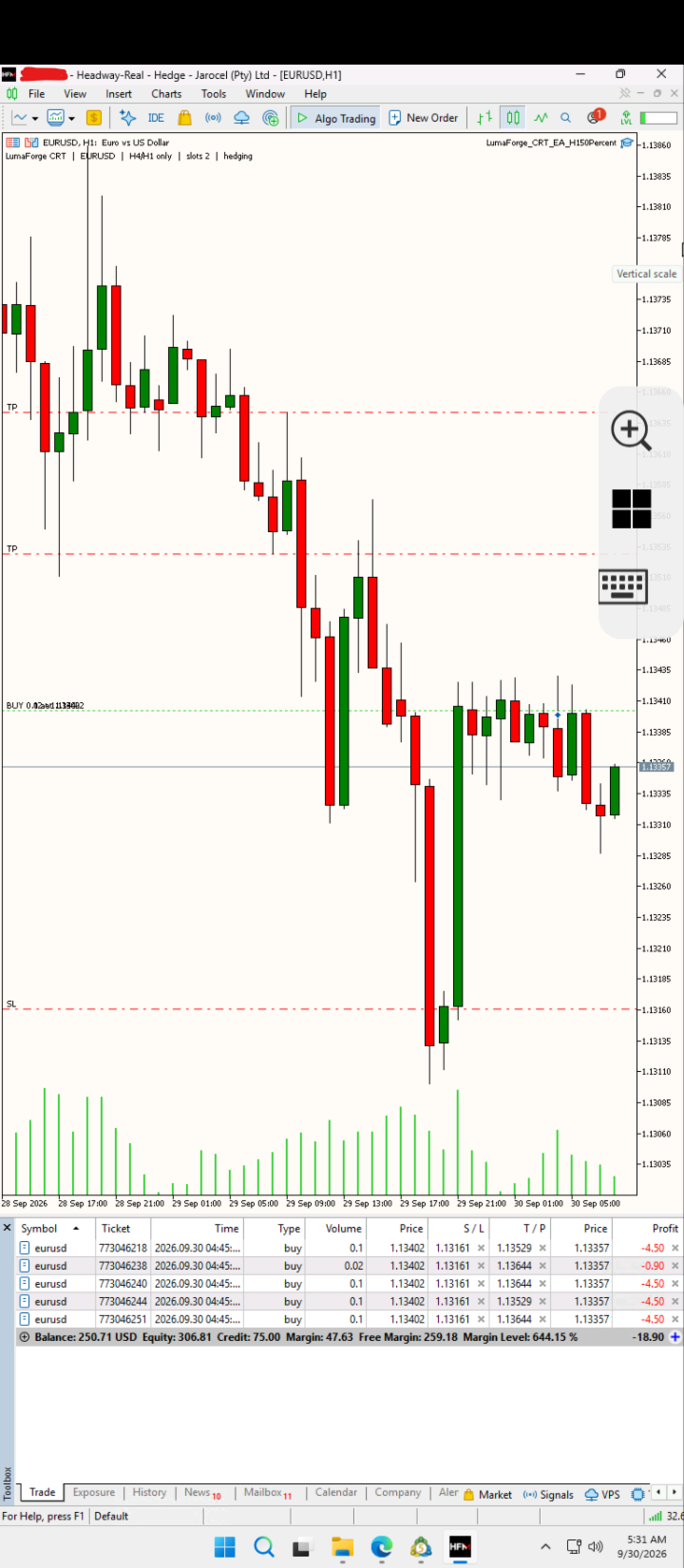
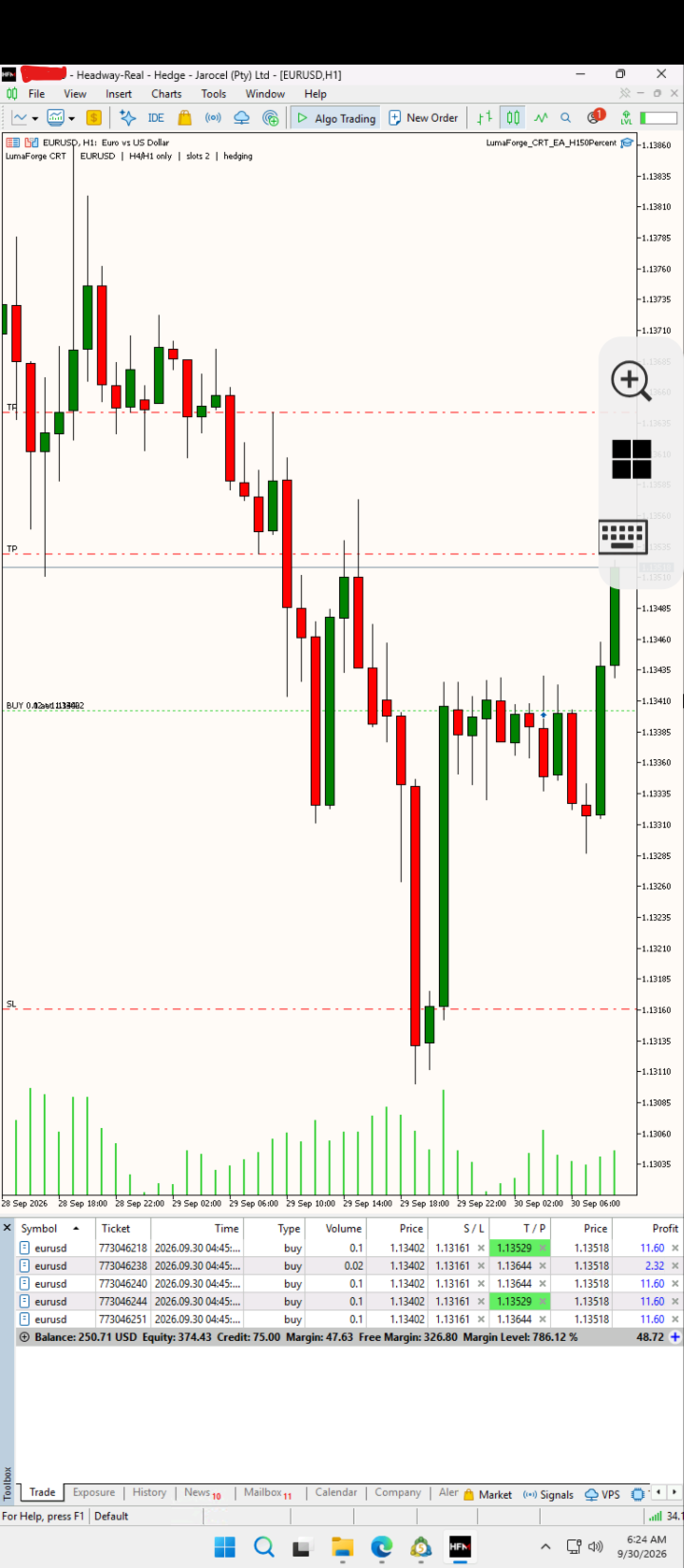
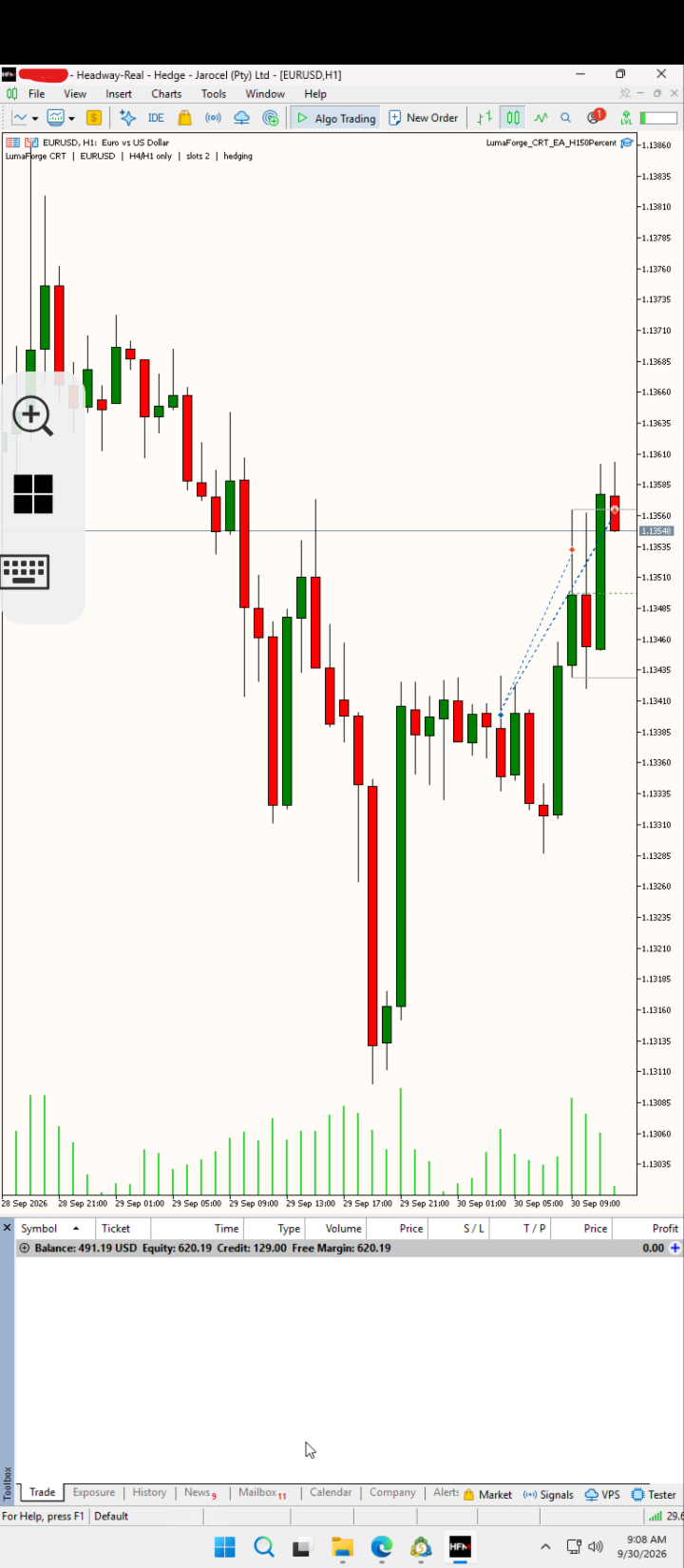
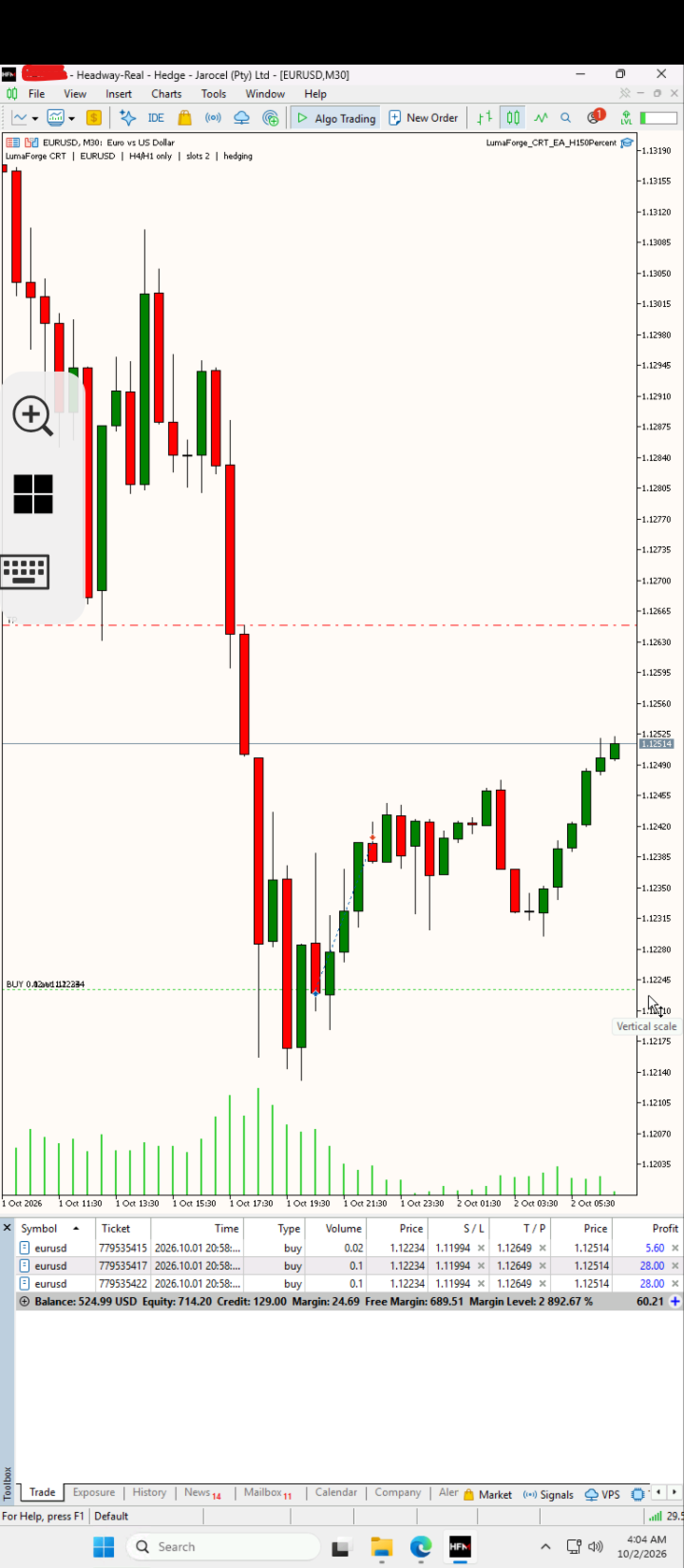
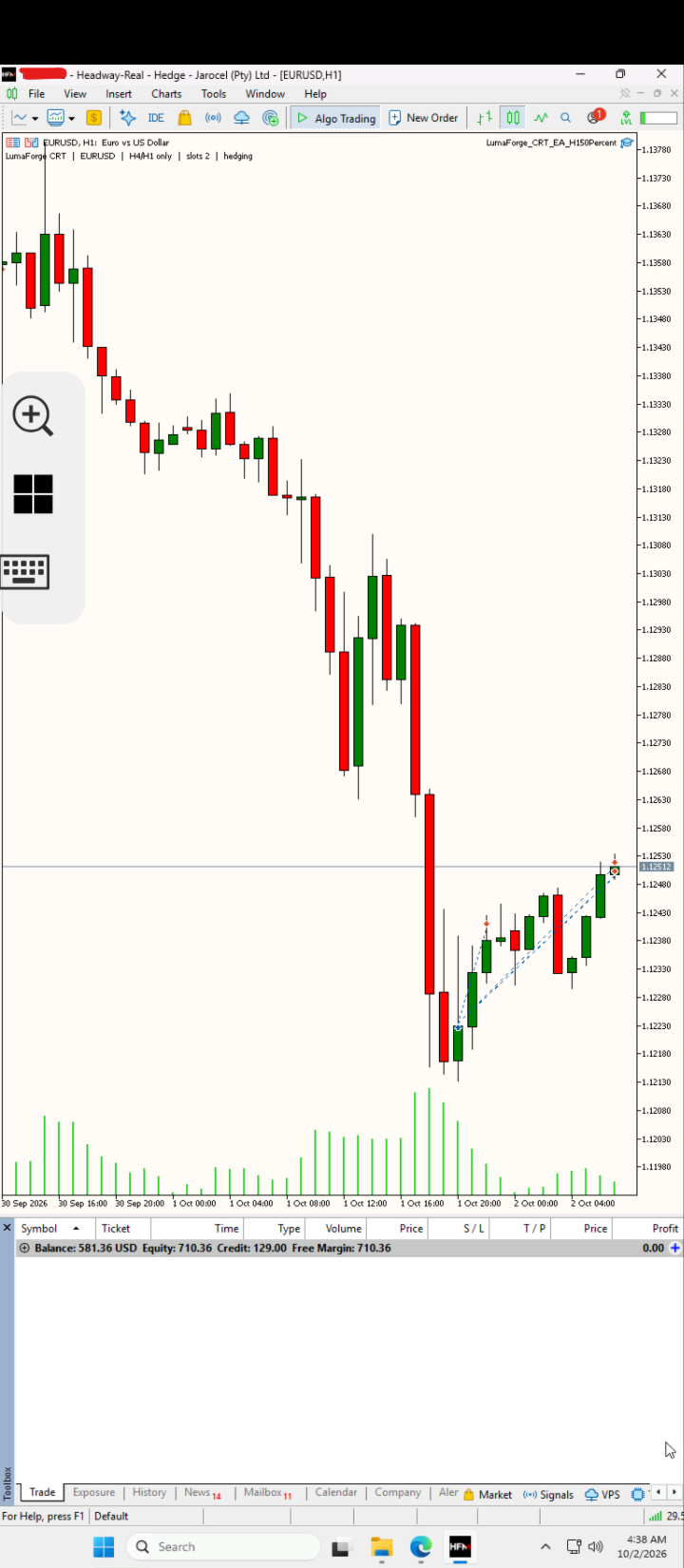
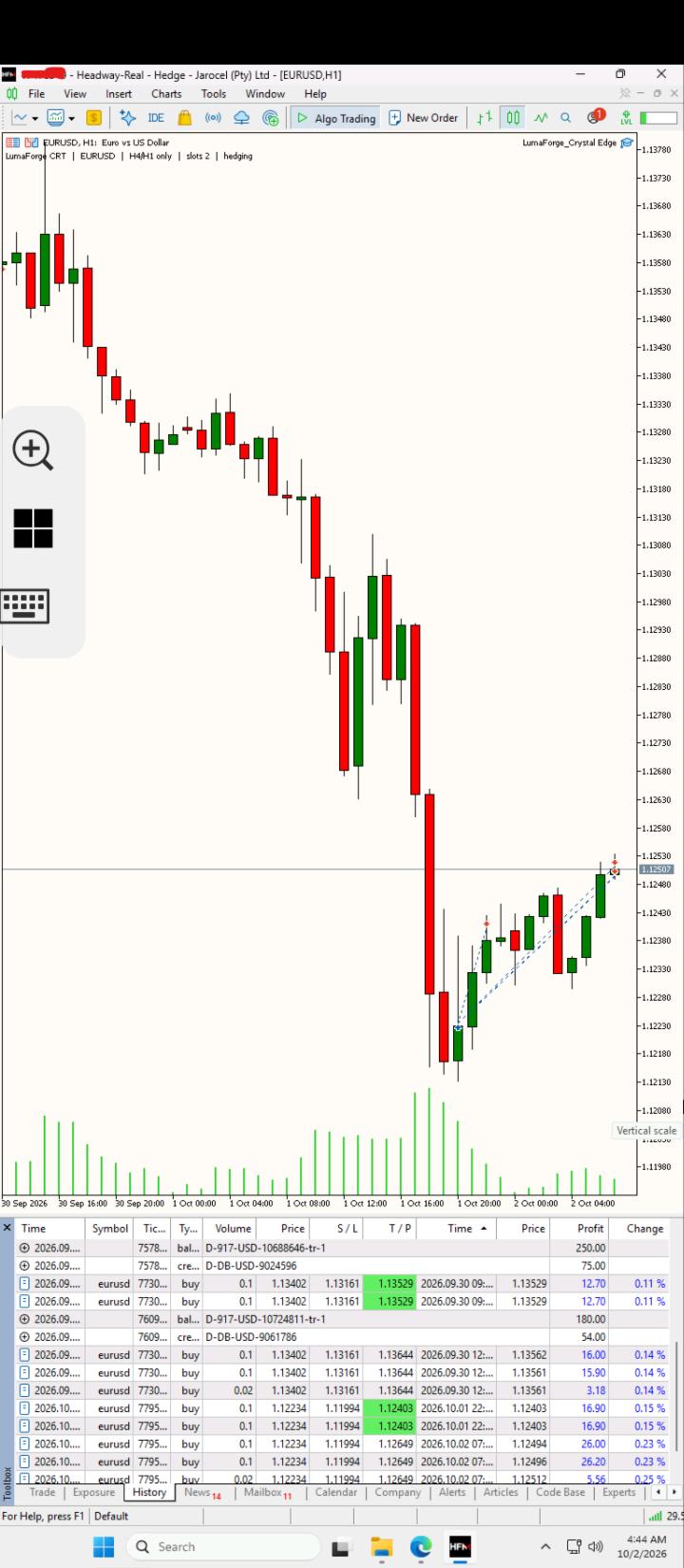
LumaForge Crystal Edge has already been tested by me on a live trading account.
Screenshots included with the product show examples from this live testing and are identified as such.
They are provided to demonstrate how the EA has operated under those particular live market and broker conditions. They should not be interpreted as a promise or guarantee of future performance.
Trading results can vary because of spread, execution speed, slippage, leverage, broker specifications, market conditions and the selected lot settings.
Before Using Crystal Edge Live
I recommend testing the EA in the MetaTrader 5 Strategy Tester and on a demo account before using it with live funds.
This gives you an opportunity to understand:
- how frequently the EA trades;
- how its partial-target and runner positions behave;
- how changing Base Lot affects total exposure;
- how the balance tiers affect additional positions;
- how your broker handles the EA's pending orders;
- and how the EA behaves under your broker's EURUSD spread and execution conditions.
Do not select a lot size solely because an account has enough margin to open it. Available margin and appropriate risk are not the same thing.
Important Information
LumaForge Crystal Edge is a fully automated trading system, but automated trading still involves financial risk.
The EA cannot guarantee profitable results or prevent losses. Historical tests, demo results and previous live-account results do not guarantee future performance.
Execution can differ between brokers because of spreads, commissions, liquidity, slippage, Stop Level restrictions, symbol specifications and price feeds, therefore Headway is the current recommended Broker
The $250 minimum balance is the minimum account size recommended for operation and is not a statement that every Base Lot or risk configuration is appropriate for a $100 account.
Users are responsible for selecting position-sizing settings suitable for their own account and risk tolerance.
For support, questions about configuration or assistance with the EA, please use the MQL5 product comments or MQL5 messaging system.