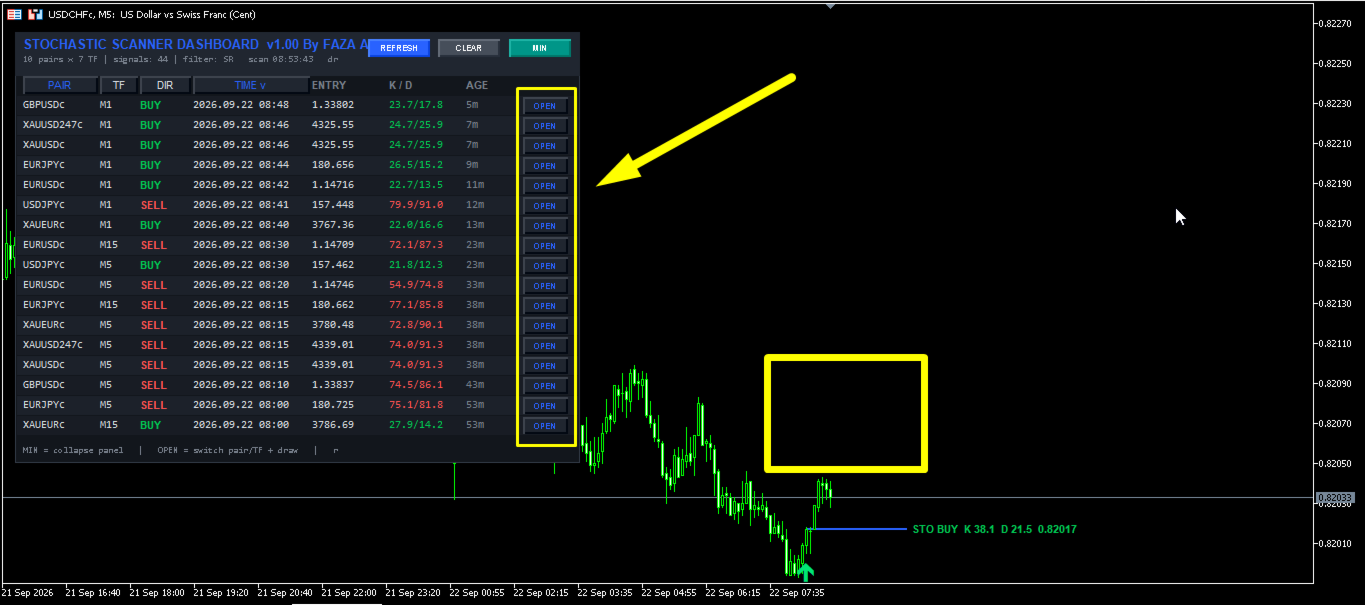
Stochastic Scanner Dashboard All Pair Timeframe
- Indicatori
- Versione: 1.0
- Attivazioni: 5

════════════════════════════════════════════════════════════════════════════════
🚀 STOCHASTIC SCANNER DASHBOARD PRO - MULTI-PAIR & MULTI-TIMEFRAME SCANNER FOR MT5
════════════════════════════════════════════════════════════════════════════════
📌 PRODUCT TYPE & INFORMATION
════════════════
• Product Type : MetaTrader 5 (MT5) Custom Indicator
• Category : Multi-Asset Dashboard / Multi-Timeframe Scanner / Filter Tool
• Trading Platform : MetaTrader 5 (Desktop Edition)
• Asset Support : Forex, Commodities (Gold, Silver, Oil), Crypto, Indices, Stocks
• Trading Style : Scalping, Day Trading, Swing Trading, Position Trading
• Alert System : Desktop Pop-up, Sound FX, Push Notification (Mobile), Email
════════════════════════════════════════════════════════════════════════════════
🌟 OVERVIEW & UNIQUE VALUE PROPOSITION
════════════════════════════════════════════════════════════════════════════════
Are you tired of manually switching through dozens of currency pairs and timeframes every single day just to look for valid Stochastic crossover setups?
Stochastic Scanner Dashboard Pro is an elite, high-performance multi-pair and multi-timeframe auto-scanning panel engineered specifically for MetaTrader 5 traders. It continuously monitors up to 10 market symbols across 7 different timeframes simultaneously, filtering out market noise with 17 built-in confluence filters including Ichimoku, RSI, ADX, Moving Averages, Awesome Oscillator, Parabolic SAR, CCI, RVI, MACD, Support & Resistance, Fibonacci levels, and Heiken Ashi candles!
✨ WHY CHOOSE THIS DASHBOARD?
1. ZERO CHART CLUTTER: Keep your trading environment clean while monitoring up to 70 individual market combinations from a single, fully interactive master dashboard.
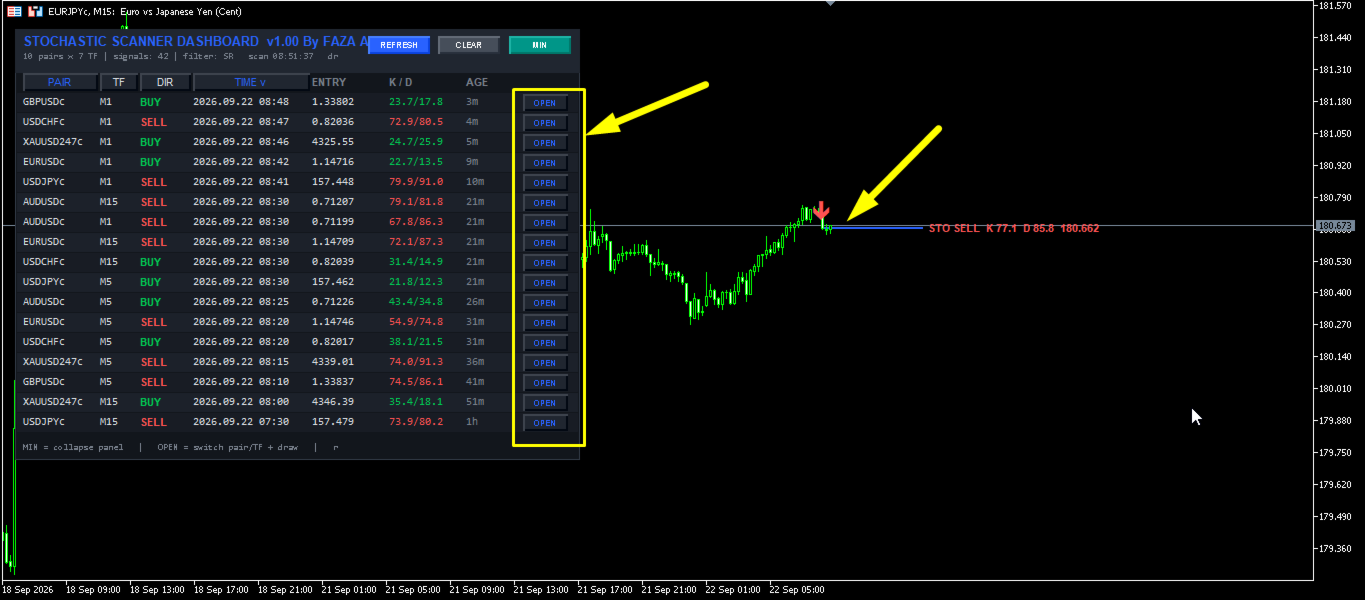
2. INSTANT CHART NAVIGATION: One click on the custom "OPEN" button instantly changes your chart symbol and timeframe while placing visual signal levels and entry markers directly onto the candle.
3. INSTITUTIONAL-GRADE FILTERING: Tired of false Stochastic crossovers in low-volatility consolidation ranges? Use up to 17 precision technical filters to ensure you only execute trades in high-momentum alignment with overall trend direction.
4. DRAGGABLE & FULLY CUSTOMIZABLE UI: Modern user interface featuring responsive scaling, column sorting, minimization mode, custom color schemes, and real-time age counters.
5. MULTI-CHANNEL ALERT ENGINE: Get instantly notified on your mobile phone, desktop screen, or email inbox the exact second a filtered crossover confirms.
════════════════════════════════════════════════════════════════════════════════
🔥 KEY FEATURES & ADVANTAGES
════════════════════════════════════════════════════════════════════════════════
⚡ MULTI-ASSET & MULTI-TIMEFRAME AUTO-SCANNING
Scan pre-defined symbol lists or your entire active Market Watch window across M1, M5, M15, M30, H1, H4, D1, W1, and MN timeframes in configurable scan intervals.
⚡ 17 MULTI-INDICATOR CONFLUENCE FILTERS
Combine your core Stochastic strategy with powerful trend, momentum, volatility, structure, and price-action confirmation filters to maximize win rates and eliminate false signals.
⚡ INTERACTIVE LIVE PANEL CONTROLS
• Dynamic Sorting: Sort your signal results instantly by Signal Age/Time, Symbol Name, Timeframe, or Trade Direction (Buy/Sell first).
• Draggable Header: Click and drag the dashboard header to position the panel anywhere on your chart space.
• One-Click Chart Switch: Click the "OPEN" button on any signal row to seamlessly load that exact pair and timeframe onto your active window.
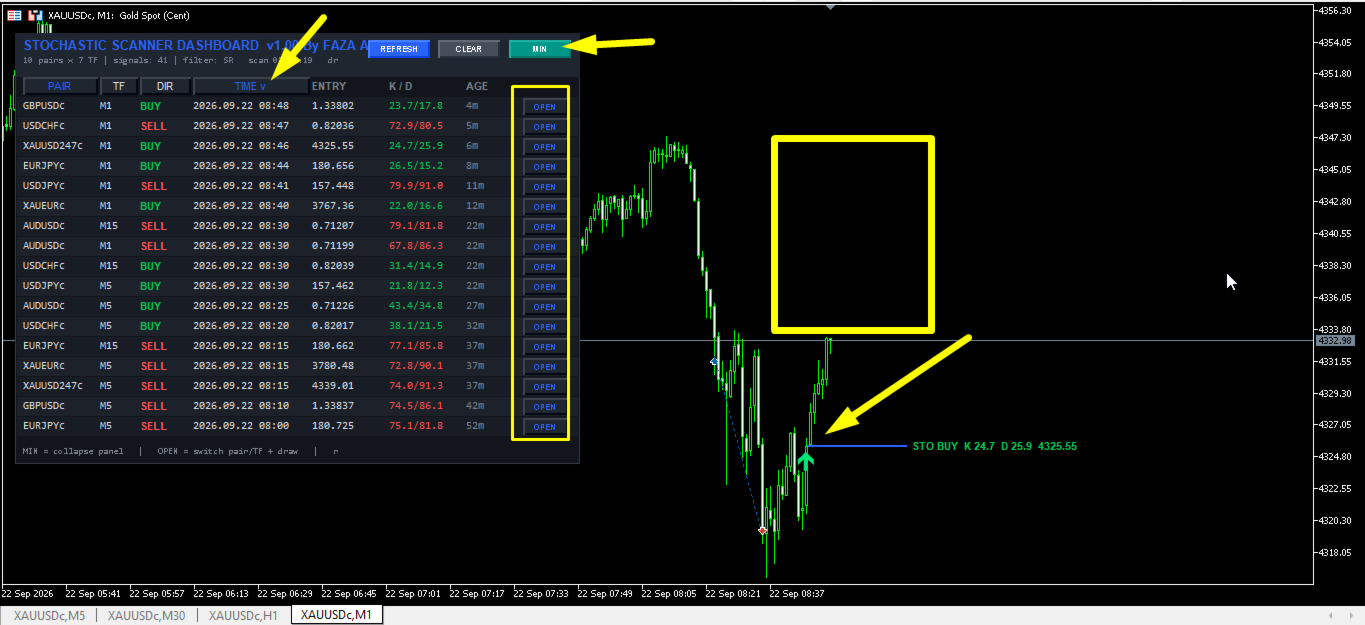
• Panel Minimization: Minimizes into a sleek compact header bar with a single click to save screen workspace whenever needed.
⚡ AUTOMATIC ON-CHART VISUAL SUITE
Automatically plots clear entry lines, level tags, signal text annotations, and customizable arrow markers directly onto your active chart whenever a valid setup is detected or opened.
⚡ SMART SIGNAL AGE TRACKING
Tracks the precise elapsed age of every signal (seconds, minutes, hours, days), giving you instant insight into whether a signal is brand new or mature.
════════════════════════════════════════════════════════════════════════════════
🛠️ IN-DEPTH EXPLANATION OF THE 17 CONFLUENCE FILTERS
════════════════════════════════════════════════════════════════════════════════
Every indicator filter can be enabled independently or combined into custom multi-filter strategies:
1. ☁️ Ichimoku Senkou Span B Filter: Validates Buy setups only when price trades above the Senkou Span B cloud baseline, and Sell setups only when price trades below it.
2. 📈 RSI Crossover Filter: Ensures Stochastic signals only trigger when RSI is crossing out of oversold/overbought zones.
3. 📊 ADX Volatility/Trend Filter: Requires ADX main line to exceed a set threshold (e.g., 20.0), blocking signals during dead or sideways market conditions.
4. 📉 Single Moving Average Filter: Filters trades using a custom MA baseline; price must remain above the MA line for Buys and below for Sells.
5. 🔍 RSI 75 Trend Filter: Evaluates higher-period RSI (75) bias; Buy signals require RSI > 50, while Sell signals require RSI < 50.
6. 🔀 Double Moving Average Cross Filter: Uses Fast MA and Slow MA alignment (e.g., 30 EMA vs 140 EMA) to ensure trades flow strictly with the dominant trend direction.
7. 🌊 Awesome Oscillator (AO) Multi-Mode Filter: Offers 3 versatile AO modes - Volume Minimum Threshold, Histogram Color Alignment, and Zero-Line Directional Filter.
8. 🎯 Parabolic SAR Filter: Confirms momentum alignment; SAR dots must print below price for Buys and above price for Sells.
9. 🕯️ Heiken Ashi Candle Filter: Validates structural candle color momentum; HA candles must be bullish green for Buys and bearish red for Sells.
10. 📊 CCI Trend Filter: Requires Commodity Channel Index (50) to trade above 0 for long setups and below 0 for short setups.
11. 🚨 CCI Overbought / Oversold Filter: Confirms extreme market positioning by requiring short-term CCI (14) to reach extreme levels (+100 / -100).
12. ⚡ RVI Trend Filter: Relative Vigor Index main line must print above 0 for Buy setups and below 0 for Sell setups.
13. 🔄 RVI Signal Line Filter: Confirms internal momentum crossovers where RVI main line trades above its signal line for Buys and below for Sells.
14. 📶 MACD Signal Filter: Ensures MACD histogram momentum aligns with signal bias (Histogram > 0 for Buys, Histogram < 0 for Sells).
15. 0️⃣ MACD Zero Line Filter: MACD main line must trade strictly above the zero baseline for Buys and below for Sells.
16. 🧱 Support & Resistance Zone Filter: Filters signals based on proximity to recent structural Highs and Lows within a user-defined point zone.
17. 📐 Fibonacci Retracement Filter: Identifies ZigZag swing highs/lows and validates signals only when price bounces off key Fibonacci retracement zones (e.g., 38.2% - 61.8%).
════════════════════════════════════════════════════════════════════════════════
📊 DASHBOARD UI COMPONENT BREAKDOWN
════════════════════════════════════════════════════════════════════════════════
• PAIR Column: Displays the symbol name. Clicking header sorts pairs alphabetically.
• TF Column: Displays timeframe (M1 through MN1). Clicking header sorts by timeframe hierarchy.
• DIR Column: Shows clear color-coded direction (BUY = Green, SELL = Red). Clicking header groups directions.
• TIME Column: Displays exact timestamp when the Stochastic crossover occurred. Clicking header sorts newest/oldest.
• ENTRY Column: Displays precise candle close entry price corresponding to the signal bar.
• K / D Column: Displays live numerical Stochastic %K and %D line values recorded at the signal bar.
• AGE Column: Displays readable elapsed age since signal confirmation (e.g., 15s, 4m, 2h, 1d).
• OPEN Button: Switches current active chart symbol and timeframe directly to the signal pair while drawing signal levels.
• REFRESH Button: Instantly re-initializes all indicator handles and runs a fresh scan across all symbols.
• CLEAR Button: Clears dashboard panel display objects from the active chart space.
• MIN / MAX Button: Toggles panel state between full dashboard view and compact top header bar.
════════════════════════════════════════════════════════════════════════════════
⚙️ FULL INPUT PARAMETERS & DETAILED USER GUIDE
════════════════════════════════════════════════════════════════════════════════
SECTION 1: SCANNER PARAMETERS
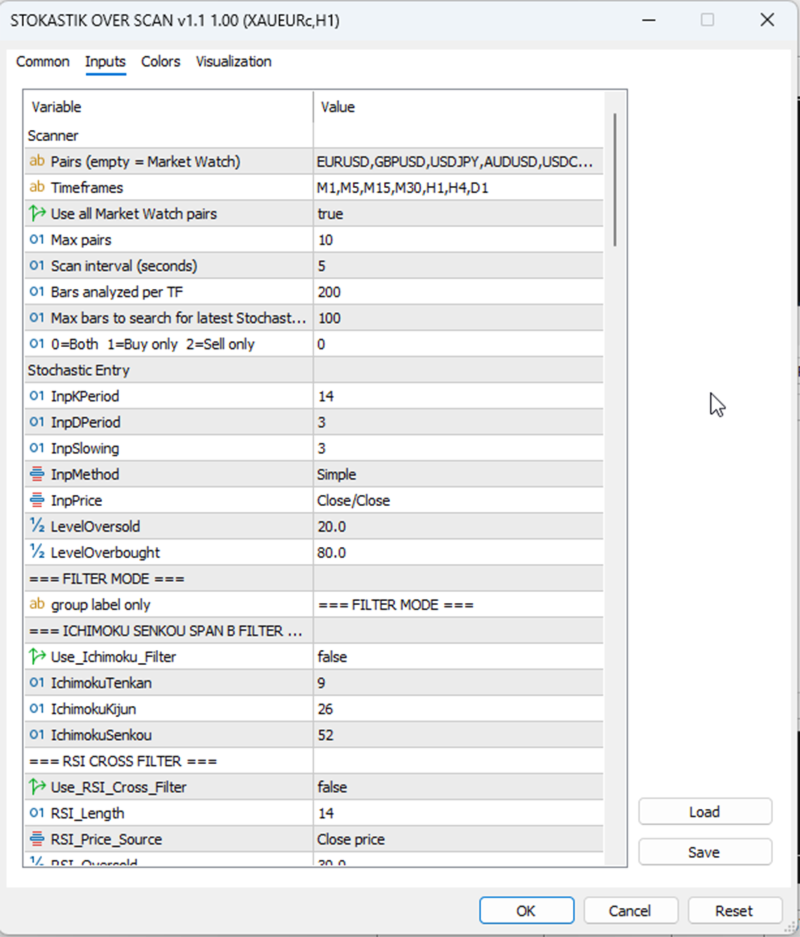
• InpSymbols (EURUSD,GBPUSD,USDJPY...) : Custom symbol list separated by commas.
• InpTimeframes (M1,M5,M15,M30,H1,H4,D1) : Custom timeframes separated by commas.
• InpUseWatch (true/false) : If set to true, automatically scans pairs from Market Watch.
• InpMaxSymbols (10) : Maximum pair scan limit to protect CPU efficiency.
• InpScanSec (5) : Automatic scanning interval timer in seconds.
• InpBarsCopy (200) : Historical price bar count calculated per timeframe.
• InpLookback (100) : Maximum historical bars searched for Stochastic crossovers.
• InpDirection (0=Both, 1=Buy Only, 2=Sell Only) : Filter direction permissions.
SECTION 2: STOCHASTIC ENTRY PARAMETERS
• InpKPeriod (14) : Stochastic %K Period.
• InpDPeriod (3) : Stochastic %D Period.
• InpSlowing (3) : Stochastic Slowing value.
• InpMethod (MODE_SMA) : Moving Average method applied to Stochastic.
• InpPrice (STO_CLOSECLOSE) : Price base calculation source.
• LevelOversold (20.0) : Oversold threshold level for Buy signals.
• LevelOverbought (80.0) : Overbought threshold level for Sell signals.
SECTION 3: CONFLUENCE INDICATOR FILTERS
• Use_Ichimoku_Filter (false) : Enable/Disable Ichimoku Senkou Span B filter.
• IchimokuTenkan / Kijun / Senkou (9 / 26 / 52) : Ichimoku calculation periods.
• Use_RSI_Cross_Filter (false) : Enable/Disable RSI cross filter.
• RSI_Length / RSI_Oversold / RSI_Overbought (14 / 30.0 / 70.0) : RSI filter settings.
• Use_ADX_Filter (false) : Enable/Disable ADX strength filter.
• ADX_Period / ADX_Min_Level (10 / 20.0) : ADX calculation parameters.
• Use_MA_Filter (false) : Enable/Disable Single MA trend filter.
• MA_Period / MA_Method / MA_Applied (50 / MODE_SMA / PRICE_CLOSE) : Single MA inputs.
• Use_RSI75_Filter (false) : Enable/Disable higher period RSI 75 trend filter.
• Use_DoubleMA_Filter (false) : Enable/Disable Dual MA cross filter.
• MA_A_Period / MA_B_Period (30 / 140) : Fast and Slow MA period lengths.
• Use_AO_Filter (false) : Enable/Disable Awesome Oscillator filter.
• AO_Buy_Min / AO_Sell_Max (4.0 / -4.0) : AO volume cutoff parameters.
• Use_SAR_Filter (false) : Enable/Disable Parabolic SAR filter.
• SAR_Step / SAR_Maximum (0.02 / 0.2) : Parabolic SAR sensitivity settings.
• Use_HeikenAshi_Filter (false) : Enable/Disable Heiken Ashi candle filter.
• Use_CCI_Filter / Use_CCI_OBOS_Filter (false) : Enable/Disable CCI trend / OBOS filters.
• Use_RVI_Filter / Use_RVI_Signal_Filter (false) : Enable/Disable RVI trend / Signal filters.
• Use_MACD_Filter / Use_MACD_Zero_Filter (false) : Enable/Disable MACD signal / Zero filters.
• Use_SR_Filter (false) : Enable/Disable Support & Resistance structure filter.
• SR_Period / SR_Zone_Points (50 / 80) : SR structural lookback & point zone width.
• Use_Fib_Filter (false) : Enable/Disable Fibonacci retracement filter.
• Fib_Level_1 / Fib_Level_2 (0.382 / 0.618) : Target Fibonacci retracement range.
SECTION 4: ALERT & NOTIFICATION PARAMETERS
• InpAlertPopup (true) : Enable/Disable MetaTrader 5 pop-up dialog alerts.
• InpAlertSound (true) : Enable/Disable audio alert notifications.
• InpSoundFile (alert.wav) : Audio sound file assigned to signal alerts.
• InpAlertPush (false) : Enable/Disable mobile push notifications.
• InpAlertEmail (false) : Enable/Disable email notification alerts.
• InpAlertOnlyNew (true) : Alert only when a brand new signal triggers.
SECTION 5: DISPLAY & COLOR CUSTOMIZATION
• InpX / InpY (12 / 28) : Panel X and Y screen coordinate positions.
• InpScale (110) : Panel scale percentage ratio (80% to 160%).
• InpRowH / InpFont (18 / 7) : Row height pixels and font point sizes.
• InpShowEmpty (false) : Display pairs without active signals on panel.
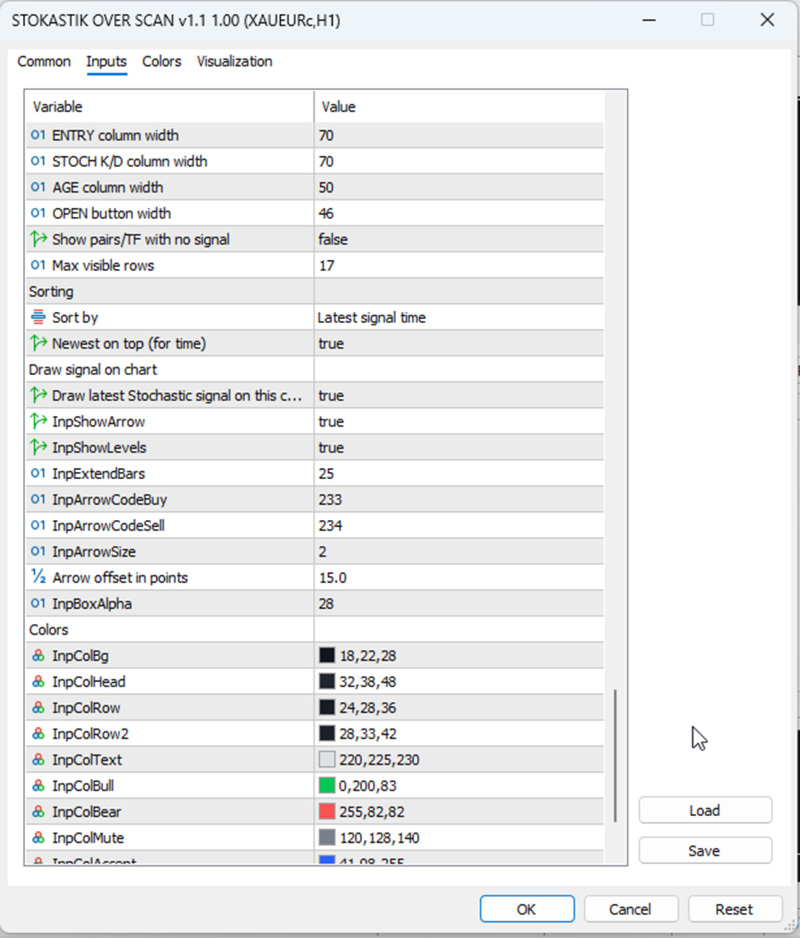
• InpMaxRows (17) : Maximum visible dashboard rows.
• InpDrawOnChart (true) : Draw entry line & signal details on chart.
• InpShowArrow / InpShowLevels (true) : Display signal arrows & price levels.
• Custom Color Palette : Fully customizable colors for Background, Header, Rows, Buttons, Bullish Green, and Bearish Red accents.
════════════════════════════════════════════════════════════════════════════════
💡 STEP-BY-STEP TRADING GUIDE & BEST PRACTICES
════════════════════════════════════════════════════════════════════════════════
STEP 1: INSTALLATION & INITIAL SETUP
1. Download and copy the indicator file into your MetaTrader 5 "MQL5/Indicators/" folder.
2. Refresh your MT5 Navigator window or restart your MetaTrader 5 terminal.
3. Open any chart (e.g. EURUSD H1) and attach "Stochastic Scanner Dashboard Pro".
STEP 2: CONFIGURING ASSETS AND CONFLUENCE FILTERS
1. In the input menu, define your favorite trading pairs inside "InpSymbols" or enable "InpUseWatch".
2. Select your target timeframes in "InpTimeframes".
3. Activate desired confluence filters. For example, set "Use_DoubleMA_Filter = true" and "Use_ADX_Filter = true" to capture strong trend-following momentum breakouts while filtering out ranging consolidations.
STEP 3: SIGNAL EVALUATION & EXECUTION
1. Watch the dashboard panel for incoming BUY or SELL signals.
2. Check the "AGE" column to confirm signal freshness (e.g., 10s or 1m old).
3. Click the "OPEN" button next to the signal row to instantly switch your active chart window to that exact pair and timeframe.
4. Verify the on-chart entry levels, arrow pointers, and indicator readings.
5. Place your order with proper risk management, setting your Stop Loss beyond recent market structure swings!
════════════════════════════════════════════════════════════════════════════════
🙏 THANK YOU FOR YOUR SUPPORT
════════════════════════════════════════════════════════════════════════════════
Thank you for choosing Stochastic Scanner Dashboard Pro!
We are dedicated to building high-performance, institutional-grade trading tools to elevate your trading journey. If you find this indicator helpful, please leave a ⭐⭐⭐⭐⭐ 5-star review on the MQL5 Market. Your support inspires us to continue delivering regular updates and improvements!
If you have any questions, feedback, or need assistance, feel free to contact us via MQL5 Direct Messaging. Wish you great trading success! 🎯📈