Miriva MultiBot
- Experts
-
Alexey Oreshkin
 I design, develop and audit automated trading systems intended for real-world operation, not only Strategy Tester results.
Main areas of work:
• trading systems for MetaTrader 5 / MQL5, Interactive Brokers / Python, broker APIs and crypto exchanges - Versione: 1.7
- Attivazioni: 10
Miriva MultiBot
Miriva MultiBot is a fully automated multi-currency Expert Advisor for MetaTrader 5.
The EA manages a portfolio of positions across several currency pairs at the same time and is launched from a single chart. It automatically monitors the selected instruments, opens and manages positions using its internal trading logic, and provides several ways to manage results for individual directions, individual symbols, and the whole portfolio.
Main Features
- multi-currency trading from a single chart;
- one EA instance for the whole symbol list;
- simultaneous operation on several currency pairs;
- separate BUY and SELL management;
- result management by symbol and by total portfolio;
- monetary Take Profit / Stop Loss and trailing controls;
- flexible symbol list adjustment for broker-specific naming;
- all monetary parameters are set in the account deposit currency.
Recommended Setup
- recommended timeframe: M30;
- recommended chart for launch: EURUSD;
- hedging account is required;
- all configured symbols must be available in Market Watch and have sufficient price history.
Default Configuration
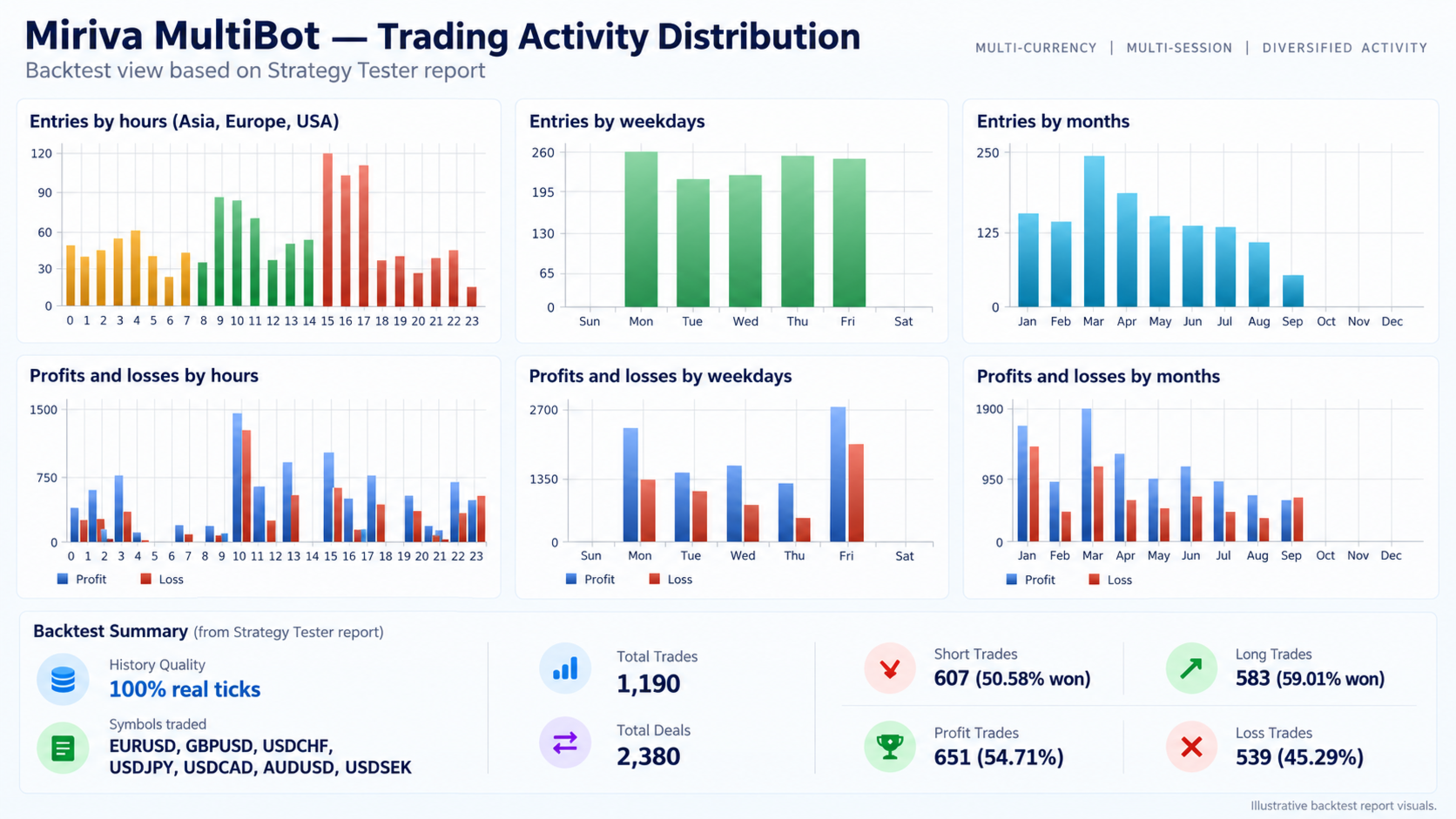
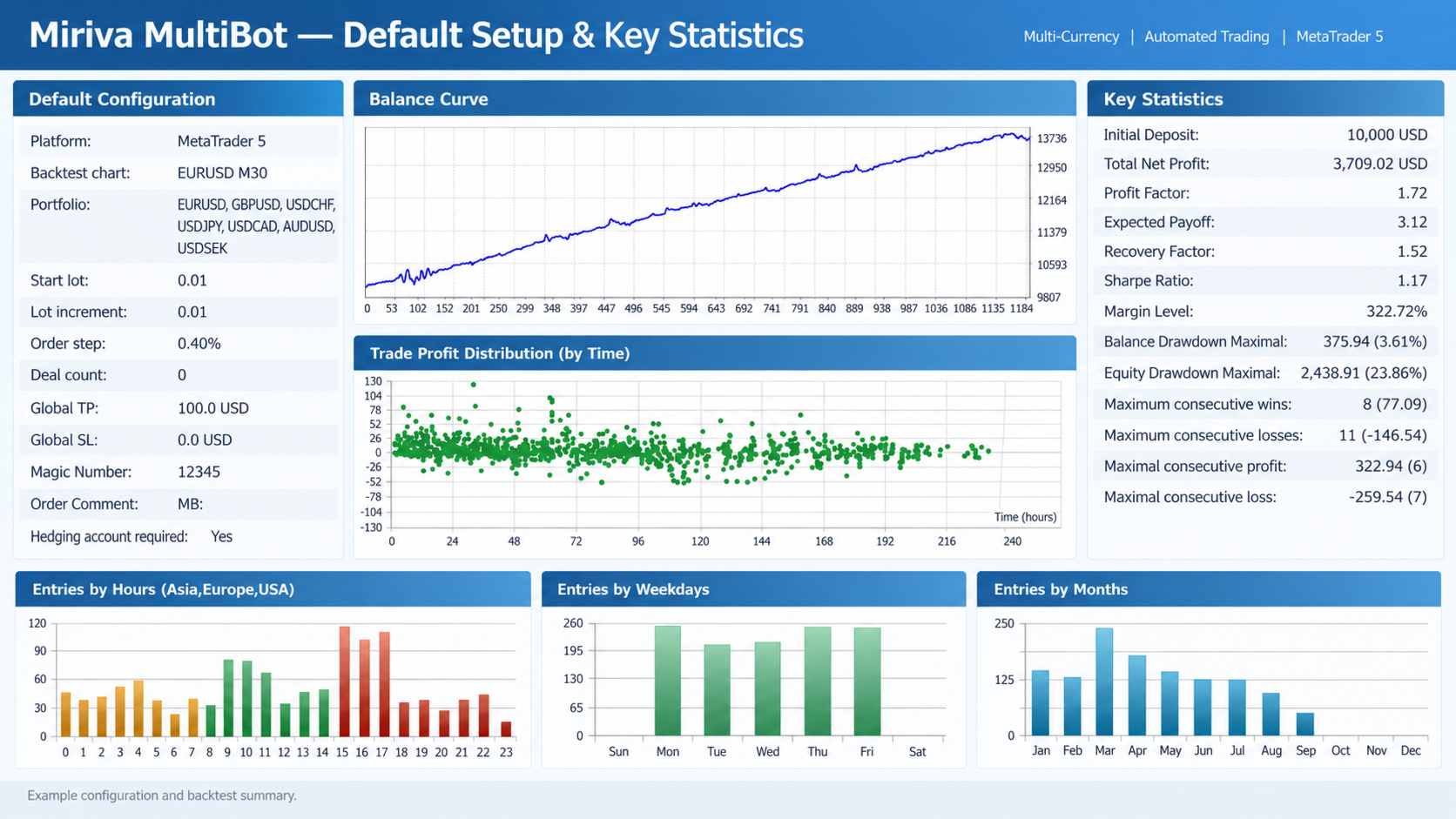
By default, the EA is configured for the following symbols:
- EURUSD
- GBPUSD
- USDCHF
- USDJPY
- USDCAD
- AUDUSD
- USDSEK
If your broker uses prefixes or suffixes, the symbol list must be adjusted manually.
Examples: EURUSD , EURUSD.std , EURUSDm , etc.
Main Input Parameters
General Settings
- Pause All EA Processing — fully pauses EA activity.
- Symbols — trading symbol list separated by ; .
- Initial Volume — initial trading volume.
- Added Volume — volume added to the next positions.
- Entry Distance, % — distance between entries in percent.
- Maximum Positions per Symbol, 0 = Unlimited — maximum number of positions per symbol. Value 0 means unlimited.
- Magic Number — EA magic number.
- Order Comment — order comment.
Directional Exit Settings per Symbol
- Profit Threshold, Account Currency — monetary profit level for closing positions of one direction on a symbol.
- Stop Loss, Account Currency — monetary loss level for closing positions of one direction on a symbol.
Combined Exit Settings per Symbol
- Combined Take Profit, Account Currency — total monetary Take Profit for a symbol.
- Combined Stop Loss, Account Currency — total monetary Stop Loss for a symbol.
Portfolio Exit Settings
- Portfolio Take Profit, Account Currency — total monetary Take Profit for the whole portfolio.
- Portfolio Stop Loss, Account Currency — total monetary Stop Loss for the whole portfolio.
Directional Trailing Settings
- Activation Profit, Account Currency — profit level that activates trailing for one direction on a symbol.
- Maximum Retracement, % — allowed pullback from the achieved profit.
Portfolio Trailing Settings
- Activation Profit, Account Currency — profit level that activates trailing for the whole portfolio.
- Maximum Retracement, % — allowed pullback from the achieved profit.
How to Start
- Open an EURUSD M30 chart.
- Make sure all required symbols are available in Market Watch.
- Adjust the symbol list if your broker uses a different naming format.
- Set a suitable trading volume according to your deposit size and risk tolerance.
- Run only one EA instance for the whole symbol list.
Important
Miriva MultiBot uses active multi-position management. During strong directional market conditions, several positions may remain open at the same time, and floating drawdown may increase.
The Initial Volume, Added Volume, and exit settings directly affect risk. Always test the EA in the Strategy Tester and on a demo account before using it on a live account.
Historical Public Monitoring
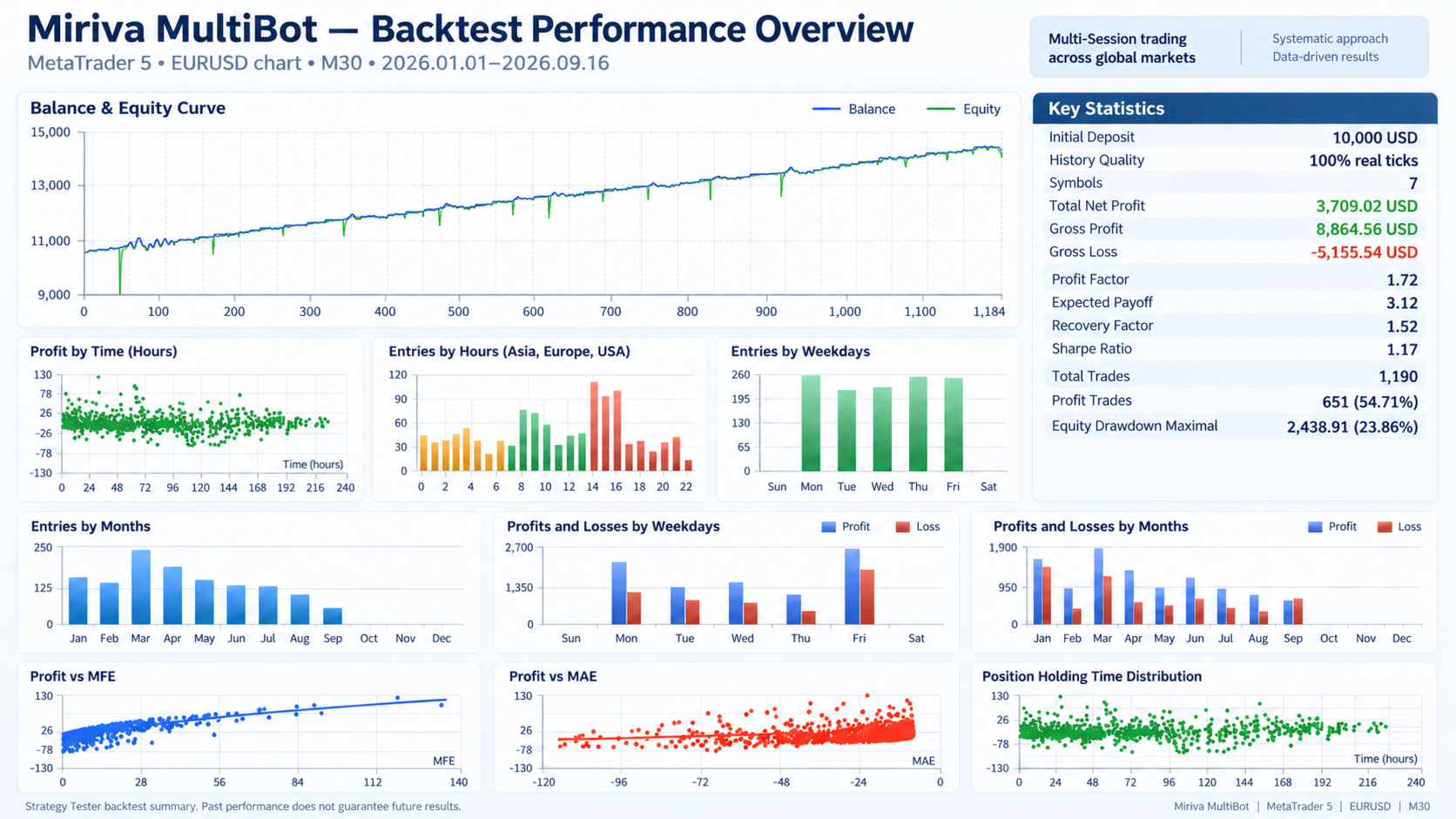
The public MQL5 Signals below show the historical behavior of the Miriva MultiBot trading logic.
These signal accounts are operated by a distribution partner and are not managed from this seller account. During the historical period, the traded symbol set and operating schedule could change. The monitoring is provided only to document historical strategy behavior and does not guarantee future results.
- TimurMultbot — https://www.mql5.com/en/signals/2299707
- RuslanMultbot — https://www.mql5.com/en/signals/2300257
- SergeyMultbot — https://www.mql5.com/en/signals/2301232
- MihailMulybot — https://www.mql5.com/en/signals/2301248