MA MTF midlle

  • Indicatori
  • Dragan Joksimovic
    Dragan Joksimovic
    MQL4 / MQL5 Expert Advisor and Indicator Developer
    I develop and test Expert Advisors, indicators and trading utilities for MetaTrader 4 and MetaTrader 5 based on clearly defined trading rules.
    My work includes:
    • Expert Advisors for MT4 and MT5
    • Custom indicators
  • Versione: 1.0
  • Attivazioni: 5
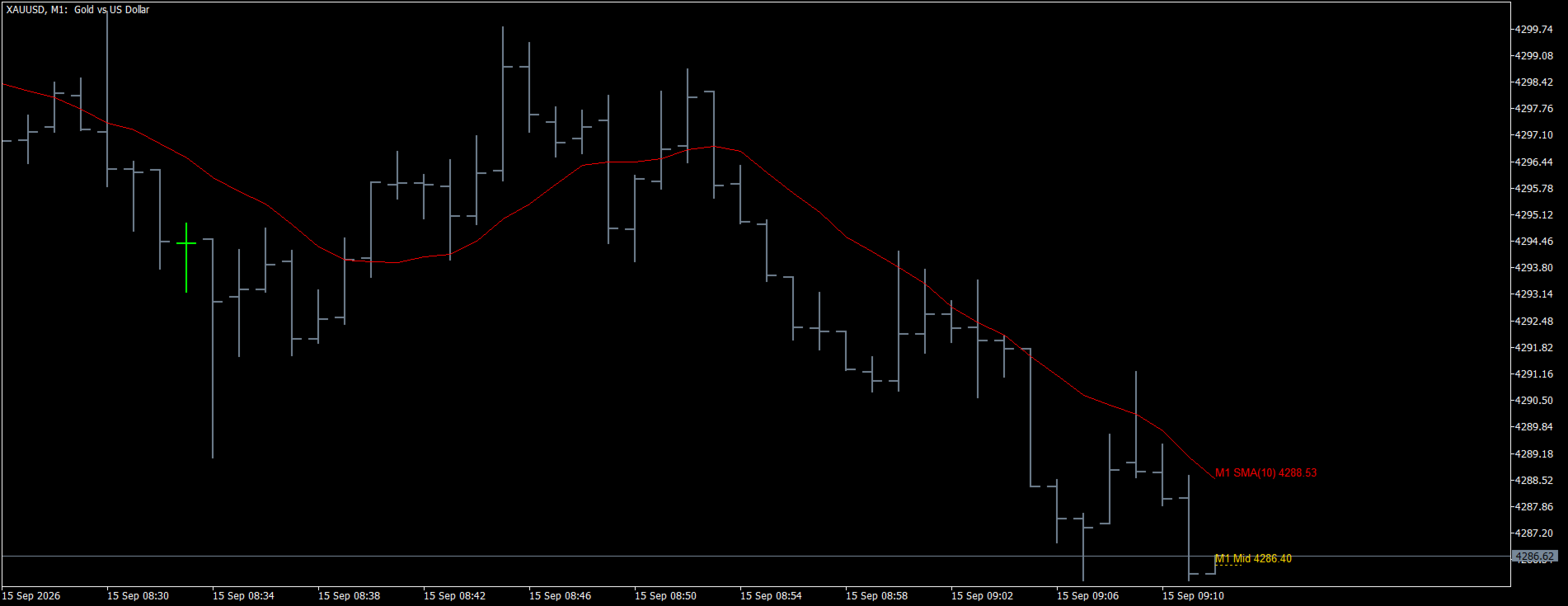
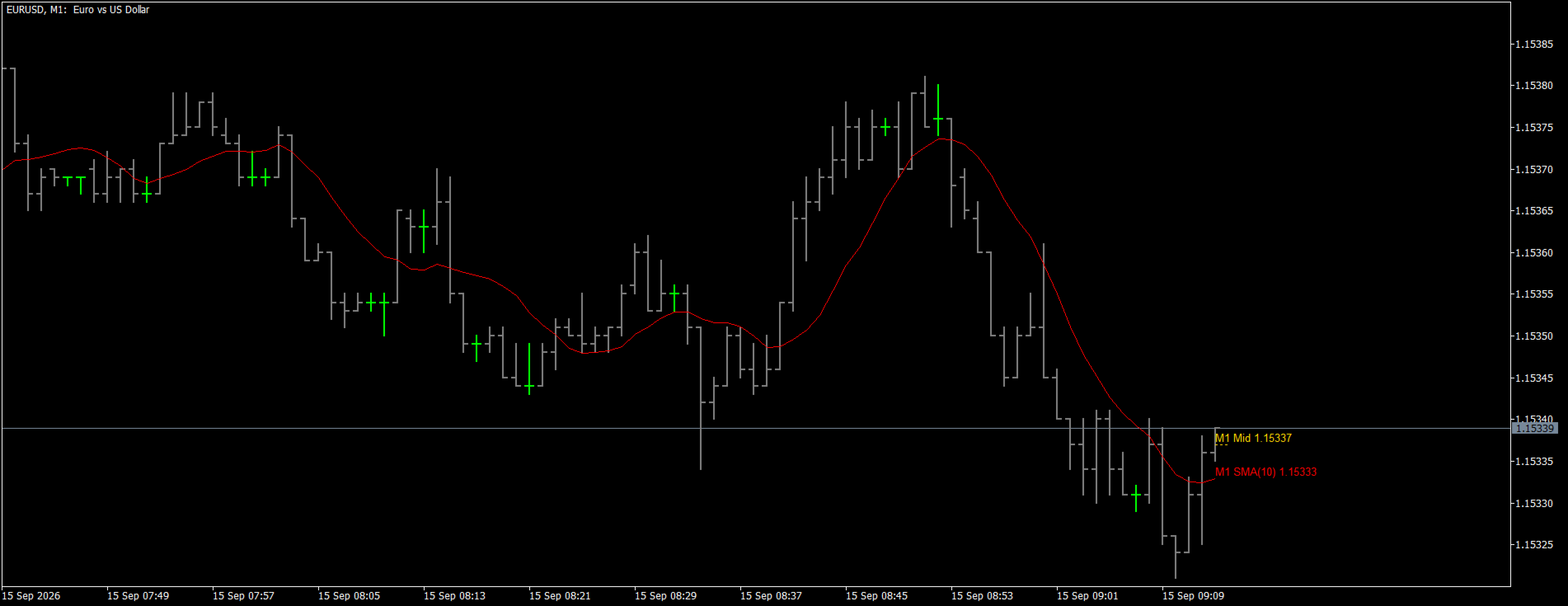
**MA MTF Middle** puts the standard Moving Average of a higher timeframe on the chart you trade from — for example the H1 moving average on an M5 chart — with exactly the inputs you know from the built-in Moving Average: period, shift, method (simple, exponential, smoothed, linear weighted) and the price it is applied to, plus the timeframe. Next to it the indicator draws a second line: the middle of the current candle of that timeframe, the price halfway between its high and its low.

**How it works**

- The moving average is calculated on the candles of the selected timeframe with the same algorithms as the built-in Moving Average, so its values are identical to the standard indicator on that timeframe's own chart. On a lower chart it is drawn as steps — one value per candle — or, optionally, smoothed between the candles. The value of the current candle changes with price until the candle closes, exactly as on the candle's own chart.
- The middle line is a horizontal segment from the open of the current candle to its close time. It moves with every new high or low of the candle, so at any moment it shows where the middle of the candle in progress is. When the next candle opens a new segment starts; the middle of the last closed candles can stay on the chart as shortened segments.

**Key features**

- Multi-timeframe: any timeframe equal to or higher than the chart, on any symbol.
- Same inputs as the standard Moving Average, so settings you already use can be copied one to one.
- Steps or smoothed line; adjustable colors, width and style of the moving average and of the middle line.
- History of the middle of closed candles, with adjustable length of the segments.
- Price labels next to the current bar for the moving average and the middle.
- Hidden buffers for Expert Advisors: the moving average as drawn, the exact moving average of the candle, the middle of the candle as it stood at every bar and a state value (+1 middle above the average, −1 below), so the indicator can be read with CopyBuffer or iCustom and used in the Strategy Tester.
- Light on resources: the average is calculated once per candle, the other ticks only move the middle line and the labels.

**How it can be used**

- Trend filter from a higher timeframe: trade lower-timeframe signals only in the direction of the higher-timeframe average.
- Crossing of the candle middle over the average as a signal that the whole candle — not just its close — has moved to the other side of the trend line.
- Dynamic support and resistance from a higher timeframe without switching charts.

**What you can adjust**

Timeframe, period, shift, method, apply to; steps or smoothed line; colors, width and style of both lines; middle line on/off, number of closed candles kept, length of their segments, extension of the current segment to the right edge; labels and font size; object name prefix (to run several copies on one chart); depth of history filled into the buffers.

**Buffers (for Expert Advisor developers)**

- 0 — moving average as drawn (steps or smoothed)
- 1 — moving average of the candle (exact value, one per candle)
- 2 — middle of the candle as it stood at that bar
- 3 — state: +1 middle above the average, −1 below, 0 equal or no data

Example — reading the H1 average and the middle from an EA on any chart:

```
int handle = iCustom(_Symbol, _Period, "Market\\MA MTF Middle MT5", PERIOD_H1);

double ma[], mid[];
if(CopyBuffer(handle, 1, 0, 1, ma) == 1 && CopyBuffer(handle, 2, 0, 1, mid) == 1 && ma[0] != EMPTY_VALUE)
  {
   // ma[0] is the H1 moving average of the current candle, mid[0] its current middle
  }
```

**Notes**

- The average is built from the candles of the selected timeframe, so it is identical to the standard Moving Average on that timeframe's own chart.
- The indicator draws with chart objects (prefix adjustable) and cleans them up when it is removed.
- The indicator does not open trades and does not use any DLL or external files.
Altri dall’autore
Supertrend MTF Indicator is a free MetaTrader 4 indicator designed to help traders follow trend direction across multiple timeframes directly on the chart. The indicator provides a clear visual representation of bullish and bearish market conditions and can be used as a multi-timeframe confirmation tool for manual trading. Main features: Multi-timeframe trend analysis Clear bullish and bearish trend visualization Suitable for Forex, Gold, indices and other MT4 instruments Can be used on differen
FREE
MTF Fixed Candle Boxes is a multi-timeframe chart visualization indicator for MetaTrader 4. The indicator displays High, Low and optional Middle levels of M1, M5, M15, M30, H1 and H4 candles directly on the active chart. It helps traders observe multi-timeframe candle structure without switching between several charts. Main features: Multi-timeframe candle boxes on one MT4 chart Supported timeframes: M1, M5, M15, M30, H1 and H4 High and Low levels for each selected candle Optional Middle line fo
Mtf Middle Expert Advisor is a MetaTrader 4 trading robot based on a multi-timeframe middle-of-candle model. The higher timeframe defines the allowed direction. By default, the EA reads the middle of the last closed M30 candles and confirms direction with both slope and price position. The lower timeframe then waits for an entry signal, by default an M5 close crossing the middle of its own candle. All signal decisions are made from closed candles only. The EA does not use the current forming c
Universal MidZone Expert Advisor – Automation Companion for H1 Container 5 Zones Universal MidZone EA was developed as an automated trading companion to our free H1 Container M30 M15 M5 M1 - 5 Zones indicator. The free H1 Container indicator gives traders a visual multi-timeframe view of the H1 candle and its internal M30, M15, M5 and M1 structures, divided into five price zones by the 20%, 40%, 60% and 80% levels. Universal MidZone EA takes the same zone-based trading concept one step further b
Supertrend MTF Expert Advisor is an automated trading system for MetaTrader 4 based on the same Supertrend MTF trading concept used by the free Supertrend MTF Indicator available in the MQL5 Market and CodeBase. The Expert Advisor is designed to automate Supertrend-based trend following while keeping the trading rules transparent and configurable. It analyzes market direction using the Supertrend calculation and can confirm signals using closed candles, helping to reduce decisions based on incom
Supertrend MTF Dragan — MQL5 Market description (MetaTrader 5, Indicators) Supertrend MTF Dragan is a clean multi-timeframe ATR Supertrend for MetaTrader 5. It shows the Supertrend of a higher timeframe directly on your working chart — for example the H1 Supertrend on an M5 chart — with a color-coded trend line, confirmed reversal arrows that never repaint, alerts and a hidden trend-state buffer that you can read from your own Expert Advisor. Key features Multi-timeframe: select any timeframe eq
Fvg mtf dragan
Dragan Joksimovic
**FVG MTF Dragan** finds Fair Value Gaps (price imbalances) on the timeframe of your choice and draws them as boxes on the chart you trade from — for example the H1 gaps on an M5 chart. Every box has a size filter, a selectable mitigation rule, labels, alerts and hidden buffers, so the indicator works both as a discretionary tool and as a signal source for your own Expert Advisor. **What is a Fair Value Gap** A Fair Value Gap is a three-candle pattern in which the middle candle moves so fast
Fvg mtf ea
Dragan Joksimovic
**FVG MTF EA** trades one of the cleanest price-action setups: the return of price into a Fair Value Gap. The gaps are detected inside the EA on the timeframe of your choice, with the same rules as the FVG MTF indicator, so what you see on the chart is exactly what the EA trades. No grid, no martingale, no averaging — one position per gap with a fixed stop loss and take profit. **How it trades** A Fair Value Gap is a three-candle pattern in which the middle candle moves so fast that the first
**ATR Levels MTF Dragan** draws the volatility levels of a higher-timeframe candle on the chart you trade from. The moment a candle of the selected timeframe opens, the indicator fixes its open price as a base line and places two ATR levels above it and two below it. The lines stay exactly where they are until the candle closes, so what you see during the candle is what you would have seen at its open — nothing is recalculated afterwards and nothing repaints. A sixth, dotted line follows the mi
ATR Levels MTF EA
Dragan Joksimovic
**ATR Levels MTF EA** trades the volatility levels of a higher-timeframe candle. At the open of every candle of the selected box timeframe the EA fixes the candle open and four ATR levels around it — two above and two below, at adjustable multiples of the ATR — exactly as the ATR Levels MTF indicator draws them. The levels are known the moment the candle opens and do not change until it closes, so every entry and exit can be checked on the chart afterwards. No grid, no martingale, no averaging
MA MTF midlle EA
Dragan Joksimovic
**MA MTF Middle EA** trades the crossing of the candle middle over a higher-timeframe moving average. The average is calculated inside the EA with the inputs you know from the built-in Moving Average — period, shift, method, apply to — on the box timeframe of your choice, exactly as the MA MTF Middle indicator draws it. Instead of waiting for a close, the EA watches the middle of the candle in progress: the price halfway between the high and the low the candle has made so far. No grid, no marti
**MA Channel MTF Middle** draws a moving-average channel of a higher timeframe on the chart you trade from: the upper line is the moving average of the candle highs, the lower line the moving average of the candle lows. The inputs are the ones you know from the built-in Moving Average — period, shift and method — plus the timeframe. A third line marks the middle of the current candle of that timeframe, the price halfway between its high and its low. **How it works** - Both averages are calcul
**MA Channel MTF Middle EA** trades the breakout of the candle middle out of a higher-timeframe moving-average channel. The channel is calculated inside the EA — the moving average of the candle highs as the upper line, the moving average of the candle lows as the lower line, with the inputs you know from the built-in Moving Average (period, shift, method) — on the box timeframe of your choice, exactly as the MA Channel MTF Middle indicator draws it. The EA watches the middle of the candle in p
Filtro:
Nessuna recensione
Rispondi alla recensione