Candle Timer Multi Time Frame
- Indicatori
- Versione: 2.0

Never miss a candle close again. Monitor countdown timers for 7 timeframes simultaneously with visual progress bars and smart alerts.
What Makes This Special?
This isn't just another candle timer. It's a complete visual timing system designed for professional traders who need precision timing across multiple timeframes.
Core Features
-
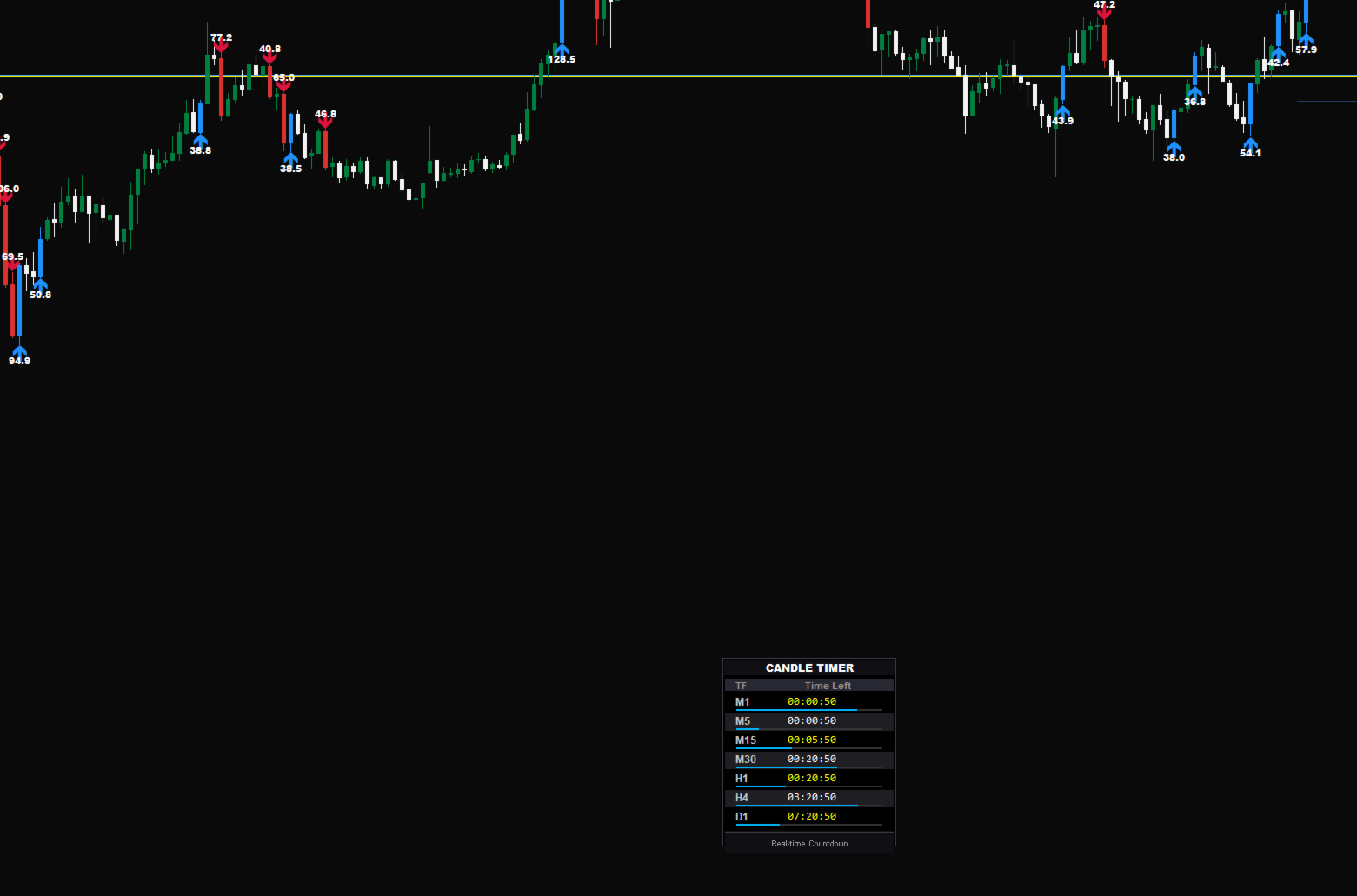
7 Timeframe Monitoring - M1, M5, M15, M30, H1, H4, D1 all in one panel
-
Visual Progress Bars - See candle completion at a glance
-
Smart Color Alerts - Changes to RED when less than 10 seconds remain
-
Flashing Warning - Highlights the last 5 seconds
-
Dual Color Display - Alternating Yellow/White for easy reading
-
6 Position Options - Top, Bottom, and Center positions available
-
Keyboard Toggle - Press 'N' to show/hide instantly
-
Zero Lag - Updates every second with minimal CPU usage
Perfect For
-
Scalpers - Precise entry/exit at candle open/close
-
Day Traders - Multi-timeframe confirmation timing
-
Price Action Traders - Catch important candle formations
-
Swing Traders - Monitor higher timeframe closes
Fully Customizable
-
Colors - Choose your own timer, alert, and background colors
-
Alert Timing - Adjust when alerts trigger (default: 10 seconds)
-
Progress Bars - Customize colors, height, and visibility
-
Position - 6 flexible positions including corners and center top/bottom
-
Toggle Key - Change the keyboard shortcut to your preference
How It Works
-
Attach the indicator to any chart
-
Monitor all timeframes simultaneously
-
Get alerted when candles are closing
-
Take action at the desired timing
The progress bar fills as the candle progresses, giving you instant visual feedback. When less than 10 seconds remain, the timer turns RED. At 5 seconds, it flashes to grab your attention.
Technical Specifications
-
Clean Code - Well-commented and efficient MQL5
-
Low Resources - Minimal CPU and memory usage
-
No Repainting - Accurate real-time calculations
-
Error Handling - Robust and reliable
-
Multi-Symbol - Works on any chart and symbol
Installation
-
Download and place the indicator in the Indicators folder
-
Restart MT5 or refresh the Navigator
-
Drag the indicator onto any chart
-
Customize the settings if desired
-
Press 'N' to toggle visibility
Pro Tips
-
Use Center Bottom position for a quick glance without blocking the chart
-
Set the alert to 15 seconds if you need more preparation time
-
Yellow timer indicates sufficient remaining time
-
Red timer indicates the candle is approaching its close
-
Combine the timer with your preferred trading strategy for better timing
Screenshots
Include screenshots showing:
-
Full panel with all timeframes
-
Progress bars in action
-
Red alert state
-
Different positions including corners and center
Version Information
Version 2.1 - Latest Release
-
Added Center Top/Bottom positions
-
Improved compact layout
-
Enhanced visual alerts
-
Optimized performance
What Traders Say
"Game changer for my scalping! Never miss M1 closes anymore." - John D.
"The visual progress bars are genius. I can see all TFs at once." - Maria S.
"Clean, professional, and exactly what I needed." - Ahmed K.
Support
Questions, issues, or feature requests? Contact: your email/website
Download now and take control of your trading timing.