
FJD Lot Calculator MQL5
- Experts
- Versione: 2.21
- Aggiornato: 5 agosto 2026

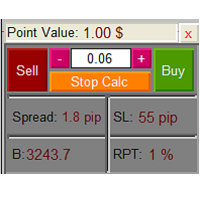
FJD Lot Calculator & Risk Manager EA is an all-in-one, high-performance trading assistant for MetaTrader 5. Designed for manual traders, scalpers, and prop firm challenge accounts, this tool combines dynamic position sizing, interactive order placement (Market & Pending Orders), and a real-time Account Risk Dashboard into a sleek, draggable on-chart interface.
Stop making volume calculation errors or struggling with lot size formulas. Simply drag your Stop Loss or Entry lines on the chart, let the EA calculate the exact risk-adjusted lot size, and execute Market or Pending orders with a single click.
🌟 Key Features
-
Dual Interactive Chart Lines:
-
SET SL LINE (Orange): Places a draggable Stop Loss line on your chart.
-
SET ENTRY (Blue): Places a draggable Limit/Pending Entry line on your chart to plan trades at specific price levels.
-
-
Smart Order Execution Engine:
-
Market Orders: If only the SL line is active, clicking BUY or SELL executes a Market Order at the current Bid/Ask.
-
Pending Orders (Limit & Stop): If the SET ENTRY line is active, clicking BUY or SELL automatically places the correct Pending Order ( Buy Limit, Buy Stop, Sell Limit, or Sell Stop) at the exact price of the entry line!
-
-
Built-in Account Risk Dashboard:
-
Symbol Risk: Displays active position count, total Take Profit potential in $, total Stop Loss risk in $, and floating profit for the current chart symbol.
-
Global Summary (All Symbols): Calculates aggregate active positions, total TP potential $, and total SL risk $ across ALL open trades in your entire account.
-
-
Independent One-Click Minimize / Maximize (− / +): Both the main trading panel and the risk dashboard feature dedicated minimize buttons. Collapse them into 30px compact bars to keep your chart clean and uncluttered.
-
100% Smooth Draggable Panels: Move the control panel and risk dashboard anywhere on your chart seamlessly using mouse drag.
-
Customizable Risk Percentage & Steps: Increase or decrease your Risk Per Trade percentage using on-screen + and − buttons with your preferred precision step (e.g., 0.1%, 0.25%, 0.5%).
-
Pre-Trade Safety Validation Engine: Built-in order checks verify Free Margin, Broker StopLevel boundaries, and Min/Max Lot limits before sending any order to prevent execution rejections.
-
Universal Multi-Asset Support: Optimized for Forex, Gold (XAUUSD), Silver, Crypto, Indices, and CFDs across 3, 4, and 5-digit brokers.
-
Real-Time Market Info: Displays live Spread (in pips) and Stop Loss distance in real-time.
🚀 How It Works
-
Attach FJD Lot Calculator EA to any MT5 chart.
-
Select your desired Risk Per Trade (%) using the + / − buttons or input parameters.
-
Click SET SL LINE to place the Stop Loss line.
-
(Optional) Click SET ENTRY if you want to place a Pending Order (Limit or Stop).
-
Drag the line(s) to your technical analysis levels. The calculated Lot Size and SL Distance update instantly in real-time.
-
Click BUY or SELL to execute the trade!
⚙️ Input Parameters
--- Risk & SL Settings ---
-
Initial Risk Per Trade (%): Sets your default risk percentage (e.g., 1.0%).
-
Risk Increase/Decrease Step (%): Determines the step increment for + and − buttons (e.g., 0.1%, 0.5%).
-
Default SL Line Distance (in pips): Initial placement distance for the SL line when drawn (e.g., 5.0 pips).
--- Risk Dashboard Settings ---
-
Show Risk Dashboard (ON / OFF): Enable or disable the floating Risk Dashboard.
-
Show All Symbols Summary (ON / OFF): Enable or disable the account-wide global position summary.
-
Dashboard Start X Position: Horizontal starting position of the dashboard.
--- General Settings ---
-
Position Confirmation: Enable (CONFIRM_YES) or disable (CONFIRM_NO) the order confirmation popup dialog.
-
Slippage (in points): Maximum allowed price slippage for orders.
-
Magic Number: Unique order identifier.
--- UI Position ---
-
Panel Display X Position / Y Position: Default panel starting coordinates.
Author: Amirhossein Farjad
Website: www.Farjad.org

































L'utente non ha lasciato alcun commento sulla valutazione.