Dawnbreak Session Range Breakout
- Experts
-
Pitt Petruschke
 Algo trader and EA developer from Germany. Founder of AlgoVerdict (algoverdict.com) – independent tests of Expert Advisors, brokers and signal platforms based on live accounts. Author of Dawnbreak, a session range breakout EA for MT5. My own EA park runs on real accounts; my signals are listed in
 - Versione: 3.50
- Attivazioni: 10
Full guide – how it trades, every setting, set files: mql5.com/en/blogs/post/776683
Recommended brokers: mql5.com/en/blogs/post/776684
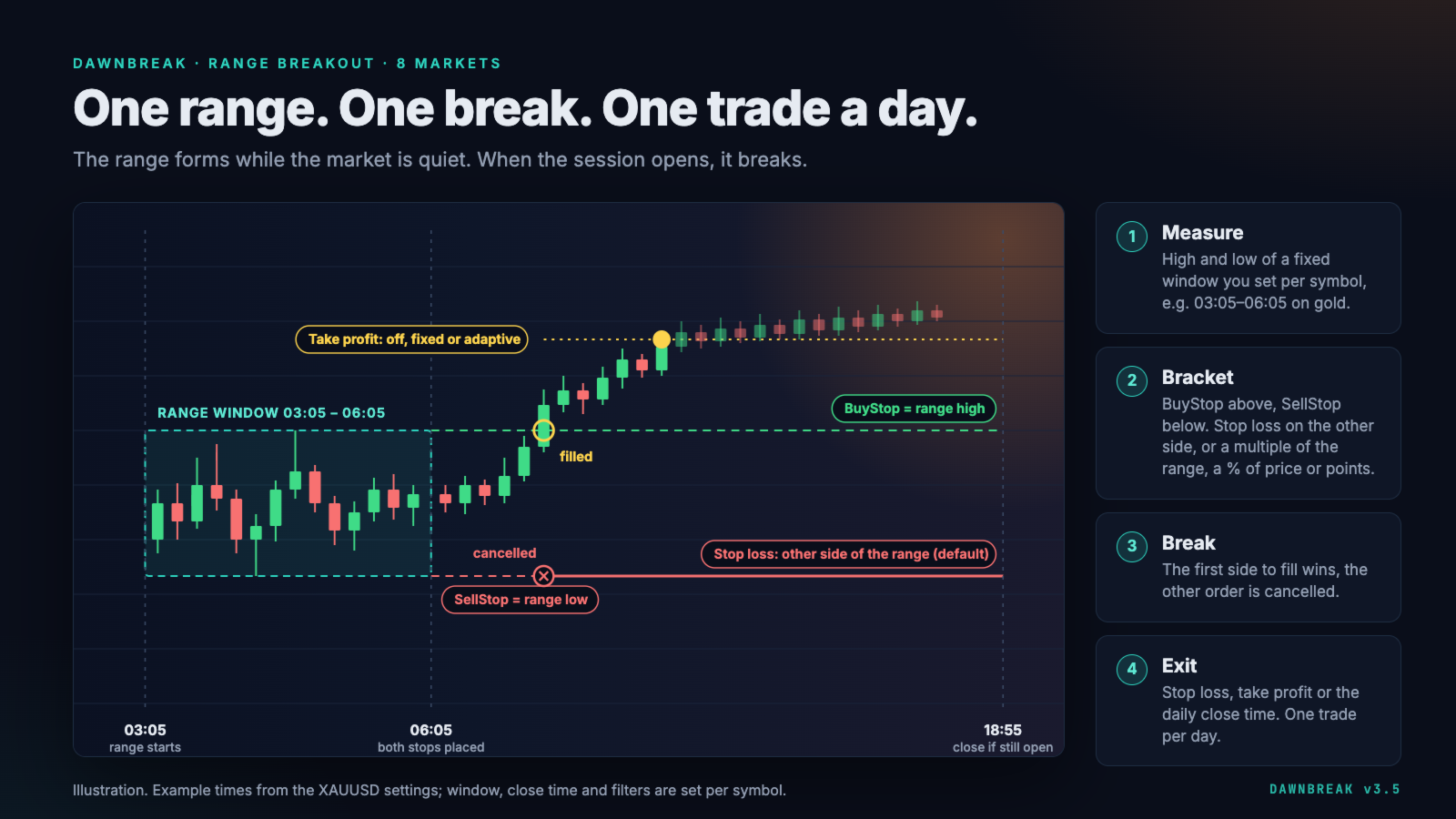
Dawnbreak is a session range breakout EA for MetaTrader 5 that trades gold, currency pairs, stock indices and Bitcoin. It places a BuyStop above and a SellStop below the range of a fixed time window; the first to fill cancels the other. One trade per day and chart, a stop loss on every trade, no grid, no martingale.
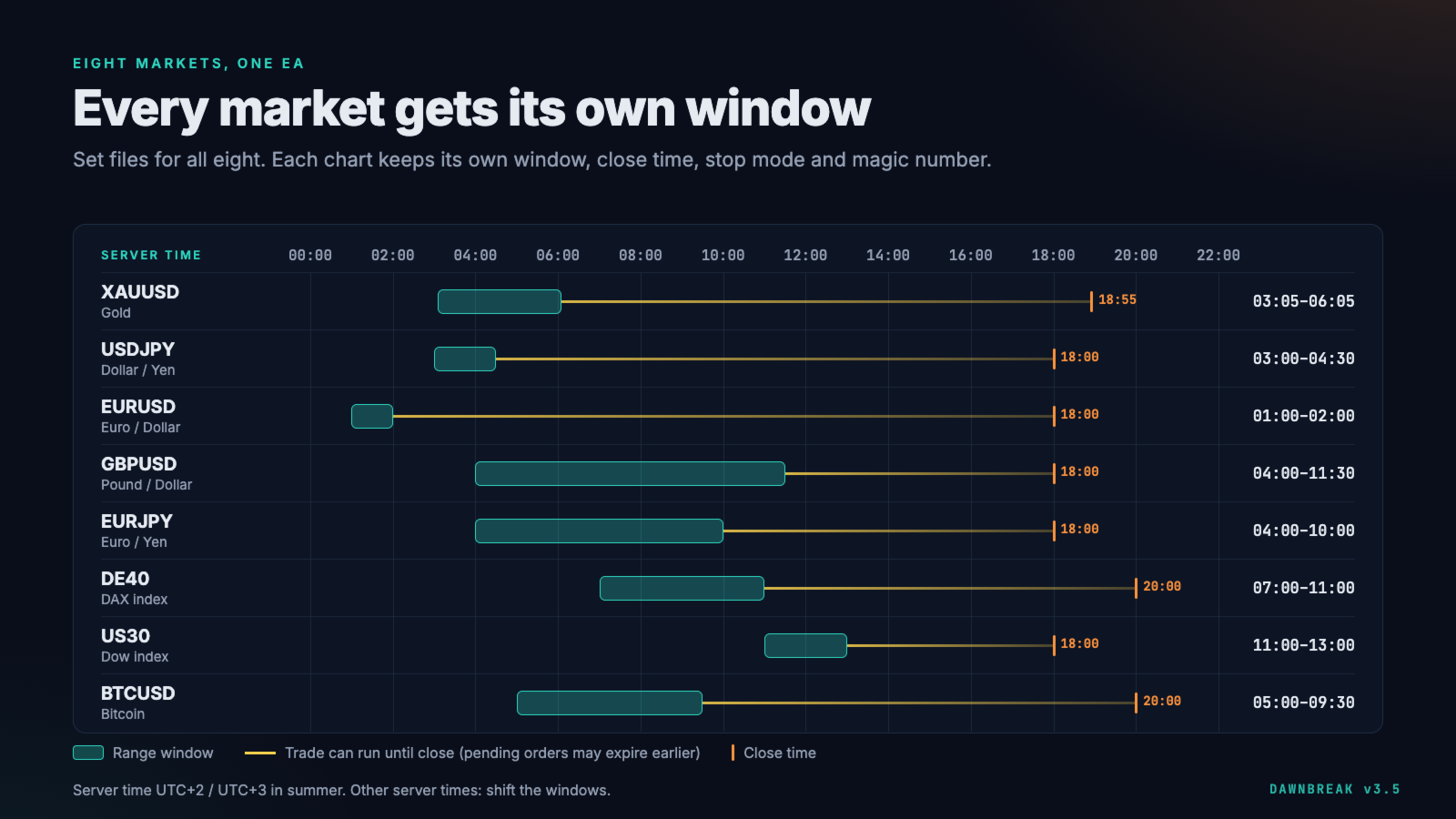
Each chart has its own time window, close time, stop mode and range filter. Set files for all eight markets are attached to the guide linked above. Also on board: an optional adaptive take profit that learns a target for each symbol, and a live dashboard on the chart.
How it trades
- Measure — high and low of a fixed time window, for example 03:05–06:05 on XAUUSD or 07:00–11:00 on DE40 (server time).
- Bracket — BuyStop at the range high, SellStop at the range low.
- Break — the first order to fill wins, the other one is cancelled (one cancels the other).
- Exit — stop loss, take profit or a fixed close time. Anything still open at the close time is closed.
One EA, eight markets
Dawnbreak runs on any symbol with M1 history. Dawnbreak can trade:
- Gold: XAUUSD
- Currency pairs: EURUSD, GBPUSD, USDJPY, EURJPY
- Stock indices: DE40, US30
- Crypto: BTCUSD
Each set has its own time window and close time and risks 1% of the balance per trade, with the stop loss at the opposite side of the range. Each set uses its own magic number, so several charts can run side by side on one account.
The set files are starting points. Only gold has been backtested so far. Symbol names, server time, spreads and contract sizes differ between brokers, so test each market in the Strategy Tester with your broker's data and on a demo account before you trade it live.
Risk and stop loss
Every trade has a stop loss. You choose how it is placed:
- Opposite side of the range (default)
- A multiple of the range, measured from the entry
- A percentage of price
- A fixed distance in points
Risk per trade is a fixed amount or a percentage of the balance, and the lot size follows the stop distance. When the orders are placed, the lot size is capped to your broker's maximum volume and volume limit and reduced to fit 90% of the free margin. If not even the minimum lot fits, the EA skips the day and says so in the log.
Adaptive take profit (optional)
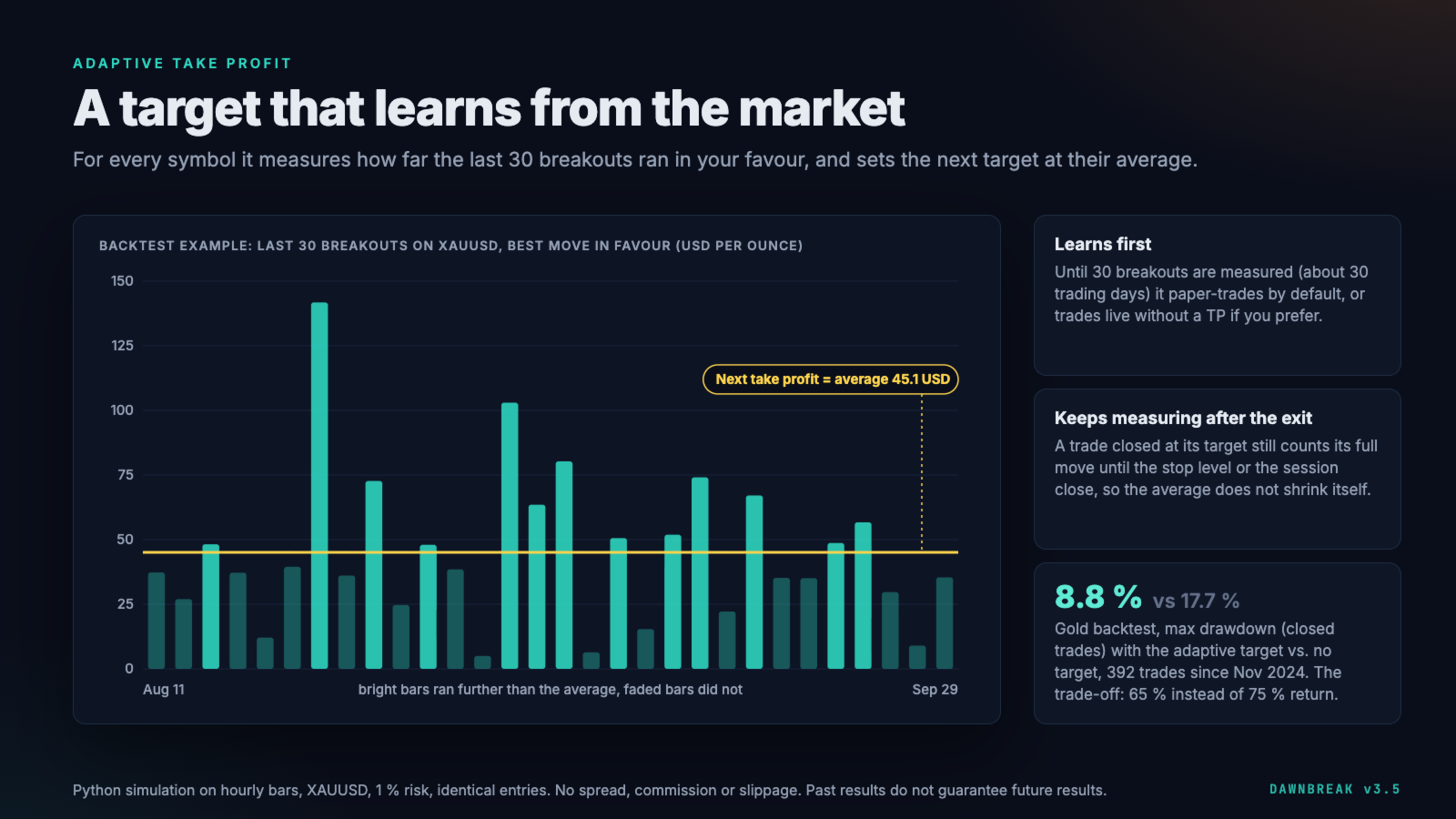
Instead of a fixed target, Dawnbreak can learn one for each symbol. After every breakout it records how far price moved in the trade's direction and sets the next target at the average of the last 30 breakouts. The measurement runs until the stop level or the session close, also after a target was hit, so the average does not shrink itself.
Until 30 breakouts are recorded (usually six to eight weeks), it paper-trades by default and places no orders. You can also let it trade live without a take profit during this phase. An optional floor and cap keep the target within a multiple of the range. A fixed take profit or no take profit are available as well.
Protection and dashboard
- Range window, pending-order expiry and close time adjustable within one server day
- Break-even and trailing stop, in points or as a multiple of the range
- Range filter: skip ranges that are too small or too wide (points or % of price)
- Daily loss limit for this chart (closed and open result), pause after a losing streak, maximum spread, trading days
- If both pending orders disappear before a fill (deleted by another program, by hand or by the broker), the bracket is placed again, up to 8 times a day and only until the pending-order expiry. To stop for the day, remove the EA from the chart.
- After a restart of the terminal, the EA finds its orders again; if a trade already filled that day, the leftover order is removed
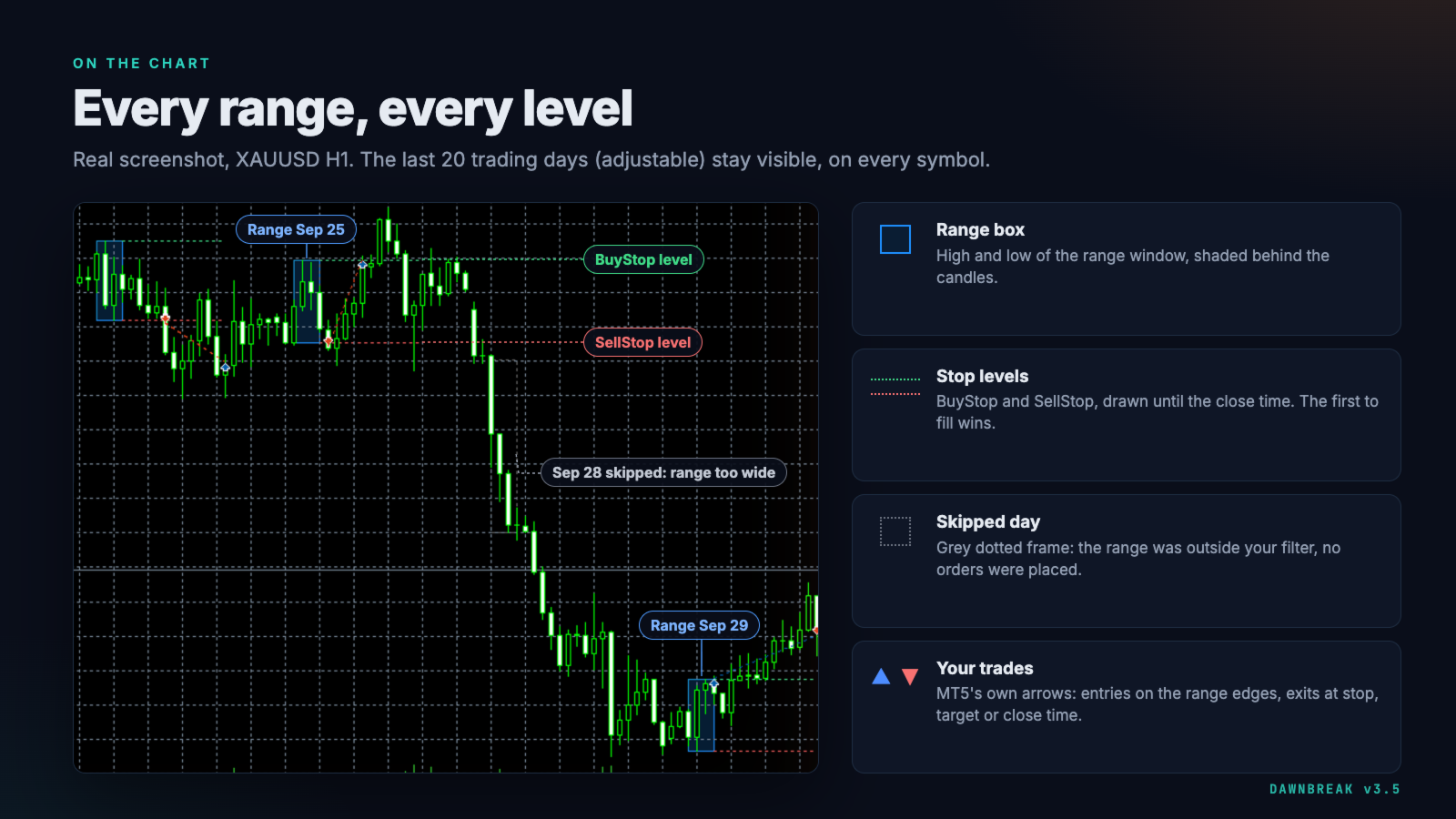
- Past ranges and their BuyStop and SellStop levels drawn on the chart for the last 20 trading days (adjustable); days skipped by the range filter are marked
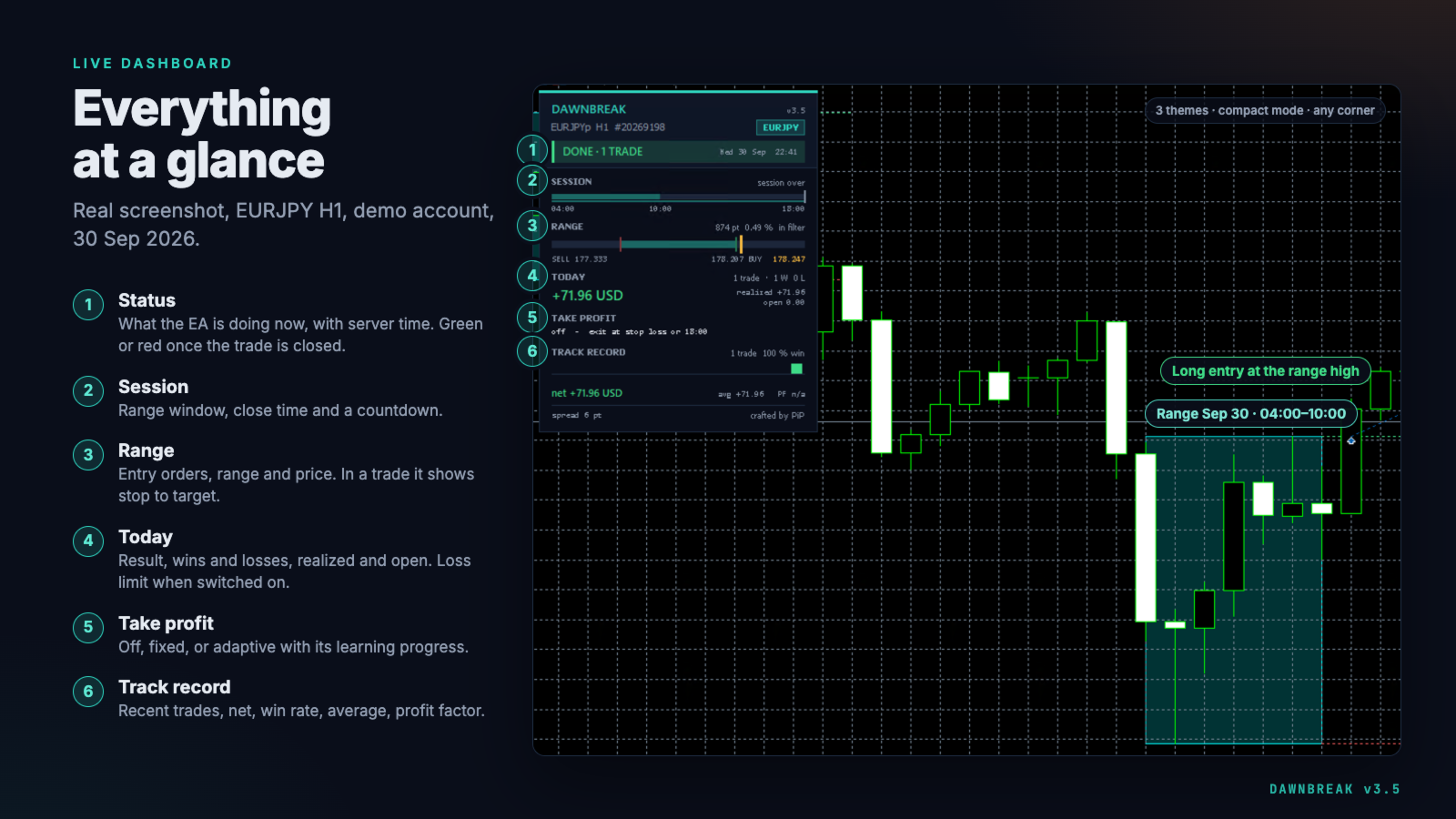
- Live dashboard: status, session timeline, range and price, today's result, loss limit, take profit, recent trades. Three themes, compact mode, any chart corner
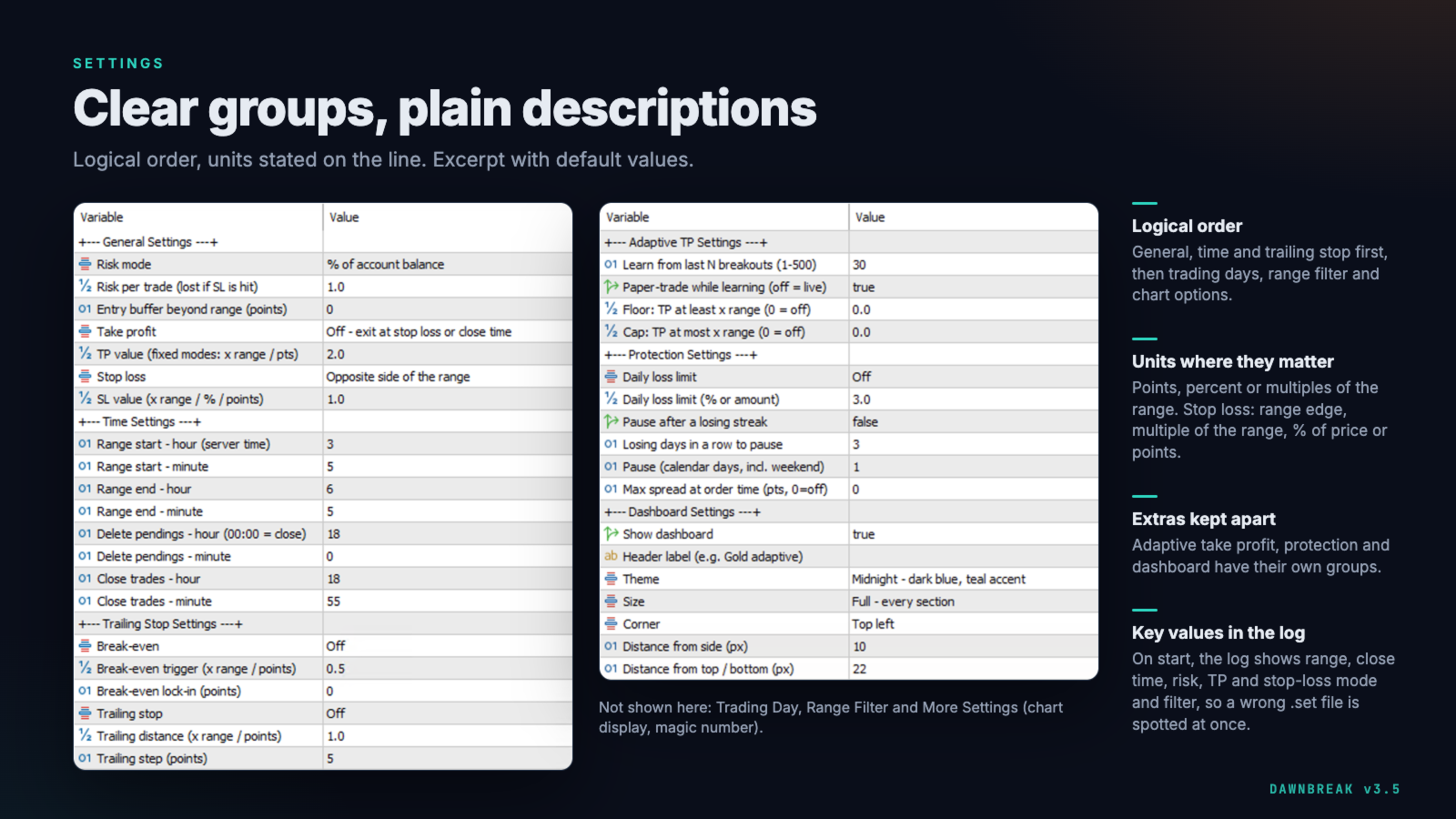
- On start, the Experts log shows the key settings (range window, close time, risk, take-profit and stop-loss mode, range filter, pending-order expiry), so a wrong set file is easy to spot
Requirements
- MetaTrader 5, hedging or netting account. On a netting account, do not trade the same symbol by hand or with another EA.
- The terminal must stay online during the session; a VPS is recommended. The EA cancels the second order and closes at the close time itself.
- Your broker must accept pending orders with an expiry time.
- Any chart timeframe; the range is read from M1 history.
- Check your broker's server time. The example windows assume UTC+2 in winter and UTC+3 in summer; shift them if your broker differs.
- Symbol names differ between brokers: the DE40 set also works on GER40, the gold set on XAUUSD with a suffix.
- Wide ranges need more capital at the same risk: gold at 1% risk with ranges of 20–75 USD needs about 7,500 USD or more.
- Risk adds up across charts. Eight charts at 1% each can put up to 8% of the balance at risk on the same day.
- Strategy Tester: use "Every tick based on real ticks". The adaptive take profit starts with no samples in every test; with paper trading on, the first 30 breakouts place no orders.
Backtest example (gold only)
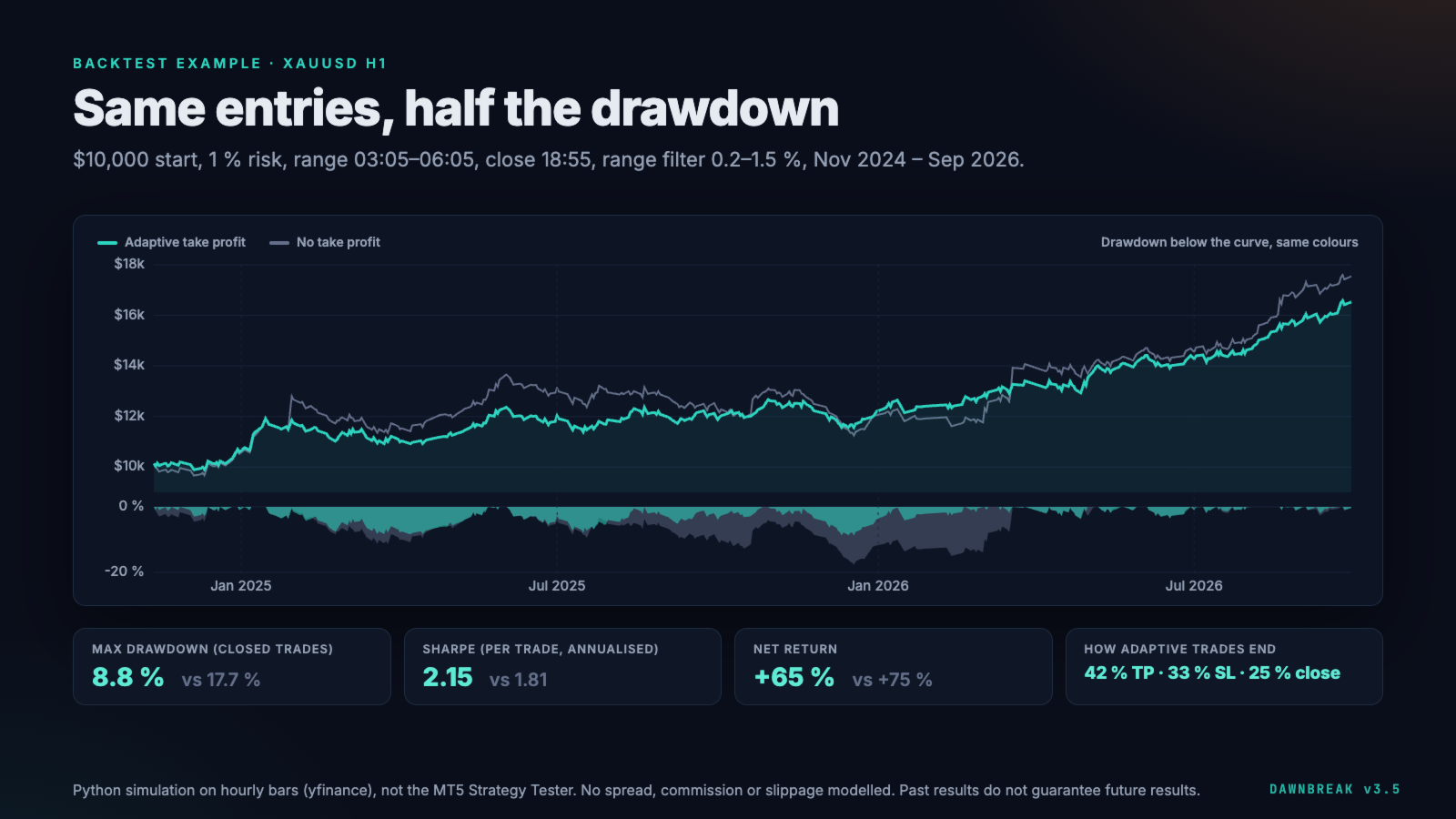
Settings of the gold example set: 1% risk per trade, range 03:05–06:05, close 18:55, stop loss at the opposite side of the range, range filter 0.2–1.5%. Nov 2024 – Sep 2026, 392 trades:
- No take profit: +75%, maximum drawdown 17.7% (closed trades)
- Adaptive take profit, paper trading off: +65%, maximum drawdown 8.8% (closed trades)
Python simulation on hourly gold futures data as a proxy for XAUUSD, not the MT5 Strategy Tester. Hourly bars cannot reproduce the exact range window. No spread, commission or slippage modelled. Other markets have not been backtested.
Risk warning: trading forex and CFDs on margin carries a high risk of loss. Backtests are simulations; past results do not guarantee future results.
Settings and support
Inputs are grouped by topic, and every value that needs a unit states it on the line. Set files and the full settings guide: see the links at the top of this description.
Questions and bug reports through the comments or a private message. Please include your broker, symbol, the set file and the Experts log lines from the day in question.