Architectural Griding Expert System
- Utilità
-
Sina Mohammadamin Shahriari Moghadam
 Sono uno sviluppatore professionista di trading algoritmico con oltre 7 anni di esperienza nei mercati finanziari e più di 100 Expert Advisor e Indicatori personalizzati sviluppati in MQL4/MQL5.
 - Versione: 3.10
- Attivazioni: 5
Architectural Griding Expert Advisor: Advanced Grid Trading System
Overview
This Expert Advisor (EA) is a sophisticated grid-based trading system designed for MetaTrader 5 (MT5). Developed by me, this EA automates grid trading strategies with separate configurations for Buy and Sell grids, allowing traders to capitalize on market ranges, trends, and reversals. It incorporates advanced risk management, customizable grid levels, lot sizing modes, and a user-friendly graphical interface (UI) for real-time control.
This EA is ideal for experienced traders seeking a robust, multi-functional grid system. It supports range-bound trading with visual tools like draggable rectangles for defining price ranges, virtual take-profits (TP), and capital management modes to handle drawdowns. With built-in filters for spreads, slippage, news events, and trading hours, it minimizes risks while maximizing efficiency.
Key Benefits:
- Flexible Grid Setup: Independent Buy/Sell grids with variable step multipliers for asymmetric strategies.
- Risk Controls: Profit/Loss targets, breakeven modes, and position limits to protect capital.
- Interactive UI: Drag-and-drop ranges, buttons for quick actions (Start, Pause, Close), and a built-in calculator for lot sizing based on max loss.
- State Persistence: Automatically saves and loads configurations across sessions or restarts.
- No External Dependencies: Runs natively on MT5 without needing additional DLLs or indicators.
Note: Trading involves risks. Backtest thoroughly on a demo account before live use. This EA does not guarantee profits and should be used with proper risk management.
Key Features
- Dual Grid System: Separate Buy and Sell grids with customizable levels, steps, and multipliers. Supports below/above zero multipliers for adaptive spacing (e.g., tighter grids near entry, wider in extremes).
- Lot Sizing Modes:
- Constant Lot Multiplier: Multiplies lots every N steps for progressive sizing.
- Split Levels: Different lot sizes for the first and second half of the grid (e.g., smaller lots near base, larger in extremes).
- Position Management:
- Max positions per level and total positions at grid extremes.
- TP Level Offset: Sets virtual TP at an offset from the target level.
- Positions Without TP: Configurable number of positions (e.g., the deepest ones) that run without TP for hedging or averaging.
- Capital Management Modes:
- None: Standard operation.
- Close: Closes all positions immediately.
- Pause: Stops new trades but allows existing ones to run.
- Pause TP: Pauses TP executions for manual intervention.
- Stop: Closes profitable positions and halts new trades.
- Average: Closes all trades at breakeven when profit is positive or price hits a threshold.
- Profit/Loss Targets: Global USD-based targets to close all positions on reaching profit or limiting loss (0 to disable).
- Filters and Restrictions:
- Spread/Slippage Limits: Separate for Buy/Sell to avoid high-volatility entries.
- Trading Hours/Days: Restrict to specific hours (e.g., 9-17) and days (Mon-Fri).
- News Filter: Limits trades per candle on a specified timeframe (e.g., M15) to avoid news spikes.
- UI Elements:
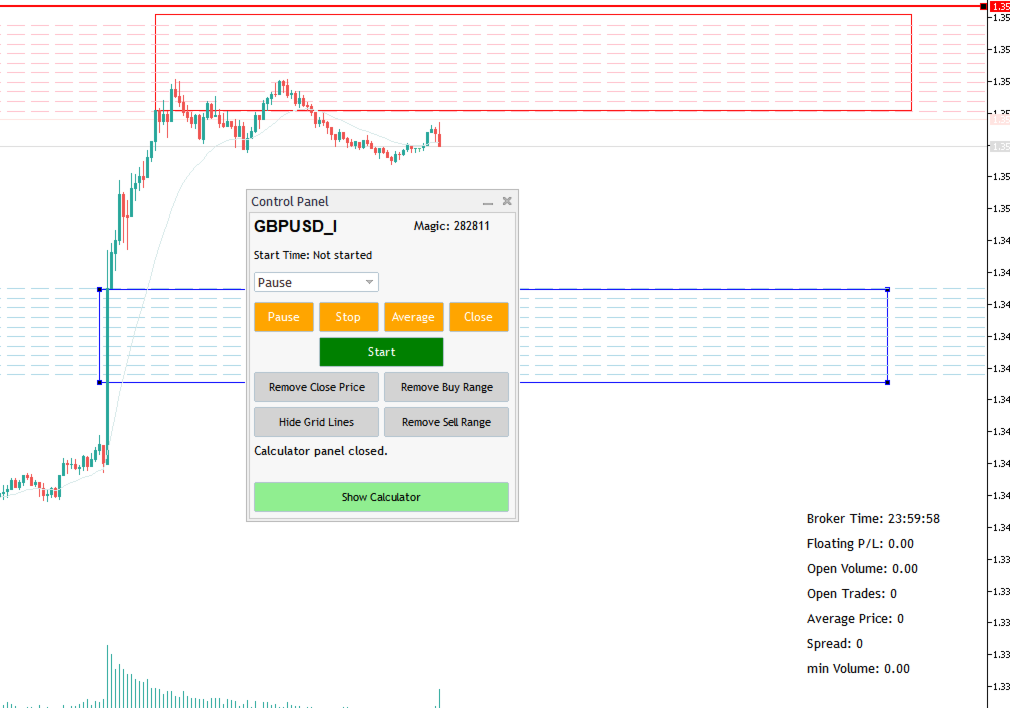
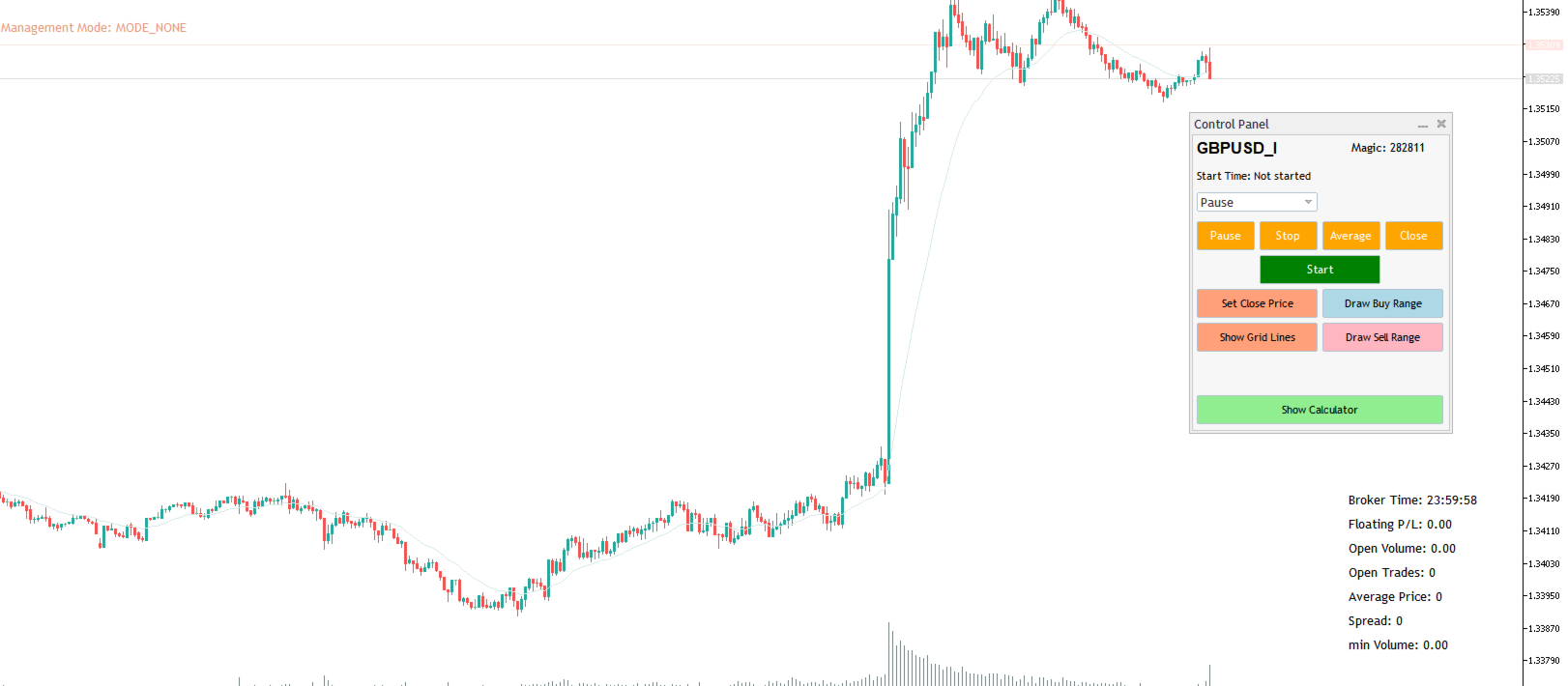
- Control Panel: Buttons for Start, Pause (with mode selector), Stop, Average, Close, Draw/Remove Ranges, Set Close Price, Show/Hide Grid Lines, and Show Calculator.
- Info Panel: Displays broker time, floating P/L, open volume, open trades, average price, spread, and min volume.
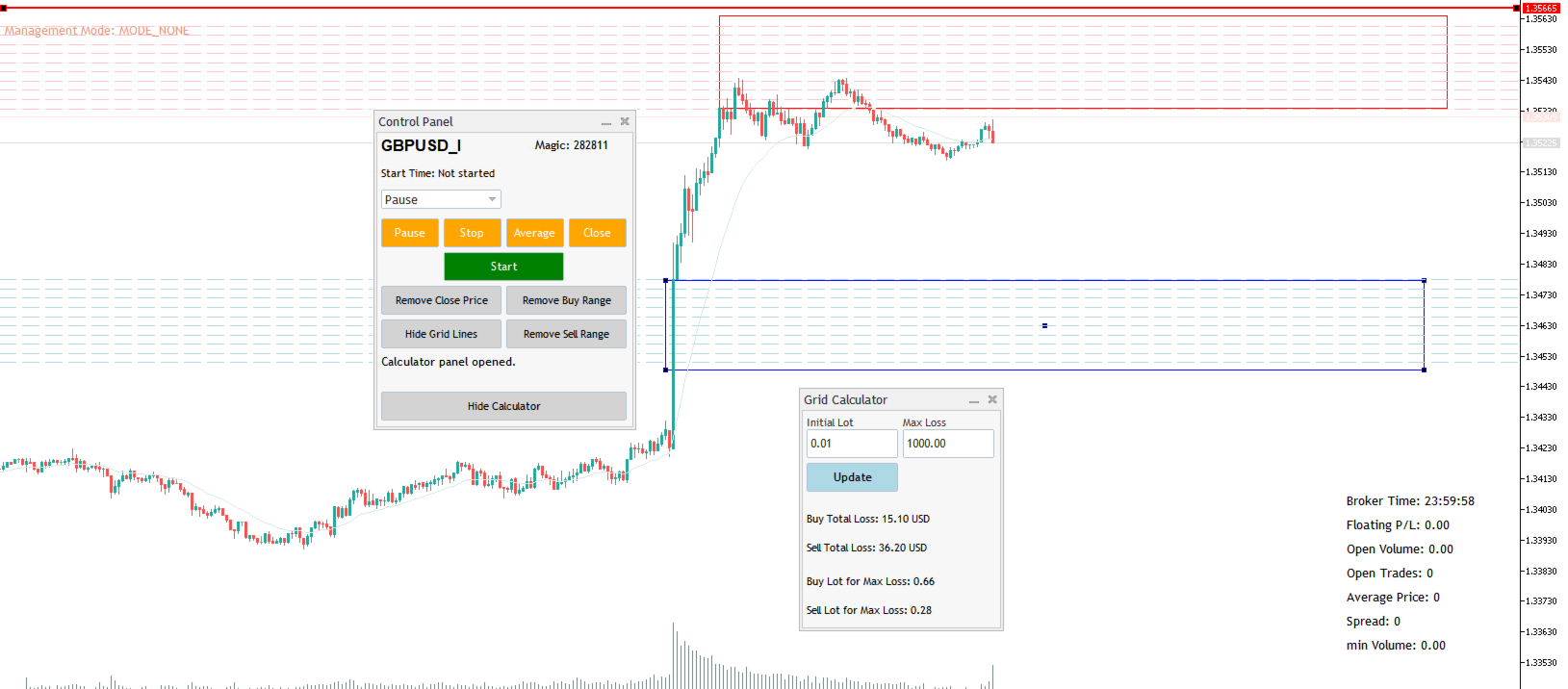
- Calculator Panel: Computes total potential loss for grids and suggests initial lots based on max acceptable loss.
- Visual Tools: Draggable rectangles for Buy/Sell ranges, horizontal line for close price, and optional grid lines with labels.
- Breakeven and Close Price: Automatically calculates breakeven price; optional close-all line for price-based exits.
- Gap Detection: Detects and blocks levels skipped due to price gaps, unblocking them when price revisits.
- Candle Timer: Displays time remaining for the current candle.
- License and Security: Optional license key with expiration check via server time.
- Performance Optimizations: Stateful REPL-like code execution, debouncing for buttons, and efficient position tracking.
Input Parameters
The EA is highly configurable through grouped inputs. All parameters are accessible via the MT5 Inputs tab.
Buy Grid Settings:
- MagicNumberBuy: Unique identifier for Buy positions (default: 282811).
- MaxSpreadBuy/MaxSlippageBuy: Max allowed spread/slippage in points (default: 100/10).
- GridLevelsBuy: Number of grid levels (default: 10).
- StepSizeBuy: Grid step in points (default: 100).
- StepMultiplierBuy: Below|Above zero multipliers (e.g., "1|1" for uniform; default: "1|1").
- StartingLotSizeBuy: Initial lot size (default: 0.01).
- LotMode: Constant or Split (default: Constant).
- LotMultiplierBuy: Multiplier for constant mode (default: 1.0).
- LotSizeFirstHalf/LotSizeSecondHalf: For split mode (defaults: 0.01/0.02).
- LotStepIntervalBuy: Apply multiplier every N steps (default: 1).
- MaxPositionsPerLevelBuy: Max trades per level (default: 1).
- MaxPositionsAtExtremeBuy: Max total trades at grid end (default: 10).
- TPLevelOffsetBuy: TP offset from target level (default: 1).
- NoPositionsWithoutTPBuy: Number of deepest positions without TP (default: 0).
Sell Grid Settings: Mirror of Buy settings with separate values (e.g., MagicNumberSell: 982811).
Profit/Loss Settings:
- ProfitTarget/LossTarget: USD targets to close all (0=disabled; defaults: 0.0/0.0).
Capital Management Settings:
- CapitalManagementMode: Default mode (None, Close, etc.; default: None).
- BreakevenThreshold: USD threshold for Average mode (default: 0.1).
Trading Time Settings:
- RestrictTradingHours: Enable time restrictions (default: false).
- TradeStartHour/TradeEndHour: Trading window (defaults: 9/17).
- TradeDays: Comma-separated days (1=Mon,5=Fri; default: "1,2,3,4,5").
News Filter Settings:
- RestrictNewsFilter: Enable (default: false).
- MaxTradesPerCandle: Max trades per candle (default: 2).
- NewsCandlePeriod: Timeframe for filter (default: M15).
UI Settings:
- RangeObjectNameBuy/Sell: Names for range rectangles (defaults: "PriceRangeBuy/Sell").
- ClosePriceObjectName: Name for close line (default: "ClosePriceLine").
- PanelPosition: Panel location (Default, Top Left, etc.; default: Default).
- UseSavedPanelPosition: Load saved position (default: false).
Candle Time Settings: Customize label color, size, anchor, etc. (defaults provided).
Saving File Settings:
- saveFile: Save settings on close (default: true).
How It Works
- Setup Ranges: Use the UI to draw Buy/Sell rectangles on the chart. The EA calculates grid levels from the rectangle's top/bottom (with 2-pip margin optional).
- Start Trading: Click "Start" to activate. The EA opens positions at grid levels when price hits them, respecting filters.
- Grid Logic: Positions open in the direction of the grid (Buy below base, Sell above). Lots adjust per mode. Virtual TPs trigger closes without modifying orders.
- TP and No-TP Handling: Most positions get TP at offset levels; deepest ones (per config) run open for recovery.
- Capital Modes: Activate via buttons; e.g., Average closes at breakeven if profit >0 or price near threshold.
- Exits: Via TP, profit/loss targets, close price line, or manual buttons. Gaps block skipped levels until revisited.
- Monitoring: UI updates real-time stats. Calculator helps size lots for risk (e.g., max loss of $1000 yields suggested initial lot).
Installation and Usage
- Download: Place the .ex5 file in MT5's Experts folder. Compile in MetaEditor.
- Attach to Chart: Open a chart (e.g., XAUUSD H1), attach the EA, and configure inputs.
- UI Interaction: Panel appears (draggable). Draw ranges, set modes, and start.
- Backtesting: Use MT5 Strategy Tester with historical data. Optimize parameters like steps/multipliers.
- Live Trading: Start on a small account. Monitor via UI and logs.
Risk Warnings and Tips
- High Risk: Grid systems can lead to large drawdowns in trending markets. Use low leverage and small lots.
- Broker Compatibility: Ensure low spreads and fast execution. Test on your broker's demo.
- Optimization: Backtest with varying parameters. Avoid over-optimization.
- Updates: Check for version updates from the developer (Telegram: @tradearchitecturegrid).
- Support: Contact via the provided link for questions.
This EA empowers you with professional-grade grid trading—buy now and elevate your strategy! If you need custom modifications, reach out.