Virtual TP SL TS

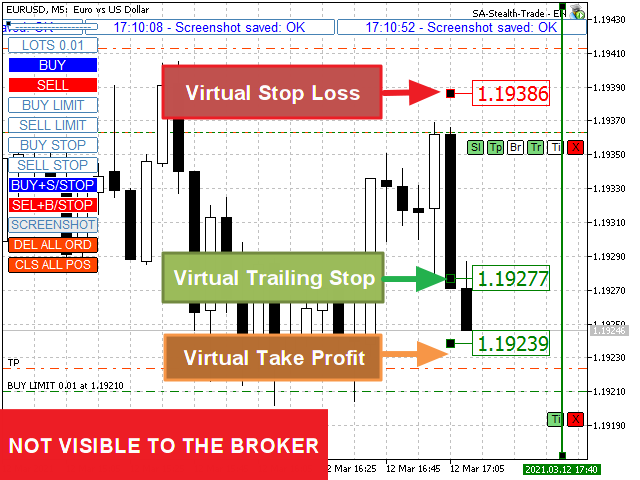
Make your Take Profit, Stop Loss, and Trailing Stop levels invisible to the broker!

Main option: STEALTH MODE

  • Virtual Trailing Stop
  • Virtual Take Profit
  • Virtual Breakeven
  • Virtual Stop Loss
  • Virtual Orders Lifetime

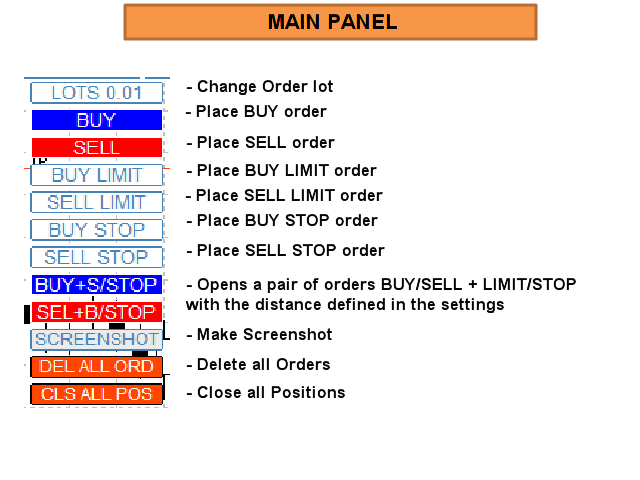
WARNING: The Expert Advisor does not place orders by itself. You must open orders yourself (including through the Expert panel) or use a third-party Expert on another chart of the same currency pair. Please specify the Magic number "-1" in the Expert settings for the Expert to process these orders

For testing use VISUAL MODE !!!

WORK ALGORITHM

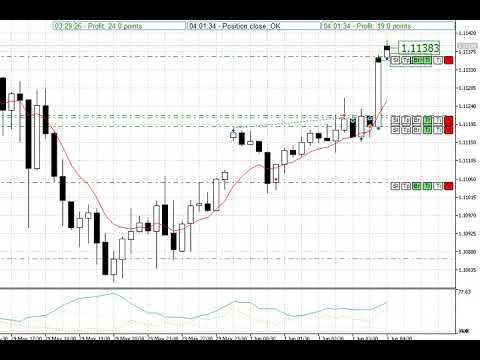
When you (or another Expert Advisor) open a BUY / SELL order, or a pending order is triggered, or there may already be open positions/orders on the chart, the Expert will install the control panels and start tracking the v-StopLoss, v-BreakEven, v-TakeProfit parameters.

REMINDER:  When you use a Magic number other than "-1" the Expert will only track orders/positions opened through its Panel

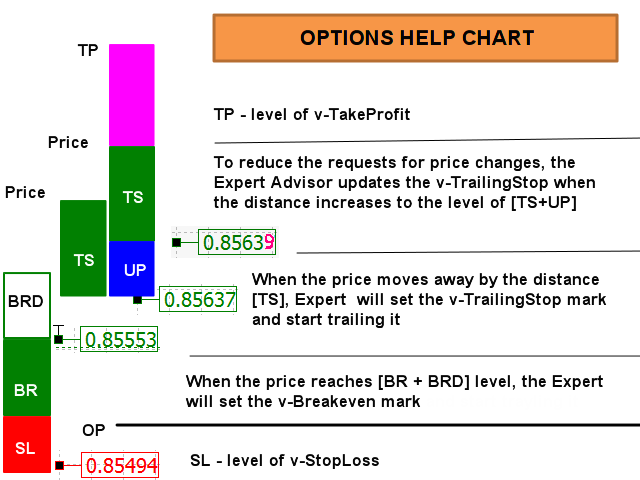
ABBREVIATIONS USED:  v-SL=Virtual StopLoss, v-BR= Virtual BreakEven, v-BRD= Virtual BreakEven Distance, v-TS= Virtual TrailingStop, UP=Refresh TralingStop. 

See picture “OPTIONS HELP CHART” for visual perception of the algorithm.

When the price reaches the [v-SL] level, position will be closed.

When the price reaches the [v-BR + v-BRD] level, the v-BR mark will be set at the [v-BR] level. If the price approaches the v-BR mark, the order will be closed.

If the "Tr" button is enabled on the “Position control panel”: When the price moves away from the level [v-BR] by the distance [v-TS] (or [OpenPrice], when V-BR Mode was not used), the "Br" button will be disabled, the v-BR mark will be replaced with the v-TS mark and the price trolling at the [v-TS] distance will start.

Buttons: "Br", "Tr" are enabled by default

If the price approaches the v-TS mark, the position will be closed.

If the button "Tp" on the “Position control panel” is activated: If the price approaches the v-TP mark, the position will be closed.

If the button "Ti" on the “Position control panel” is activated: When the price approaches the TimeClose Line, the order/position will be closed.


POSITIONS/ORDERS CONTROL PANELS

Panel for open positions has 6 buttons, orders panel - only 2 ("Ti" and "X"). When a pending order is triggered, it's panel is replaced by the panel of an open position!

Button “Sl”. When enabled, the virtual Stop Loss tracking mode works. The EA places a v-SL mark on the chart and tracks the position of the price relative to it. You can adjust the v-SL by simply moving the v-SL marker on the chart (NOT WORK IN TEST MODE). When the price reaches the [v-SL] level, position will be closed.

Button “Tp”. When enabled, the virtual Take Profit tracking mode works. The EA places a v-TP mark on the chart and tracks the position of the price relative to it. You can adjust the v-TP by simply moving the v-TP marker on the chart (NOT WORK IN TEST MODE). When the price reaches the [v-TP] level, position will be closed.

Button “Br”. When enabled, the virtual Breakeven tracking mode works. When the price reaches the [v-BR + v-BRD] level, the EA places a v-BR mark on the chart at the [v-BR] level.

Button “Tr”. When enabled, the virtual Trailing Stop tracking mode works. When the price moves away from the level [v-BR] (or [OpenPrice], when V-BR Mode was not used)  by the distance [v-TS], the EA places a v-TR mark on the chart and tracks the position of the price relative to it at the [v-TS] distance. Button “Br” will be disabled; the v-BR mark will be replaced. You can also adjust the v-TR by simply moving the v-TR marker on the chart (NOT WORK IN TEST MODE).

Button “Ti”. When enabled, the virtual order's / position's Lifetime tracking mode works. EA places a v-Ti line on the chart. You can adjust the trigger time by simply moving the line on the chart (NOT WORK IN TEST MODE). When the price approaches the TimeClose Line, the order/position will be closed.

Button “X”. Closes an order/position.

See pictures “OPTIONS HELP CHART”, “CONTROL ELEMENTS”


Virtual SL TP Trailing + TRADING PANEL + VIRTUAL MANAGEMENT PANEL + NEWS ADVISOR & NEWS FILTER

https://www.mql5.com/ru/market/product/75210


Full Description and Settings can be found here: <link>


Produits recommandés
Cet outil peut vous aider à clôturer toutes les commandes ouvertes en un seul clic, cliquez simplement sur « Tout fermer ». Si vous souhaitez uniquement clôturer les ordres rentables, cliquez sur le bouton « Fermer les ordres rentables ». Après avoir cliqué, tous les ordres flottants seront fermés ; Si vous souhaitez uniquement clôturer les ordres avec des pertes flottantes, cliquez sur le bouton « Fermer les ordres perdants ». Après avoir cliqué, tous les ordres avec des pertes flottantes seron
GS trade report
Aleksander Gladkov
5 (1)
3 in 1 : Report + monitoring + sending messages (Telegram, ...) to optimize trading and use of advisors. Monitoring: Panel on the chart Sending messages to Telegram Sending messages to Email Sending Notifications Sending pop-up messages Sound notifications when the established Profit/Loss levels are exceeded Monitoring is activated by pressing the Start button. Profit for the period by currency pairs, hours and Magic number for the current account. Forms four tables: by symbols, by magic number
T Manager for Price action Traders
Haidar Lionel Haj Ali
4.5 (10)
Maximisez votre succès en trading avec T Manager, la solution ultime de gestion du commerce conçue par des traders pour les traders. Avec son interface conviviale et ses fonctionnalités avancées, vous pouvez planifier, exécuter et gérer rapidement et facilement vos opérations de trading. Expérimentez un contrôle sans égal en ayant la possibilité de définir vos opérations de prix, vos stop loss et vos bénéfices avec facilité. Gérez votre risque avec précision et calculez la valeur monétaire de vo
Spread and Swap monitor
Hennadii Stanilevych
5 (1)
The indicator is intended for determining the spread and swap size, the distance for setting stop orders and stop losses from the current price allowed and the risk per 1 point in the deposit currency. The indicator informs a trader about possible additional expenses and profits connected with transferring a position to the next trade session of the financial instrument. It also informs about the spread size and the distance of pending orders, stop loss and trailing from the current price. In ad
RealCost Auditor MT5 is an execution-cost monitor for MetaTrader 5. It does not open, close, or modify trades. It watches the chart symbol, samples live spread, records executed deals, estimates signed slippage when the terminal exposes the requested price, and saves a local CSV audit file. Many backtests use spread, slippage, commission, and swap assumptions that are cleaner than real trading conditions. This utility gives you broker and account data from your own terminal before you trust a s
One Click Trader  is a tool designed for MetaTrader 4 platform, which enables you to take your trading to the next level. It enables you to open, manage and close your trades in simple an efficient way by just one click of your mouse button. "-"   ,  "+"  change OCT window size  Up arrow minimizes the OCT panel Down arrow maximizes the OCT panel Right arrow displays the next panel with additional features Left arrow hides the panel with additional features Red  SELL  button enables you to open s
Visual Trade Manager for MT5 is an interactive trade execution and position management tool designed for traders who want fast chart-based control over risk and execution. The panel provides a visual trade box with entry, stop and target lines directly on the chart. Position size is calculated from the selected risk percentage, and the tool supports both market execution and pending order placement. Main features - BUY and SELL switching directly from chart buttons - Draggable Entry, Stop and
AW Metatrader to Telegram MT5
AW Trading Software Limited
5 (1)
Un système automatisé d'envoi de notifications afin qu'aucun de vos abonnés ne rate vos événements de trading depuis votre terminal de trading. Un utilitaire qui envoie des notifications au messager Telegram sur toutes les opérations de trading sur votre compte. Instructions pas à pas pour connecter l'utilitaire à une chaîne dans Telegram -> ICI / MT4 -> ICI Avantages : Installation facile et instructions détaillées, Possibilité d'envoyer des captures d'écran ajustables, Texte de notification pe
SPICA CLICK TRADE CONTROL MT5 Spica Click Trade Control is a complete one-click trading panel for MT5 — built for traders who want speed without giving up control. Every trade shows you the exact lot size, dollar risk, and reward before you click Buy or Sell. Manage open positions with breakeven, trailing stops, and partial closes. Protect your whole account with automatic equity-based shutoffs. All from a clean, tabbed panel that stays out of your way until you need it. KEY FEATURES Trading
Master Close via Telegram can help you perform some management tasks on MT4/MT5 remotely via your Telegram by one click, easy to set up & use. Demo here (see more Master Notify   Master Control ) ************************************************************************************ LIST OF COMMANDS: info_acc -  Get account info info_pen -   Get pending orders details info_pos -   Get positions details info_pos_sum -   Get positions summary close_pen -   Delete all pending orders close_pos_all -  
Position Prime
Mariana Cordeiro Neves Fernandes
Téléchargez dès maintenant la version de démonstration gratuite et testez toutes les fonctionnalités de gestion des risques de votre outil de test de stratégie avant d'acheter ! Position Prime est un assistant d'exécution visuelle et un gestionnaire de risques de niveau institutionnel pour MetaTrader 5. Conçu pour les traders qui exigent vitesse et précision, il élimine le besoin de calculs manuels de lots et transforme votre graphique en une véritable station de trading. Planifiez, exécutez et
Simple Telegram Notification – Stay Informed on Your MT5 Trading Activity! Stay connected with your MetaTrader 5 trading activity using Simple Telegram Notification , the Expert Advisor that sends real-time notifications to your Telegram app whenever orders are opened, modified, or closed . Whether you're at your desk or on the move, you’ll always be up-to-date with critical trading information. Key Features: Order Notifications : Receive instant Telegram alerts whenever an order is opened, mod
Un utilitaire qui mesure comment votre courtier exécute vos ordres. Attachez-le à n'importe quel graphique : il surveille chaque transaction du compte de trading - ordres de tous les Expert Advisors, trades manuels depuis le terminal de bureau, web ou mobile, exécutions de stop loss et de take profit - et enregistre, pour chaque exécution, ce qui a été demandé et ce qui a été obtenu. Il n'ouvre, ne modifie ni ne clôture jamais une position sur un compte réel. Ce qu'il enregistre pour chaque exéc
Neuron News Risk Manager MT5 Neuron News Risk Manager MT5 est un système de protection contre les actualités économiques, de gestion du risque et de contrôle à distance via Telegram pour MetaTrader 5. Il surveille le calendrier économique MT5 et affiche le prochain événement, la devise, l'heure, l'importance, l'impact et le temps restant. Les événements Low, Medium et High peuvent être filtrés et affichés sous forme de lignes sur le graphique. Le Global Algo Trading Guard peut désactiver automat
Détecteur de Marge Élevée Requise (HMR) pour MT5 Détectez les événements de Marge Élevée Requise (HMR) d'Exness et choisissez quoi faire de vos trades ouverts. Le Détecteur HMR est un utilitaire MetaTrader 5 conçu pour surveiller les conditions HMR liées à Exness sur votre compte et répondre automatiquement selon vos paramètres. Qu'est-ce que le HMR ? Le HMR est une condition liée à la marge qui s'applique à certains instruments et périodes nécessitant des exigences de marge plus élevées. Si vou
Manager Trader
Muhammad Firdaus Bin Zainun
Manual Trade Manager for MT5 This is not auto trade ea. It Manage your manually opened trades from one simple chart panel. Monitor your positions in real time and act on multiple layers with a single click. Features CLOSE ALL: Sends fast asynchronous close requests for managed manual positions. BE ALL: Checks each layer individually and sets its stop loss only when that layer has reached your chosen profit threshold. BE SET: Applies your current BE step setting to eligible layers. Optional Avera
ApexForge Economic Calendar Safety Dashboard Calendrier économique MT5 | Calendrier économique Forex | News Filter | Alertes des annonces économiques majeures | Compte à rebours des événements économiques | Clôture d'urgence | Close All | Alertes jours fériés | Alertes de clôture anticipée | KTimer | Compte à rebours des bougies | Notifications Push mobiles | 12 langues + Auto ApexForge Economic Calendar Safety Dashboard est un tableau de bord complet pour MetaTrader 5 intégrant le calendrier éc
Risk Basket Planner
Mohamed Qosyairy Bin Shamsuddin
Risk Basket Planner Risk Basket Planner est un outil de planification manuelle du risque pour MetaTrader 5. Il aide à planifier plusieurs niveaux d'entrée, définir un Stop Loss technique et calculer la taille de lot et le risque réel de chaque couche avant de trader manuellement. Fonctions principales Planification de 1 à 5 niveaux d'entrée . Direction BUY ou SELL . Risque défini en pourcentage de l'equity du compte . Prix L1-L5 modifiables ou déplaçables directement sur le graphique. Un Stop Lo
FREE
This script analyzes all symbols in Market Watch for a set timeframe. The result is displayed on the Experts tab and in the specified file. For more convenient viewing and editing, the result is displayed in a csv file. For the calculation, the Pearson formula is used. The value of the correlation coefficient of pairs close to 1 means that the pairs move almost identically. A value close to -1 means that the pairs move in the same way. This tool will be useful to those who use hedging due to the
Master Decision Engine MT5 is an on-chart decision support utility for manual traders who want a more structured way to read market conditions before entering a trade. Current price: $59 - increases by $10 after every 20 purchases until reaching the final price of $119 . Next price: $69 . Complete Buyer Kit: 40 Professional Resources included at no additional cost. MT5 Presets, PDF Guides, Checklists, Mindmaps, Reference Cards, and Excel Workbooks - built from 8 years of developing structured X
Superior MT5 To Telegram Signals Notifier OVERVIEW Superior MT5 To Telegram Signals Notifier is a smart bridge tool for MetaTrader 5 that instantly sends your trading activity directly to your Telegram phone app, channels, or group chats. It tracks your account in real time and broadcasts trade openings, closures, modifications, pending orders, and clear chart screenshots automatically using a simple Telegram Bot. Whether you run a VIP signal channel and want to share trades automatically wit
Telegram ChartSnap MT5 is an utility tool to bridge your MetaTrader 5 activities to your Telegram chat/group/channel. It will screen shot your MetaTrader 5 chart and send it to your dedicated Telegram chat/group/channel through a Telegram bot. The whole process will keep repeating based on a time cycle that predetermined by the user. It is a convenient tool for those who like to get access to their favorite system/dashboard that only available at MetaTrader Desktop. Beside that, trader can easi
Telegram to mt5 signal copier
Chukwuemeka Kingsley Anyanwu
5 (2)
**COPIE LES SIGNAUX DE N'IMPORTE QUEL CANAL TELEGRAM ET EXÉCUTE INSTANTANÉMENT LE TRADE SUR MT5 SANS DROITS D'ADMINISTRATEUR !** Vous recevez des signaux de trading sur Telegram et souhaitez qu'ils soient exécutés instantanément sur MetaTrader 5 ? **Telegram to MT5 Signal Copier** est un pont puissant entre vos canaux de signaux Telegram et MetaTrader 5. Il écoute les messages d'un canal Telegram spécifique et extrait automatiquement les signaux de trading — y compris le symbole, l'action, l
Forget about enabling templates when you launch the window. Auto Template Master Service  is a professional utility tool that runs as a system service in MetaTrader 5, and it will do it for you. Unlike traditional indicators or expert advisors (EAs), the program runs in the background of the entire terminal and doesn't require you to add it to each window individually. As soon as you open a new chart of any instrument (Forex, Stocks, Crypto), the service immediately detects the new window and a
Risk Control Utility MT5 designed for manual trading. It helps to calculate and control your risks, transfer transactions to breakeven and accompany positions with trailing stop. Easy to set up and use. It can be used for calculating a trading lot, calculating stop loss and take profit levels. Works with currency pairs, CFDs, stocks, indices, futures, cryptocurrencies Displays   volume,   potential loss and profit before   placing an order Ability to set the expiration time of a pending order Tr
Chart Date Jump Chart Date Jump is a lightweight MetaTrader 5 utility that helps you open historical chart context in seconds. Enter a target Day / Month / Year / Hour / Minute , press Go to datetime , and the chart scrolls to the matching bar and centers it in the window. A vertical marker is drawn on the located candle so you can instantly see the exact time you jumped to. Key features Jump to an exact date and time on the current symbol/period Center the found bar in the visible chart area Ma
Nomad Trade Panel Pro
Tsog Erdene Borjigon Enkhkhudulmur
Nomad Trade Panel Pro is a manual trade panel for MetaTrader 5 that checks each order you send from it against limits you set, and refuses the ones that break them. It is built for an account with a daily loss limit. A daily limit is rarely broken by one trade. It is broken by the next one, sized as if the losses still open did not count. This panel counts them before it lets another order through. It does not close positions or delete pending orders, so a running loss, a gap or slippage can s
Risk Controller Expert Advisor, un programme qui vous permet de contrôler le risque total de vos conseillers en trading sur votre compte. Avec ce programme, vous pouvez contrôler le risque maximum qui sera autorisé sur le compte pour tous les conseillers. Par exemple, vous définissez le risque de 30% du drawdown maximum, ce qui signifie que si vos robots de trading actions dépassent le risque de 30%, le Risk Controller fermera toutes les positions des conseillers, et pourra également fermer tou
This utility provides the ability to use hot keys in manual trading instantly responding to the current market situation. You can assign hot keys to open/close positions by their type, open/close all positions on the current chart and remove all orders on the current chart. You can also assign hot keys for five predefined trade volumes and switch between them if necessary with no need to change the volume manually from time to time. It is also possible to set the auto calculation of a trade volu
Order Trailing
Makarii Gubaydullin
Trailing des ordres : obtenez le meilleur prix d'exécution au fur et à mesure que le marché évolue Le trailing des ordres en attente vous permettra de maintenir la distance par rapport au prix d'entrée à la distance spécifiée. L'ordre se déplacera si le prix du marché s'éloigne de lui. Utilitaire multifonction : 66+ fonctionnalités, incluant cet outil  |   Contactez-moi si vous avez des questions | Version MT4 Pour activer le Trailing des Ordres, vous devez définir les 4 paramètres principaux (
Les acheteurs de ce produit ont également acheté
Trade Assistant MT5
Evgeniy Kravchenko
4.43 (216)
It helps to calculate the risk per trade, the easy installation of a new order, order management with partial closing functions, trailing stop of 7 types and other useful functions. Additional materials and instructions Installation instructions - Application instructions - Trial version of the application for a demo account Line function -   shows on the chart the Opening line, Stop Loss, Take Profit. With this function it is easy to set a new order and see its additional characteristics bef
Bienvenue sur Trade Manager EA, l’outil ultime de gestion des risques conçu pour rendre le trading plus intuitif, précis et efficace. Ce n’est pas seulement un outil d’exécution d’ordres ; c’est une solution complète pour la planification des trades, la gestion des positions et le contrôle des risques. Que vous soyez débutant, trader expérimenté ou scalpeur ayant besoin d’une exécution rapide, Trade Manager EA s’adapte à vos besoins, offrant une flexibilité sur tous les marchés, des devises et i
Telegram to MT5 Multi-Channel Copier   copie automatiquement les signaux de trading de vos canaux Telegram directement vers MetaTrader 5. Pas de bots, pas d'extensions de navigateur, pas de copie manuelle. Un signal arrive sur Telegram et l'EA ouvre le trade dans votre terminal en quelques secondes. Et avant de copier un canal, le backtester intégré vous montre ce que ce canal aurait fait sur votre compte. Le produit comprend deux composants : une application Windows qui écoute vos canaux Telegr
================================================================================ POC BREAKOUT - V20.72. Full Professional Grade Toolkit ================================================================================ POC Breakout is a full MetaTrader 5 trading dashboard for discretionary traders who want breakout signals, Point of Control (POC) context, volume profiles, order flow, market structure, news, alerts, and advanced trade planning in one professional workspace. Attached directly to you
TradePanel MT5
Alfiya Fazylova
4.88 (170)
Trade Panel est un assistant commercial multifonction. L'application contient plus de 50 fonctions de trading pour le trading manuel et permet d'automatiser la plupart des tâches commerciales. Instructions d'utilisation : https://www.mql5.com/fr/blogs/post/762589 Version d'essai de l'application pour un compte démo : https://www.mql5.com/fr/blogs/post/762644 Comment installer l'application : https://www.mql5.com/fr/blogs/post/762645 Comment tester l'application en mode visuel : https://www.mql5.
Copiez les signaux Telegram avec vos propres règles de trading Telegram to MT5 Signal Trader copie automatiquement les signaux de trading au format texte provenant de canaux et de groupes Telegram publics et privés vers MetaTrader 5. Gérez plusieurs fournisseurs et comptes MT5 depuis une seule application de bureau, avec des paramètres de risque et de trading propres à chaque fournisseur . Aucun bot Telegram ni configuration d'API n'est nécessaire pour copier les signaux. Connectez-vous simpleme
Farmed Hedge Yield Farming | All Markets (Manual - Hybrid - Semi/Automated EA) VERIFIED TRADING RESULTS - Farmed Hedge Yield Axi Copy:  https://www.mql5.com/en/signals/2356376 - Farmed Hedge Yield Exn Copy:   https://www.mql5.com/en/signals/2356404 - Farmed Hedge Yield V Copy:  https://www.mql5.com/en/signals/2357156 IMPORTANT NOTICE: FarmedHedge is a MANUAL-FOCUSED TRADING UTILITY ,not a fully automated EA. Results shown on this Signal include manual trades and overall strategic management.
Exp COPYLOT CLIENT for MT5
Vladislav Andruschenko
3.97 (35)
Copieur professionnel de trades pour MetaTrader 5 Un copieur de trades rapide, professionnel et fiable pour MetaTrader . COPYLOT permet de copier des trades Forex entre les terminaux MT4 et MT5 avec prise en charge des comptes Hedge et Netting . La version MT5 de COPYLOT prend en charge : - MT5 Hedge → MT5 Hedge - MT5 Hedge → MT5 Netting - MT5 Netting → MT5 Hedge - MT5 Netting → MT5 Netting - MT4 → MT5 Hedge - MT4 → MT5 Netting Version MT4 Description complète + DEMO + PDF Comment acheter Comme
Footprint Chart Pro — Professional OrderFlow EA for MetaTrader 5 Version 6.34 | Professional tool for real traders | Institutional-Grade Visualization DEMO USERS - PLEASE SELECT EVERY TICK / REAL TICK WHEN TESTING AND YOU HAVE DOWNLOADED HISTORICAL DATA. IF YOU SEE A WAITING SCREEN AND IT IS NOT DOWNLOADING, IT MEANS YOU HAVE LOW HISTORICAL DATA. TRY 1 MIN AND 5 MIN FIRST ON 1 DAY DATA. ONE DAY DATA SHOULD BE THE NEWEST AND MOST CURRENT DATE. PLEASE WAIT UNTIL THE MARKET HAS ROLLED OVER PERIOD.
Power Candles Strategy Scanner - Outil de recherche de configurations multi-symboles à optimisation automatique Le Power Candles Strategy Scanner utilise le même moteur d'auto-optimisation que celui qui alimente l'indicateur Power Candles, pour chaque symbole de votre Market Watch, en parallèle. Un panneau vous indique quels symboles sont statistiquement négociables à l'instant, quelle stratégie est la plus performante pour chacun, la paire Stop Loss / Take Profit optimale, et vous alerte dès qu
Grid Manual MT5
Alfiya Fazylova
4.73 (22)
Grid Manual est un panneau de trading permettant de travailler avec une grille d'ordres. L'utilitaire est universel, possède des paramètres flexibles et une interface intuitive. Il fonctionne avec une grille d'ordres non seulement dans le sens des pertes, mais aussi dans le sens de l'augmentation des profits. Le commerçant n'a pas besoin de créer et de maintenir une grille d'ordres, l'utilitaire le fera. Il suffit d'ouvrir une ordre et "Grid Manual" créera automatiquement une grille de ordres po
Signal Trading View to MT5 Pro
Mirel Daniel Gheonu
4.5 (2)
Signal TradingView to MT5 Pro Automator Exécution professionnelle instantanée entre TradingView et MetaTrader 5 Automatisez votre stratégie de trading avec le pont de communication le plus robuste entre les alertes TradingView et l'exécution réelle sur MT5. Conçu pour les traders qui exigent vitesse, flexibilité et une gestion des risques impeccable, cet Expert Advisor transforme tout message d'alerte en un ordre au marché ou à cours limité précis. POINTS FORTS ET AVANTAGES Moteur d'analyse univ
The News Filter MT5
Leolouiski Gan
4.78 (23)
Ce produit filtre tous les conseillers experts et les graphiques manuels pendant les heures de publication des actualités, de sorte que vous n'avez pas à vous soucier des pics de prix soudains qui pourraient détruire vos configurations de trading manuelles ou les transactions entrées par d'autres conseillers experts. Ce produit est également livré avec un système de gestion des ordres complet qui peut gérer vos positions ouvertes et vos ordres en attente avant la publication de toute actualité.
Copy your MT5 trades to Interactive Brokers You keep using MT5. Every order you open or close is sent to your IB account. In real time. No coding. No changes to your strategy or EA. Try it first Rent 1 month: $30. Test on a live or paper account. What it does Real-time copying: same direction, reverse, or one side only. Map any MT5 symbol to any IB symbol. Set a lot ratio for each. Forex, Futures, Stocks, CFDs, Metals and Crypto. Position sync: both accounts checked, any difference fixed. Optio
Welcome to ENTRY IN THE ZONE AND SMC MULTI TIMEFRAME  SPECIAL BENEFIT FOR OUR MQL5 CUSTOMERS  FREE ACCESS TO THE NEW TOOL —COMING SOON —   Learn More on Our Official Website : https://www.fableedge.net Entry In The Zone and SMC Multi Timeframe is a real-time market analysis tool based on Smart Money Concepts (SMC), designed to analyze market structure, price direction, and key trading zones. It supports both Single-Timeframe Analysis and Multi-Timeframe Analysis, providing a clearer view of the
Premium Trade Manager - Le panneau de trading avec un coach intégré Premium Trade Manager intègre un coach de trading directement dans votre graphique, avec un moteur d'exécution complet en dessous. Configurez le trade comme vous le faites toujours, puis laissez Max, votre coach de trading IA, analyser ce setup exact par rapport à votre compte en direct et vous donner un verdict clair avant de vous engager : le stop est-il discipliné, le risque est-il raisonnable, une publication à fort impact e
Anchor Trade Manager
Kalinskie Gilliam
5 (9)
Your EAs cannot see each other, but Anchor can. Anchor gives you one place to coordinate your EAs, manage risk, and decide when trading is allowed. It works alongside the trading bots you already use without any changes to them. The Problem One EA opens a trade. Then another starts trading. The next thing you know, you wake up to multiple grids built across your account. Each EA may be doing exactly what it was designed to do, but together they can place far more risk on your account than you in
Trade Indicator Assistant   is a powerful MT5 utility designed to turn indicators into automated trading systems. Its main feature is the ability to automatically detect an indicator’s   BUY and SELL signal buffers , without requiring you to know the buffer numbers, search through indicator settings, or modify the indicator source code. Bonus Indicator:   After purchasing Trade Indicator Assistant, contact me to receive   Trade Signal Pro   completely free as a bonus indicator. [Download Demo V
Quant Panel
Kevin Craig E Gittins
QUANT PANEL Independent per-algo analytics, protected MT5 history and professional PDF reporting Quant Panel is built for traders who run several Expert Advisors or strategies on one MT5 account and need to know how each algo is actually performing. Instead of treating the terminal as one combined portfolio, Quant Panel groups closed positions by EA comment or magic number and calculates every strategy independently. It gives you one clear dashboard for comparing algos, finding weak systems and
MT5 to Telegram Signal Provider est un utilitaire facile à utiliser et entièrement personnalisable qui permet l'envoi de signaux spécifiés vers un chat, un canal ou un groupe Telegram, transformant ainsi votre compte en fournisseur de signaux. Contrairement à la plupart des produits concurrents, il n'utilise pas d'importations DLL. [ Démonstration ] [ Manuel ] [ Version MT4 ] [ Version Discord ] [ Canal Telegram ]  New: [ Telegram To MT5 ] Configuration Un guide utilisateur étape par étape est
YuClusters
Yury Kulikov
4.93 (43)
Attention: You can view the program operation in the free version  YuClusters DEMO .  YuClusters is a professional market analysis system. The trader has unique opportunities to analyze the flow of orders, trade volumes, price movements using various charts, profiles, indicators, and graphical objects. YuClusters operates on data based on Time&Sales or ticks information, depending on what is available in the quotes of a financial instrument. YuClusters allows you to build graphs by combining da
DrawDown Limiter
Haidar Lionel Haj Ali
5 (23)
DrawDown Limiter v5.0 — Contrôleur avancé de protection de compte DrawDown Limiter v5.0 est un contrôleur de protection de compte côté client conçu pour surveiller votre compte de trading et réagir automatiquement lorsque les limites configurées de risque, de profit, d’actualités, de planification, de rollover ou de nombre de positions sont atteintes. Il peut surveiller les opérations manuelles, les stratégies automatisées, plusieurs Expert Advisors, les ordres en attente et les positions ouvert
Panneau de trading pour MetaTrader 5 — contrôle professionnel du trading en un clic depuis le graphique et le clavier Un panneau de trading avancé conçu pour les traders actifs, afin d’ouvrir, gérer et clôturer des positions bien plus rapidement qu’avec l’interface standard de MetaTrader. Cette solution s’adresse à ceux qui veulent contrôler positions, ordres en attente, profit global et exécution depuis un seul espace de travail professionnel. Il ne s’agit pas d’un simple utilitaire. C’est un
Smart Stop Scanner – Analyse multi-actifs des stop-loss basée sur la structure réelle du marché Vue d’ensemble Smart Stop Scanner offre une surveillance professionnelle des niveaux de stop-loss sur de nombreux marchés. Le système identifie automatiquement les zones de stop les plus pertinentes à partir de la structure réelle du marché, des ruptures importantes et de la logique du price action, puis affiche toutes les informations dans un panneau clair, cohérent et optimisé pour les écrans haut
Binance Quotes Updater
Andrey Khatimlianskii
5 (1)
This service is designed to stream online cryptocurrency quotes   from the Binance exchange to your MetaTrader 5 terminal. You will find it perfectly suitable if you want to see the quotes of cryptocurrencies in real time — in the Market watch window and on the MetaTrader 5 charts. After running the service, you will have fully featured and automatically updated  cryptocurrency charts in your MetaTrader 5. You can apply templates, color schemes, technical indicators and any non-trading tools to
Prop Guardian Risk Manager MT5 – Drawdown, Risk & Hedge Protection for Prop Firm and Managed Accounts Prop Guardian Risk Manager is a professional risk-control utility for MetaTrader 5, designed for prop firm traders, money managers and anyone who wants strict account-level risk protection. It does not generate trading signals, strategy entries or trading decisions. Instead, it runs in the background, monitors your account risk and can automatically block new exposure, close managed positions or
Mentfx Mmanage mt5
Anton Jere Calmes
4.25 (8)
The added video will showcase all functionality, effectiveness, and uses of the trade manager. Drag and Drop Trade Manager. Draw your entry and have the tool calculate the rest. Advanced targeting and close portions of a trade directly available in tool (manage trades while you sleep). Market order or limit order on either side with factored spread. Just draw the entry, the tool does the rest. Hotkey setup to make it simple. Draw where you want to enter, and the stop loss, the tool calculates al
Timeless Charts
Samuel Manoel De Souza
5 (8)
Timeless Charts est un utilitaire de trading tout-en-un destiné aux traders professionnels. Il combine des types de graphiques personnalisés tels que les graphiques en secondes et Renko avec une analyse avancée du flux d’ordre s utilisant Footprints , Clusters , Profils de Volume , études VWAP et outils d’analyse ancrés pour une compréhension plus approfondie du marché. Le trading et la gestion des positions sont effectués directement depuis le graphique via un panneau intégré de gestion des ord
The product will copy all telegram signal to MT5 ( which you are member) , also it can work as remote copier.  Easy to set up, copy order instant, can work with almost signal formats, image signal,  s upport to translate other language to English Work with all type of channel or group, even channel have "Restrict Saving Content", work with  multi channel, multi MT5 Work as remote copier: with signal have ticket number, it will copy exactly via ticket number. Support to backtest signal. How to s
Trade Manager DashPlus
Henry Lyubomir Wallace
4.85 (13)
DashPlus est un outil de gestion de trading avancé conçu pour améliorer l'efficacité et la performance de vos transactions sur la plateforme MetaTrader 5. Il offre un ensemble complet de fonctionnalités, incluant le calcul des risques, la gestion des ordres, des systèmes de grilles avancés, des outils basés sur les graphiques et des analyses de performance. Fonctionnalités principales 1. Grille de récupération Implémente un système de grille flexible et de moyenne pour gérer les transactions dan
Plus de l'auteur
Faits saillants des séances de négociation sur le graphique L'indicateur des séances de trading met en évidence les débuts et les fins de chaque séance de trading. Version payante du produit Trading_Sessions_Indicator_Pro avec la possibilité de personnaliser le début/la fin des sessions >>> [OPTIONS:] Timeshift - Utiliser s'il y a un décalage de session dans le temps [Paramètre prédéfini:] Asian session Open=0; Asian session Close=9; Asian session OpenSummertime=1; Asian session CloseSummert
FREE
BUX mini eurusd
Andrei Sviatlichny
Conseiller simple pour le commerce sur la paire de devises EUR / USD et pas seulement Seulement 2 options pour configurer le conseiller: taille du lot procédure de calcul du lot Options de calcul du lot: lot fixe % (pourcentage) du Solde du compte % (pourcentage) de la valeur Margin Propulsé par le moteur BUX EA Bon commerce! Utilisez le testeur de stratégie pour tester et optimiser votre stratégie de trading
Affiche les événements du calendrier Forex sur le graphique sous la forme de lignes multicolores, en fonction de l'importance des nouvelles. Affiche la devise et l'impact des nouvelles (si disponible). [OPTION:] Afficher uniquement les nouvelles sur une paire de devises ou Toutes les nouvelles. Afficher les nouvelles par devises principales (facultatif). Réglage de l'intervalle de temps des nouvelles affichées. Sélection de l'importance des événements affichés. Affichage des effets des nouvell
FREE
Highlights trading sessions on the chart The demo version only works on the AUDNZD chart!!! The full version of the product is available at: (*** to be added ***) Trading Session Indicator displays the starts and ends of four trading sessions: Pacific, Asian, European and American. the ability to customize the start/end of sessions; the ability to display only selected sessions; works on M1-H2 timeframes; The following parameters can be configured in the indicator: TIME_CORRECTION = Correct
FREE
Demo version of the Virtual SL TP Trailing product for testing all functions https://www.mql5.com/ru/market/product/75210 ВНИМАНИЕ: ТОЛЬКО ДЛЯ ДЕМО-СЧЕТОВ !!! Make Trailing Stop, Take Profit, Breakeven, Stop Loss levels invisible to the broker! HIDDEN MODE (STEALTH MODE)   Virtual Trailing Stop (Virtual Trailing Stop)   Virtual Take Profit (Virtual Take Profit)   Virtual Breakeven (Virtual Breakeven)   Virtual Stop Loss (Virtual Stop Loss)   Виртуальный 2-уровневый Трейлинг-стоп   Virtual Tr
FREE
Virtual SL TP Trailing
Andrei Sviatlichny
4 (1)
Rendez vos niveaux de Stop Suiveur, de Take Profit, de Seuil de rentabilité et de Stop Loss invisibles pour le courtier! MODE FURTIF (STEALTH MODE) Arrêt De Fuite Virtuel Prise de Profit Virtuelle Seuil De Rentabilité Virtuel Stop Loss Virtuel Arrêt de fuite virtuel à 2 niveaux Prise de Profit De Suivi Virtuelle Durée de Vie Virtuelle des Commandes  Réglage des niveaux en faisant glisser les étiquettes sur le graphique (Glisser-déposer) PANNEAU DE NÉGOCIATION Opérez plus rapidement avec les o
Faits saillants des séances de négociation sur le graphique Version payante du produit Trading_Sessions_Indicator_Free avec la possibilité de personnaliser le début/la fin des sessions. L'indicateur des séances de trading met en évidence les débuts et les fins de chaque séance de trading. [OPTIONS:] Asian session Open Asian session Close Asian session OpenSummertime Asian session CloseSummertime European session Open European session Close European session Open European session Close Timeshi
BUX Expert Advisor
Andrei Sviatlichny
Rabais - 110 $pour les 5 acheteurs suivants (2 personnes à gauche): Prochain prix: 300 $ BUX - Conseiller de Trading Universel Principales caractéristiques du BUX EA : Ensemble optimal d'indicateurs pour la génération de signaux Ouverture/fermeture de transactions sur un signal/sans signal, Ordres en attente Mode Martingale (y compris Martingale dynamique) Stop suiveur virtuel (non visible pour le courtier) Suivi global dans la devise du compte (3 modes + 3 options pour calculer la distance)
BUX Solo s1 EURUSD
Andrei Sviatlichny
Un simple conseiller expert pour trader sur la paire de devises EUR/USD et pas seulement Propulsé par le moteur BUX EA OPTER.VAR: S1 Ensemble optimal d'indicateurs pour la génération de signaux Ouverture/fermeture de transactions sur un signal/sans signal, Ordres en attente Mode Martingale (y compris martingale dynamique) Stop suiveur virtuel (non visible pour le courtier) Utilisez le testeur de stratégie pour tester et optimiser votre stratégie de trading Toutes les informations nécessair
Un simple conseiller expert pour trader sur la paire de devises EUR/USD et pas seulement Version allégée de BUX SOLO Propulsé par le moteur BUX EA OPTER.VAR: S1 (OPT.VER: S1) Ensemble optimal d'indicateurs pour la génération de signaux Ouverture/fermeture de transactions sur un signal/sans signal, Ordres en attente Mode Martingale Stop suiveur virtuel (non visible pour le courtier) Utilisez le testeur de stratégie pour tester et optimiser votre stratégie de trading Toutes les informations
Filtrer:
Aucun avis
Répondre à l'avis