Daily Loss Budget

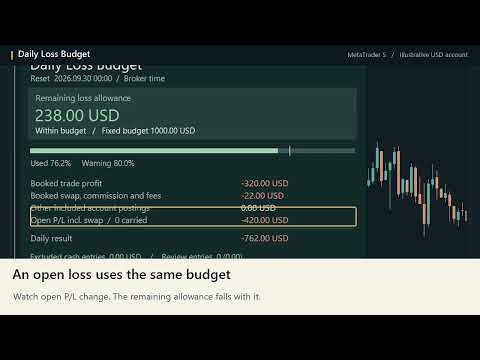
How much room is left in your daily loss budget once open positions, swap and fees are counted? Daily Loss Budget displays the amount in your MT5 account currency, using the fixed allowance and broker-time reset you choose.

Read the remaining allowance

The panel adds the day’s booked trading result and the current floating result to your fixed budget. A positive trading result increases the remaining allowance. The figure can turn negative when losses exceed the budget.

The breakdown shows booked trade profit, booked swap, commissions and fees, other included account postings, and open profit or loss including open swap. Commissions on entries count when booked. Deposits, withdrawals, credit and bonuses appear in the excluded cash total when the broker records them as balance, credit or bonus operations. Corrections, cancelled deals and unrecognised postings are listed for review and excluded from the calculation.

Positions held across the reset contribute their full current floating result. For example, a position showing a 500 USD loss and 10 USD of swap uses 510 USD of a 1,000 USD allowance after reset. If it closes at those same amounts with no additional costs, 490 USD remains. The booked closing result replaces the open amount.

Choose the reset and alerts

Attach Daily Loss Budget to a separate chart in desktop MetaTrader 5. Enter your allowance in account currency, set a broker-time reset hour and minute, and choose the warning percentage. The panel covers all symbols on that account. It rebuilds the figures from the broker’s deal history and current positions after a restart.

Desktop and mobile alerts are optional. Alerts can fire at the warning threshold and at the loss limit. The terminal remembers delivered alert levels for the session. Mobile delivery uses the push configuration in your MT5 terminal. The panel works with Algo Trading off. It monitors the calculation shown here and leaves decisions about positions to you. Compare its treatment of carried positions, cash entries and reset time with any trading rules you follow.

Produits recommandés
Voici NAS100 Auto SL and TP Maker pour MT5 : Ne manquez plus jamais le réglage du StopLoss et du TakeProfit avec notre NAS100 Auto SL and TP Maker, un assistant indispensable pour les traders qui naviguent sur le marché du Nasdaq 100 sur MetaTrader 5. Cet outil est conçu pour ceux qui recherchent une solution transparente pour automatiser la gestion des niveaux de StopLoss et TakeProfit. Caractéristiques principales : Automatisation sans effort : Surveille automatiquement les transactions sur
FREE
The only EA for TRADING PSYCHOLOGY:Discipline, Mindset Training & Risk Control  Checklist-Enforced Trading (No trades allowed until  strategy checklist is met)  1-Click Revenge Trade Blocker (Auto-freezes account after losses)  Overtrading Circuit Breaker (Hard daily trade limits enforced)  Neuroplasticity Training (Rewires retail habits into institutional discipline)  Institutional Risk Protocols (Auto SL/TP, position sizing, daily loss cutoffs)  Prop Firm  and account Safeguard (Preve
FiT Panel Pro
Thonglak Janyakorn
Overview FiT Panel Pro is a professional-grade trade management panel designed for MetaTrader 5 traders who demand speed, precision, and full control over their trades. Built with a modern dark-theme UI, it combines one-click execution with advanced risk management, visual SL/TP drag lines, automatic Fibonacci-based levels, and comprehensive order management — all in a single, compact panel. Whether you are a scalper, day trader, or swing trader, FiT Panel Pro gives you the edge you need to exec
FREE
Inverse Liquidity Grab Ultimate EA
Stephen Muriithi Muraguri
5 (1)
This EA finds Fair Value Liquidity (FVL) on the chart, tracks when they get mitigated , and then looks for an inversion signal (price “fails” through the zone). When that inversion happens, it places a trade in the opposite direction of the original Liquidity gap (an Inverse FVG approach). It also lets you control when it trades using market sessions , and it can auto-close positions at New York open (all positions or profitable-only). Key advantages Clear, rule-based entries (no guessing): trad
FREE
My Grid Scalper
Ahmad Aan Isnain Shofwan
3 (2)
MyGrid Scalper Soit vous la menez, soit elle vous mène. Je publie une version MT5 basée sur la version MT4 — qui a été téléchargée plus de 30 000 fois depuis 2022 — sans publicité, sans fanfare ni réductions. Cette application est gratuite et le restera à jamais. Je dédie les bienfaits spirituels qu'elle procure à ma défunte mère dans l'au-delà . Une exécution cohérente entre les mains de ceux qui comprennent Informations de base Symbole : N’importe lequel (optimisé par défaut : XAUUSD) Période
FREE
ST Daily Pivot Levels MT5
Stefan Oliver Schoenfeld
ST Daily Pivot Levels MT5 ST Daily Pivot Levels MT5 est un indicateur gratuit pour MetaTrader 5 qui calcule et affiche automatiquement les points pivots journaliers classiques directement sur votre graphique. Fonctionnalités principales : Calcul automatique des niveaux PP, R1, R2, R3, S1, S2 et S3. Calcul basé sur le plus haut, le plus bas et le cours de clôture de la dernière bougie journalière terminée. Actualisation automatique au début de chaque nouvelle journée de trading selon l'heure du s
FREE
Manual Assistant MT5
Igor Kotlyarov
4.75 (4)
Bonus when buying an indicator or an advisor from my list. Write to me in private messages to receive a bonus. Manual Assistant MT5 is a professional manual trading tool that will make your trading fast and comfortable. It is equipped with all the necessary functions that will allow you to open, maintain and close orders and positions with one click. It has a simple and intuitive interface and is suitable for both professionals and beginners. The panel allows you to place buy and sell orders w
FREE
Protect your funded accounts and personal capital with military-grade precision. This utility continuously monitors your floating equity against your daily starting balance. The moment your custom drawdown threshold is breached, it instantly liquidates all open positions, deletes pending orders, and completely unloads from the chart. Stop revenge trading and never fail a prop firm evaluation due to a margin breach again.
FREE
EURUSD EMA–SMA Reversal Breakout (H1) is a fully automated MetaTrader 4 strategy designed to capture **confirmed reversal breakouts** on EURUSD using a simple trend + position filter with rule-based **pending STOP execution** beyond recent structure. The EA was backtested on **EURUSD on the H1 timeframe** from **April 1, 2004 to April 24, 2024** using a MetaTrader 4 backtest engine (base data: EURUSD_M1_UTC2). No parameter setup is required — the system is delivered with optimized and fine-tune
FREE
Ironclad
Vadodariya Bhargavkumar Punabhai
ironclad is a powerful automated trading system designed to execute trades based on dynamic price levels. The EA is optimized for smooth and controlled trading with built-in risk protection and profit management. The strategy focuses on level-based market movement and automatic trade execution, helping traders reduce emotional trading and maintain consistency. Main Features • Fully automated trading system • Level-based trade execution • Smart lot management system • Target profit auto close • M
FREE
EA34 Tanin Force
Nhat Tien Duong
5 (2)
[FREE EA] EA34 TANIN FORCE: MACD & STOCH ENGINE (Prop Firm Ready) Are you tired of market noise and false breakouts? Meet EA34 Tanin Force, a commercial-grade Expert Advisor designed specifically for the EURUSD on the M15 timeframe. This system combines the raw trend-following power of MACD with the precision timing of the Stochastic Oscillator. PERFORMANCE HIGHLIGHTS (6-Year Stress Test 2020 - 2026): * Symbol & Timeframe: EURUSD | M15 * Set & Forget: Hard Stop Loss and Take Profit. No
FREE
XAU VWAP Mean Reversion H4 Expert Advisor for MetaTrader 5 — Gold / XAUUSD focus Version: 1.00 What it is XAU VWAP Mean Reversion H4 is an Expert Advisor for gold on the H4 chart. Intraday VWAP mean-reversion style participation on gold H4. Built for structured automated participation — not grid , not martingale . Evaluate on your broker and risk profile before any live use. This product is a technical system . Exact thresholds and entry equations remain internal product design and are not publ
FREE
Sovereign Hunter
Rehan Sulistyo Nugroho
5 (1)
Sovereign Hunter is an algorithmic trading system designed for trading Gold (XAUUSD). The EA monitors the market in real-time to identify price momentum and execute trades based on predefined technical conditions. Sovereign Hunter does not utilize Martingale, Grid, or Averaging strategies. Every opened position is equipped with a defined Stop Loss (SL) and Take Profit (TP). The risk management features are designed to be compatible with standard account types as well as Prop Firm account rules.
FREE
Chart Pro Classic Dark v1.00 Chart Pro Classic Dark is a professional MT5 chart styling and customization tool designed to give your charts a clean, modern, and professional dark appearance. Key Features Dark Black Background — Applies a clean black background to the chart. ️ Candlestick Chart — Automatically configures the chart to use candlesticks. Bullish Candles — Green/Lime bullish candles. Bearish Candles — White bearish candles. Grid Removal — Hides the chart grid for a clean
FREE
Nexus HFT Pro
Daniel Ivan Stadelmann
Nexus HFT PRO Nexus HFT PRO is an Expert Advisor for MetaTrader 5 designed to identify short-term trading opportunities by analyzing real-time price action and market dynamics. The system incorporates flexible management that allows it to adapt to different financial instruments and risk profiles. Multi-pair XAUUSD recommended Key Features Automatic trade opening. Configurable risk management. Support for fixed and automatic lot sizes. Spread control. Advanced Stop Loss and Take Profit mana
GOM Trade Manager
Wannapach Chinnaprapa
GOM Trade Manager helps you execute trades the way you want it. Works on all instruments Forex, Commodities, & Crypto. It helps you with lot calculations, spread addition and balance calculations so you can just focus on actual trading. For full automatic planned management, stackable triggers and spread widening protection >> check out GOM Trade Manager Pro . ------------------------------------------NOTABLE FEATURES------------------------------------------ You set everything based on bid
FREE
Neuro Edge
Agus Wahyu Pratomo
5 (4)
Please give review to support development of this Expert Advisor NeuroEdge EA is an advanced trend-following scalper designed to adapt dynamically to market behavior. Built with precision algorithms and smart averaging logic, it maintains minimal drawdown while capturing high-probability setups in trending conditions. NeuroEdge continuously analyzes market flow to ensure optimal entries and exits — giving traders the edge they need in volatile markets. ️ Core Features: Adaptive Trend Detection
FREE
Phoenix Volume Trader
Nigel Nii Darku Narnor Darko
The Phoenix Volume Trader is a high-performance Semi-Automatic Execution EA designed for traders who prioritize Order Flow and Momentum Analytics. Built for the MetaTrader 5 platform, it bridges the gap between complex Volume Profile analysis and lightning-fast trade execution. At its core, the Phoenix Engine identifies the Point of Control (POC)—the price level with the highest trading activity—and visualizes it as a dynamic "Value Zone." By monitoring the Volume Ratio, the EA alerts traders t
FREE
Introduction Welcome to the world of Forex trading, where every tick of the market can be influenced by news events. Introducing our expert advisor for MetaTrader, your ultimate tool for navigating the complexities of news trading. This innovative advisor is specifically designed to automate your trading strategy during key macroeconomic releases, ensuring you never miss an opportunity.  When important indicators are announced, volatility often spikes, creating potential for profit. Our expert
FREE
King Experts V2
Craig Alden Matteo
King_Expert EA - Professional Trading System Overview King_Expert EA is a sophisticated automated trading system for MetaTrader 5 that combines trend-following strategies with intelligent risk management. The EA uses a multi-layered approach to identify high-probability trading opportunities while incorporating advanced features like grid averaging and dynamic position management. Core Trading Strategy Primary Signal Generation EMA Crossover System : Uses dual Exponential Moving Averages (21/50
FREE
SMART Gold Pulse 5M
Naseepah Yatmanee
SMART GOLD PULSE 5M Automated Gold Trading with Built-In Risk Control Gold Focused XAUUSD M5 Controlled Entries EMA + Fibonacci + Candle Reversal Filter Risk Management Max DD + Emergency Equity Stop + Daily Order Control Stay Connected Telegram alerts directly to your mobile SMART GOLD PULSE 5M (SCALPING) Introducing SMART GOLD PULSE 5M , an automated Expert Advisor designed specifically for trading XAUUSD (Gold) on the 5-minute timeframe (M5) . The EA monitors the market and automatical
FREE
Go Long Advanced
Phantom Trading Inc.
4.78 (9)
Le EA Go Long met en œuvre une stratégie de trading intraday avancée basée sur le principe du trading quotidien systématique avec de multiples confirmations techniques. Alors que de nombreux traders recherchent des algorithmes complexes, cet EA combine des concepts simples mais efficaces avec une gestion sophistiquée des risques et de multiples filtres techniques. L'EA ouvre des positions à une heure spécifique chaque jour, mais uniquement lorsque les conditions du marché s'alignent avec plusi
FREE
EA16 Taka Grid
Nhat Tien Duong
TAKA Grid EA (EA16): The Sideway King & Prop Firm Shield Are you tired of EAs that get destroyed by choppy, ranging markets? Meet TAKA Grid EA , the ultimate mean-reversion system designed specifically for the AUDNZD cross pair on the M15 timeframe. It doesn't rely on explosive breakouts; it dominates the sideways chop with mathematical precision. AUTO-LICENSE SYSTEM (NO KEY REQUIRED) This EA is 100% FREE. We have upgraded our license server to GitHub Cloud for maximum stability. You NO LON
FREE
Auric Mohd iK
Md Iqbal Kaiser
AURIC MOHD-iK is a dynamic, logic-based Expert Advisor (EA) engineered specifically for trading XAUUSD (Gold). Unlike standard trading systems that rely on lagging, unreliable indicators, this EA operates purely on clean price logic—executing trades the way an experienced human trader naturally reads the market. This version is completely free with limitations, offering permanent value to your trading setup with zero hidden costs. Active Auric Mode That's it!!!!!!!!!! Core Trading Parameters Ac
FREE
BB Strategy V5.01 Advanced Bollinger Bands Grid Expert Advisor BB Strategy V5.01 is a fully automated Expert Advisor for MetaTrader 5 that combines Bollinger Bands mean-reversion trading, percentage-based grid management, advanced entry filtering, and intelligent risk control. The EA is designed to identify temporary market overextensions and capture high-probability reversal opportunities while filtering out low-quality entries that often occur during strong trending conditions. Unlike traditio
FREE
Kintech Gold
Doan Van Hai
Following our guide, you will gain more than you lose. EA for long-term. Stable profit - min risk. Symbol:  XAUUSD Attach to any timeframe Min deposit:   3000$ - Calculate profit by month Live signal:  https://www.mql5.com/en/signals/2080910?source=Site+Signals+My EA input instruction: 1. With XAU 2 digits (eg: 1843.23) please set - Input   [3. Max spread]: 55 2. With XAU 3 digits (eg: 1843.235) please set - Input   [3. Max spread]: 550 If you want daily trade, this signal maybe not suit with
Simple MACD Expert
Abraao Moreira
3 (1)
Why use it A simple, readable rule: the EA trades when the MACD and its signal line both cross the zero line. Every position gets a stop loss and a take profit when you set them. Daily gain and daily loss limits in money: when one is hit, the EA closes its positions and stops for the day. A trading-hours window, plus a clear message if the volume does not fit the symbol. How the rule works MACD is calculated on every tick and the EA keeps the last three values. When the latest MACD value is abo
FREE
Golden Square X
Huynh Tan Linh N
4.18 (11)
This is my latest Free version for Gold. With optimized parameters and user-friendly features, this version is likely very easy to use and highly effective. You can customize TP and SL parameters as you wish, but the default settings should work well for you without the need for further adjustments.  This version is designed for the M5. This version does not require a large capital investment; only $100-$200 is sufficient for Golden Square X to run and generate profits for you. Based on backtest
FREE
Trade Assistant JJC Academy
Jhonathan Alexis Jaramillo Cortez
JJC Academy Trade Assistant — Calculateur de Risque et Panneau de Gestion de Position Arrêtez de calculer votre taille de lot à la main. Arrêtez de dépasser votre drawdown à cause d'une erreur de calcul. JJC Academy Trade Assistant est le panneau de trading que j'ai développé et que j'utilise moi-même pour gérer un portefeuille de comptes financés (funded accounts) — conçu pour que chaque entrée respecte exactement le risque que vous avez défini, quel que soit l'instrument, le broker, ou la prop
FREE
[Title: Tomgoodcar Cleopatra – Grid Averaging & Risk Management System] Introduction Tomgoodcar Cleopatra is an automated trading tool designed for systematic order management. It utilizes a structured grid-averaging strategy combined with a proprietary trend-filtering technique to identify market opportunities. This EA is built for traders who prioritize systematic discipline, structured risk management, and capital preservation over manual intervention. Operational Logic Macro Trend Identifica
FREE
Les acheteurs de ce produit ont également acheté
Trade Assistant MT5
Evgeniy Kravchenko
4.43 (216)
It helps to calculate the risk per trade, the easy installation of a new order, order management with partial closing functions, trailing stop of 7 types and other useful functions. Additional materials and instructions Installation instructions - Application instructions Line function -   shows on the chart the Opening line, Stop Loss, Take Profit. With this function it is easy to set a new order and see its additional characteristics before opening.   Risk management  - The risk calculation
Bienvenue sur Trade Manager EA, l’outil ultime de gestion des risques conçu pour rendre le trading plus intuitif, précis et efficace. Ce n’est pas seulement un outil d’exécution d’ordres ; c’est une solution complète pour la planification des trades, la gestion des positions et le contrôle des risques. Que vous soyez débutant, trader expérimenté ou scalpeur ayant besoin d’une exécution rapide, Trade Manager EA s’adapte à vos besoins, offrant une flexibilité sur tous les marchés, des devises et i
Telegram to MT5 Multi-Channel Copier   copie automatiquement les signaux de trading de vos canaux Telegram et Discord directement vers MetaTrader 5. Pas de bots, pas d'extensions de navigateur, pas de copie manuelle. Un signal arrive sur Telegram ou Discord et l'EA ouvre le trade dans votre terminal en quelques secondes. Et avant de copier un canal, le backtester intégré vous montre ce que ce canal aurait fait sur votre compte. Le produit comprend deux composants : une application Windows qui éc
Local Trade Copier EA MT5
Juvenille Emperor Limited
4.94 (150)
Local Trade Copier EA MT5 est un copieur de trades rapide et flexible permettant de copier et de gérer des trades entre plusieurs comptes MetaTrader 5 sur le même ordinateur Windows ou Windows VPS. Il combine la synchronisation locale des trades avec des contrôles côté Receiver pour la taille des lots, la gestion du risque, le filtrage des trades, le mappage des symboles, la gestion des trades et la protection du compte. Configurez vos terminaux Transmitter et Receiver en environ 1 minute et co
Farmed Hedge Yield Farming | All Markets (Manual - Hybrid - Semi/Automated EA) VERIFIED TRADING RESULTS - Farmed Hedge Yield Axi Copy:  https://www.mql5.com/en/signals/2356376 - Farmed Hedge Yield Exn Copy:   https://www.mql5.com/en/signals/2356404 - Farmed Hedge Yield V Copy:  https://www.mql5.com/en/signals/2357156 IMPORTANT NOTICE: FarmedHedge is a MANUAL-FOCUSED TRADING UTILITY ,not a fully automated EA. Results shown on this Signal include manual trades and overall strategic management.
TradePanel MT5
Alfiya Fazylova
4.89 (174)
Trade Panel est un assistant commercial multifonction. L'application contient plus de 50 fonctions de trading pour le trading manuel et permet d'automatiser la plupart des tâches commerciales. Instructions d'utilisation : https://www.mql5.com/fr/blogs/post/762589 Version d'essai de l'application pour un compte démo : https://www.mql5.com/fr/blogs/post/762644 Comment installer l'application : https://www.mql5.com/fr/blogs/post/762645 Comment tester l'application en mode visuel : https://www.mql5.
EA Overfitter
Stephen J Martret
5 (4)
That backtest looks great. But will it still be making money tomorrow, next week, next month? EA Overfitter re-runs your EA on 100 price histories it has never seen. One score tells you if the edge is real. A backtest tells you what an EA did on one price history — the one that happened to occur. What you cannot tell from it is how much of that result was the strategy and how much was the particular path. EA Overfitter answers that. It builds up to 100 synthetic price histories your EA has n
Strategy Ledger Pro
Abdullah Uygar Tuna
5 (17)
Désormais disponible en français. Strategy Ledger Pro est un panneau d'analyse de compte en lecture seule pour MetaTrader 5. Il sépare les résultats du compte par Expert Advisor, stratégie, symbole et numéro magic, pour que vous voyiez ce que chacun apporte réellement. Le panneau est disponible en 11 langues : English, Français, Deutsch, Español, Italiano, Português, Русский, Türkçe, 中文, 日本語 et 한국어. Avant de télécharger la démo. Le Market exécute la démo de tout produit payant uniquement dans l
Copiez les signaux Telegram avec vos propres règles de trading Telegram to MT5 Signal Trader copie automatiquement les signaux de trading au format texte provenant de canaux et de groupes Telegram publics et privés vers MetaTrader 5. Gérez plusieurs fournisseurs et comptes MT5 depuis une seule application de bureau, avec des paramètres de risque et de trading propres à chaque fournisseur . Aucun bot Telegram ni configuration d'API n'est nécessaire pour copier les signaux. Connectez-vous simpleme
Exp COPYLOT CLIENT for MT5
Vladislav Andruschenko
3.97 (35)
Copieur professionnel de trades pour MetaTrader 5 Un copieur de trades rapide, professionnel et fiable pour MetaTrader . COPYLOT permet de copier des trades Forex entre les terminaux MT4 et MT5 avec prise en charge des comptes Hedge et Netting . La version MT5 de COPYLOT prend en charge : - MT5 Hedge → MT5 Hedge - MT5 Hedge → MT5 Netting - MT5 Netting → MT5 Hedge - MT5 Netting → MT5 Netting - MT4 → MT5 Hedge - MT4 → MT5 Netting Version MT4 Description complète + DEMO + PDF Comment acheter Comme
AI Agent Supervisor is NOT an Expert Advisor. AI Agent Supervisor   is a   multi-agent AI risk & portfolio supervisor   that watches every EA on your account and intervenes in real time.  WANT AN AI PORTFOLIO MANAGER WATCHING YOUR FLEET 24/7?   Run your fleet on the same brokers I do:   IC MARKETS , IC TRADING   .  Unlike the centralized stock market, Forex has no single, unified price feed.  Every broker sources liquidity from different providers, creating unique data streams. The Supervisor r
================================================================================ POC BREAKOUT - V20.72. Full Professional Grade Toolkit ================================================================================ POC Breakout is a full MetaTrader 5 trading dashboard for discretionary traders who want breakout signals, Point of Control (POC) context, volume profiles, order flow, market structure, news, alerts, and advanced trade planning in one professional workspace. Attached directly to you
Power Candles Strategy Scanner : détecteur de setups multi-symboles auto-optimisé Un scanner qui sonne au moindre frémissement vous apprend à l'ignorer. Une clôture de bougie agitée, alerte après alerte, et le seul setup que vous tradez vraiment se noie dans le bruit. Power Candles Strategy Scanner fait tourner le moteur auto-optimisé de Power Candles sur chaque symbole de votre Market Watch et ne vous alerte que sur ce qui passe vos propres filtres : la force de la dernière bougie clôturée, le
The product will copy all telegram signal to MT5 ( which you are member) , also it can work as remote copier.  Easy to set up, copy order instant, can work with almost signal formats, image signal,  s upport to translate other language to English Work with all type of channel or group, even channel have "Restrict Saving Content", work with  multi channel, multi MT5 Work as remote copier: with signal have ticket number, it will copy exactly via ticket number. Support to backtest signal. How to s
Unlimited Trade Copier Pro MT5 is a tool to copy trade remotely to multiple MT4, MT5 and cTrader accounts at different computers/locations over internet. This is an ideal solution for you if you are a signal provider and want to copy your trades to other receivers globally on your own rules. One provider can copy trades to multiple receivers and one receiver can get trade from multiple providers as well. The provider can even set the subscription expiry for each receiver, so that receiver will n
Expert advisor order block, BOS et ChoCH pour MetaTrader 5, avec alertes Telegram SMC Trade Pilot MT5 lit la structure de marché sur votre graphique et envoie le signal sur Telegram. Il marque les cassures de structure (BOS) et les changements de caractère (ChoCH), dessine les order blocks avec une note de force , suit les fair value gaps (FVG) et les liquidity sweeps, affiche un volume profile avec point of control, value area high et value area low, et résume l'ensemble dans un tableau de bord
News Trade EA MT5
Konstantin Kulikov
4.55 (11)
Je voudrais vous présenter un robot efficace que j'utilise depuis plusieurs années. Il peut être utilisé en mode semi-automatique, comme en mode totalement automatique. >>> Chat <<< Le programme comporte des paramètres souples pour le commerce sur les nouvelles du calendrier économique. Il est impossible de le vérifier dans le testeur des stratégies. Ce qu’il faut, c’est le travail réel. Téléchargez la dernière archive des paramètres : https://www.mql5.com/en/blogs/post/747929 Surveillance des
VirtualTradePad PRO SE MT5 — centre de contrôle de trading professionnel pour MetaTrader 5 VirtualTradePad PRO SE est un panneau de trading premium basé sur le graphique et un espace de gestion des trades pour MetaTrader 5 . Il est conçu pour les traders qui souhaitent une exécution plus rapide, un contrôle plus clair des positions, une gestion structurée des trades, une planification visuelle des niveaux et un flux de travail professionnel directement depuis le graphique. Ce n’est pas seulement
Timeless Charts
Samuel Manoel De Souza
5 (9)
Timeless Charts est un utilitaire de trading tout-en-un destiné aux traders professionnels. Il combine des types de graphiques personnalisés tels que les graphiques en secondes et Renko avec une analyse avancée du flux d’ordre s utilisant Footprints , Clusters , Profils de Volume , études VWAP et outils d’analyse ancrés pour une compréhension plus approfondie du marché. Le trading et la gestion des positions sont effectués directement depuis le graphique via un panneau intégré de gestion des ord
Equity Protect Pro : Votre expert en protection de compte complet pour un trading en toute sérénité Si vous recherchez des fonctionnalités telles que la protection de compte, la protection des capitaux propres, la protection de portefeuille, la protection multi-stratégies, la protection des bénéfices, la prise de bénéfices, la sécurité de trading, les programmes de contrôle des risques, le contrôle automatique des risques, la liquidation automatique, la liquidation conditionnelle, la liquidatio
Strategy Builder offers an incredible amount of functionality. It combines a trade panel with configurable automation (covert indicators into an EA), real-time statistics (profit & draw down) plus automatic optimization of SL, TP/exit, trading hours, indicator inputs. Multiple indicators can be combined into an single alert/trade signal and can include custom indicators, even if just have ex4 file or purchased from Market. The system is easily configured via a CONFIG button and associated pop-u
Astro Trade MT5
Indra Maulana
5 (8)
25% discount on the release of the tool: only for the next 3 buyers Send a message to receive a demo version. AstroTrade Trading Assistant AstroTrade is a comprehensive multi-functional trading utility developed for the MetaTrader 5 platform. It integrates essential tools for trade execution, risk management, and technical monitoring into a single unified interface. The application is designed to assist traders in managing their daily operations through a visual and structured environment. Vi
Panneau de trading pour MetaTrader 5 — contrôle professionnel du trading en un clic depuis le graphique et le clavier Un panneau de trading avancé conçu pour les traders actifs, afin d’ouvrir, gérer et clôturer des positions bien plus rapidement qu’avec l’interface standard de MetaTrader. Cette solution s’adresse à ceux qui veulent contrôler positions, ordres en attente, profit global et exécution depuis un seul espace de travail professionnel. Il ne s’agit pas d’un simple utilitaire. C’est un
News Filter EA
Rashed Samir
5 (2)
News Filter EA: Advanced Algo Trading Assistant News Filter EA is an advanced algo trading assistant designed to enhance your trading experience. By using the News Filter EA , you can integrate a Forex economic news filter into your existing expert advisor, even if you do not have access to its source code. In addition to the news filter, you can also specify trading days and hours for your expert. The News Filter EA also includes risk management  and equity protection features. MT4 Version Ma
Telegram To MT5 Ultra
Mirel Daniel Gheonu
5 (5)
Telegram To MT5 — Copieur de signaux Transformez les appels de trading de vos canaux Telegram en véritables ordres MT5 — automatiquement, sur autant de comptes que vous le souhaitez, avec le risque et les règles entièrement sous votre contrôle. Telegram To MT5 relie les canaux VIP / de signaux que vous suivez déjà sur Telegram à votre terminal MetaTrader 5. Une application de bureau compagnon gratuite lit les messages (même des canaux qui bloquent les bots), et cet Expert Advisor les exécute sur
Trade Manager DashPlus
Henry Lyubomir Wallace
4.85 (13)
DashPlus est un outil de gestion de trading avancé conçu pour améliorer l'efficacité et la performance de vos transactions sur la plateforme MetaTrader 5. Il offre un ensemble complet de fonctionnalités, incluant le calcul des risques, la gestion des ordres, des systèmes de grilles avancés, des outils basés sur les graphiques et des analyses de performance. Fonctionnalités principales 1. Grille de récupération Implémente un système de grille flexible et de moyenne pour gérer les transactions dan
Vous avez trouvé un excellent signal, mais le lot d'un fournisseur est trop petit ? Vous avez besoin d'un volume de position plus important, mais les paramètres du terminal sont trop pauvres ? Signal Lot Manager augmentera le volume de position du fournisseur au moyen d'une commande en double du volume nécessaire. Définissez simplement une taille de lot et un nom de signal à partir duquel copier les commandes. Signal Lot Manager est un utilitaire multiplicateur de lots pour dupliquer les command
Trade copier MT5
Alfiya Fazylova
4.61 (57)
Trade Copier est un utilitaire professionnel conçu pour copier et synchroniser les commandesentre les comptes de trading. Les commandes sont copiées du compte/terminal du fournisseur vers le compte/terminal du destinataire, qui sont installés sur le même ordinateur ou vps. Avant d'acheter, vous pouvez tester la version démo sur un compte démo. Version démo ici . Instructions complètes ici . Principales fonctionnalités et avantages: Prend en charge la copie des commandes MT5> MT5, MT4> MT5, MT5>
Trade Manager DaneTrades
Levi Dane Benjamin
4.13 (31)
Trade Manager pour vous aider à entrer et sortir rapidement des transactions tout en calculant automatiquement votre risque. Y compris des fonctionnalités pour vous aider à éviter le sur-trading, le trading de vengeance et le trading émotionnel. Les transactions peuvent être gérées automatiquement et les mesures de performances du compte peuvent être visualisées dans un graphique. Ces fonctionnalités rendent ce panneau idéal pour tous les traders manuels et contribuent à améliorer la plateforme
TradingView-grade charts, native in MT5, with Pine Script v4 and up support A complete charting replacement built inside MetaTrader 5: a custom rendering engine, a Pine Script v4-v6 interpreter, 10+ built-in indicators, professional drawing tools, multi-chart layouts, a forex sessions overview, a bar replay simulator, and an integrated trade manager with risk-based position sizing. One license. Free updates for life. Why ChartZephyr MT5 gives you world-class execution. Its charting engine hasn't
Plus de l'auteur
Brent Precision Pro is an intraday Expert Advisor for MetaTrader 5, designed for Brent oil CFDs. It combines long reversals, short reversals and break-and-retest entries, with stop-loss management and shared account risk controls. It does not use grid, martingale or averaging down. Strategy Version 1.40 selects its entry logic according to the current spread. The lower-spread regime retains the previous M3 reversal and M5 break-and-retest logic. The higher-spread regime uses M15 signals, additio
# Universal Smart Manual Trade Manager MT5 v1.00 ## What the EA does Universal Smart Manual Trade Manager MT5 is a protective and management Expert Advisor for manually opened trades. It does not open new entries by itself. It only adopts already open positions that pass the selected filters, and can add missing SL/TP, manage break-even, profit lock, ATR trailing, send Telegram notifications, and display status information on the chart. The default setup is intentionally safe: the EA manages
Would your stop loss or take profit have been reached first? Trade Path Journal shows how price moved between the entry and final exit of a closed MetaTrader 5 position. Set virtual exit levels and see which one the broker’s recorded ticks reached first, down to the millisecond. Review a position Attach Trade Path Journal to a separate chart in desktop MT5. It opens your most recent closed position. Use Older and Newer to browse, or set History symbol to review one instrument. Enter SL pts and T
Bid Ask Radar shows which side of your broker’s quote just moved. When Bid rises, did Ask rise too, or did the spread narrow? The desktop MT5 panel compares consecutive Bid and Ask quotes and plots both on the same price scale. Read the panel Attach Bid Ask Radar to a separate chart for the symbol you want to monitor. The turquoise line follows Bid and the amber line follows Ask. The newest quote is on the right. Horizontal spacing follows quote order, so a quiet period and a busy period can cov
What price did your order actually get? Execution Slippage Journal reviews fills on the current chart symbol and measures the difference against a reference you can inspect. Positive points mean a worse fill for the trader. Negative points mean price improvement. Three ways to review a fill Prior quote compares a market buy with Ask and a market sell with Bid. The journal uses the last recorded quote strictly before the broker’s order setup timestamp. Set the maximum quote age in milliseconds. A
Tick History Inspector helps you check a broker’s price history before you use it for an MT5 backtest. Select a broker day and see which minutes contain ticks, where a scheduled quote session is empty, and where the price history reconstructed from ticks differs from the M1 chart. Inspect one day Attach the utility to a separate chart of the symbol you want to inspect. Use Prev day and Next day to move through broker dates, or enter a date in the inputs. A current-day scan covers completed minut
Where are the high and low of your chosen session, and when did price first trade beyond a level and close back inside? Session Range Map draws the completed range on your desktop MetaTrader 5 chart. It can send a text alert to your phone when a new return is confirmed. Set a session by broker time Enter the opening and closing times as HH:MM. The default window runs from 00:00 to 08:00 on the broker clock. A start later than the end defines an overnight window. Choose between 1 and 30 calendar

Order Preflight previews a market buy or sell on the symbol of your MT5 chart. Enter a cash budget and a stop distance to see how many lots fit the plan, how much a fill at that stop would cost, and how much standalone margin MT5 estimates for the entry. Build a preview Attach the utility to a separate desktop chart. Choose Buy or Sell with the side button. Enter your budget in account currency and your stop distance in symbol points. Leave lots at zero for automatic sizing, or enter a fixed vol
Which strategy contributed to a portfolio’s drawdown? Strategy Contribution Report groups your MetaTrader 5 trading deals by magic number and plots their combined realised P/L. Select one group to see how the curve and maximum drawdown change when its deals are removed. Every retained deal keeps its original volume. Read the report Attach the utility to a separate desktop MT5 chart. The default window covers the most recent 90 days across all symbols. You can set the history length, filter by sy
Broker Feed Compare lets you compare Bid, Ask and spread for the same instrument across two MT5 terminals. Export a quote window at each broker, bring the files together and see how much of the recorded time can be compared at your chosen quote age. Collect the quotes Attach the utility to a chart in desktop MT5. Choose a new export filename in Inputs, then click Export quotes. Repeat on the corresponding instrument at the second broker. Export near the same time so the windows overlap. The defa
Trade Desk Health Monitor brings terminal connection, the age of the last quote and the protection of open positions into one desktop MT5 panel. Attach it to the symbol you want to observe. Set a magic-number filter to focus the position check on one strategy, or retain all positions on the chart symbol. Read the terminal state The panel shows the terminal’s connection and Algo Trading settings alongside the account’s EA trading permission. Quote freshness uses the broker’s published weekly quot
Portfolio Risk Map shows how much of your account’s open risk sits in each symbol or strategy. It reads the current positions, measures the estimated move from the executable quote to each protective stop, and displays the result in the account currency. Inspect the exposure Attach the utility to a separate chart in desktop MetaTrader 5. Choose Symbols , Strategies or Positions . Select a row to see its direction, size, stop coverage and price scenarios. Rows are sorted by priced stop risk. A mu
Find the first fill where two completed MT5 tests differ. Backtest Model Compare reads the Deals tables from two standard Strategy Tester HTML reports. The chart shows matching fills, changed fills, fills found on one side only and fills with several possible matches. Load two runs 1. Save the Strategy Tester report for each completed single test in HTML format. Copy the two .htm or .html files into the terminal’s MQL5/Files folder. A subfolder is fine. 2. Attach the utility to a separate deskto
Write down the test before you see the outcome. Research Protocol Studio keeps a local MT5 record of your hypothesis, development and holdout periods, execution costs, metric, acceptance threshold and minimum sample size. A later assessment compares the observed result with that specific version of the plan. Register a plan Attach the utility to a desktop MT5 chart and open its Inputs. Enter the hypothesis, market and timeframe, two non-overlapping date ranges, a cost assumption and one numerica
Has an EA started entering more often, or facing wider spreads before it trades? EA Drift Monitor compares two adjacent, non-overlapping windows of account history for one magic number on the chart symbol. Compare like with like Set the reference and recent window lengths in broker calendar days. The default compares 28 days with the following seven completed days. Set the exclusive end date to reproduce an older comparison. Pick a magic number, or let the panel select the one associated with th
Practise a trade on a completed broker day, one decision at a time. Trading Day Replay Atlas replaces the price chart with a historical Bid and Ask replay that advances when you press a step button. Start a replay Attach the utility to a separate, clean chart in desktop MetaTrader 5. Choose a historical broker date, start time and lookback. Date zero selects a completed daily bar. The initial view uses recorded quotes preceding the starting cursor. The Bid plot and its price scale are based on t
Mark a level and let MT5 watch for a touch followed by a reclaim. Conditional Entry Assistant records a paper entry only when two separate completed bars satisfy your conditions and the observed spread is within your limit. Build a watch Attach the utility to a desktop MT5 chart. Choose a long or short setup, confirmation timeframe, touch depth, close buffer, maximum spread and active duration. Drag the horizontal line to your level or enter its price in the inputs. Click Arm to freeze the setup
Brent Setup Scanner follows a four-stage price sequence on closed bars. It shows when a sweep has been reclaimed, when a directional candle has displaced price, when a three-bar fair value gap has formed, and when a later retest closes back outside that gap. An arrow marks the confirming bar. Read the sequence For a long candidate, price dips below the lowest low of the preceding range and closes back above that level. A later bullish candle must close above the sweep candle’s high and meet the
Session Exit Agent watches the next trading break for the chart symbol. Use the default Preview mode to see which positions or pending orders are in scope and when the warning and exit windows begin. You can opt in to actual close and cancel requests. Set the scope and time Attach the utility to a separate desktop MT5 chart. Set the exact position magic number. Zero includes manual trades with magic zero. Enter a ticket to narrow the scope to one position or pending order. Pending-order cancella
Gold Precision Pro is an intraday Expert Advisor for spot gold CFDs in MetaTrader 5. It waits for a trading day whose high is lower and low is higher than the day before it. The next session, a five-minute candle must close outside that narrower range before the EA can enter. Choose the entry direction Follow breakout is the default. A close above the range triggers a buy. A close below it triggers a sell. Always buy opens a buy after either boundary is crossed and the candle closes outside. It
Filtrer:
Aucun avis
Répondre à l'avis