Smart Trade Entry MT5
- Indicateurs
-
Reza Aghajanpour
 =============================================================================================
<<<<<< Our team after 19 years of experience in the markets and programming would like to share winner solutions with you. >>>>>> - Version: 1.1
- Activations: 5
Smart Trade Entry MT5
Discount: The price is $200$, But now it is just $49,One purchased is 49$.
- New Scanner Panel
*** Contact me to send you instruction and add you in group for sharing or seeing experiences with other users.
+ FREE Trading Utility MT5
Description:
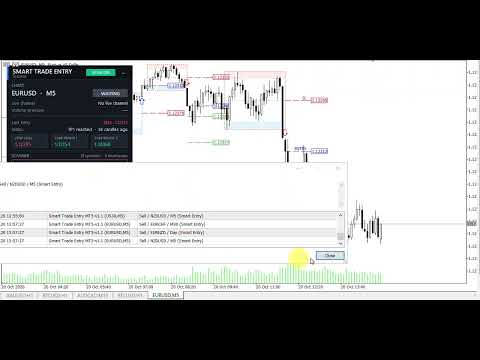
Smart Trade Entry indicator entries with Entry, Stop Loss and Take Profit levels, a professional panel and a multi symbol, multi timeframe scanner.
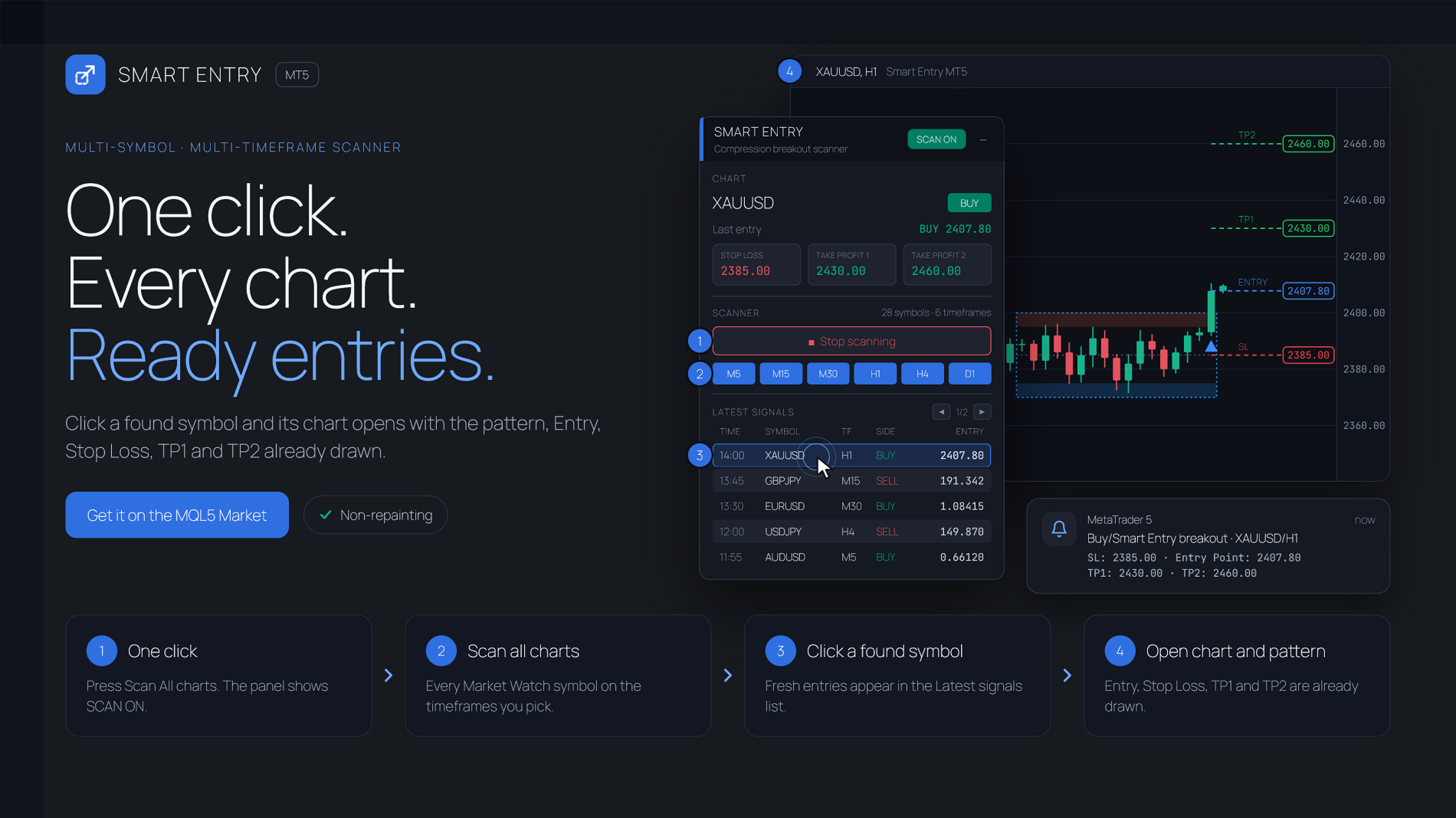
Smart Trade Entry finds the moments when the market goes quiet and marks the breakout that follows. Every breakout comes with a ready trade plan: Entry, Stop Loss, TP1 and TP2. A built-in scanner watches every symbol in your Market Watch on the timeframes you choose and alerts you the moment a new entry appears.
HOW IT WORKS
- Smart Trade Entry measures how much the price is moving inside its recent range. When that movement shrinks, a compression starts. When it wakes up again, the compression is boxed as a channel.
- Each channel has a buy zone at the bottom and a sell zone at the top.
- A breakout entry is given when a closed candle leaves the channel (on the close or on the body midpoint).
- Channels, arrows and levels are decided on closed candles only. Signals do not repaint.
SMART ENTRY LEVELS
- Entry on the breakout close, or on the retest of the broken edge
- Stop Loss at the channel midline, the opposite edge, or inside the broken edge zone
- TP1 and TP2 as multiples of the channel height
- Optional volume filter: breakout volume above average and/or buy volume above sell volume in the breakout direction
PROFESSIONAL PANEL
- Dark or light theme, scales with your screen resolution
- Chart status at a glance: SQUEEZE, BUY, SELL or WAITING
- Live channel range and buy/sell volume pressure
- Last entry with its Stop Loss, TP1, TP2 and current status
- Scanner controls: one button and timeframe switches
- Latest signals of all charts with pages. Click a signal to open its chart; the scanner keeps running
- Statistics: TP1 reached before Stop Loss on the open chart
- Minimize button to keep the chart clean
MULTI SYMBOL / MULTI TIMEFRAME SCANNER
- Scans all symbols of the Market Watch, or only the open chart symbol on every timeframe
- Timeframes M1 to MN, selectable from the panel
- Each timeframe is scanned as soon as its candle closes, with a full rescan at the interval you set
- The open chart is alerted from the same calculation that draws it, so what you are alerted to is what you see
ALERTS
- Popup, push notification and email
- Optional Entry, Stop Loss, TP1 and TP2 in the alert text
- Optional alert when a new compression channel forms
- Alert hours, also across midnight (for example 22 to 6)
- No duplicate alerts, even after changing the chart symbol or timeframe
FOR EXPERT ADVISORS
Five buffers, written on the breakout candle: Entry, Stop Loss, Take Profit 1, Take Profit 2, Buy=1 / Sell=0. Empty candles hold EMPTY_VALUE.
MAIN SETTINGS
- Scanner: candles to scan, rescan timer, timeframes, symbols
- Channel: normalization length, squeeze length, minimum compression length, edge zone height, nested channels, body breakout
- Entry: entry type, stop loss type, TP1 and TP2 ratios, volume filter
- Panel: theme, position, signals per page, start minimized, statistics
- Display: levels, line length, volume meter, squeeze label, chart theme, colors
- Alerts: popup, push, email, new channel alert, alert hours
NOTES
- The scanner works on live charts. In the Strategy Tester the chart signals, levels and panel work; the multi-chart scanner is disabled.
- Push notifications need the MetaQuotes ID set in Tools > Options > Notifications. Email needs the email settings in Tools > Options > Email.