U30 Predator
- Experts
- Version: 2.30
- Activations: 5

Overview
US30 Predator EA is a fully automated Expert Advisor for MetaTrader 5, designed for trading the US30 (Dow Jones Industrial Average) on the M5 timeframe. It combines a New York session open straddle with a grid-based recovery system to capture the high-volatility burst that occurs at the NY open each trading day.
⚠️ Hedge account required. This EA opens simultaneous BUY and SELL positions on the same instrument. Your broker must support hedging — i.e. holding both a BUY and a SELL on the same symbol at the same time (non-FIFO / non-net-position mode). It will not work correctly on brokers that enforce FIFO or net-position rules.
⚠ Important — Please Read Before Trading
By default, this EA comes with a 50% emergency drawdown stop enabled. When equity drops below 50% of balance, all positions are closed automatically and the EA halts for the session.
Adjust both your lot size and the drawdown stop level to match your own risk appetite before going live.
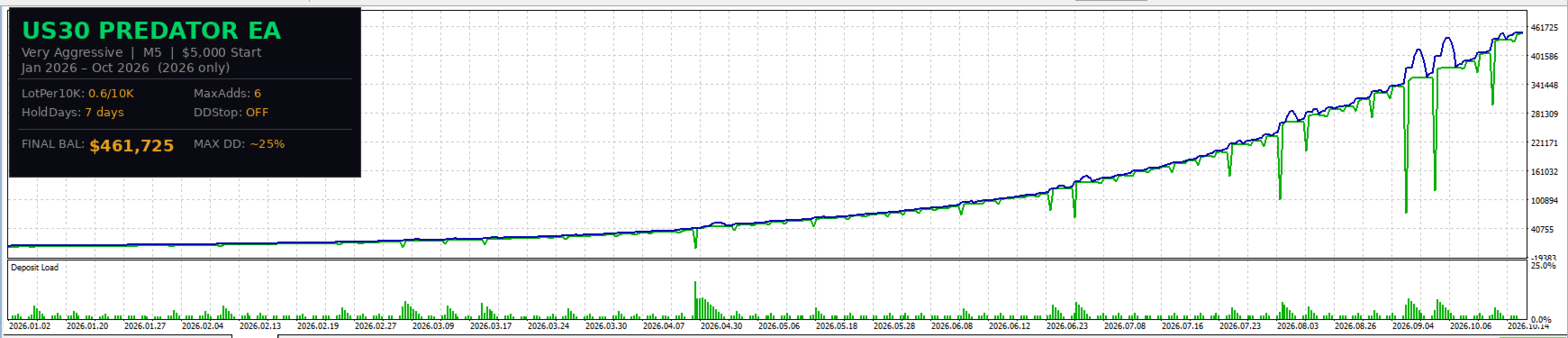
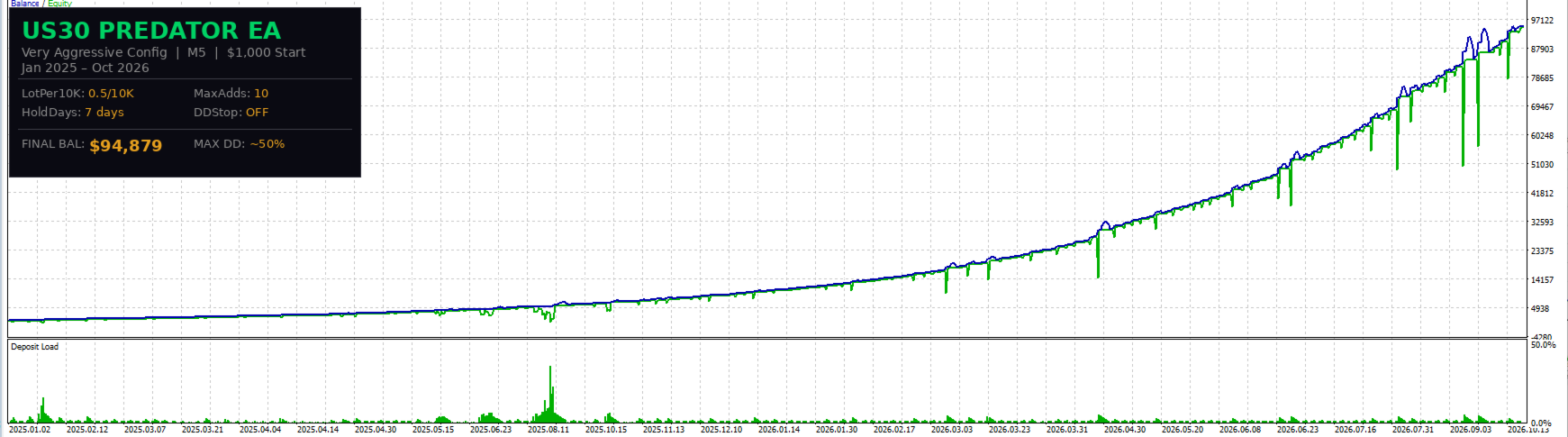
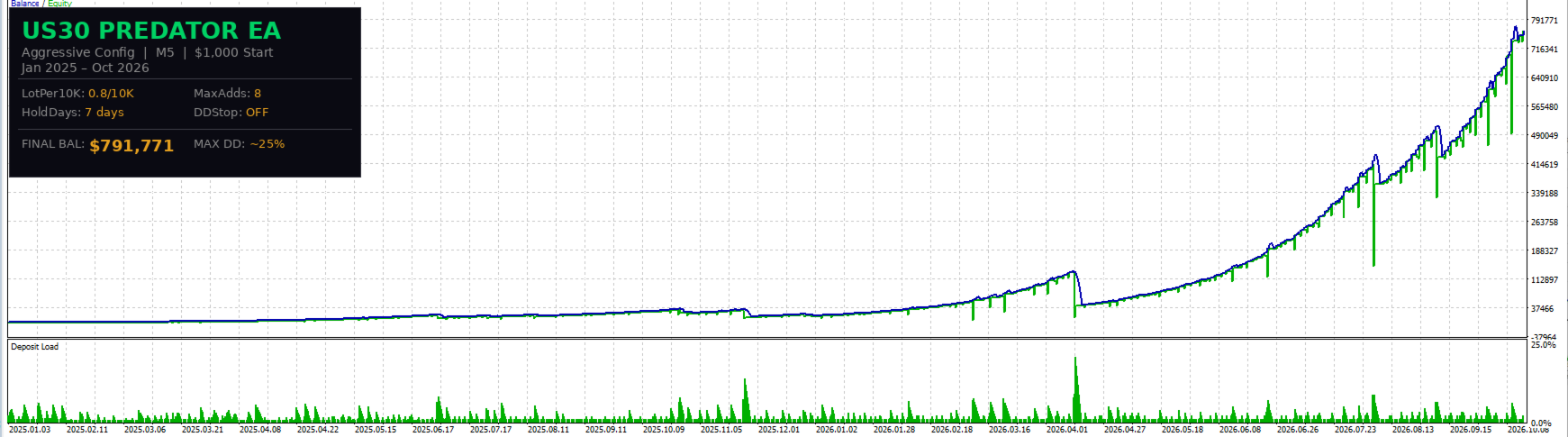
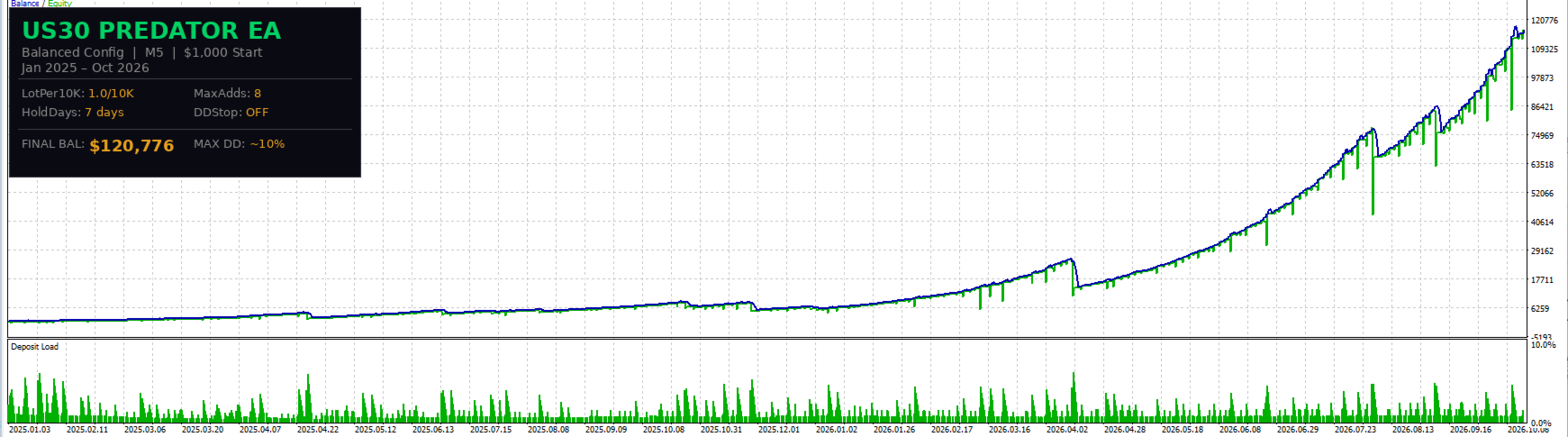
Note: all backtest results shown in this listing are run without the percentage stop active — returns in those tests reach into the thousands of percent. The stop is there to protect you; removing or relaxing it unleashes the full compounding power of the strategy.
The core idea: start with a small account and grow it aggressively — many times over.
How It Works
1. NY Open Straddle Entry
At the New York session open (default: 16:30 broker time), the EA simultaneously places one BUY and one SELL market order at the same lot size. The EA uses SymbolInfoSessionTrade() to detect the session open automatically and handle DST changes — no manual time adjustments needed between summer and winter.
2. Swing-Based Take Profit
Before entry, the EA scans the overnight price range (midnight to open) and sets each leg's take profit to the nearest swing extreme — clamped between your configured minimum and maximum:
- BUY TP → overnight high (clamped between MinTPPts and MaxTPPts)
- SELL TP → overnight low (clamped between MinTPPts and MaxTPPts)
This means each leg targets a level the market has already shown interest in, rather than a fixed arbitrary pip value.
3. Grid Recovery
One leg will immediately move into profit while the other goes into drawdown. The losing leg is managed with a grid:
- Every time price moves a fixed distance (GridSpacePts) further against the position, a new recovery order is added at the same lot size.
- After each add, the take profit is recalculated from the basket's weighted-average entry price — spreading the recovery requirement across all open positions in the leg.
- Grid adds continue until the configured maximum depth (MaxAdds) is reached.
4. Force-Close Timer
A configurable hold timer (default: 7 days) automatically closes all positions if neither basket has hit its target. This prevents the EA from holding losing positions indefinitely through weekends or low-volatility periods.
5. Emergency Hedge (Optional)
Once the grid reaches maximum depth, an optional emergency hedge can activate. This opens a counter-direction position at a configurable fraction of the losing leg's total lots (25%–100%), locking in the current loss level and preventing further drawdown while the market finds direction.
Lot Sizing
Compound mode (default): Lot size scales automatically with account balance — balance / 10,000 × LotPer10K . The EA naturally reduces risk after a drawdown and compounds up as the account grows. Default ratio: 0.6 lot per $10,000.
Fixed mode: A constant lot size regardless of balance. Useful for manual risk control or when running on a prop firm challenge with strict lot limits.
Input Parameters
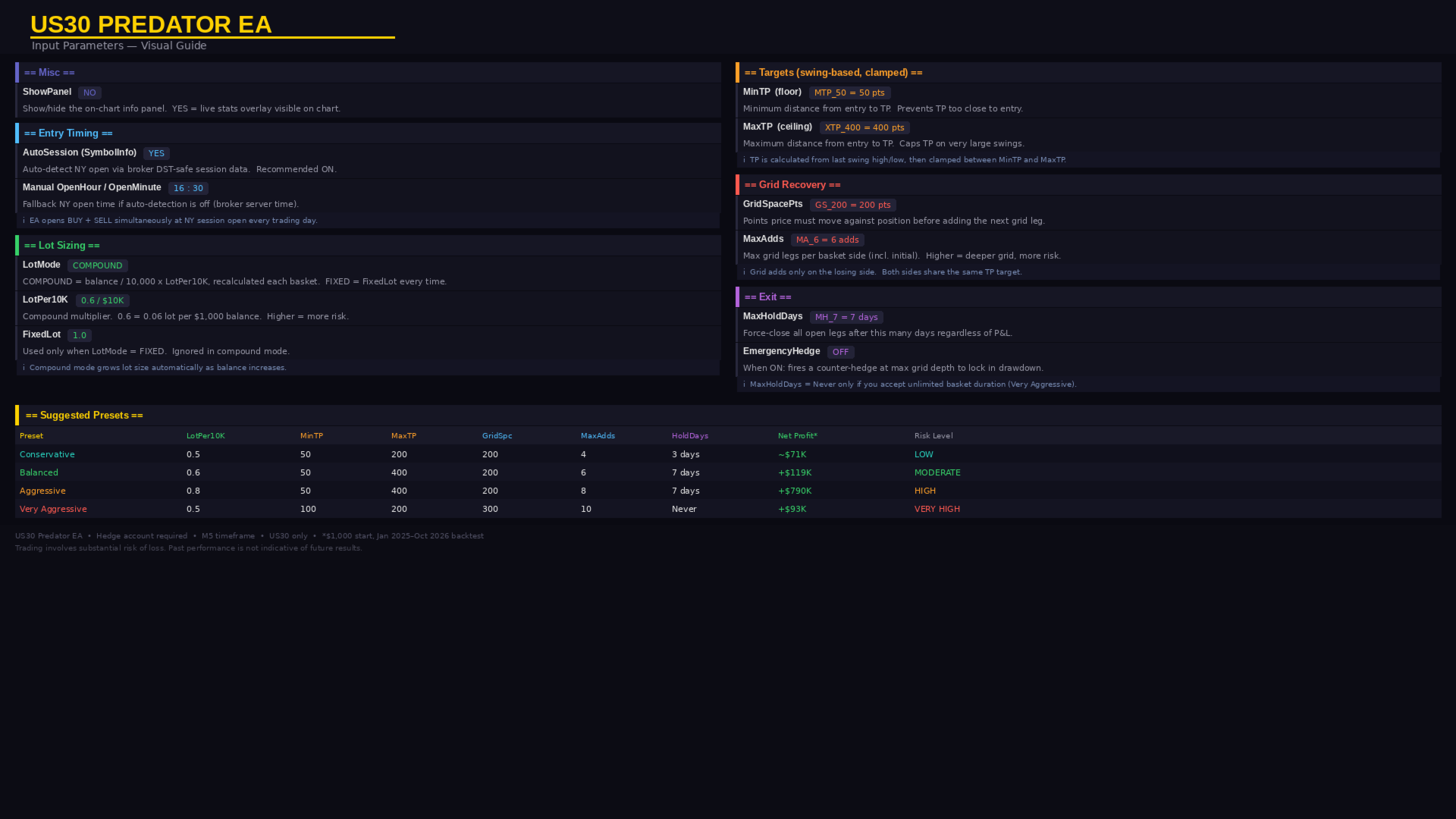
Misc
| Parameter | Default | Description |
|---|---|---|
| ShowPanel | NO | Show live info panel on chart |
Entry Timing
| Parameter | Default | Description |
|---|---|---|
| OpenHour | 16 | Manual fallback open hour (broker time) |
| OpenMinute | 30 | Manual fallback open minute |
| AutoSession | YES | Auto-detect NY open via broker session data (DST-safe) |
Lot Sizing
| Parameter | Default | Description |
|---|---|---|
| LotMode | COMPOUND | COMPOUND scales with balance; FIXED is constant |
| FixedLot | 0.50 | Lot size when LotMode = FIXED |
| LotPer10K | 0.6 | Compound ratio — lots per $10,000 balance |
Targets
| Parameter | Default | Description |
|---|---|---|
| MinTPPts | 50 | Minimum TP distance from entry (points) |
| MaxTPPts | 400 | Maximum TP distance from entry (points) |
Grid Recovery
| Parameter | Default | Description |
|---|---|---|
| GridSpacePts | 200 | Points adverse move before next grid add |
| MaxAdds | 6 | Max positions per leg including initial entry |
Exit
| Parameter | Default | Description |
|---|---|---|
| MaxHoldDays | 7 | Force-close all positions after this many days (0 = never) |
Emergency Hedge
| Parameter | Default | Description |
|---|---|---|
| EmergencyHedge | OFF | Hedge fraction at max grid depth: OFF / 25% / 50% / 75% / 100% |
Suggested Configurations
| Profile | LotPer10K | MinTP | MaxTP | GridSpace | MaxAdds | HoldDays |
|---|---|---|---|---|---|---|
| Conservative | 0.5 | 50 | 200 | 200 | 4 | 3 |
| Balanced (default) | 0.6 | 50 | 400 | 200 | 6 | 7 |
| Aggressive | 0.8 | 50 | 400 | 200 | 8 | 7 |
| Very Aggressive | 0.5 | 100 | 200 | 300 | 10 | Never |
Start with Conservative or Balanced until you understand how the EA behaves on your broker's feed. You can backtest it yourself and dial the settings very low to simply enjoy 10–50% per month at reduced risk — the EA scales entirely to your preference.
⚠️ Note on Very Aggressive: This configuration did not survive the full 2025 period in testing, but generated over 1,000% return in 2026 alone. It is suitable only for high-risk traders who understand grid drawdown dynamics and are prepared for potential full drawdown events.
Requirements
- Platform: MetaTrader 5
- Instrument: US30 / Dow Jones — symbol name varies by broker (US30, DJ30, DOWJONES, etc.)
- Timeframe: M5
- Account type: Hedge account — broker must allow simultaneous BUY and SELL on the same symbol
- Tested brokers: Pepperstone, Ox Securities
Risk Warning
Grid strategies carry significant risk during prolonged trending markets. The losing leg can accumulate multiple open positions before the force-close timer triggers. Always test on a demo account first. Start with the Conservative profile and move up only after observing live behaviour on your broker's execution. Past performance is not indicative of future results.