TradeMatrix Assistant

  • Utilitaires
  • Abdul Basit
    Abdul Basit
    I am passionate about developing professional trading solutions for MetaTrader 5, combining modern trading concepts with robust software engineering.
    My development experience includes:
    • Expert Advisors (Fully Automated Trading Systems)
    • Custom Indicators
    • Trading Panels & Dashboards
  • Version: 7.40
  • Activations: 10
TradeMatrix Assistant

A tabbed trade-management dashboard and market-structure analysis panel for MetaTrader 5.

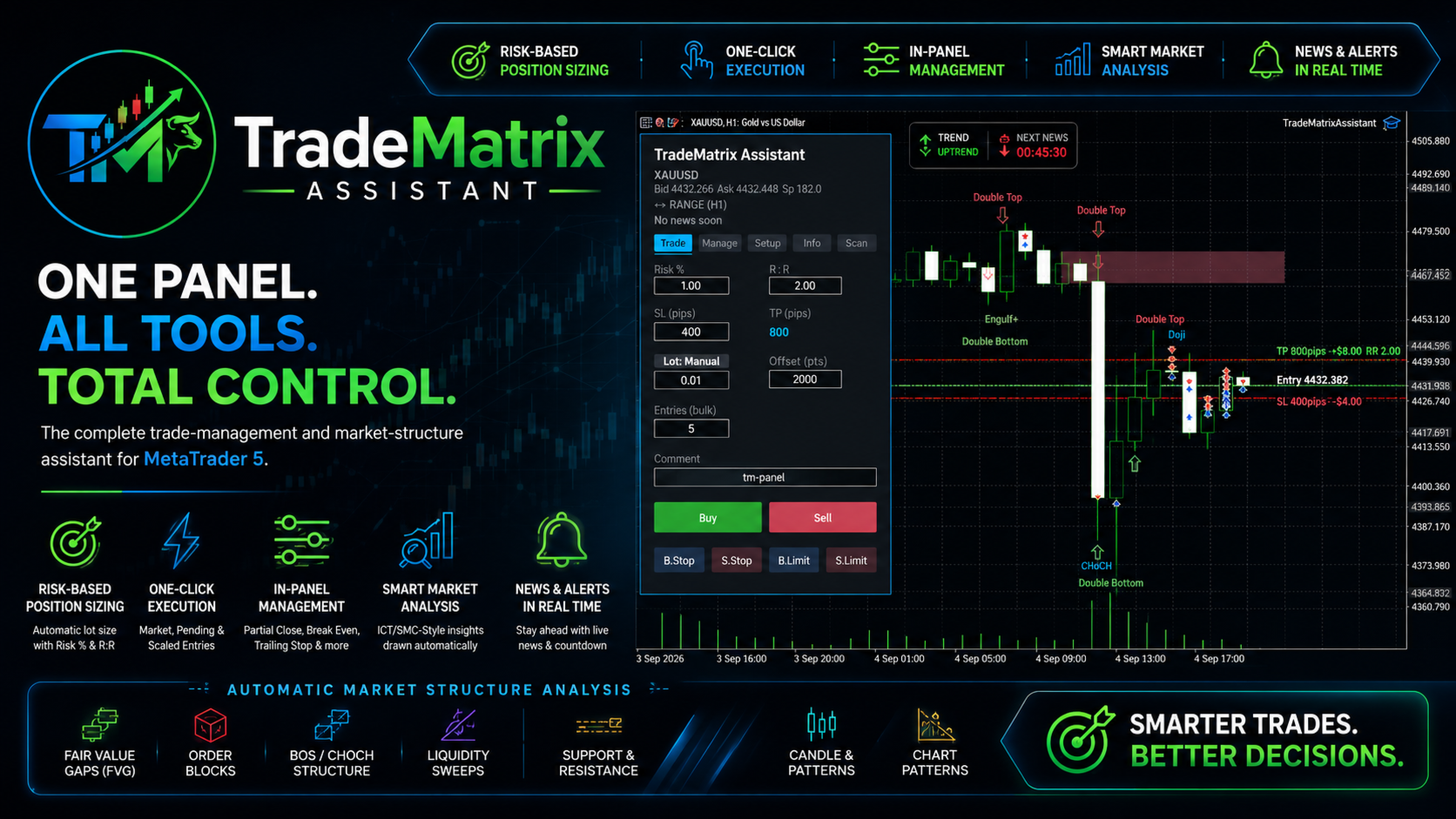
TradeMatrix Assistant turns manual trading into a single-panel workflow: risk-based position sizing, one-click order execution with scaled entries, in-panel position management, and automatic ICT/SMC-style chart analysis — all in one dockable dashboard, with no coding or separate indicators required.

Overview

The EA draws a five-tab panel directly on the chart. Every field is live-editable — risk percentage, stop distance, entries, comment — and every button executes immediately, with values re-read at the moment of the click so nothing is lost if you didn't press Enter first. Alongside the panel, the EA continuously analyzes the chart itself: fair value gaps, order blocks, structure breaks, liquidity sweeps, support/resistance, candlestick patterns, and simple chart patterns are detected and drawn automatically, on a timer, with no manual refresh needed.

Tab-by-Tab Features

Trade

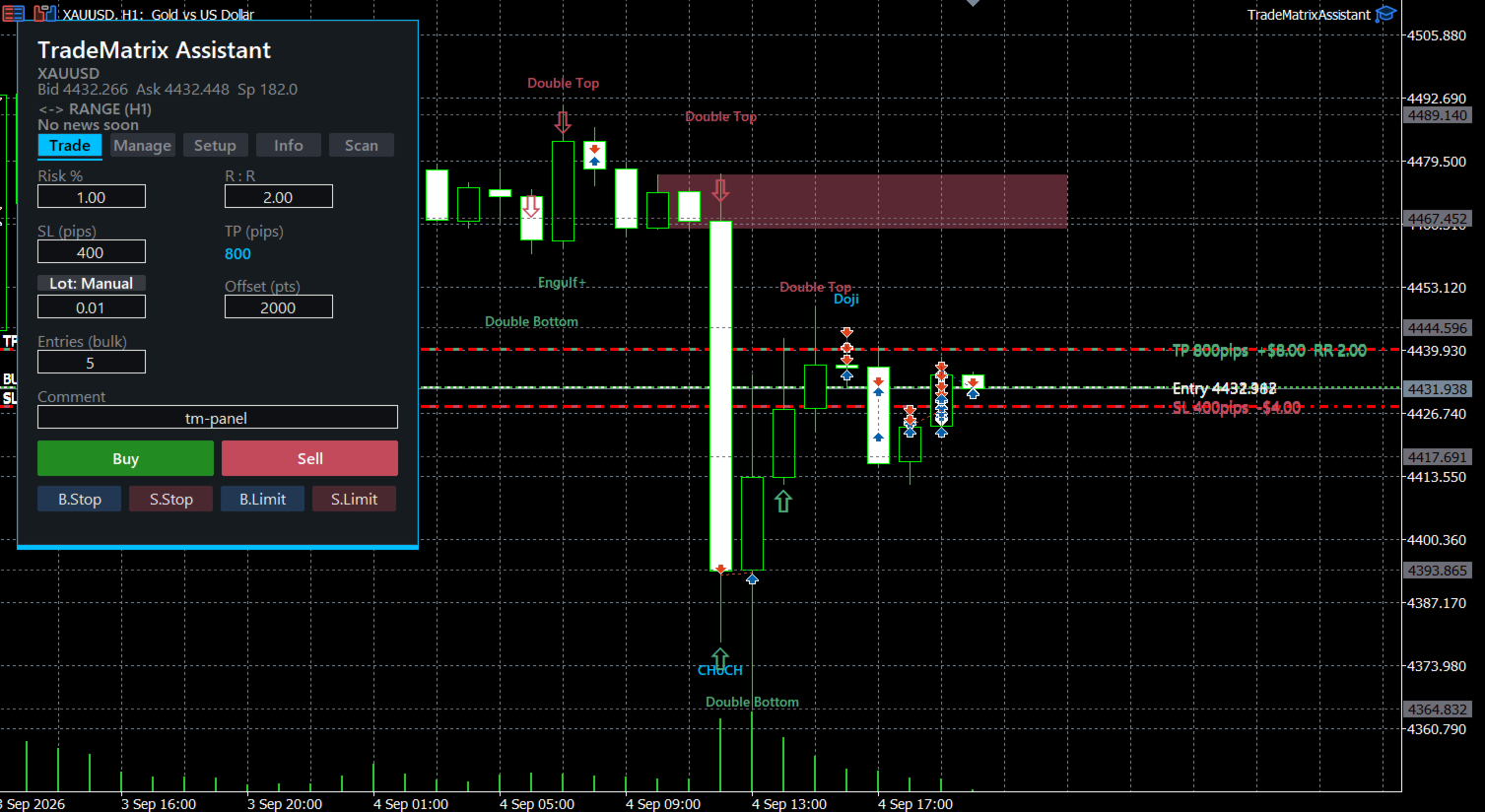
  • Risk % + R:R → automatic lot size. Enter a risk percentage and a reward ratio; the EA calculates lot size from your account balance, stop distance, and the symbol's tick value.
  • Auto / Manual lot toggle. Switch instantly between risk-based sizing and a manually typed lot size.
  • SL / TP in pips, with an adjustable points-per-pip conversion factor (gold has no single industry-standard pip size, unlike major forex pairs, so this is exposed as a setting rather than assumed).
  • Offset (points) for placing stop/limit orders away from the current price.
  • Entries (bulk): place 1–N positions in a single click. The lot splits evenly across all N, each keeps the same stop loss, and take-profits stagger at 1×, 2×, 3×... your R:R — a built-in scale-out ladder. If the lot is too small to split as requested, the EA places as many full-size entries as it can and explains why via an alert, rather than silently under-filling.
  • One-click Buy / Sell / Buy Stop / Sell Stop / Buy Limit / Sell Limit, no confirmation dialog.
  • Editable trade comment, with a settable default.

Manage

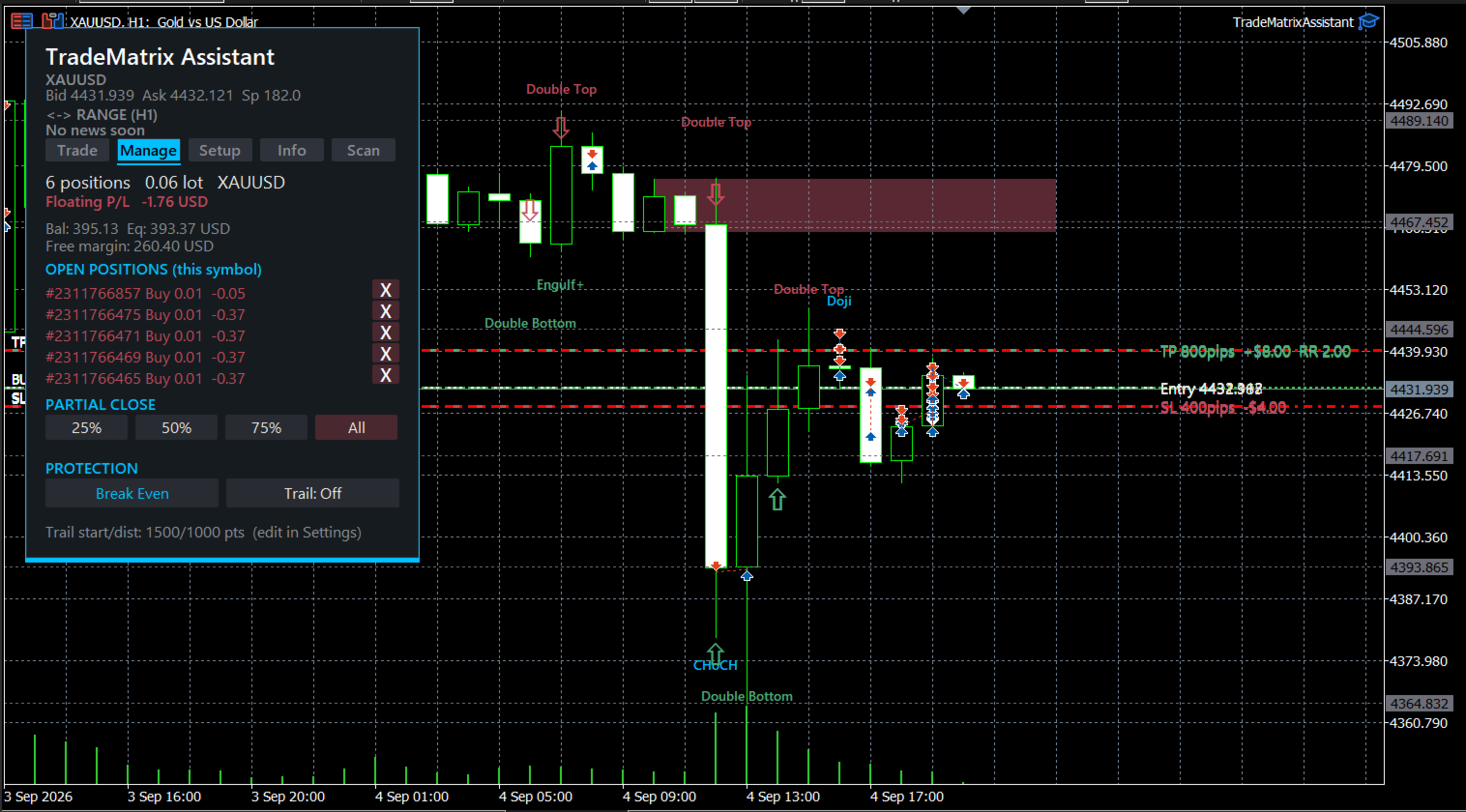
  • Live position summary: count, direction, total lot, floating P/L.
  • Account snapshot: balance, equity, and free margin, visible without switching tabs.
  • Open positions list (up to 5 shown at once): ticket, type, lot, and P/L per row, each with its own one-tap close icon. The tab's height adjusts automatically to how many positions are actually open, rather than always reserving space for the maximum.
  • Partial close: 25% / 50% / 75% / 100%, aggregated across all EA-tagged positions on the symbol.
  • Break Even: moves stop loss to entry plus a small buffer, only when the position is in profit.
  • Trailing stop: on/off toggle: once price moves far enough in profit, the stop follows it automatically, live, every tick.

Setup

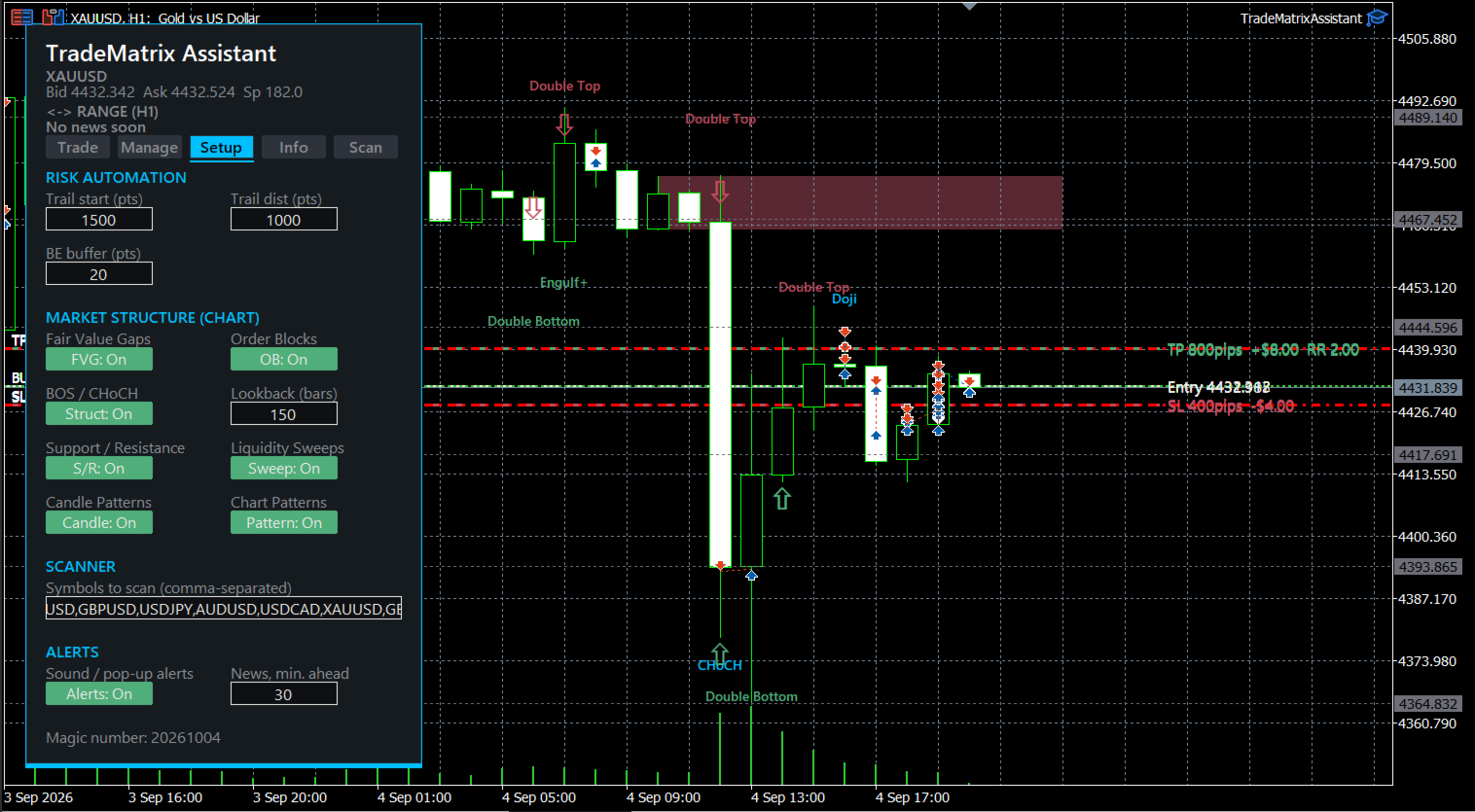
  • Trailing start distance, trailing distance, and break-even buffer — all live-editable, no restart required.
  • Independent on/off toggles for every chart-analysis layer: Fair Value Gaps, Order Blocks, Break of Structure / Change of Character, Support/Resistance, Liquidity Sweeps, Candlestick Patterns, and Chart Patterns.
  • Adjustable lookback window (bars).
  • Editable, comma-separated scanner symbol list.
  • Alerts on/off, and configurable minutes-ahead warning for high/medium-impact news.

Info

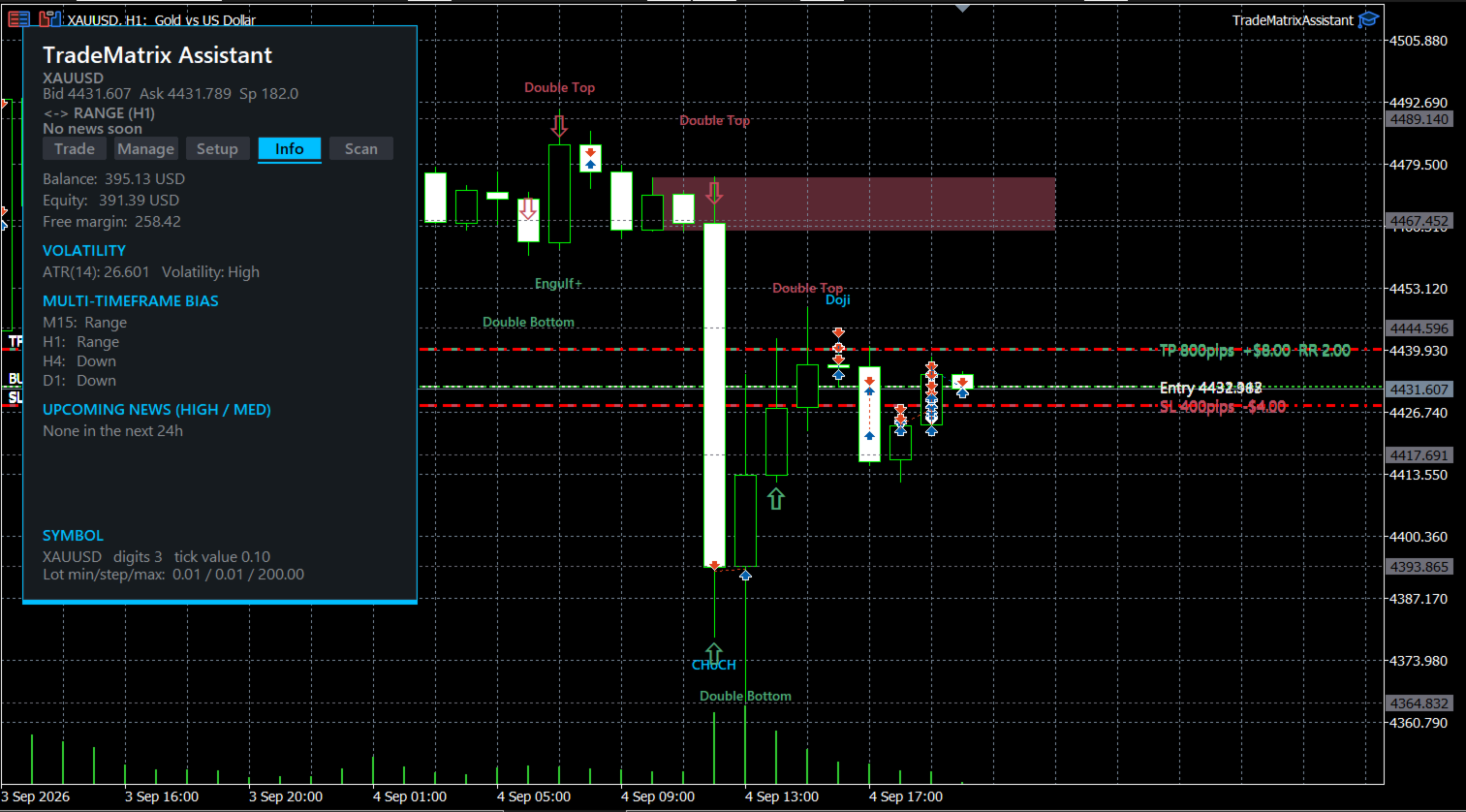
  • Balance / Equity / Free Margin.
  • ATR(14) and a relative volatility read (High/Normal/Low vs. its own 50-bar average).
  • Multi-timeframe trend bias (M15 / H1 / H4 / D1), each shown as Up / Down / Range.
  • Upcoming economic news, up to 5 events, with a live countdown and impact tag.
  • Current symbol specification summary.

Scan

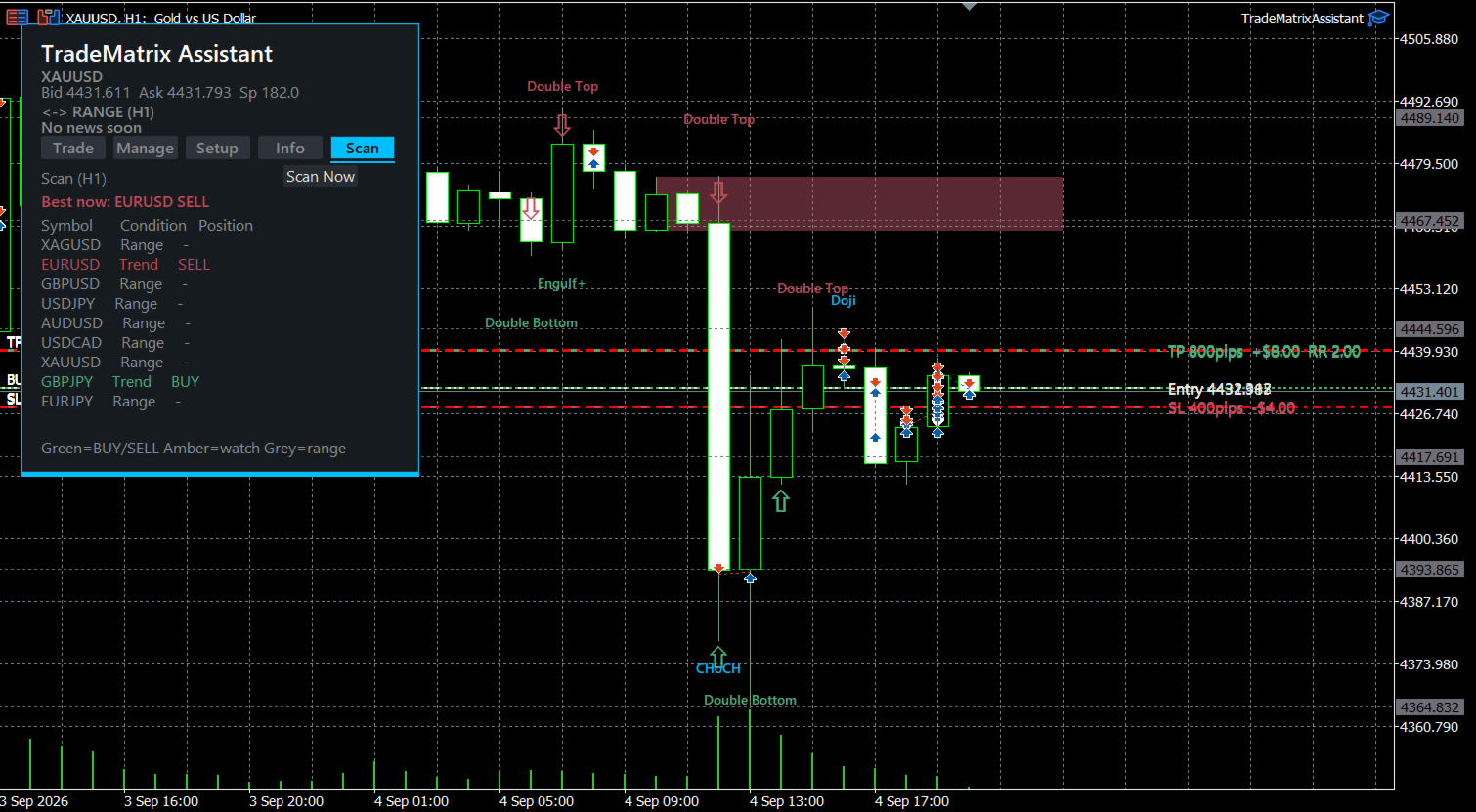
  • A multi-symbol watchlist (configurable in Setup) showing, per symbol: trend condition (Trend/Range), and signal (BUY / SELL / REVERSAL? / Up / Down / –).
  • Highlights the single strongest current setup across the whole list.
  • Manual "Scan Now" plus automatic refresh roughly every 60 seconds.

Persistent header (visible on every tab)

  • A trend-direction badge for the current timeframe.
  • A news badge showing the next high/medium-impact event with a live countdown.

Automatic Chart Analysis

All of the following are detected and drawn directly on the chart, continuously, without any manual step:

  • Fair Value Gaps (FVG) — imbalance zones, shaded and colour-coded by direction.
  • Order Blocks — the qualifying opposite-direction candle before a structural break, detected with a minimum break-distance and minimum body-percentage filter to avoid noise.
  • Break of Structure / Change of Character (BOS/CHoCH) — labelled directly at the break point.
  • Liquidity Sweeps — a wick beyond a prior swing high/low that closes back inside it, marked with a directional arrow.
  • Support/Resistance — clustered swing highs and lows, drawn as dotted levels.
  • Candlestick patterns — Doji, Hammer, Shooting Star, and Bullish/Bearish Engulfing, tagged at the candle.
  • Chart patterns — Double Top and Double Bottom, detected from matching swing points with a confirmed reversal between them.
  • Live position overlay — entry, stop loss, and take-profit drawn as bounded lines on the chart for every open position, each labelled with its distance and dollar value.

Risk & Money Management

  • Position size is derived from account risk percentage and stop distance — not a fixed lot — so sizing adapts automatically as balance changes.
  • Bulk entries implement a scale-out approach (staggered take-profits) from a single click, with transparent feedback if the requested split isn't possible at the current lot size.
  • Partial close, break-even, and trailing stop are all available per-symbol from the Manage tab without leaving the chart.

News Awareness

  • Reads the built-in MT5 economic calendar.
  • Surfaces upcoming high/medium-impact events with a live countdown, both in the Info tab and in the always-visible header badge.
  • Optional alert a configurable number of minutes before a qualifying event.

Key Inputs

Input Purpose
InpMagic Magic number used to tag and identify this EA's own positions
InpDefaultRiskPercent Starting risk % for auto lot sizing
InpDefaultRR Starting reward:risk ratio
InpDefaultSLPoints Starting stop-loss distance, in raw points
InpPointsPerPip How many raw points count as one pip for this symbol — no universal standard for gold, so this is adjustable rather than assumed
InpStartInManualLot Whether the EA starts in Manual lot mode instead of Auto
InpDefaultManualLot Lot size used when Manual mode is active
InpMaxEntries / InpDefaultEntries Maximum and starting value for bulk/scaled entries
InpDefaultComment Starting trade comment (still editable on-panel)
InpShowCandlePatterns / InpShowChartPatterns Show/hide the two pattern-detection layers independently
InpShowSweeps Show/hide liquidity-sweep arrows

(Additional inputs exist for FVG, Order Block, structure, and S/R display, following the same on/off pattern.)

Notes & Assumptions Worth Knowing

  • Pip size for gold is a convention, not a fact. InpPointsPerPip defaults to 10 (1 pip = $0.10), the most common retail convention, but this varies by broker and trader. Verify it matches your own usage before relying on the pip-denominated SL/TP fields.
  • Default stop distance is capital-aware, not fixed. The shipped default assumes a small account balance and reasons backward from the broker's minimum tradeable lot size, so that the smallest possible position still lands close to the intended risk percentage rather than wildly overshooting or undershooting it. This is a starting point calculated for one account size at one point in time — revisit it if balance changes materially.
  • Bulk entries respect the broker's minimum lot. If the requested number of entries can't be split without going below the minimum lot, the EA reduces the entry count and alerts you, rather than placing an invalid order or silently doing something different from what was asked.
  • All chart-drawn objects use a dedicated internal prefix and are excluded from the panel's own redraw cycle, so analysis drawings and the dashboard never fight each other for the same screen space.
  • Head & Shoulders, triangles, wedges, and other multi-point geometric chart patterns are not implemented — Double Top/Bottom is the only chart-pattern type currently detected, since the others require more elaborate multi-point fitting than a straightforward swing-matching approach can reliably deliver.

Requirements

  • MetaTrader 5, any broker offering the traded symbol.
  • Works on any timeframe; multi-timeframe bias and the scanner read other timeframes independently of the chart it's attached to.
  • No external indicators or libraries required — self-contained in a single .mq5 file.

Disclaimer

This is a trading tool, not financial advice. TradeMatrix Assistant automates order placement and displays technical analysis; it does not recommend trades, predict price direction, or guarantee any outcome. The decision to open, hold, or close any position remains entirely the user's own.

Trading carries a real risk of loss. Forex and CFD trading, including gold (XAUUSD), is typically leveraged and can result in losses that are large relative to the account balance. Only trade with capital you can afford to lose. Past results — from backtesting, demo trading, or a live track record — do not guarantee future performance.

No warranty. This software is provided "as is," without warranty of any kind, express or implied, including but not limited to fitness for a particular purpose, accuracy of any analysis it draws, or uninterrupted, error-free operation. The chart-drawn patterns (fair value gaps, order blocks, structure breaks, liquidity sweeps, support/resistance, candlestick and chart patterns) are algorithmic pattern-matching against price history — not signals that reliably predict what price will do next.

Verify defaults before trading live. Default values such as stop-loss distance, risk percentage, and the points-per-pip conversion are starting points calculated from stated assumptions — a specific account balance and a common but not universal broker tick-value convention, both documented earlier in this description. Confirm they match your own broker and current account before risking real funds, and test on a demo account first.

No liability. Whoever provides or modifies this EA is not liable for any financial loss, damage, or other consequence arising from its use, misuse, or from any error in its code or analysis.

Not affiliated with MetaQuotes or any broker. This is an independently built tool for MetaTrader 5. It is not endorsed by, and has no official relationship with, MetaQuotes Software Corp. or any brokerage.

This is standard-practice wording, not a substitute for a lawyer's review. If this EA is going to be sold, published on a marketplace, or distributed to other users, get the disclaimer and terms actually reviewed by someone qualified in your jurisdiction before that happens — the stakes are different for personal use versus distributing to others.

Produits recommandés
Title:   Smart Position Manager PRO - Advanced Risk & Position Manager Description: Smart Position Manager PRO is an all-in-one visual trade management and risk calculation tool designed for serious traders who prioritize iron discipline and strict risk management. Whether you are executing precise SMC or ICT setups on personal capital or managing large funded accounts on strict prop firms, this tool ensures you focus on counting percentages rather than emotional money swings. With a highly int
FREE
Zirk Trading Management Zirk Trading Management is a powerful trade management utility for MetaTrader that helps traders execute trades with consistent risk management. It is designed to simplify position sizing by automatically calculating the correct lot size based on your chosen risk percentage and stop-loss distance. Instead of manually calculating lot sizes, simply set your desired account risk (e.g., 1%), place your stop loss, and the utility instantly determines the appropriate trade volu
User Manual Buy Trading Utility, Get 1 indicator FREE ! After purchase contact me for your " one indicator GIFT (Any one you want) ", adding you in group. Trading Utility MT5 The manual trader's cockpit. Size every trade by risk, place it from the chart, and manage it without ever opening the order dialog. Eight tabs, seven trailing engines, and every stop and target draggable with one click. One panel between you and the order window. Risk-sized entries, draggable stops, seven trailing modes,
Equity Master Stop v2 MT5
Frank William Jr Colbert
Trading tool combining a sophisticated equity stop-loss, dynamic take-profit management (Breakeven & Trailing), and symbol-group-based closing logic. It is a complete risk management and trade supervision tool. Features: All features of `Equity Master Stop v1` (floating profit/loss limits, exit protection, skip hours). Take-Profit Override: Can force a TP on any order to lock in a `MAX_FLOATING_PROFIT`. Step Breakeven: Locks in increasing amounts of profit as a trade moves favorably (e.g., aft
SmartTrail PRO MT5 — All-in-One Trade Management Panel Your all-in-one trade management companion for MetaTrader 5. SmartTrail PRO takes the stress out of position management. Whether you trade manually or use Expert Advisors, it protects your capital with intelligent, volatility-adaptive stop management — across all symbols, all account types, automatically. Why SmartTrail PRO? Most traders lose not because of bad entries, but because of poor exits. SmartTrail PRO solves this by providing a com
Trade Manager DaneTrades
Levi Dane Benjamin
4.23 (30)
Trade Manager pour vous aider à entrer et sortir rapidement des transactions tout en calculant automatiquement votre risque. Y compris des fonctionnalités pour vous aider à éviter le sur-trading, le trading de vengeance et le trading émotionnel. Les transactions peuvent être gérées automatiquement et les mesures de performances du compte peuvent être visualisées dans un graphique. Ces fonctionnalités rendent ce panneau idéal pour tous les traders manuels et contribuent à améliorer la plateforme
Chart Pro Classic Dark v1.00 Chart Pro Classic Dark is a professional MT5 chart styling and customization tool designed to give your charts a clean, modern, and professional dark appearance. Key Features Dark Black Background — Applies a clean black background to the chart. ️ Candlestick Chart — Automatically configures the chart to use candlesticks. Bullish Candles — Green/Lime bullish candles. Bearish Candles — White bearish candles. Grid Removal — Hides the chart grid for a clean
FREE
AZ Trade Recovery Assistant MT5 combines manual trading flexibility with intelligent automated management.This advanced on-chart panel isn’t just for trade execution — it’s a complete trade management assistant. You can open or close positions instantly, adjust lot size, manage trailing stops, and modify Take Profit or Stop Loss — all directly from the panel. It’s built for traders who want full control of their trades with smart automation running in the background. What truly makes this assist
Product introduction : Trade Manager Tool for MT5 Trade Manager Tool will help trader calculate almost exactly the risk based on your account automatically. Along with that, there are features to support capital preservation with Trailing Stop, BreakEven, Risk Limit such as Daily Limit Profit/Loss,etc.. helps you avoid overtrading.In particular, the panel is simply designed with many interactive buttons inside the panel and outside the chart to help trader interact more easily.These features re
Imagine flying a real aircraft without ever stepping into a flight simulator. That's what trading is like. You have to simulate your strategy before you can take it to a live market. It is good if you can simulate things speedily before even stepping into any live market, or before coming up with an automated system.  People don't have all day to stare at a higher timeframe chart until the entry signal finally arrives. That's why I built this so that you can simulate your strategy with speed. Th
FREE
Grid Trading EA is a semi-automated one-click trading EA for both Normal Trading and Grid/Martingale Trading . Normal Trading Simply click Buy or Sell directly from the chart. The EA will automatically manage trades by: Setting Stop Loss and Take Profit Managing Trailing Stop Grid / Martingale Trading (For Hedging Account Type Only) When Grid Trading mode is enabled, the EA will automatically open additional grid orders at specified distances while increasing the lot size based on your settings.
Account Monitor Pro — Your Ultimate Trade Statistics Hub Account Monitor Pro is a professional information dashboard designed for traders who combine Expert Advisors (EAs) and manual trading. The indicator separates statistics in real-time based on your Magic Number, allowing you to clearly see who is driving the profit: the algorithm or yourself. Key Features: Split Monitoring: Instant separation of "Robot" positions (by Magic Number) and "Manual" trades. Multi-language Support: 11 languages in
FREE
no Trade operation, Robot Set auto SL to every manually Trade from a Phone Automatic Phone TradeManager Need just Set on 1 Symbol Auto BE Trigger is added that immediately sets a stop-loss for every () But does NOT calculate position size based on risk, allows the fixed  SL to   adjusted dynamically drag on Chart or Menu. It protects capital around the clock, reduces emotional mistakes, and ensures consistent risk management.
FREE
Truvana Trend Campaign Manager EA (TCM) Advanced Basket Management & Profit Locking Tool for Trend Traders Short Description Turn strong trends into managed campaigns. Truvana TCM is a professional trade management EA designed for traders who already know how to identify trends and execute entries. The EA automatically manages basket expansion, validates risk before adding positions, and locks profits using a broker-side Basket Stop Price (BSP). No martingale. No grid recovery. No signal genera
TP SL Bot MT5
Ruslan Brezovskiy
5 (1)
TP SL Bot - un utilitaire qui définit automatiquement les Stop Loss et Take Profit pour les nouveaux ordres ouverts de différentes manières selon vos indications. Il dispose également d'une fonction de calcul du volume nécessaire pour ouvrir un trade afin d'atteindre le montant souhaité avec la taille de Stop Loss/Take Profit spécifiée.   Il existe plusieurs façons de calculer la taille et de définir les paramètres : 1. Réglages basés sur le montant spécifié par l'utilisateur en pourcentage du s
Protect your funded accounts and personal capital with military-grade precision. This utility continuously monitors your floating equity against your daily starting balance. The moment your custom drawdown threshold is breached, it instantly liquidates all open positions, deletes pending orders, and completely unloads from the chart. Stop revenge trading and never fail a prop firm evaluation due to a margin breach again.
FREE
SwiftEdge Scalper EA Professionnel de Scalping avec Contrôle Manuel Complet Le scalping exige des décisions en une fraction de seconde, une gestion précise des risques et une exécution parfaite des ordres. Gérer les calculs de breakeven, les trailing stops et plusieurs positions tout en surveillant l'action des prix est accablant sans les bons outils. SwiftEdge Scalper est votre assistant de trading professionnel conçu pour les scalpers actifs et les day traders. Exécutez des trades en un clic o
Automatic TP and SL
Dushshantha Rajkumar Jayaraman
TradeGuard    by Chart Walker TradeGuard is a MT5 Expert Advisor (EA) designed to enhance your trading experience by automating key aspects of trade management. This EA excels in efficiently managing Take Profit (TP) and Stop Loss (SL) levels, offering a seamless and intelligent approach to trailing stops. One of TradeGuard's standout features is its Smart Trailing Stop, which dynamically adjusts the trailing distance based on market conditions. This adaptive approach helps maximize profits dur
DDKiller Pro
Njaratahiry Michael Randrianiaina
Arrête de faire sauter ton compte. Une bonne fois pour toutes. DDKiller Pro est le gardien du risque MT5 qui tourne silencieusement sur ton graphique et coupe le trading dès qu'une limite est atteinte — que tu passes un challenge prop firm ou que tu gères ton propre compte CFD. Le problème que tout trader connaît : Tu fixes tes règles. Tu les enfreins quand même. Un trade de vengeance. Une position surleviéragée. Une session qui efface un mois de gains. DDKiller Pro retire cette décision de tes
Trade assistant pro v8
Ahmed Mohammed Bakr Bakr
2 (1)
FREE FREE FREE Trade Assistant MT5 – Professional Trading & Risk Management Panel Trade Assistant MT5 is an advanced trading panel designed to help traders execute orders faster, safer, and more professionally . It simplifies manual trading by combining smart order management , precise risk control , and one-click execution , making it ideal for both beginners and advanced traders. This tool does not trade automatically . Instead, it empowers you with full control while applying professional-gra
FREE
This is a common, simple and easy to use but effective tool to manage trading risks for all traders. It also help trader places stop loss and take profit levels at the same time the order is filled. How to set the expert advisor's parameters to support your trading style? Lots size. Fixed lots size - For traders who prefered to trade with fixed lots size, they can input the lots size in 'User lots' menu in the expert advisor's properties. The input value should be from the 'Minimum Volume' to th
Capital Management EA – Smart Risk Management & Profit Optimization for MT5 Take control of your trading capital with smart, automated strategies — fully optimized for MetaTrader 5 (MT5). Looking to protect your capital and maximize profits through automated money management strategies ? Capital Management EA is the all-in-one Expert Advisor for MetaTrader 5 (MT5) that helps you trade smarter, not harder. Core Features: 5-in-1 Capital Management Strategies – Built-in versatility Gr
Breakevan Utility
Jose Luis Thenier Villa
BreakEvan Utility  Is a simple tool in a panel with this utilities: This utility will draw a Golden Line in the chart applied showing the breakeven price, considering all the positions opened for that specific symbol. Also the information panel shows: Balance Breakeven Price for that chart Force Breakeven (for that symbol) as ON/OFF Force Breakeven Global (takes into account all trades opened) as ON/OFF Total Lots opened for Symbol Total Lots opened Global And two buttons: Force Breakeven: Whe
Данный советник - это аналог TakeProfit и StopLoss, только невидимый брокеру и остальным участникам рынка. Удобная вещь для скальпирующих стратегий, использующих одинаковый StopLoss и  TakeProfit - один раз установил размер предполагаемых убытка и прибыли и далее остается только при соответствующем сигнале открыть позицию, а советник закроет ее сам при достижении установленных уровней.
This tool will perform Trailing stop loss and Break even management for orders. Helps you limit or reduce the time spend watching orders on the screen, especially when you need to go to sleep. Just add this EA to 1 chart, you can manage all pairs. You can filter orders by comment, magic number, symbol and order ticket number. When Breakeven it can add shift/offset pips (to cover the commission...). You can try in strategy tester before purchase. The EA will add Buy and Sell alternately, so you
The "Lot Size" button toggles between fixed and auto lot size modes. Fixed mode uses a predetermined lot size, while auto mode calculates lot size based on a customizable percentage of the account balance, displayed at the bottom. The "Trailing Stop" button enables the activation or deactivation of the trailing stop feature. Initially set to "No Trailing," clicking the button changes it to "Trailing ON" when the trailing stop is active, and "Trailing OFF" when it is inactive. Below the button,
Local Copy Trader Utility - Professional Copy Trading System Overview Local Copy Trader Utility is the complete solution for mirroring trades between MetaTrader 5 accounts. With both Master and Slave functionality in one powerful Expert Advisor, it delivers reliable, lightning-fast trade copying with zero external dependencies. Perfect for managing multiple accounts, following trading signals, or transferring trades between brokers, this system ensures your positions stay perfectly synchronized
CoPilot dashboard MT5
Frederic Jacques Collomb
CoPilot — Tableau de bord de trading journalier Connaissez vos chiffres. Tradez avec clarté. MT4 version Qu'est-ce que CoPilot ? CoPilot est un assistant de trading de niveau professionnel qui affiche en temps réel toutes vos statistiques de performance journalière directement sur le graphique — avec une courbe d'équité live qui se met à jour trade par trade. Conçu pour les traders actifs qui ont besoin d'une visibilité instantanée sur leur session sans quitter le graphique, CoPilot agrège chaqu
King ElChart Manual Trade Panel
Mohammed Maher Al-sayed Mohammed Ahmed Saleh
King Chart – Manual Trading Panel for MetaTrader 5 Overview King Chart is a simple yet powerful manual trading panel built for traders who want speed, precision, and clarity. It enables quick order execution, clear lot control, and real-time account monitoring  all directly on your MT5 chart. Main Features Multi-Lot Trade Execution 3 Buy and 3 Sell buttons for instant execution Each button is tied to a custom lot size field Designed for flexible scaling in or out of trades Position Management D
Les acheteurs de ce produit ont également acheté
Trade Assistant MT5
Evgeniy Kravchenko
4.41 (216)
It helps to calculate the risk per trade, the easy installation of a new order, order management with partial closing functions, trailing stop of 7 types and other useful functions. Additional materials and instructions Installation instructions - Application instructions - Trial version of the application for a demo account Line function -   shows on the chart the Opening line, Stop Loss, Take Profit. With this function it is easy to set a new order and see its additional characteristics bef
Bienvenue sur Trade Manager EA, l’outil ultime de gestion des risques conçu pour rendre le trading plus intuitif, précis et efficace. Ce n’est pas seulement un outil d’exécution d’ordres ; c’est une solution complète pour la planification des trades, la gestion des positions et le contrôle des risques. Que vous soyez débutant, trader expérimenté ou scalpeur ayant besoin d’une exécution rapide, Trade Manager EA s’adapte à vos besoins, offrant une flexibilité sur tous les marchés, des devises et i
TradePanel MT5
Alfiya Fazylova
4.88 (167)
Trade Panel est un assistant commercial multifonction. L'application contient plus de 50 fonctions de trading pour le trading manuel et permet d'automatiser la plupart des tâches commerciales. Instructions d'utilisation + tutoriel vidéo : https://www.mql5.com/fr/blogs/post/762589 Version d'essai de l'application pour un compte démo : https://www.mql5.com/fr/blogs/post/762644 Comment installer l'application : https://www.mql5.com/fr/blogs/post/762645 Comment tester l'application en mode visuel :
================================================================================ POC BREAKOUT - V20.72. Full Professional Grade Toolkit ================================================================================ POC Breakout is a full MetaTrader 5 trading dashboard for discretionary traders who want breakout signals, Point of Control (POC) context, volume profiles, order flow, market structure, news, alerts, and advanced trade planning in one professional workspace. Attached directly to you
Version Bêta Le Telegram to MT5 Signal Trader est presque prêt pour la sortie officielle en version alpha. Certaines fonctionnalités sont encore en développement et vous pourriez rencontrer de petits bugs. Si vous rencontrez des problèmes, merci de les signaler, vos retours aident à améliorer le logiciel pour tout le monde. Telegram to MT5 Signal Trader est un outil puissant qui copie automatiquement les signaux de trading depuis des chaînes ou groupes Telegram vers votre compte MetaTrader 5 .
Local Trade Copier EA MT5
Juvenille Emperor Limited
4.94 (148)
Découvrez une expérience exceptionnellement rapide de copie de trades avec le   Local Trade Copier EA MT5 . Avec sa configuration facile en 1 minute, ce copieur de trades vous permet de copier des trades entre plusieurs terminaux MetaTrader sur le même ordinateur Windows ou Windows VPS avec des vitesses de copie ultra-rapides de moins de 0.5 seconde. Que vous soyez un trader débutant ou professionnel, le   Local Trade Copier EA MT5   offre une large gamme d'options pour le personnaliser en fonc
Farmed Hedge Yield Farming | All Markets (Manual - Hybrid - Semi/Automated EA) VERIFIED TRADING RESULTS - Farmed Hedge Yield Axi Copy:  https://www.mql5.com/en/signals/2356376 - Farmed Hedge Yield Exn Copy:   https://www.mql5.com/en/signals/2356404 - Farmed Hedge Yield V Copy:  https://www.mql5.com/en/signals/2357156 * Before purchasing, please feel free to send me a message if you have any questions about the product or setup. - You can test the system using Strategy Tester: Visual Mode , a
EA Overfitter
Stephen J Martret
That backtest looks great. But will it still be making money tomorrow, next week, next month? EA Overfitter re-runs your EA on 100 price histories it has never seen. One score tells you if the edge is real. A backtest tells you what an EA did on one price history — the one that happened to occur. What you cannot tell from it is how much of that result was the strategy and how much was the particular path. EA Overfitter answers that. It builds up to 100 synthetic price histories your EA has n
Telegram to MT5 Multi-Channel Copier   copie automatiquement les signaux de trading de vos canaux Telegram directement vers MetaTrader 5. Pas de bots, pas d'extensions de navigateur, pas de copie manuelle. Un signal arrive sur Telegram et l'EA ouvre le trade dans votre terminal en quelques secondes. Le produit comprend deux composants : une application Windows qui écoute vos canaux Telegram, et cet Expert Advisor qui exécute les signaux dans votre terminal MT5. Une version MT4 est également disp
Astro Trade MT5
Indra Maulana
5 (5)
25% discount on the release of the tool: only for the next 3 buyers Send a message to receive a demo version. AstroTrade Trading Assistant AstroTrade is a comprehensive multi-functional trading utility developed for the MetaTrader 5 platform. It integrates essential tools for trade execution, risk management, and technical monitoring into a single unified interface. The application is designed to assist traders in managing their daily operations through a visual and structured environment. Vi
Exp COPYLOT CLIENT for MT5
Vladislav Andruschenko
3.97 (35)
Copieur professionnel de trades pour MetaTrader 5 Un copieur de trades rapide, professionnel et fiable pour MetaTrader . COPYLOT permet de copier des trades Forex entre les terminaux MT4 et MT5 avec prise en charge des comptes Hedge et Netting . La version MT5 de COPYLOT prend en charge : - MT5 Hedge → MT5 Hedge - MT5 Hedge → MT5 Netting - MT5 Netting → MT5 Hedge - MT5 Netting → MT5 Netting - MT4 → MT5 Hedge - MT4 → MT5 Netting Version MT4 Description complète + DEMO + PDF Comment acheter Comme
HINN MagicEntry Extra
ALGOFLOW OÜ
4.74 (19)
HINN MAGIC ENTRY – the ultimate tool for entry and position management! SIMPLE. FASTEST. INTUITIVE. MAX AUTOMATED. Place orders by selecting a level directly on the chart! full description   ::  demo-version  :: 60-sec-video-description Key features: - Market, limit, and pending orders - Automatic lot size calculation - Automatic spread and commission accounting - Unlimited partitial take-profits  - Breakeven and trailing stop-loss and take-profit  functions - Invalidation leves - Intuitive, a
Premium Trade Manager - Le panneau de trading avec un coach intégré Premium Trade Manager intègre un coach de trading directement dans votre graphique, avec un moteur d'exécution complet en dessous. Configurez le trade comme vous le faites toujours, puis laissez Max, votre coach de trading IA, analyser ce setup exact par rapport à votre compte en direct et vous donner un verdict clair avant de vous engager : le stop est-il discipliné, le risque est-il raisonnable, une publication à fort impact e
Anchor Trade Manager
Kalinskie Gilliam
5 (8)
Anchor: The EA Manager Your EAs cannot see each other, but Anchor can. Anchor gives you one place to coordinate your EAs, manage risk, and decide when trading is allowed. It works alongside the trading bots you already use without any changes to them. The Problem One EA opens a trade. Then another starts trading. The next thing you know, you wake up to multiple grids built across your account. Each EA may be doing exactly what it was designed to do, but together they can place far more risk on y
Power Candles Strategy Scanner - Outil de recherche de configurations multi-symboles à optimisation automatique Le Power Candles Strategy Scanner utilise le même moteur d'auto-optimisation que celui qui alimente l'indicateur Power Candles, pour chaque symbole de votre Market Watch, en parallèle. Un panneau vous indique quels symboles sont statistiquement négociables à l'instant, quelle stratégie est la plus performante pour chacun, la paire Stop Loss / Take Profit optimale, et vous alerte dès qu
Trade Dashboard MT5
Fatemeh Ameri
4.95 (132)
Trade Dashboard simplifies how you open, manage, and control your trades, with built-in lot size calculation. It allows you to execute trades, manage risk, and control positions directly on the chart, with tools such as partial close, breakeven, and trailing stop. Designed to reduce manual work and help you stay focused on your trading decisions. A demo version is available for testing. Detailed explanations of features are provided within the MQL5 platform. Installation instructions are include
Ultimate Extractor
Clifton Creath
5 (8)
Ultimate Extractor - Professional Trading Analytics for MT5 *****this is the local HTML version of Ultimate Extractor. !!!!!it is not compatible with Cloud!!!! For the online version please reach out to me directly****** Ultimate EA manager also now available when you use cloud pro and above for free!! Ultimate Extractor transforms your MetaTrader 5 trading history into actionable insights with comprehensive analytics, interactive charts, and real-time performance tracking. What It Does Automa
Grid Manual MT5
Alfiya Fazylova
4.73 (22)
Grid Manual est un panneau de trading permettant de travailler avec une grille d'ordres. L'utilitaire est universel, possède des paramètres flexibles et une interface intuitive. Il fonctionne avec une grille d'ordres non seulement dans le sens des pertes, mais aussi dans le sens de l'augmentation des profits. Le commerçant n'a pas besoin de créer et de maintenir une grille d'ordres, l'utilitaire le fera. Il suffit d'ouvrir une ordre et "Grid Manual" créera automatiquement une grille de ordres po
Signal Trading View to MT5 Pro
Mirel Daniel Gheonu
4.5 (2)
Signal TradingView to MT5 Pro Automator Exécution professionnelle instantanée entre TradingView et MetaTrader 5 Automatisez votre stratégie de trading avec le pont de communication le plus robuste entre les alertes TradingView et l'exécution réelle sur MT5. Conçu pour les traders qui exigent vitesse, flexibilité et une gestion des risques impeccable, cet Expert Advisor transforme tout message d'alerte en un ordre au marché ou à cours limité précis. POINTS FORTS ET AVANTAGES Moteur d'analyse univ
The News Filter MT5
Leolouiski Gan
4.78 (23)
Ce produit filtre tous les conseillers experts et les graphiques manuels pendant les heures de publication des actualités, de sorte que vous n'avez pas à vous soucier des pics de prix soudains qui pourraient détruire vos configurations de trading manuelles ou les transactions entrées par d'autres conseillers experts. Ce produit est également livré avec un système de gestion des ordres complet qui peut gérer vos positions ouvertes et vos ordres en attente avant la publication de toute actualité.
FUTURES ORDERFLOW FOOTPRINT CHART Professional OrderFlow EA for MetaTrader 5 Version 1.01| Professional tool for real traders | Institutional-Grade Visualization STRATEGY TESTER USERS - PLEASE SELECT EVERY REAL TICK WHEN TESTING AND YOU HAVE DOWNLOADED HISTORICAL DATA. IF YOU SEE A WAITING SCREEN AND IT IS NOT DOWNLOADING, IT MEANS YOU HAVE LOW HISTORICAL DATA. TRY 1 MIN AND 5 MIN FIRST ON 1 DAY DATA. ONE DAY DATA SHOULD BE THE NEWEST AND MOST CURRENT DATE. PLEASE WAIT UNTIL THE MARKET HAS ROL
The product will copy all telegram signal to MT5 ( which you are member) , also it can work as remote copier.  Easy to set up, copy order instant, can work with almost signal formats, image signal,  s upport to translate other language to English Work with all type of channel or group, even channel have "Restrict Saving Content", work with  multi channel, multi MT5 Work as remote copier: with signal have ticket number, it will copy exactly via ticket number. Support to backtest signal. How to s
Telegram To MT5 Receiver
Levi Dane Benjamin
4.53 (15)
Copiez les signaux de n'importe quel canal dont vous êtes membre (y compris les canaux privés et restreints) directement sur votre MT5.  Cet outil a été conçu en pensant à l'utilisateur et offre de nombreuses fonctionnalités nécessaires pour gérer et surveiller les trades. Ce produit est présenté dans une interface graphique conviviale et attrayante. Personnalisez vos paramètres et commencez à utiliser le produit en quelques minutes ! Guide de l'utilisateur + Démo  | Version MT4 | Version Disc
MT5 to Telegram Signal Provider est un utilitaire facile à utiliser et entièrement personnalisable qui permet l'envoi de signaux spécifiés vers un chat, un canal ou un groupe Telegram, transformant ainsi votre compte en fournisseur de signaux. Contrairement à la plupart des produits concurrents, il n'utilise pas d'importations DLL. [ Démonstration ] [ Manuel ] [ Version MT4 ] [ Version Discord ] [ Canal Telegram ]  New: [ Telegram To MT5 ] Configuration Un guide utilisateur étape par étape est
Prop Firm Os
Gayathiri Gopalakrishnan
5 (1)
PROP FIRM OS Structured Trading Assistant for MetaTrader 5 PROP FIRM OS is a structured trading assistant designed for MetaTrader 5 users who prefer rule-based market analysis and organized trading workflows. The Expert Advisor combines market analysis tools, scanner functions, dashboard monitoring, alerts, risk-control settings, and trade management features inside one system. PROP FIRM OS is designed to help traders follow selected rules, filters, and monitoring conditions during trading activ
News Filter EA
Rashed Samir
5 (2)
News Filter EA: Advanced Algo Trading Assistant News Filter EA is an advanced algo trading assistant designed to enhance your trading experience. By using the News Filter EA , you can integrate a Forex economic news filter into your existing expert advisor, even if you do not have access to its source code. In addition to the news filter, you can also specify trading days and hours for your expert. The News Filter EA also includes risk management  and equity protection features. MT4 Version Ma
EA Auditor
Stephen J Martret
5 (5)
EA Auditor is an independent analysis tool for traders evaluating Expert Advisors and trading signals on MetaTrader 5. It audits backtest reports, reviews posted developer signals, and cross-verifies the two against each other to help traders assess strategies before committing capital. The MQL5 market offers a wide range of Expert Advisors from many developers, with varying approaches, quality, and transparency. EA Auditor provides a consistent, data-driven framework for reviewing them, answer
X2 Copy MT5
Liubov' Shkandrii
Rapide. Précis. Innovant. Technologique. Découvrez la copie instantanée de transactions avec le révolutionnaire X2 Copy MT5. Avec seulement 10 secondes d'installation simple, vous obtenez un outil puissant pour synchroniser les transactions entre les terminaux MetaTrader sur un seul ordinateur ou Windows VPS avec une vitesse sans précédent. Que vous gériez plusieurs comptes, suiviez des signaux ou déployiez votre stratégie, X2 Copy MT5 s'adapte à votre flux de travail avec une précision et un co
Quant AI Agents
Ho Tuan Thang
5 (1)
Quant AI Agents are independent trading Expert Advisors. Instead of trading using a fixed strategy like other conventional EAs, Quant AI Agents   is a   multi-agent AI trading framework   that turns natural-language strategy prompts into live.  WANT THE SAME RESULTS AS MY LIVE SIGNAL?   Use the exact same brokers I do:   IC MARKETS , IC TRADING   .  Unlike the centralized stock market, Forex has no single, unified price feed.  Every broker sources liquidity from different providers, creating un
Trade Copier Ultimate
Janitha Sandaruwan Amaradasa Wickramasingha Arachchilage
5 (5)
Trade Copier Ultimate - Telegram to MT5 Signal Copier Trade Copier Ultimate automatically copies Telegram trading signals into MetaTrader 5. The EA can read signal messages, detect the symbol, order type, entry price, Stop Loss, Take Profit levels and selected update commands, then execute or manage the trade in MT5 using your lot and risk settings. It is more than a basic Telegram to MT5 copier. TCU also supports Bot API and user-account Bridge workflows, Discord signal routing, local MT5 to MT
Plus de l'auteur
GDAI Trading EA is an automated Expert Advisor for MetaTrader 5 that analyzes market conditions and executes trades based on predefined trading logic. The EA is designed for traders who want a rule-based system to assist with trade execution across Gold, Silver, and major Forex pairs. Supported Symbols The EA has been developed and tested on the following instruments: XAUUSD (Gold) XAGUSD (Silver) EURUSD Performance may vary depending on broker spreads, execution speed, and account type. Result
Professional Smart Money Trading Signal Indicator An advanced MQL5 indicator that identifies institutional trading concepts including Order Blocks (OB), Fair Value Gaps (FVG), Market Structure Breaks (BOS/CHOCH), liquidity zones, and trend confirmation to generate high-probability BUY and SELL signals. Each signal includes complete trade management levels: Entry Price Stop Loss (SL) Take Profit 1 (TP1) Take Profit 2 (TP2) Take Profit 3 (TP3) The indicator features a 0–100 Quality Score , multi-
FX Signal Pro EA — The Automated Trading System Built for People Who Are Done Guessing LAUNCH OFFER: First 10 Buyers Get Lifetime Access for $49 (Price Rises to $149 After) Most traders lose money not because they lack a strategy — but because they can't execute one. They hesitate. They panic-close winners. They move their stop loss "just this once." They watch news candles wreck a perfectly good trade. FX Signal Pro EA removes you from that equation entirely. This isn't another repainting ind
SIA Zone Sniper Smart Money Concepts, confirmed — not guessed. Most "Smart Money" indicators throw every Order Block and Fair Value Gap they can find onto your chart and let you figure out which ones still matter. SIA Zone Sniper does the opposite: it automatically removes a zone the moment price invalidates it, and it only marks a Buy/Sell entry after price has actually come back to retest the zone — not the instant a score crosses a threshold. This is a tool built for traders who want a cle
Filtrer:
Aucun avis
Répondre à l'avis