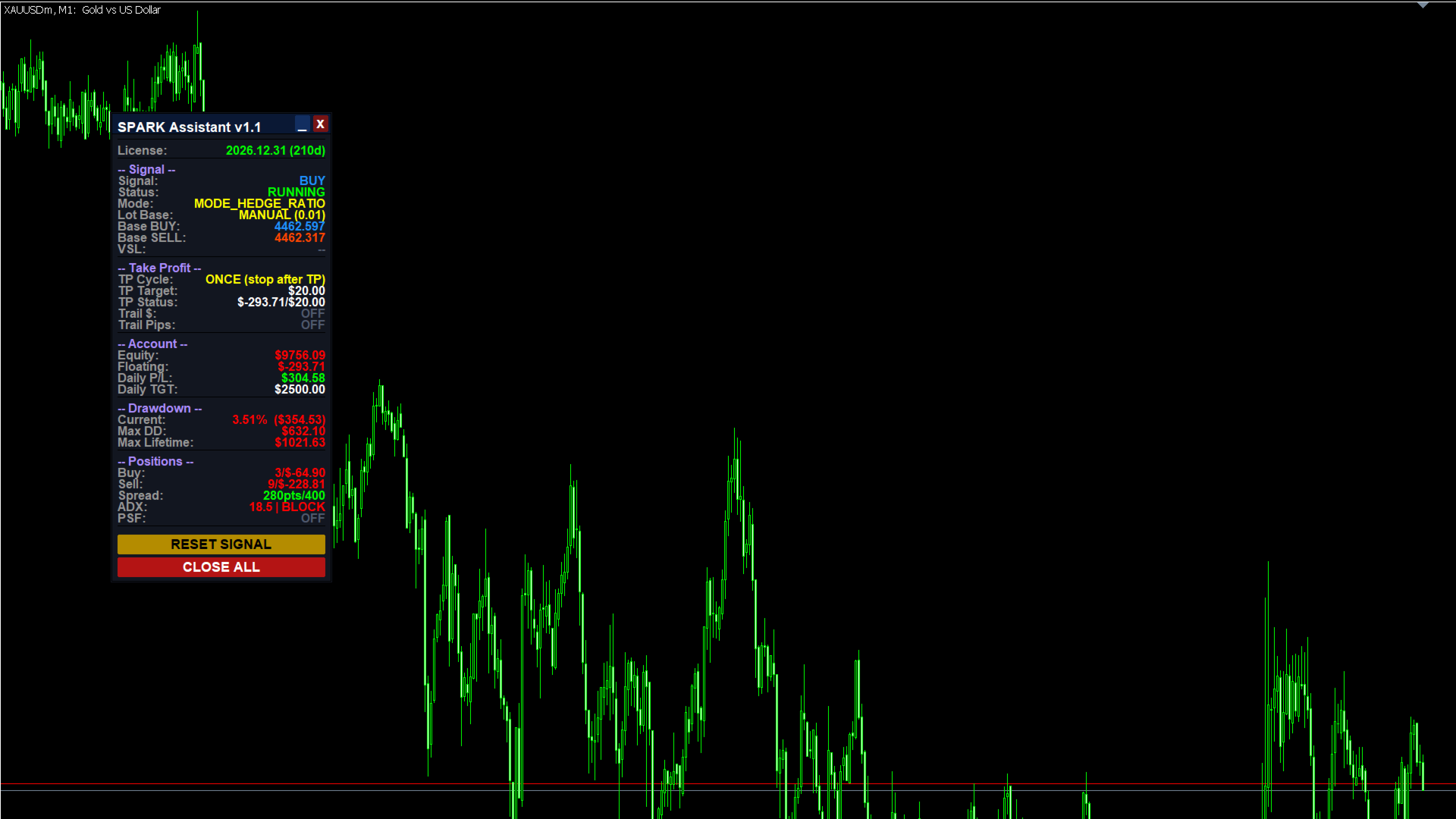
SPARK Assistant v1.1
Entered the wrong direction? No problem. SPARK Assistant follows the latest trend to always close in profit.
🔥 What is SPARK Assistant?
SPARK Assistant is a semi-automatic trading EA that works as your intelligent co-pilot. You make the entry — SPARK takes it from there.
Whether your manual trade goes with or against the market, SPARK automatically detects the real trend and layers positions intelligently until the full cycle closes in profit. It doesn't fight the market. It adapts to it.
💡 How It Works
3 simple steps:
- You open a trade manually (BUY or SELL) — this is your trigger signal
- SPARK detects your entry and starts layering additional positions aligned with the market trend
- When the profit target is hit, SPARK closes all positions cleanly and starts the next cycle automatically
The cycle repeats — accumulating profit — until your Daily Target is reached. Then it stops and waits for your next signal.
✅ Key Features
- Semi-Automatic — You control the trigger, EA manages everything else
- 3 Layering Modes — Grid, Hedge Original, Hedge Ratio
- Smart Sideways Filter — Dual filter system (ADX + Pre-Sideway Filter) blocks new layers during ranging markets
- Auto Cycle Restart — After TP, EA automatically opens the next cycle at the new price level
- Daily Target System — EA stops when your daily profit goal is reached
- Telegram Integration — Real-time notifications and remote control via Telegram bot
- Multi-Symbol Safe — Runs alongside other EAs on the same symbol without interference
- Lot Mirror Mode — Option to match your manual entry lot size as the layering base
- Trailing Stop — Optional money-based and pips-based trailing
- Drawdown Protection — Automatic close if drawdown exceeds your limit
- Compatible with synthetic indices and standard forex pairs
📊 Strategy Modes
Mode 1: Grid
Both BUY and SELL layers are placed symmetrically from your entry price. Works best in markets with consistent volatility.
- Layers added above entry → BUY
- Layers added below entry → SELL
- Partial TP or accumulated TP options available
Mode 2: Hedge Original
BUY-biased strategy. After your manual BUY entry, a Virtual Sell Line is calculated below. If price drops to that level, a SELL hedge is opened, then both sides pyramid from there.
- Best for strong directional bias
- Built-in virtual sell line trigger
Mode 3: Hedge Ratio
Both BUY and SELL are opened at entry (net-zero lock). As price moves, additional layers are added in the trending direction with progressively larger lots based on the ratio setting.
- Strongest trend-following behavior
- Lot size increases toward the winning direction
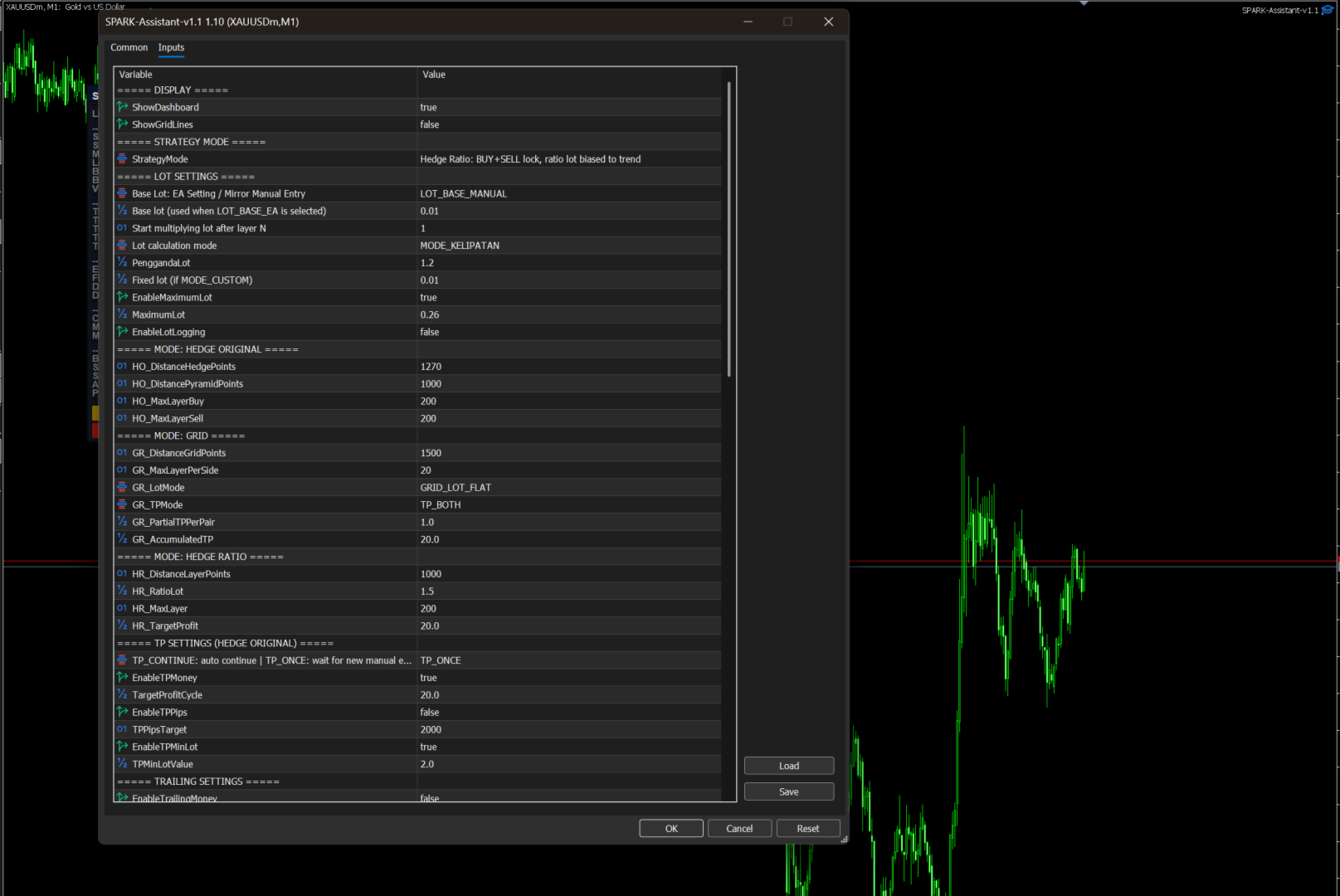
🔧 Settings Guide
Strategy Mode
| Setting | Description |
| StrategyMode | Choose between Grid, Hedge Original, or Hedge Ratio |
Lot Settings
| Setting | Default | Description |
| LotBaseMode | EA Setting | EA Setting = use LotAwal as base. Mirror Manual = mirror your manual entry lot |
| LotAwal | 0.01 | Base lot size (used when LotBaseMode = EA Setting) |
| StartMultiplyAtLayer | 1 | Start multiplying lot after this layer number |
| LotMultiplyMode | Multiplier | Multiplier = exponential growth. Fixed Custom = fixed lot per layer |
| PenggandaLot | 1.2 | Lot multiplier factor (e.g. 1.2 = each layer 20% larger) |
| LotCustom | 0.01 | Fixed lot per layer (used when LotMultiplyMode = Fixed Custom) |
| EnableMaximumLot | true | Enable maximum lot cap |
| MaximumLot | 0.26 | Maximum lot size per layer |
Mode: Grid
| Setting | Default | Description |
| GR_DistanceGridPoints | 1500 | Distance between grid levels in points |
| GR_MaxLayerPerSide | 20 | Max layers per side (BUY and SELL) |
| GR_LotMode | Flat | Flat = same lot all layers. Pyramid = increasing lot |
| GR_TPMode | Both | Partial = close best pair. Accumulated = close all at target. Both = partial first |
| GR_PartialTPPerPair | 1.0 | Minimum profit per pair for partial close ($) |
| GR_AccumulatedTP | 20.0 | Total profit target to close all positions ($) |
Mode: Hedge Original
| Setting | Default | Description |
| HO_DistanceHedgePoints | 1270 | Distance from BUY1 to Virtual Sell Line (points) |
| HO_DistancePyramidPoints | 1000 | Distance between pyramid layers (points) |
| HO_MaxLayerBuy | 200 | Maximum BUY layers |
| HO_MaxLayerSell | 200 | Maximum SELL layers |
Mode: Hedge Ratio
| Setting | Default | Description |
| HR_DistanceLayerPoints | 1500 | Distance between layers (points) |
| HR_RatioLot | 1.5 | Lot multiplier per layer (trending direction grows faster) |
| HR_MaxLayer | 20 | Max total layers (BUY + SELL combined) |
| HR_TargetProfit | 20.0 | Profit target to close all ($) |
TP Settings (Hedge Original mode)
| Setting | Default | Description |
| TPCycleMode | Continue | Continue = auto-restart cycle after TP. Once = stop after TP, wait for new manual entry |
| EnableTPMoney | true | Enable money-based take profit |
| TargetProfitCycle | 20.0 | Profit target per cycle ($) |
| EnableTPPips | false | Enable pips-based take profit |
| TPPipsTarget | 2000 | Pips target |
| EnableTPMinLot | true | Enable lot-difference based TP |
| TPMinLotValue | 2.0 | Value per 0.01 lot difference ($) |
Trailing Stop
| Setting | Default | Description |
| EnableTrailingMoney | false | Enable money trailing stop |
| TrailMoney_Threshold | 20.0 | Activate trailing after profit reaches this ($) |
| TrailMoney_MinPips | 1000 | Minimum pips in profit before trailing activates |
| TrailMoney_Drawback | 1.5 | Max allowed profit drawback ($) before close |
| TrailMoney_DrawbackPip | 2000 | Max allowed pips drawback before close |
| EnableTrailingPips | false | Enable pips trailing stop |
| TrailPips_Threshold | 2000 | Activate pips trailing after this many pips profit |
| TrailPips_Distance | 2000 | Trailing distance in pips |
| TrailPips_MinMove | 100 | Minimum SL movement in points |
Trading Hours
| Setting | Default | Description |
| StartHourGMT7 | 0 | Trading start hour (GMT+7) |
| StartMinuteGMT7 | 0 | Trading start minute |
| StopHourGMT7 | 23 | Trading stop hour (GMT+7) |
| StopMinuteGMT7 | 59 | Trading stop minute |
| ServerToGMT7Offset | 5 | Your broker server offset to GMT+7 |
| CloseBeforeSessionEnd | true | Auto-close profitable positions before session ends |
| MinutesBeforeSessionEnd | 5 | Minutes before session end to trigger close |
Daily Target
| Setting | Default | Description |
| TargetProfitDaily | 2500.0 | Daily profit target ($) — EA stops when reached |
| ActionOnDailyTarget | Stop Today | Stop Today = stop until next day. Pause Continue = pause then continue |
| PauseMinutes | 2 | Pause duration in minutes (if Pause Continue selected) |
Drawdown & Cut Off Protection
| Setting | Default | Description |
| EnableDrawDown | false | Enable drawdown protection |
| DrawDownMode | Percentage | Percentage or Fixed Value |
| DrawdownPercentage | 30.0 | Max drawdown percentage (%) |
| DrawdownValue | 30.0 | Max drawdown in dollars ($) |
| EnableCutOff | false | Enable cut-off protection |
| DistanceCutOffPoints | 30000 | Cut-off distance in points |
ADX Filter
| Setting | Default | Description |
| EnableFilterADX | true | Enable ADX sideways filter |
| ADX_Period | 20 | ADX indicator period |
| ADX_Threshold | 25.0 | ADX level below this = sideways = block new layers |
| ADX_Timeframe | Current | Timeframe for ADX calculation |
Pre-Sideway Filter (PSF)
5-condition sideways detection system. Blocks layering when 2+ conditions confirm sideways market.
| Setting | Default | Description |
| PSF_Enable | true | Enable PSF filter |
| PSF_LookbackBars | 20 | Candles to analyze |
| PSF_RangeRatioThresh | 0.55 | Range compression threshold |
| PSF_MomentumThresh | 0.30 | Momentum weakness threshold |
| PSF_FractalWindow | 10 | Fractal density window |
| PSF_FractalMinCount | 3 | Min fractals to confirm consolidation |
| PSF_CompressBars | 3 | Candle body compression lookback |
| PSF_UseVolume | true | Include volume in sideways detection |
| PSF_ConfirmCount | 2 | Minimum conditions to classify as sideways (max 5) |
Telegram Integration
| Setting | Default | Description |
| EnableTelegram | false | Enable Telegram notifications and commands |
| TelegramBotToken | — | Your Telegram bot token from @BotFather |
| TelegramChatID | — | Your Telegram chat ID |
| TelegramCheckSec | 5 | How often EA checks for new commands (seconds) |
Telegram Commands:
- /status — Get current EA status, positions, profit
- /reset — Close all positions and clear signal (wait for new manual entry)
- /close — Close all positions but keep signal active (auto-restart cycle)
Setup:
- Create a bot via @BotFather → get your Bot Token
- Send a message to your bot → get your Chat ID from api.telegram.org/bot{TOKEN}/getUpdates
- Go to MT5 → Tools → Options → Expert Advisors → Allow WebRequest → add https://api.telegram.org
- Enter token and chat ID in EA settings
Customization
| Setting | Default | Description |
| MagicNumber | 747474 | Unique identifier — change if running multiple instances |
| Slippage | 10 | Max allowed slippage in points |
| CustomComment | SPARK | Order comment prefix |
| MaxSpreadPoints | 400 | Maximum spread allowed — blocks entry if exceeded |
| SLPoints | 0 | Stop loss per position in points (0 = disabled) |
| ShowDashboard | true | Show/hide on-chart dashboard |
| ShowGridLines | true | Show/hide grid level lines on chart |
⚡ Quick Start Guide
- Attach EA to any chart (recommended: M1 or M5 timeframe)
- Set your preferred mode — Grid for balanced, Hedge Ratio for trend-following
- Set your TP target — TargetProfitCycle for HO mode, GR_AccumulatedTP for Grid, HR_TargetProfit for HR
- Set Daily Target — TargetProfitDaily (EA auto-stops when reached)
- Open a manual trade — BUY or SELL with any lot size
- Watch SPARK work — EA detects your entry and starts layering automatically
⚠️ Important Notes
- EA does NOT open the first position — your manual entry is always the trigger
- All positions are closed together on TP — including your original manual entry
- RESET clears the signal completely — EA waits for your next manual entry
- CLOSE ALL closes positions but keeps the signal active — next cycle starts automatically
- Recommended to set MaxSpreadPoints according to your broker's typical spread
- For synthetic indices, the EA automatically detects and adjusts minimum lot sizes
📞 Support
For questions, settings optimization, or custom configurations: