The News Filter

70 USD
Descargado demo:
105
Publicado:
24 abril 2023
Versión actual:
2.3
¿No ha encontrado el robot adecuado?
Encargue el suyo
en la bolsa Freelance.
Pasar a la bolsa
Encargue el suyo
en la bolsa Freelance.
Cómo comprar un robot comercial o indicador
Inicia el robot en el
hosting virtual
hosting virtual
Pruebe un indicador/robot comercial antes de comprarlo
¿Quieres ganar en el Market?
Cómo ofrecer un producto para que lo compren

Está perdiendo oportunidades comerciales:
- Aplicaciones de trading gratuitas
- 8 000+ señales para copiar
- Noticias económicas para analizar los mercados financieros
Registro
Entrada
Usted acepta la política del sitio web y las condiciones de uso
Si no tiene cuenta de usuario, regístrese
Do check out the blog post of The News Filter for important links and guides.
Feel free to reach out to me in MQL5 chat for any questions you may have.
Fixed 0 news imported error caused by Forex Factory update.
If there are any future errors, do reach out to me in the MQL5 chat.
Leolouiski Gan - Trader's profile - MQL5 communityHello, do you have an MT5 version for this product? I need it as my new broker only supports MT5 and I would like to keep using this news filter
Thank you for your comment.
At the moment only MT4 version is available, but don't worry I am already making the MT5 version and I will message you when it is released in the market.
is it possible to only filter specific news with certain keywords? This would be very handy as not all high impact news affects the charts.
Also, when the EA is removed and then restored after news, do all the EA settings get erased or does it just pause the EA?
is it possible to only filter specific news with certain keywords? This would be very handy as not all high impact news affects the charts.
Also, when the EA is removed and then restored after news, do all the EA settings get erased or does it just pause the EA?
ok thank you. This is exactly what i was looking for. The only other wish list item would be for the EA to treat certain news different than others. For example...NFP = avoid entire week.
One other question: Once the "Filter this" script is attached to a chart and settings input is there a way to revise it? or do you just need to add it again to the chart?
i tried what you said above but noticed only NFP is showing up on my chart as the next news when it should also be looking at news with keyword "speaks" and "rate". Did I do something wrong? Below are my inputs.
ok thank you. This is exactly what i was looking for. The only other wish list item would be for the EA to treat certain news different than others. For example...NFP = avoid entire week.
One other question: Once the "Filter this" script is attached to a chart and settings input is there a way to revise it? or do you just need to add it again to the chart?
Hello, I will try thinking if there is a way to add this feature without making the program too complicated for new users to use. Thank you for the suggestion!
Unfortunately, there is no way to revise inputs once Filter This is used. You will need to add the Filter This script again to the chart. One way you can save time configuring the settings is by saving the inputs so you can load the same one next time. Kindly refer to the picture below: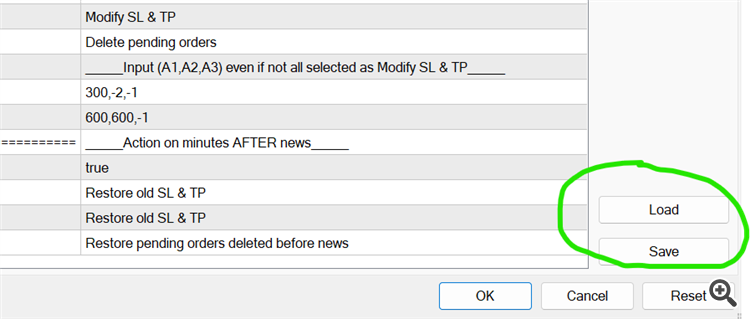
I hope you are also aware of the ability to check if inputs are correct by clicking the display while holding ctrl key. Many clients forget this feature, but its useful to ensure all the inputs are correct.
Hope all this helps,
Thank you!
THanks for the response. It worked.
A few more clarifications and questions:
1. If i attach the "filter this" script to a chart it will automatically filter news for that charts symbol?
2. What is the Custom Currency input for? If i enter another pair in thei section will it also look for news related to that pair as well as the chart where this script is attached to?
I am looking to only filter news with keyword related to the chart pair as well as correlated pairs ex. EURSUD & GBPUSD. So i would need to attach this script to bothcharts and also enter the correlated pair in the Custom currency input?
4. Given the info above which News Selection setting do i use? Custome Currency list + News with Keyword i think.
A few more clarifications and questions:
1. If i attach the "filter this" script to a chart it will automatically filter news for that charts symbol?
2. What is the Custom Currency input for? If i enter another pair in thei section will it also look for news related to that pair as well as the chart where this script is attached to?
Point 1 is correct, The "News to related to pair" option works by taking the symbol name lets say EURUSD, and selecting all news from EUR and USD. Custom currency list is used when you want to choose your own currency for news selection regardless of what symbol you attach Filter This to. If you use custom currency list, it will not select news related to the symbol unless you add them to the list. Example, you attach Filter This to EURUSD and want news from USD,EUR and GBP. So, you would need to input: "EUR,USD,GBP" in the custom currency list.
I am looking to only filter news with keyword related to the chart pair as well as correlated pairs ex. EURSUD & GBPUSD. So i would need to attach this script to bothcharts and also enter the correlated pair in the Custom currency input?
4. Given the info above which News Selection setting do i use? Custome Currency list + News with Keyword i think.
Let's say you would want to filter EURUSD chart by taking news with keywords as well as correlated pairs. You would only need to attach Filter This to EURUSD and select "Custom currency list + News with keyword". Input your keywords, and then input custom currency list: "EUR,USD,XXX,XXX" where XXX you can put whatever currency you think is correlated to EURUSD.
Hope this helps,
Thank you
Thanks. This is what i thought i needed to do but I noted that the news list included CNY for some reason. I only want it to filter news based on the keywords related to the custom currency list i input. Any suggestions?
It is also filtering "m/m" news which i did not enter into the Keyword news. Only interested in q/q or y/y news.
Thanks. This is what i thought i needed to do but I noted that the news list included CNY for some reason. I only want it to filter news based on the keywords related to the custom currency list i input. Any suggestions?
Hello,
Apologies, I misunderstood your initial request. The "Custom currency list + Keyword" option selects news that are in the custom list OR contains the keyword. Unfortunately, for your requirements it is not currently possible at the moment.
I will add a new option "Must be in custom list & Contains keyword" in the next product update. This option will select only news that are in the custom list AND has the inputted keyword. I believe this would fulfill your requirements. However, I am a little busy at the moment and the product update may take quite a while. Do check the versions tab to get the latest updates on the product.
Thank you.
Hello,
Apologies, I misunderstood your initial request. The "Custom currency list + Keyword" option selects news that are in the custom list OR contains the keyword. Unfortunately, for your requirements it is not currently possible at the moment.
I will add a new option "Must be in custom list & Contains keyword" in the next product update. This option will select only news that are in the custom list AND has the inputted keyword. I believe this would fulfill your requirements. However, I am a little busy at the moment and the product update may take quite a while. Do check the versions tab to get the latest updates on the product.
Thank you.
Thank you. This is exactly what I am looking for. "News with Keyword Related to Custom Currency List".
Can you also check the script doesn't remove the EA on news if open orders.
I've noticed it removed the EA even though I selected it to not be removed if there are open orders for that pair.
Can you also check the script doesn't remove the EA on news if open orders.
I've noticed it removed the EA even though I selected it to not be removed if there are open orders for that pair.
Is it possible to display on the chart next # of weeks news also? Does the EA consider news for the week ahead and follow the rules accordingly? For example, would the EA consider next weeks Monday news if the rule was to stop trading and remove EA 2 days (2880mins) prior and remove the EA on Thursday or Friday?
Hello,
Displaying the number of upcoming week news is definitely possible, thanks for the suggestion. It would actually be quite simple to add and I will include it on the next update.
Regarding whether the EA considers news on the week ahead, it depends slightly on your timezone and the data released by forex factory. But in general, forex factory will only provide news data for the current week which will not include next monday's news. So next monday's news is not loaded into the program and it will not do anything about it on Thursday or Friday. Basically, only news that are displayed on the chart (if display input is on), are used to stop trading. If its not displayed, it means its not loaded in the program and it will not do anything.
Hope this helps!