Dmitrii Kovalevskii
Dmitrii Kovalevskii
  • Information
no
experience
4
products
0
demo versions
0
jobs
0
signals
0
subscribers
Friends 2
Dmitrii Kovalevskii Published product

Spread Hunter MT5 – Current and Historical Spread Indicator Purpose The indicator displays the current spread value in points as a compact panel in the upper right corner of the chart. When hovering the cursor over any candle, it shows the historical spread for that bar. The tool is indispensable for traders whose strategies are sensitive to spread size: scalping, news trading, working with high-volatility instruments. Key Features Current Spread Constantly displayed in the upper right corner

Dmitrii Kovalevskii Published product

BuffersHunter — Universal Indicator Buffer Reader BuffersHunter   is a script that reads and analyzes buffers of any MetaTrader 5 indicator. No more guessing which buffer holds buy signals, where the levels are, and which buffers contain indicator lines. Run the script — and in a second you get the complete structure of all buffers with auto-detection of their types. Who is this script for? For EA developers.   You found an interesting indicator and want to use its signals in your

Dmitrii Kovalevskii
Dmitrii Kovalevskii
🕵️ Today is Monday, June 1st. I opened the terminal, looked at the chart — and the Previous Day High/Low lines were missing. Nothing.

First thought: "The market was closed on Saturday and Sunday, maybe the indicator can't find Friday?" I started digging into the code. Turns out, the problem was deeper — when subtracting days, I was using the .day field of the date structure, and when June 1st tried to find May 31st, the calculation returned day = 0, which broke the entire search. The same error occurred on any month boundary transition.

Fixed it, tested it — now everything works like clockwork. The previous trading day is found correctly, even with weekends, holidays, or month changes in between.

Also updated the logo — now you can tell at a glance what this indicator is all about.

✅ LevelsHunter v3.2 is now available on MQL5 Market. Free update for all users.
Dmitrii Kovalevskii
Dmitrii Kovalevskii
LevelsHunter Pro – Now with unlimited history and double-click navigation

Hi everyone.

The free version of LevelsHunter has been downloaded over 100 times, received great reviews, and helped many traders see the volume profile on their charts. Thank you to everyone who tested it, provided feedback, and supported the project.

But the more users I got, the more I heard the same request:

"Can we see the levels in the past?"

The free version has a limit of 100 bars. That is enough for current trading, but for proper trade analysis — not really. You want to go back to the exact bar where you opened a position and see where POC, VAH and VAL were at that very moment.

So I built LevelsHunter Pro.

What's new
Unlimited history — no more limits. Click on any bar in history, even 5000 bars back.

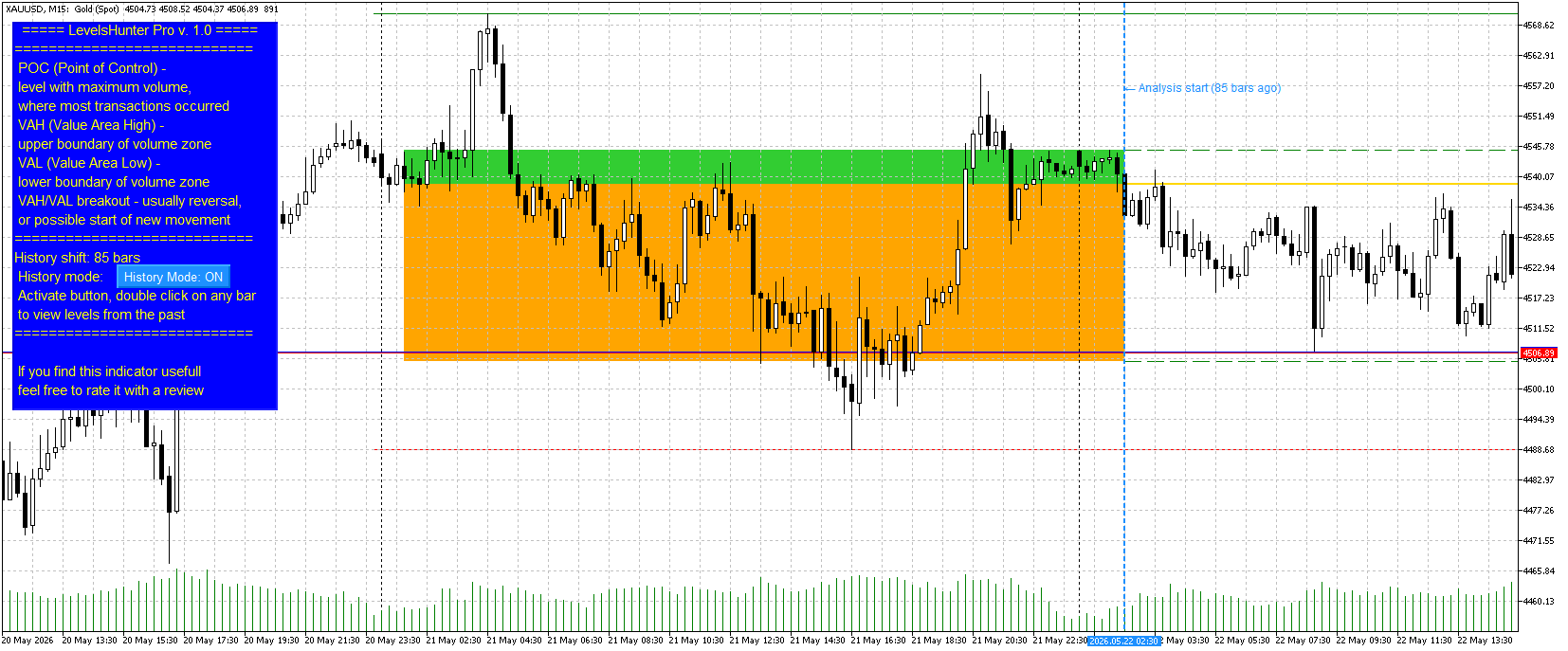
Double-click on any candle — no need to dig into settings and type numbers. Just double-click on a candle — the marker moves, levels recalculate.

Value Area fill — zones between VAH-POC and POC-VAL are now filled with different colours (light green and light orange). Visually clear.

History Mode button — turn it on to analyse the past. Turn it off to watch the current market. Simple.

Why you need this
Most indicators only show "here and now". You close a trade and want to analyse the mistake — but the levels have already moved. You cannot tell whether POC was above or below your entry.

LevelsHunter Pro records levels on every bar. You simply click on any candle in history and see exactly what the volume profile looked like at that moment.

This turns the indicator from a "light bulb that glows" into a full analytical tool. You stop guessing — you start knowing why a trade worked or not.

Price
I set the price at $30.

To put it in perspective: in many countries, that is the price of two pizzas or three cups of coffee. But unlike pizza and coffee, LevelsHunter Pro stays with you forever. You use it every day. One saved trade pays for it many times over.

The free version remains free and is not going anywhere. Anyone who is fine with 100 bars of history can continue using it without any limitations.

Where to find it
LevelsHunter Pro is now live on the Market. In the "New" tab, it is currently at 35th place.

The free version is also in the "New" tab, currently at 18th place.

Finally
Thank you to everyone who tested the free version, wrote reviews, and shared their suggestions. Without you, the Pro version would not exist.

If you have any questions or feedback — write here or in private messages.

Good luck with your trading.

Dmitry

Short version (for Telegram / social media)
LevelsHunter Pro is out

Added what users asked for:

Unlimited history (click on any candle)

Double-click navigation

Value Area fill (VAH-POC and POC-VAL)

History Mode button

The free version remains free (100 bars of history). Currently at 18th place in the "New" tab.

Pro — $30. Price of two pizzas, but years of use. Currently at 35th place in the "New" tab.
Dmitrii Kovalevskii Published product

LevelsHunter Pro – Professional Volume Profile with History Analysis What it is LevelsHunter Pro is a volume profile indicator that not only shows current POC, VAH and VAL levels but also allows you to   go back in time   and see where these levels were at the moment of any past trade. This is not a tool for guessing on the chart. It is for   cold analysis   of what has already happened. Why a trader needs this The problem:   Most indicators only show "here and now". You

Dmitrii Kovalevskii
Dmitrii Kovalevskii
Title: LevelsHunter 3.0 – added historical trade analysis
Hi everyone.
For a long time, I was annoyed that volume profile indicators only show levels for the current moment. I would look at a trade I closed yesterday, but I could not tell whether the POC was above or below my entry. The levels were gone.
I figured many traders have the same problem. If an indicator cannot show the past, proper trade analysis is impossible.
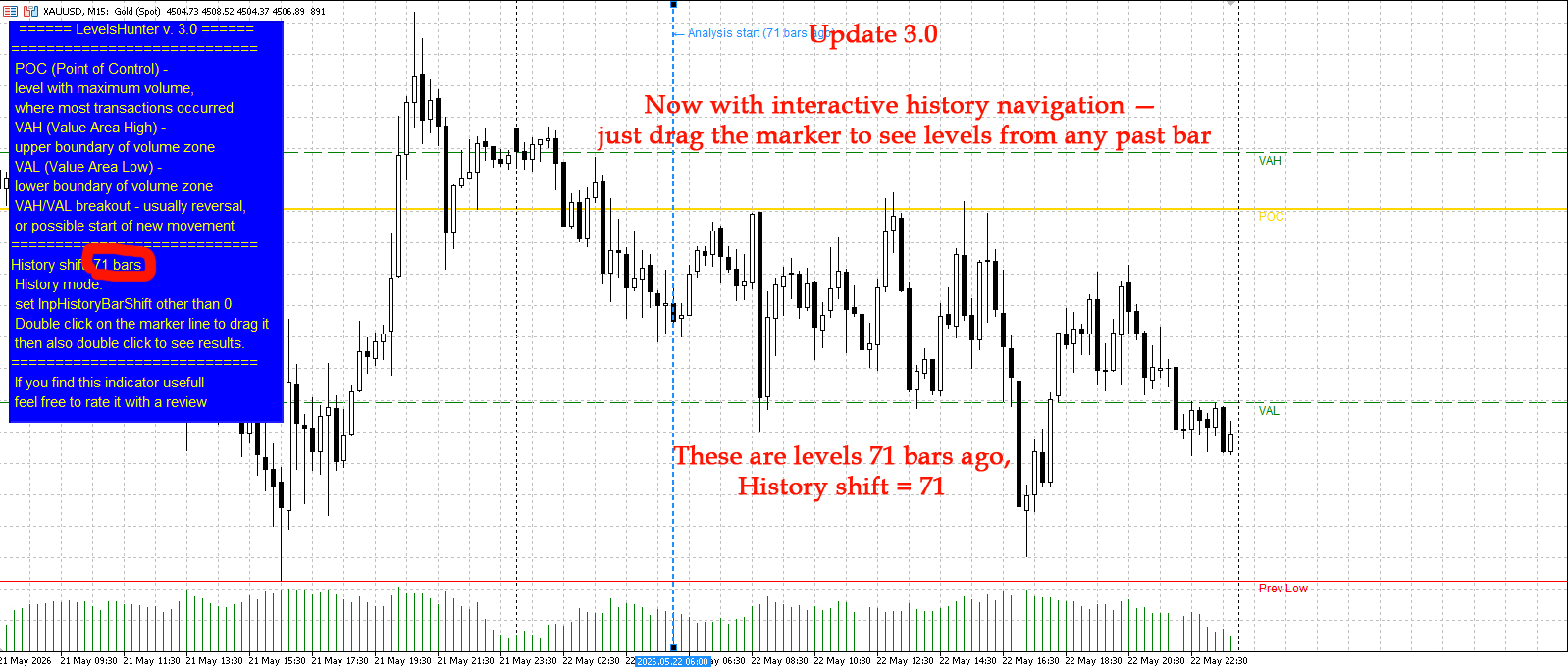
So I added a simple feature to LevelsHunter: you can now go back to any bar in history and see exactly what the POC, VAH and VAL levels were at that moment.
You can either set the shift in the input parameters (number of bars back) or just drag the blue dotted line on the chart.
The free version allows up to 100 bars back. On M15, that is about one day. Enough to test the feature and see if it helps.
I also updated the screenshots on the product page. You can see how the levels shift when I set a shift of 71 bars.
Version 3.0 is live on the Market.
Have you ever faced this problem? How do you usually analyze your past trades? Let me know in the comments.
Dmitrii Kovalevskii Published product

LevelsHunter MT5 – Volume Profile and Key Levels Indicator Purpose The indicator displays tick volume distribution across price levels over a specified number of recent bars. It is designed to analyse volume accumulation zones and identify significant support and resistance levels. It works especially well   in combination with other indicators   that show entry points. The POC, VAH and VAL levels act as an objective filter: they confirm a signal if it coincides with a volume

Dmitrii Kovalevskii
Registered at MQL5.community