Dmitrii Kovalevskii / 个人资料
- 信息
|
不
经验
|
4
产品
|
0
演示版
|
|
0
工作
|
0
信号
|
0
订阅者
|
Spread Hunter MT5 – 当前和历史点差指标 用途 该指标在图表右上角以紧凑面板形式显示当前点差值(以点为单位)。将光标悬停在任何K线上时,会显示该K线的历史点差。 该工具对于策略对点差大小敏感的交易者来说不可或缺:剥头皮交易、新闻交易、高波动性工具交易。 主要功能 当前点差 持续显示在右上角。实时更新(每秒一次)。 历史点差 鼠标悬停在任何K线上时,会出现一个包含以下信息的弹出提示: K线时间 点差值(以点为单位) 提示显示的是该K线周期内的最小点差(经纪商历史数据存储的特性) 颜色指示 绿色 – 点差在正常范围内(≤ 设定阈值) 红色 – 点差过高(> 阈值) 阈值可由用户配置(默认为20点)。 解读 低点差(绿色) – 有利的入场条件,尤其适用于剥头皮和日内交易。 高点差(红色) – 建议暂缓交易或使用更宽的止损。 历史点差 – 帮助评估过去在你分析的点位上是否存在舒适的入场条件。 实现特点 适用于任何时间框架和交易品种。 实时显示当前点差。 悬停显示历史点差。 可配置背景,提高可读性。 不使用外部DLL库。
BuffersHunter — 通用指标缓冲区读取器 BuffersHunter 是一个脚本,可读取和分析任何 MetaTrader 5 指标的缓冲区。无需再猜测哪个缓冲区包含买入信号、哪里是水平位、哪些缓冲区包含指标线。运行脚本 — 一秒钟即可获取所有缓冲区的完整结构及其自动类型检测。 适用人群 EA 开发者。 您发现了一个有趣的指标,想在机器人中使用其信号,但不知道缓冲区编号或其内容。BuffersHunter 一次运行即可显示全部信息。 交易研究者。 您正在研究一个新指标,想了解它传输了什么数据。可能存在隐藏的缓冲区,包含您在图表上看不到的有用信息。 在市场购买指标的用户。 并非所有开发者都会记录缓冲区结构。BuffersHunter 帮助您自行分析。 如何工作? 选择指标的 文件夹 (Market、Examples、Indicators)和 名称 — 与导航器中完全一致 在任何图表上运行脚本 结果显示在日志中,并保存到 MQL5\Files 文件夹的文本文件中
First thought: "The market was closed on Saturday and Sunday, maybe the indicator can't find Friday?" I started digging into the code. Turns out, the problem was deeper — when subtracting days, I was using the .day field of the date structure, and when June 1st tried to find May 31st, the calculation returned day = 0, which broke the entire search. The same error occurred on any month boundary transition.
Fixed it, tested it — now everything works like clockwork. The previous trading day is found correctly, even with weekends, holidays, or month changes in between.
Also updated the logo — now you can tell at a glance what this indicator is all about.
✅ LevelsHunter v3.2 is now available on MQL5 Market. Free update for all users.
Hi everyone.
The free version of LevelsHunter has been downloaded over 100 times, received great reviews, and helped many traders see the volume profile on their charts. Thank you to everyone who tested it, provided feedback, and supported the project.
But the more users I got, the more I heard the same request:
"Can we see the levels in the past?"
The free version has a limit of 100 bars. That is enough for current trading, but for proper trade analysis — not really. You want to go back to the exact bar where you opened a position and see where POC, VAH and VAL were at that very moment.
So I built LevelsHunter Pro.
What's new
Unlimited history — no more limits. Click on any bar in history, even 5000 bars back.
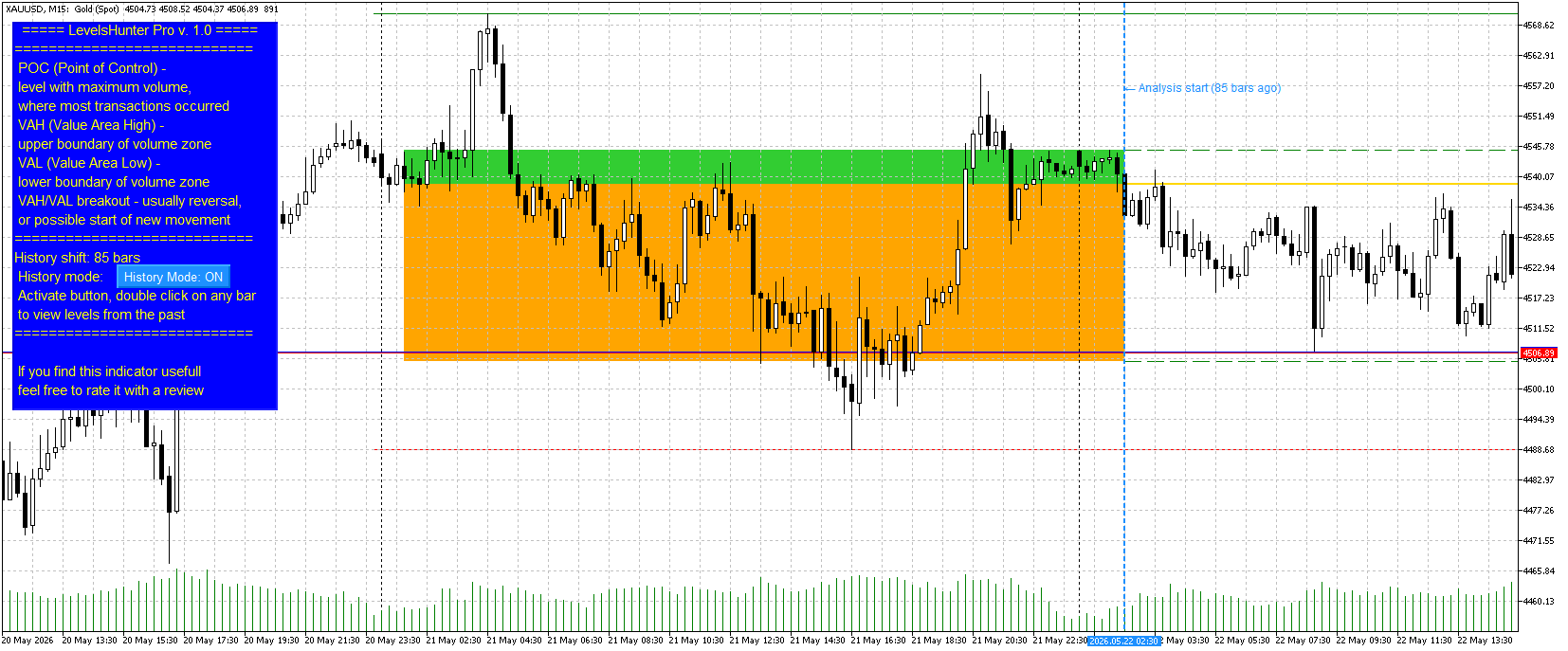
Double-click on any candle — no need to dig into settings and type numbers. Just double-click on a candle — the marker moves, levels recalculate.
Value Area fill — zones between VAH-POC and POC-VAL are now filled with different colours (light green and light orange). Visually clear.
History Mode button — turn it on to analyse the past. Turn it off to watch the current market. Simple.
Why you need this
Most indicators only show "here and now". You close a trade and want to analyse the mistake — but the levels have already moved. You cannot tell whether POC was above or below your entry.
LevelsHunter Pro records levels on every bar. You simply click on any candle in history and see exactly what the volume profile looked like at that moment.
This turns the indicator from a "light bulb that glows" into a full analytical tool. You stop guessing — you start knowing why a trade worked or not.
Price
I set the price at $30.
To put it in perspective: in many countries, that is the price of two pizzas or three cups of coffee. But unlike pizza and coffee, LevelsHunter Pro stays with you forever. You use it every day. One saved trade pays for it many times over.
The free version remains free and is not going anywhere. Anyone who is fine with 100 bars of history can continue using it without any limitations.
Where to find it
LevelsHunter Pro is now live on the Market. In the "New" tab, it is currently at 35th place.
The free version is also in the "New" tab, currently at 18th place.
Finally
Thank you to everyone who tested the free version, wrote reviews, and shared their suggestions. Without you, the Pro version would not exist.
If you have any questions or feedback — write here or in private messages.
Good luck with your trading.
Dmitry
Short version (for Telegram / social media)
LevelsHunter Pro is out
Added what users asked for:
Unlimited history (click on any candle)
Double-click navigation
Value Area fill (VAH-POC and POC-VAL)
History Mode button
The free version remains free (100 bars of history). Currently at 18th place in the "New" tab.
Pro — $30. Price of two pizzas, but years of use. Currently at 35th place in the "New" tab.
LevelsHunter Pro – 专业成交量分布图与历史分析 这是什么 LevelsHunter Pro 是一款成交量分布图指标,不仅显示当前的 POC、VAH 和 VAL 水平,还允许您 回到过去 ,查看任何历史交易时刻这些水平的位置。 这不是一个在图表上猜测的工具。而是对已经发生的情况进行 冷静分析 的工具。 交易者为什么需要它 问题: 大多数指标只显示「此时此地」。您关闭一笔交易并想分析错误 — 但水平已经移动了。您无法判断 POC 是在入场价之上还是之下。您无法判断价格为何反弹或突破水平。 解决方案: LevelsHunter Pro 记录每个K线的水平。您只需点击历史中的任何一根K线,就能准确看到当时的成交量分布图。 如何在交易中使用 1. 改善实时入场 您看到一个买入信号。价格接近 POC 或 VAH 水平。您该怎么办? 开启 历史模式 ,快速检查一小时前或昨天在同一水平上价格的表现。如果一小时前价格从 POC 反弹 — 该水平有效。如果突破了 — 最好远离。 一个具体的策略示例:
Hi everyone.
For a long time, I was annoyed that volume profile indicators only show levels for the current moment. I would look at a trade I closed yesterday, but I could not tell whether the POC was above or below my entry. The levels were gone.
I figured many traders have the same problem. If an indicator cannot show the past, proper trade analysis is impossible.
So I added a simple feature to LevelsHunter: you can now go back to any bar in history and see exactly what the POC, VAH and VAL levels were at that moment.
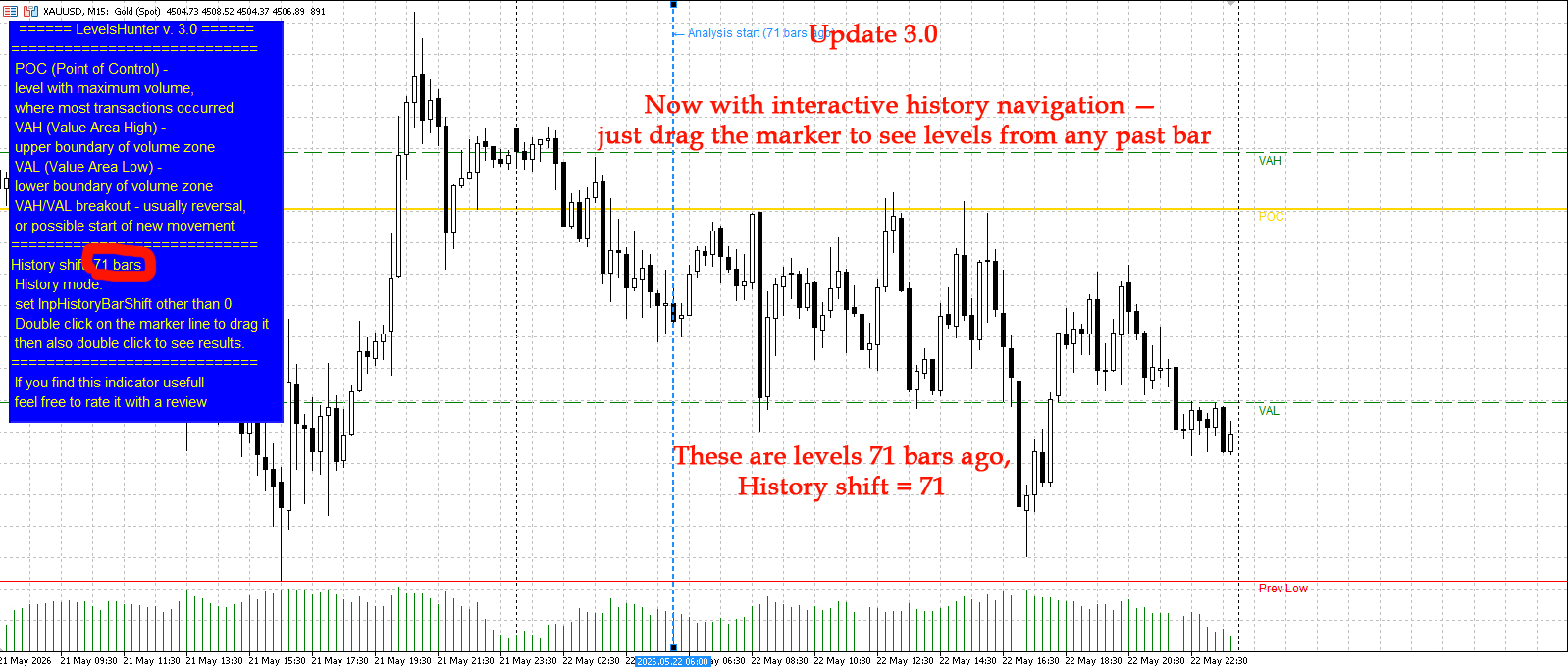
You can either set the shift in the input parameters (number of bars back) or just drag the blue dotted line on the chart.
The free version allows up to 100 bars back. On M15, that is about one day. Enough to test the feature and see if it helps.
I also updated the screenshots on the product page. You can see how the levels shift when I set a shift of 71 bars.
Version 3.0 is live on the Market.
Have you ever faced this problem? How do you usually analyze your past trades? Let me know in the comments.
LevelsHunter MT5 – 成交量分布图与关键水平指标 用途 该指标显示指定数量的最近K线上 tick 成交量在价格水平上的分布情况。该工具旨在分析成交量累积区域并识别重要的支撑和阻力水平。 它与其他显示入场点的指标结合使用 效果尤佳 。POC、VAH 和 VAL 水平充当客观过滤器:如果信号与成交量累积区域重合,则确认信号;当信号出现在"空"区域时,则提醒您暂缓交易。 关键功能 – 您可以"倒流时间",查看过去任何K线上哪些 POC、VAH 和 VAL 水平是有效的。这将指标变成了一个全面的交易分析器。 主要元素 POC(控制点) – 成交量最大的水平,在分析期间内大部分交易发生于此。 VAH(价值区域上轨) – 包含指定百分比总成交量的价格区域的上边界。 VAL(价值区域下轨) – 包含指定百分比总成交量的价格区域的下边界。 前日最高点和最低点 – 前一交易日的水平。 信号解读 测试 POC 水平可能预示潜在反转。 价格站稳 VAH 上方或