Dmitrii Kovalevskii / 프로필
- 정보
|
no
경험
|
4
제품
|
0
데몬 버전
|
|
0
작업
|
0
거래 신호
|
0
구독자
|
Spread Hunter MT5 – 현재 및 과거 스프레드 인디케이터 목적 이 인디케이터는 현재 스프레드 값을 포인트 단위로 차트의 오른쪽 상단 모서리에 있는 컴팩트한 패널로 표시합니다. 커서를 임의의 캔들 위에 올리면 해당 바의 과거 스프레드를 표시합니다. 이 도구는 스프레드 크기에 민감한 전략(스캘핑, 뉴스 트레이딩, 고변동성 상품 거래)을 사용하는 트레이더에게 필수적입니다. 주요 기능 현재 스프레드 오른쪽 상단 모서리에 지속적으로 표시됩니다. 실시간으로 업데이트됩니다(매초 1회). 과거 스프레드 마우스를 임의의 캔들 위에 올리면 다음 정보를 포함하는 툴팁이 나타납니다: 바 시간 포인트 단위의 스프레드 값 바 기간의 최소 스프레드가 표시된다는 설명 (브로커의 과거 데이터 저장 특성) 색상 표시 녹색 – 스프레드가 정상 범위 내(≤ 설정된 임계값) 빨간색 – 스프레드가 높음(> 임계값) 임계값은 사용자가 구성할 수 있습니다(기본값은 20포인트). 해석 낮은 스프레드(녹색)
BuffersHunter — 범용 인디케이터 버퍼 리더 BuffersHunter 는 모든 MetaTrader 5 인디케이터의 버퍼를 읽고 분석하는 스크립트입니다. 어떤 버퍼에 매수 신호가 들어있는지, 레벨이 어디에 있는지, 어떤 버퍼에 인디케이터 라인이 들어있는지 더 이상 추측할 필요가 없습니다. 스크립트를 실행하면 — 1초 만에 모든 버퍼의 완전한 구조와 자동 유형 감지를 얻을 수 있습니다. 이 스크립트는 누구를 위한 것인가? EA 개발자용. 흥미로운 인디케이터를 찾았고 그 신호를 로봇에서 사용하고 싶지만 버퍼 번호나 그 내용을 모르는 경우. BuffersHunter는 한 번의 실행으로 모든 것을 보여줍니다. 트레이더-연구자용. 새로운 인디케이터를 연구 중이며 어떤 데이터를 전송하는지 이해하고 싶은 경우. 차트에서 보이지 않는 유용한 정보가 담긴 숨겨진 버퍼가 있을 수 있습니다. 마켓에서 인디케이터를 구매하는 분들께. 모든 개발자가 버퍼 구조를
First thought: "The market was closed on Saturday and Sunday, maybe the indicator can't find Friday?" I started digging into the code. Turns out, the problem was deeper — when subtracting days, I was using the .day field of the date structure, and when June 1st tried to find May 31st, the calculation returned day = 0, which broke the entire search. The same error occurred on any month boundary transition.
Fixed it, tested it — now everything works like clockwork. The previous trading day is found correctly, even with weekends, holidays, or month changes in between.
Also updated the logo — now you can tell at a glance what this indicator is all about.
✅ LevelsHunter v3.2 is now available on MQL5 Market. Free update for all users.
Hi everyone.
The free version of LevelsHunter has been downloaded over 100 times, received great reviews, and helped many traders see the volume profile on their charts. Thank you to everyone who tested it, provided feedback, and supported the project.
But the more users I got, the more I heard the same request:
"Can we see the levels in the past?"
The free version has a limit of 100 bars. That is enough for current trading, but for proper trade analysis — not really. You want to go back to the exact bar where you opened a position and see where POC, VAH and VAL were at that very moment.
So I built LevelsHunter Pro.
What's new
Unlimited history — no more limits. Click on any bar in history, even 5000 bars back.
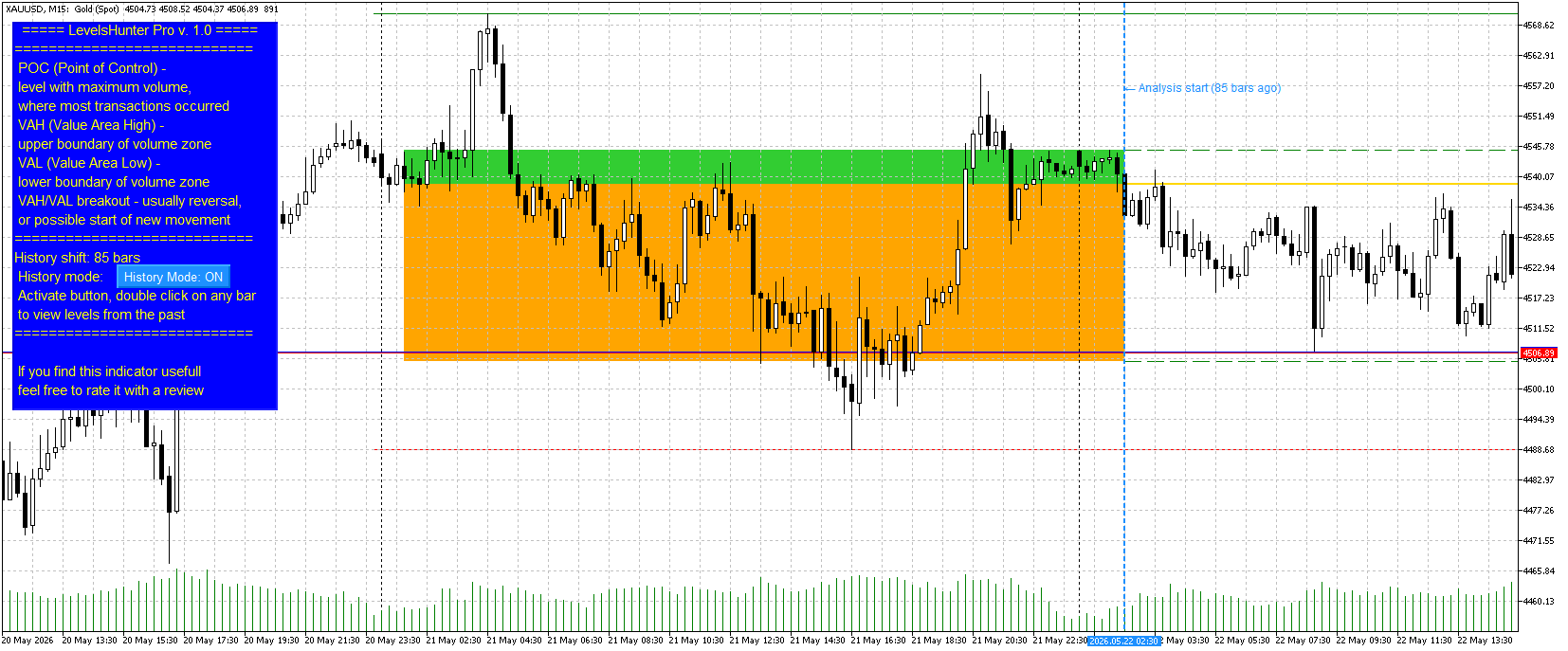
Double-click on any candle — no need to dig into settings and type numbers. Just double-click on a candle — the marker moves, levels recalculate.
Value Area fill — zones between VAH-POC and POC-VAL are now filled with different colours (light green and light orange). Visually clear.
History Mode button — turn it on to analyse the past. Turn it off to watch the current market. Simple.
Why you need this
Most indicators only show "here and now". You close a trade and want to analyse the mistake — but the levels have already moved. You cannot tell whether POC was above or below your entry.
LevelsHunter Pro records levels on every bar. You simply click on any candle in history and see exactly what the volume profile looked like at that moment.
This turns the indicator from a "light bulb that glows" into a full analytical tool. You stop guessing — you start knowing why a trade worked or not.
Price
I set the price at $30.
To put it in perspective: in many countries, that is the price of two pizzas or three cups of coffee. But unlike pizza and coffee, LevelsHunter Pro stays with you forever. You use it every day. One saved trade pays for it many times over.
The free version remains free and is not going anywhere. Anyone who is fine with 100 bars of history can continue using it without any limitations.
Where to find it
LevelsHunter Pro is now live on the Market. In the "New" tab, it is currently at 35th place.
The free version is also in the "New" tab, currently at 18th place.
Finally
Thank you to everyone who tested the free version, wrote reviews, and shared their suggestions. Without you, the Pro version would not exist.
If you have any questions or feedback — write here or in private messages.
Good luck with your trading.
Dmitry
Short version (for Telegram / social media)
LevelsHunter Pro is out
Added what users asked for:
Unlimited history (click on any candle)
Double-click navigation
Value Area fill (VAH-POC and POC-VAL)
History Mode button
The free version remains free (100 bars of history). Currently at 18th place in the "New" tab.
Pro — $30. Price of two pizzas, but years of use. Currently at 35th place in the "New" tab.
LevelsHunter Pro – 전문가용 거래량 프로필 및 과거 분석 무엇인가요? LevelsHunter Pro는 현재 POC, VAH, VAL 레벨을 표시할 뿐만 아니라 과거로 돌아가 과거 거래 순간에 이 레벨들이 어디에 있었는지 볼 수 있는 거래량 프로필 지표입니다. 차트에서 추측하는 도구가 아닙니다. 이미 일어난 일을 냉정하게 분석 하기 위한 도구입니다. 트레이더에게 필요한 이유 문제점: 대부분의 지표는 '지금 여기'만 보여줍니다. 거래를 마감하고 실수를 분석하려고 하면 이미 레벨이 이동해 있습니다. POC가 진입가 위에 있었는지 아래에 있었는지 알 수 없습니다. 가격이 왜 반등했는지 또는 레벨을 돌파했는지 알 수 없습니다. 해결책: LevelsHunter Pro는 모든 봉의 레벨을 기록합니다. 과거의 어떤 캔들이든 클릭하면 그 순간의 거래량 프로필을 정확히 볼 수 있습니다. 거래에서 어떻게 사용하나요? 1
Hi everyone.
For a long time, I was annoyed that volume profile indicators only show levels for the current moment. I would look at a trade I closed yesterday, but I could not tell whether the POC was above or below my entry. The levels were gone.
I figured many traders have the same problem. If an indicator cannot show the past, proper trade analysis is impossible.
So I added a simple feature to LevelsHunter: you can now go back to any bar in history and see exactly what the POC, VAH and VAL levels were at that moment.
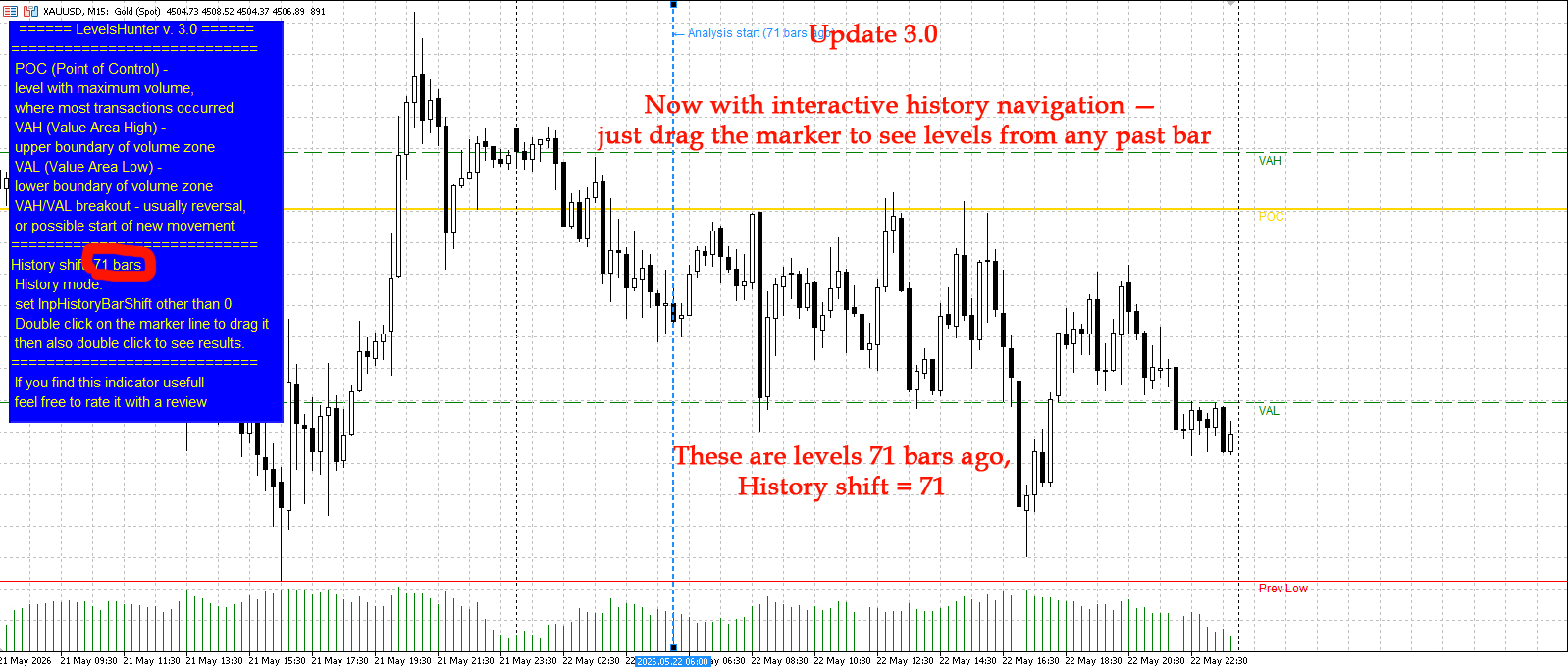
You can either set the shift in the input parameters (number of bars back) or just drag the blue dotted line on the chart.
The free version allows up to 100 bars back. On M15, that is about one day. Enough to test the feature and see if it helps.
I also updated the screenshots on the product page. You can see how the levels shift when I set a shift of 71 bars.
Version 3.0 is live on the Market.
Have you ever faced this problem? How do you usually analyze your past trades? Let me know in the comments.
LevelsHunter MT5 – 거래량 프로파일 및 주요 레벨 인디케이터 목적 이 인디케이터는 지정된 수의 최근 바에 걸쳐 틱 거래량이 가격 수준별로 분포된 것을 표시합니다. 거래량 축적 영역을 분석하고 중요한 지지 및 저항 수준을 식별하도록 설계되었습니다. 진입점을 보여주는 다른 인디케이터와 결합하여 특히 효과적입니다. POC, VAH, VAL 레벨은 객관적인 필터 역할을 합니다: 신호가 거래량 축적 영역과 일치하면 확인하고, 신호가 "빈" 영역에서 발생하면 거래를 자제할 수 있게 합니다. 핵심 기능 – 시간을 되돌려 과거의 어떤 바에서 어떤 POC, VAH, VAL 레벨이 유효했는지 확인할 수 있습니다. 이것은 인디케이터를 완전한 거래 분석기로 바꿔줍니다. 주요 요소 POC(통제점) – 분석 기간 동안 가장 많은 수의 거래가 발생한, 거래량이 가장 큰 레벨. VAH(가치 영역 고가) – 총 거래량의 지정된 비율을