Dmitrii Kovalevskii
Dmitrii Kovalevskii
  • 情報
no
経験
4
製品
0
デモバージョン
0
ジョブ
0
シグナル
0
購読者
友達 2
Dmitrii Kovalevskii パブリッシュされたプロダクト

Spread Hunter MT5 – 現在および履歴スプレッドインジケーター 目的 このインジケーターは、現在のスプレッド値をポイント単位でコンパクトなパネルとしてチャートの右上隅に表示します。任意のローソク足にカーソルを合わせると、そのバーの履歴スプレッドを表示します。 このツールは、スプレッドの大きさに敏感な戦略(スキャルピング、ニューストレード、高ボラティリティ商品の取引)を持つトレーダーに不可欠です。 主な機能 現在のスプレッド 右上隅に常時表示されます。リアルタイムで更新されます(毎秒1回)。 履歴スプレッド 任意のローソク足にマウスを合わせると、以下の情報を含むツールチップが表示されます: バーの時間 ポイント単位のスプレッド値 バー期間の最小スプレッドが表示されていることの注記(ブローカーによる履歴データ保存の特性) 色分け表示 緑 – スプレッドが通常範囲内(≤ 設定閾値) 赤 – スプレッドが高い(> 閾値) 閾値はユーザーが設定可能です(デフォルトは20ポイント)。 解釈 低スプレッド(緑)   –

Dmitrii Kovalevskii パブリッシュされたプロダクト

BuffersHunter — ユニバーサルインジケーターバッファーリーダー BuffersHunter   は、あらゆるMetaTrader 5インジケーターのバッファーを読み取り分析するスクリプトです。どのバッファーに買いシグナルが含まれているか、どこにレベルがあるか、どのバッファーにインジケーターラインが含まれているかをもう推測する必要はありません。スクリプトを実行するだけで — 数秒ですべてのバッファーの完全な構造と自動型検出を取得できます。 このスクリプトは誰向けか? EA開発者向け。   興味深いインジケーターを見つけ、そのシグナルをロボットで使用したいが、バッファー番号やその内容がわからない場合。BuffersHunterは1回の実行ですべてを表示します。 トレーダー研究者向け。   新しいインジケーターを研究しており、どのようなデータを送信しているかを理解したい場合。チャート上では見えない有用な情報を含む隠れたバッファーがあるかもしれません。 マーケットでインジケーターを購入する方へ。  

Dmitrii Kovalevskii
Dmitrii Kovalevskii
🕵️ Today is Monday, June 1st. I opened the terminal, looked at the chart — and the Previous Day High/Low lines were missing. Nothing.

First thought: "The market was closed on Saturday and Sunday, maybe the indicator can't find Friday?" I started digging into the code. Turns out, the problem was deeper — when subtracting days, I was using the .day field of the date structure, and when June 1st tried to find May 31st, the calculation returned day = 0, which broke the entire search. The same error occurred on any month boundary transition.

Fixed it, tested it — now everything works like clockwork. The previous trading day is found correctly, even with weekends, holidays, or month changes in between.

Also updated the logo — now you can tell at a glance what this indicator is all about.

✅ LevelsHunter v3.2 is now available on MQL5 Market. Free update for all users.
Dmitrii Kovalevskii
Dmitrii Kovalevskii
LevelsHunter Pro – Now with unlimited history and double-click navigation

Hi everyone.

The free version of LevelsHunter has been downloaded over 100 times, received great reviews, and helped many traders see the volume profile on their charts. Thank you to everyone who tested it, provided feedback, and supported the project.

But the more users I got, the more I heard the same request:

"Can we see the levels in the past?"

The free version has a limit of 100 bars. That is enough for current trading, but for proper trade analysis — not really. You want to go back to the exact bar where you opened a position and see where POC, VAH and VAL were at that very moment.

So I built LevelsHunter Pro.

What's new
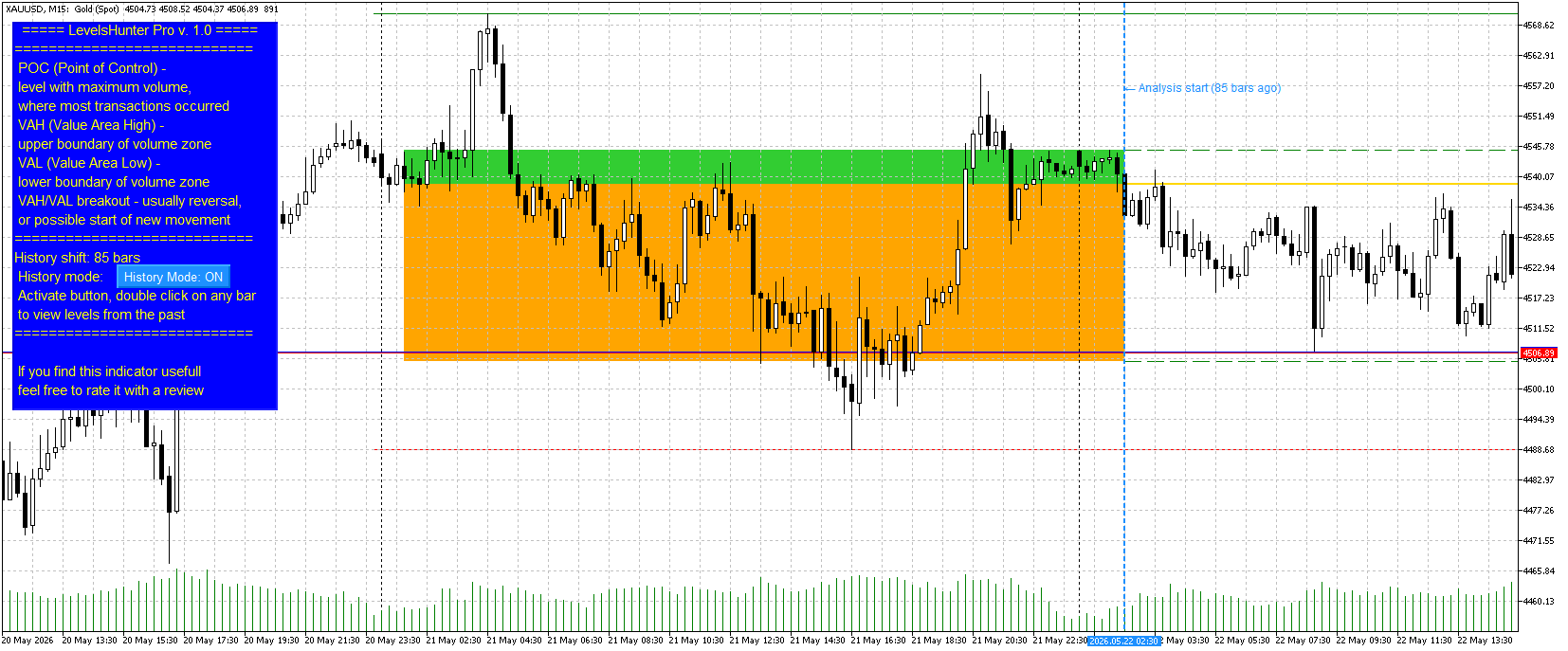
Unlimited history — no more limits. Click on any bar in history, even 5000 bars back.

Double-click on any candle — no need to dig into settings and type numbers. Just double-click on a candle — the marker moves, levels recalculate.

Value Area fill — zones between VAH-POC and POC-VAL are now filled with different colours (light green and light orange). Visually clear.

History Mode button — turn it on to analyse the past. Turn it off to watch the current market. Simple.

Why you need this
Most indicators only show "here and now". You close a trade and want to analyse the mistake — but the levels have already moved. You cannot tell whether POC was above or below your entry.

LevelsHunter Pro records levels on every bar. You simply click on any candle in history and see exactly what the volume profile looked like at that moment.

This turns the indicator from a "light bulb that glows" into a full analytical tool. You stop guessing — you start knowing why a trade worked or not.

Price
I set the price at $30.

To put it in perspective: in many countries, that is the price of two pizzas or three cups of coffee. But unlike pizza and coffee, LevelsHunter Pro stays with you forever. You use it every day. One saved trade pays for it many times over.

The free version remains free and is not going anywhere. Anyone who is fine with 100 bars of history can continue using it without any limitations.

Where to find it
LevelsHunter Pro is now live on the Market. In the "New" tab, it is currently at 35th place.

The free version is also in the "New" tab, currently at 18th place.

Finally
Thank you to everyone who tested the free version, wrote reviews, and shared their suggestions. Without you, the Pro version would not exist.

If you have any questions or feedback — write here or in private messages.

Good luck with your trading.

Dmitry

Short version (for Telegram / social media)
LevelsHunter Pro is out

Added what users asked for:

Unlimited history (click on any candle)

Double-click navigation

Value Area fill (VAH-POC and POC-VAL)

History Mode button

The free version remains free (100 bars of history). Currently at 18th place in the "New" tab.

Pro — $30. Price of two pizzas, but years of use. Currently at 35th place in the "New" tab.
Dmitrii Kovalevskii パブリッシュされたプロダクト

LevelsHunter Pro – プロフェッショナルな出来高プロファイルと履歴分析 これは何か LevelsHunter Proは、現在のPOC、VAH、VALレベルを表示するだけでなく、 過去に遡って 過去のトレードの瞬間にこれらのレベルがどこにあったかを確認できる出来高プロファイルインジケーターです。 チャート上で推測するためのツールではありません。すでに起こったことを   冷静に分析   するためのものです。 トレーダーに必要な理由 問題点:   ほとんどのインジケーターは「今、ここ」だけを示します。トレードを終了してミスを分析しようとすると、レベルはすでに動いています。POCがエントリー価格より上にあったのか下にあったのかわかりません。価格がなぜ跳ね返ったのか、レベルをブレイクしたのかわかりません。 解決策:   LevelsHunter Proはすべてのバーのレベルを記録します。履歴の任意のローソク足をクリックするだけで、その瞬間の出来高プロファイルを正確に見ることができます。 トレードでの使い方 1. リアルタイムエントリーの改善

Dmitrii Kovalevskii
Dmitrii Kovalevskii
Title: LevelsHunter 3.0 – added historical trade analysis
Hi everyone.
For a long time, I was annoyed that volume profile indicators only show levels for the current moment. I would look at a trade I closed yesterday, but I could not tell whether the POC was above or below my entry. The levels were gone.
I figured many traders have the same problem. If an indicator cannot show the past, proper trade analysis is impossible.
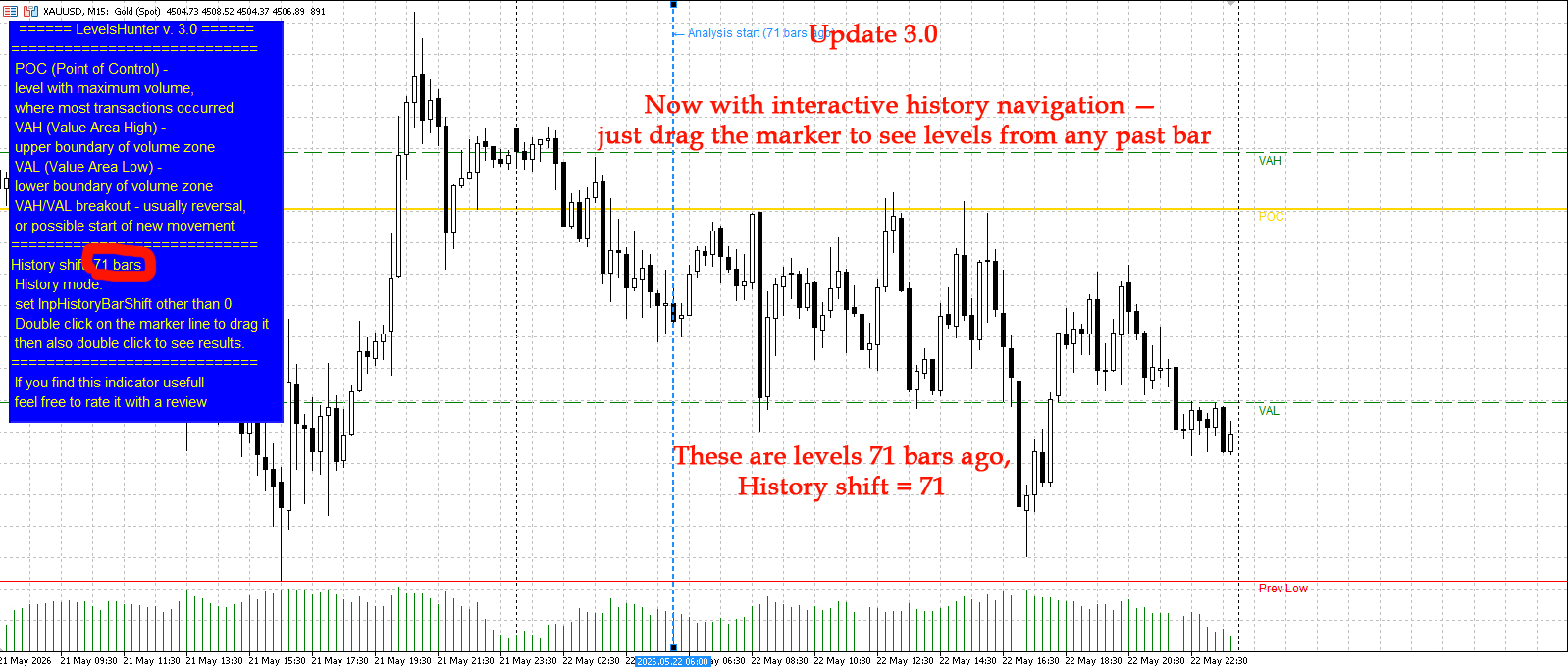
So I added a simple feature to LevelsHunter: you can now go back to any bar in history and see exactly what the POC, VAH and VAL levels were at that moment.
You can either set the shift in the input parameters (number of bars back) or just drag the blue dotted line on the chart.
The free version allows up to 100 bars back. On M15, that is about one day. Enough to test the feature and see if it helps.
I also updated the screenshots on the product page. You can see how the levels shift when I set a shift of 71 bars.
Version 3.0 is live on the Market.
Have you ever faced this problem? How do you usually analyze your past trades? Let me know in the comments.
Dmitrii Kovalevskii パブリッシュされたプロダクト

LevelsHunter MT5 – 出来高プロファイルとキーレベルインジケーター 目的 このインジケーターは、指定された本数の最近のバーにおけるティック出来高の価格レベル別分布を表示します。出来高蓄積ゾーンを分析し、重要なサポートレベルとレジスタンスレベルを特定するために設計されています。 エントリーポイントを示す 他のインジケーターと組み合わせて 特に効果的です。POC、VAH、VALレベルは客観的なフィルターとして機能します。シグナルが出来高蓄積ゾーンと一致すれば確認し、「空の」エリアでシグナルが発生した場合は取引を見送る判断を可能にします。 重要な機能   – 時間を巻き戻して、過去の任意のバーでどのPOC、VAH、VALレベルが有効だったかを確認できます。これにより、インジケーターは完全な取引分析ツールに変わります。 主な要素 POC(コントロールポイント)   – 分析期間中に最も多くの取引が発生した、出来高が最大のレベル。 VAH(バリューエリア高値)   – 総出来高の指定されたパーセンテージを含む価格ゾーンの上限。

Dmitrii Kovalevskii
MQL5.communityに登録されました