Telegram Trade Notifier MT5
- Utilities
- Version: 1.0
- Activations: 10

Get every trade of your MT5 account in Telegram: opened, closed, partially closed, SL/TP changes and pending orders, plus a daily account report. Setup takes 3 minutes, and the utility tells you in plain words if something is wrong.
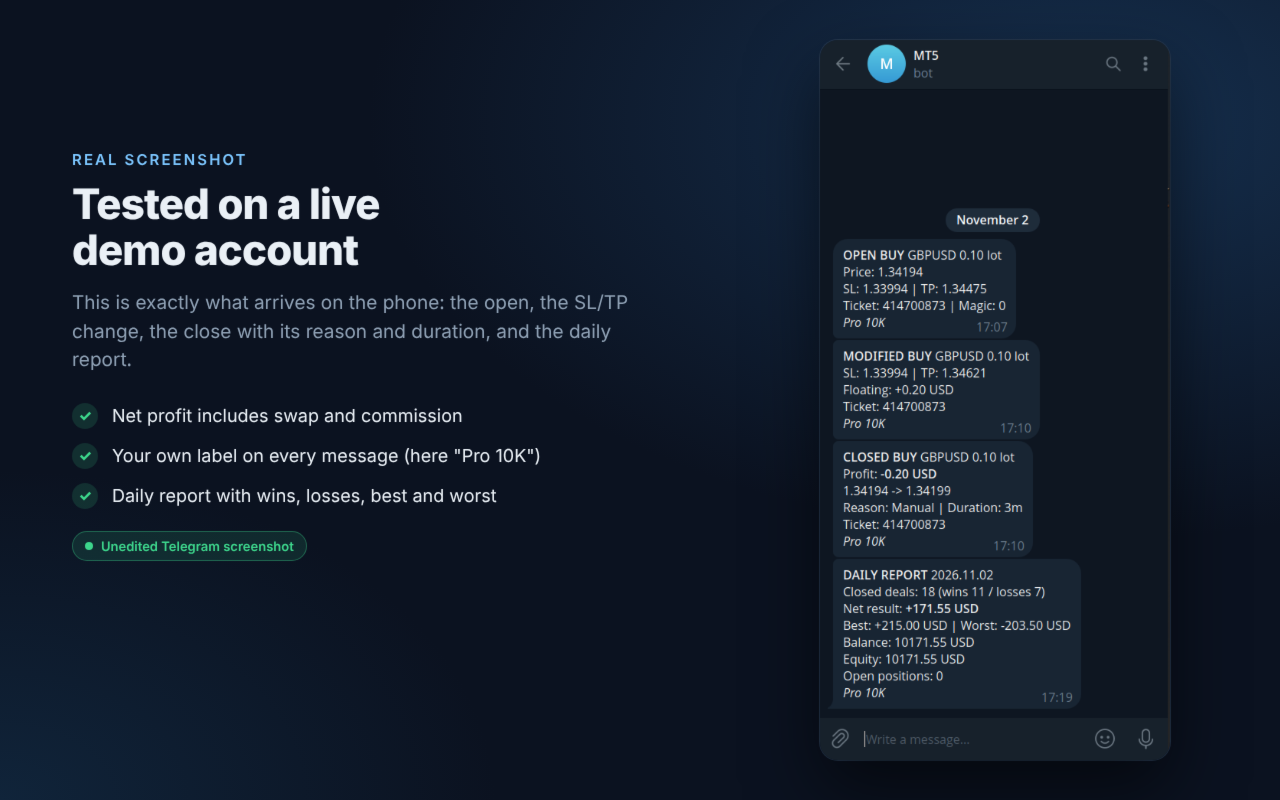
Know what happens on your account without opening MetaTrader. Telegram Trade Notifier sends a clear message to your Telegram chat, group or channel every time something happens on your MT5 account. It works for manual trades, trades from any Expert Advisor, and trades opened from the mobile app or the web terminal, as long as the terminal with the utility is running (a VPS is recommended).
HOW IT WORKS
- You create your own private Telegram bot (free, 1 minute with @BotFather).
- You attach Telegram Trade Notifier to any one chart in MetaTrader 5.
- The utility watches the whole account. When a trade is opened, closed or changed, it builds a short message and sends it to your bot.
- Your bot delivers the message to your phone, like any Telegram chat.
Messages go directly from your MetaTrader to Telegram. There is no third-party server, and your bot token never leaves your terminal.
WHAT YOU RECEIVE
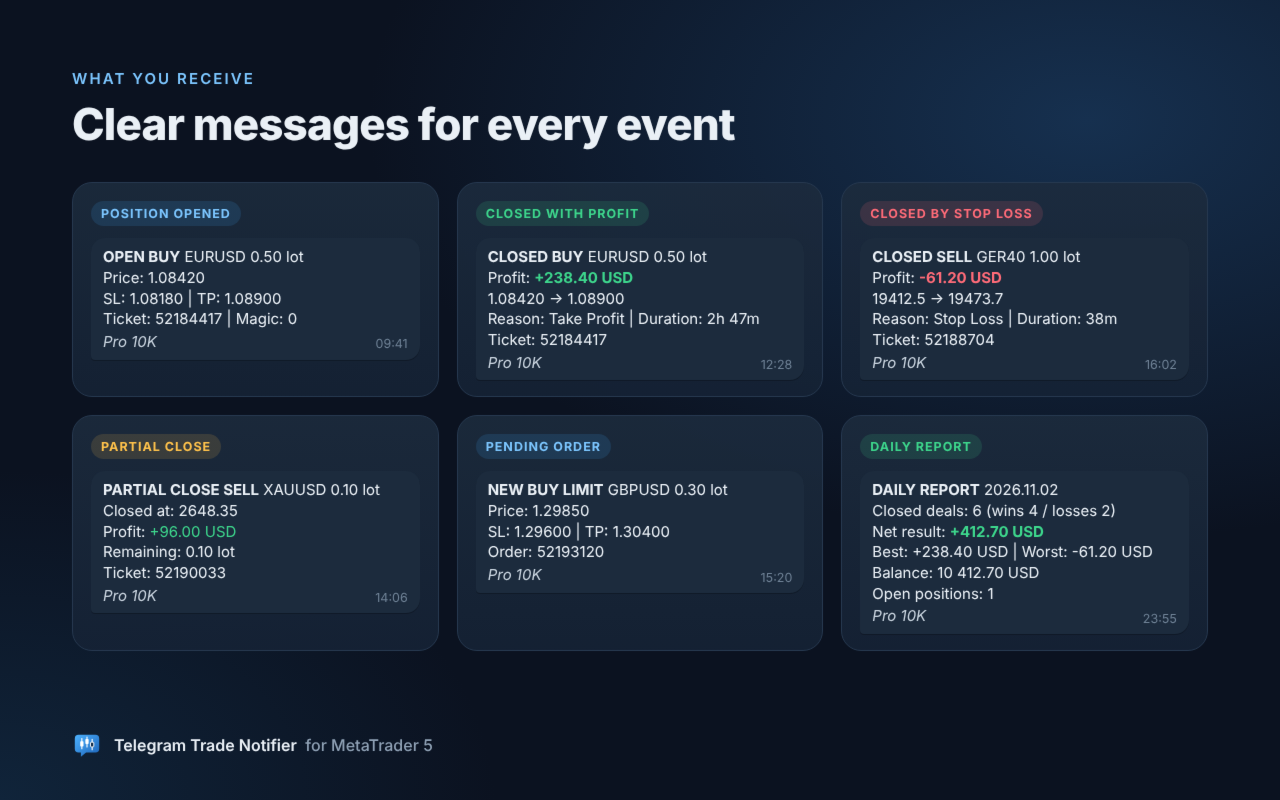
- Position opened: side, symbol, lot, price, SL, TP, ticket and magic number
- Position closed: total profit in account currency (swap and commission included), open and close price, close reason (Stop Loss, Take Profit, Manual, Expert Advisor, Stop Out) and trade duration
- Partial close: closed lot, profit of the closed part and remaining lot
- SL / TP changed: new levels and floating result
- Pending orders: placed (with price, SL and TP), modified, deleted and expired
- Daily report at the time you choose: closed deals, wins and losses, net result, best and worst deal, balance, equity and open positions
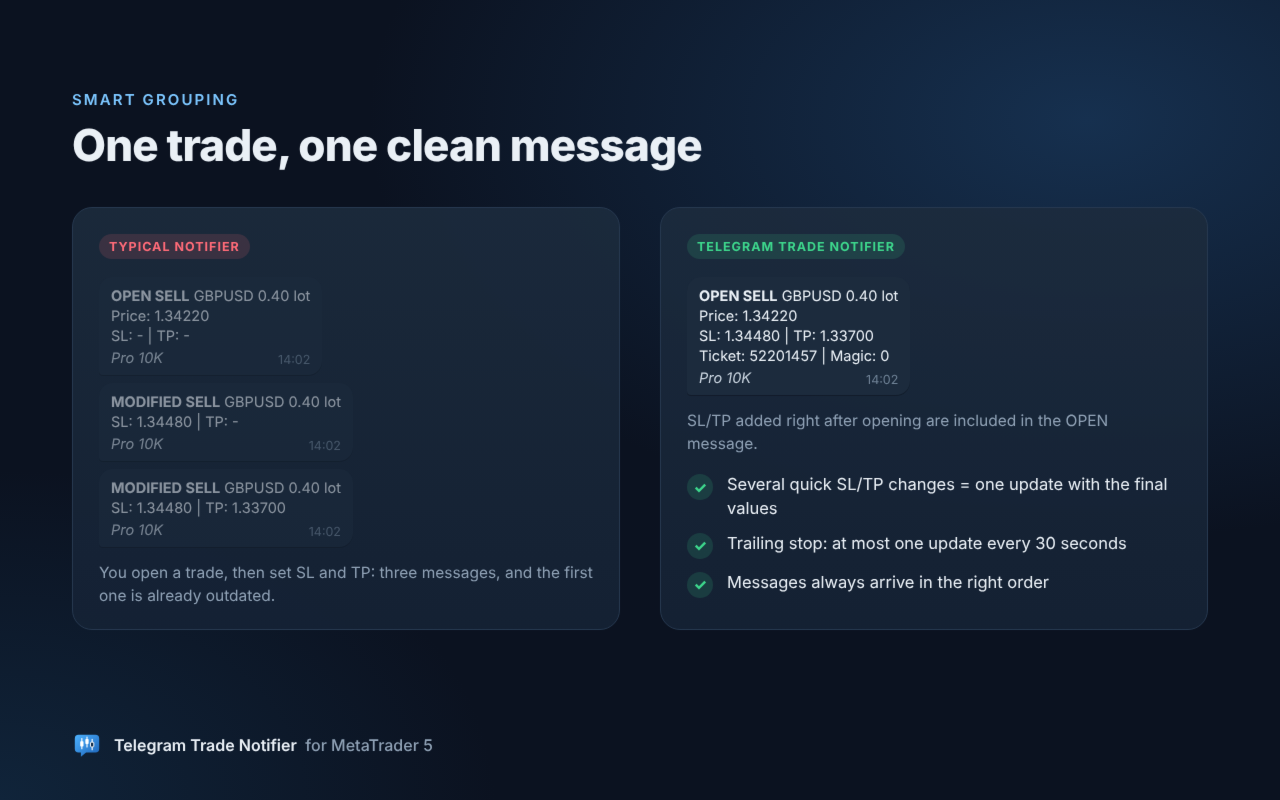
ONE TRADE, ONE CLEAN MESSAGE
- SL/TP added right after opening are included in the OPEN message, instead of extra messages
- Several quick SL/TP changes are combined into one update with the final values
- Trailing stops send at most one update every 30 seconds, so your chat is never flooded
- Messages always arrive in the right order
WHO IT IS FOR
- Traders who run Expert Advisors on a VPS and want to follow them from the phone
- Prop firm traders who want a written log of every trade and a daily result
- Signal providers who want to post their trades to a Telegram channel automatically
FILTERS
- Magic number: all trades, manual trades only, or one Expert Advisor
- Symbols: all symbols, or a list such as EURUSD,XAUUSD (suffixes like EURUSD.m are matched automatically)
SETUP STEP BY STEP (about 3 minutes)
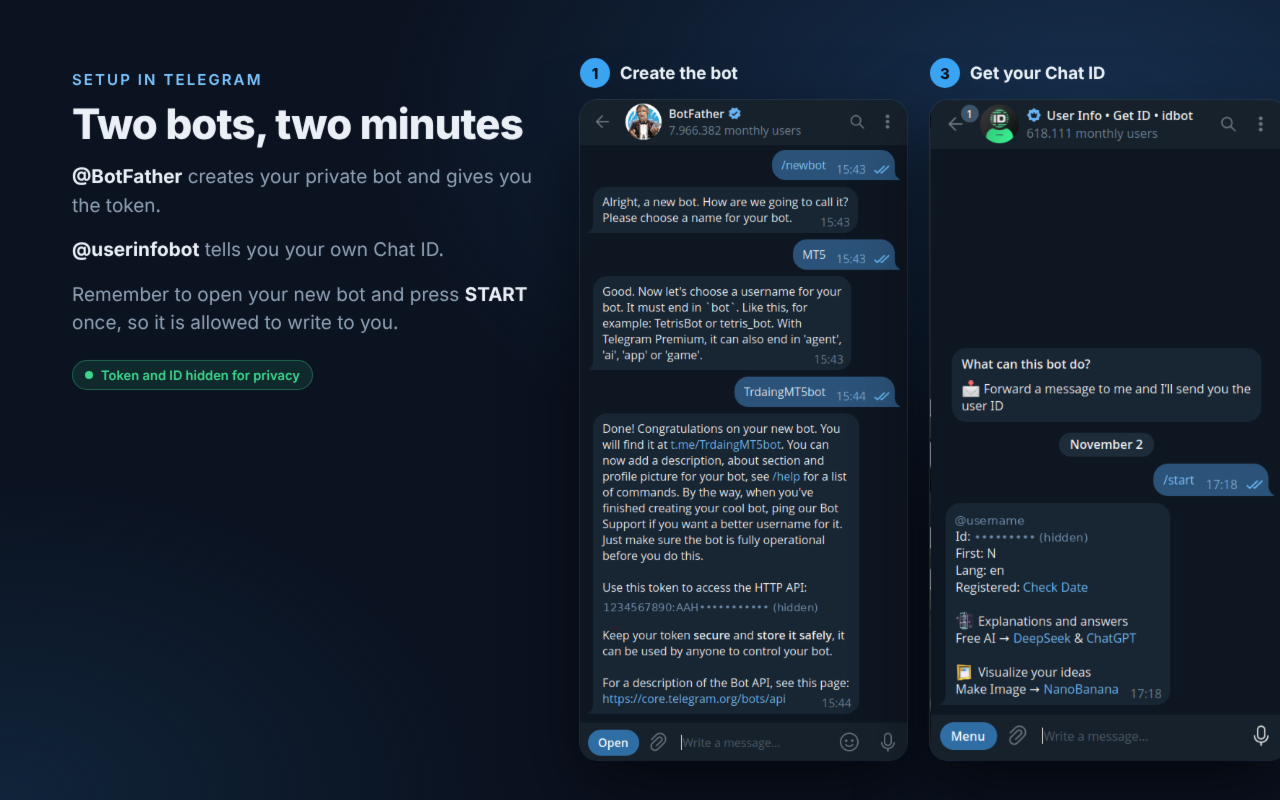
Step 1 - Create your bot. In Telegram, open @BotFather and send /newbot. Choose a name, then a username ending in "bot". BotFather replies with your Bot token (it looks like 123456789:AAH...). Copy all of it.
Step 2 - Start your bot. Open your new bot (t.me/your_bot) and press START. This is required: a Telegram bot cannot write to you before you press Start.
Step 3 - Get YOUR Chat ID. Send any message to @userinfobot. It replies with your Id, a number such as 123456789. This is your Chat ID. Do NOT use the number at the start of the bot token: that is the bot's own ID. For a group, add your bot to the group. For a channel, add your bot as administrator. Group and channel IDs start with -100.
Step 4 - Allow the connection in MetaTrader 5. Tools > Options > Expert Advisors. Tick "Allow WebRequest for listed URL" and add: https://api.telegram.org
Step 5 - Attach the utility. Drag Telegram Trade Notifier MT5 onto any one chart, paste the Bot token and your Chat ID, and press OK. Within a few seconds the chart shows "Status: Connected to @your_bot" and you receive "Telegram Trade Notifier is running" in Telegram. Done.
WHAT THE STATUS ON THE CHART MEANS
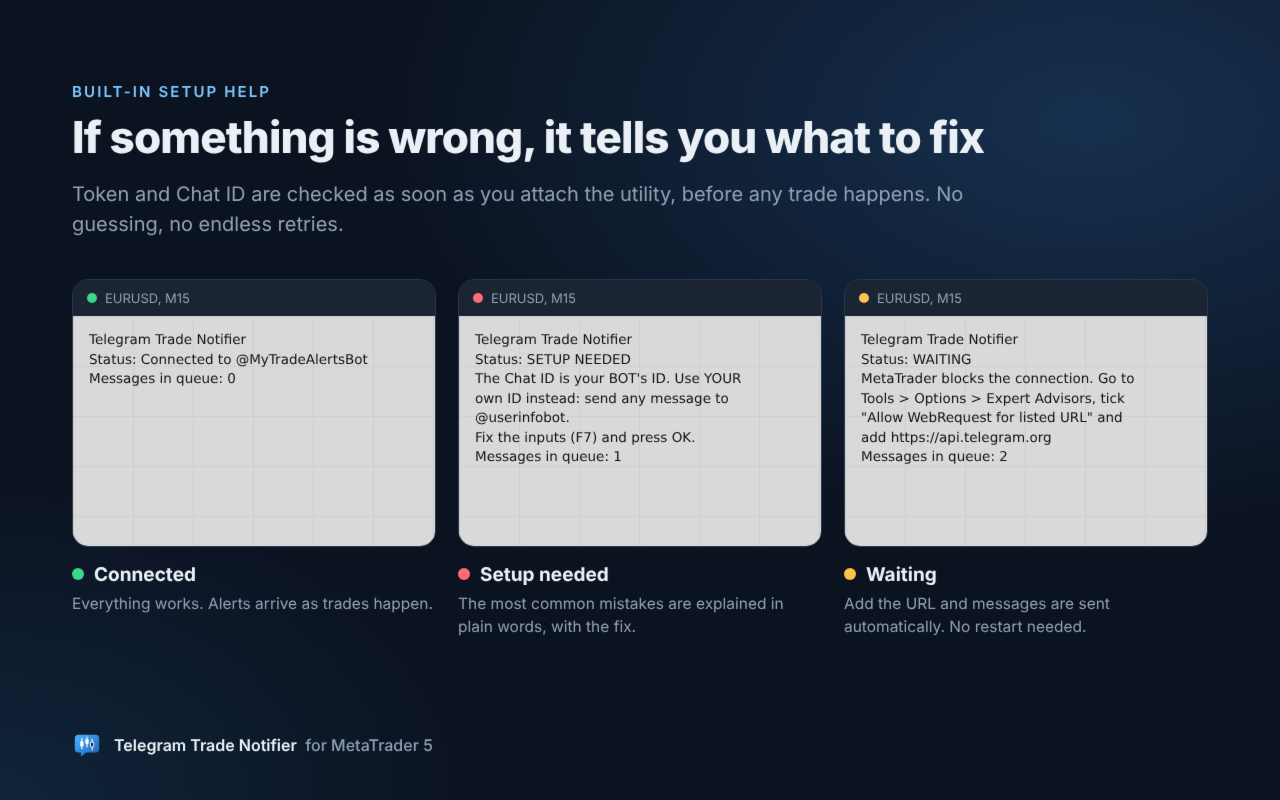
The utility checks your token and Chat ID as soon as it starts, before any trade happens. If something is wrong, the chart says exactly what to fix, and an alert pops up once. It does not keep retrying a setup that cannot work.
- Connected to @your_bot: everything works.
- Checking connection...: the first check is running (a few seconds).
- SETUP NEEDED: read the line below it, fix the input (press F7 on the chart) and press OK.
- WAITING: MetaTrader is blocking the connection. Add https://api.telegram.org as in Step 4. No restart needed: messages are sent as soon as it is allowed.
- Messages in queue: messages waiting to be sent. They are delivered automatically when the connection works.
TROUBLESHOOTING
- "The Chat ID is your BOT's ID" - you pasted the bot's number (the part of the token before ":"). Use your own ID from @userinfobot.
- "Chat ID not found" - open your bot and press Start, then check the number from @userinfobot. Group and channel IDs start with -100.
- "Your bot cannot write to you yet" or "You blocked your bot" - open your bot in Telegram, unblock it if needed, and press Start.
- "The Bot token is wrong or was revoked" - copy the token again from @BotFather: /mybots > your bot > API Token.
- "Your bot is not allowed in this group/channel" - add the bot to the group, or as administrator of the channel.
- "MetaTrader blocks the connection" - add https://api.telegram.org in Tools > Options > Expert Advisors (Step 4).
- Messages stopped arriving - make sure MetaTrader is running and connected to your broker. Alerts are sent only while the terminal is open, which is why a VPS is recommended.
INPUTS
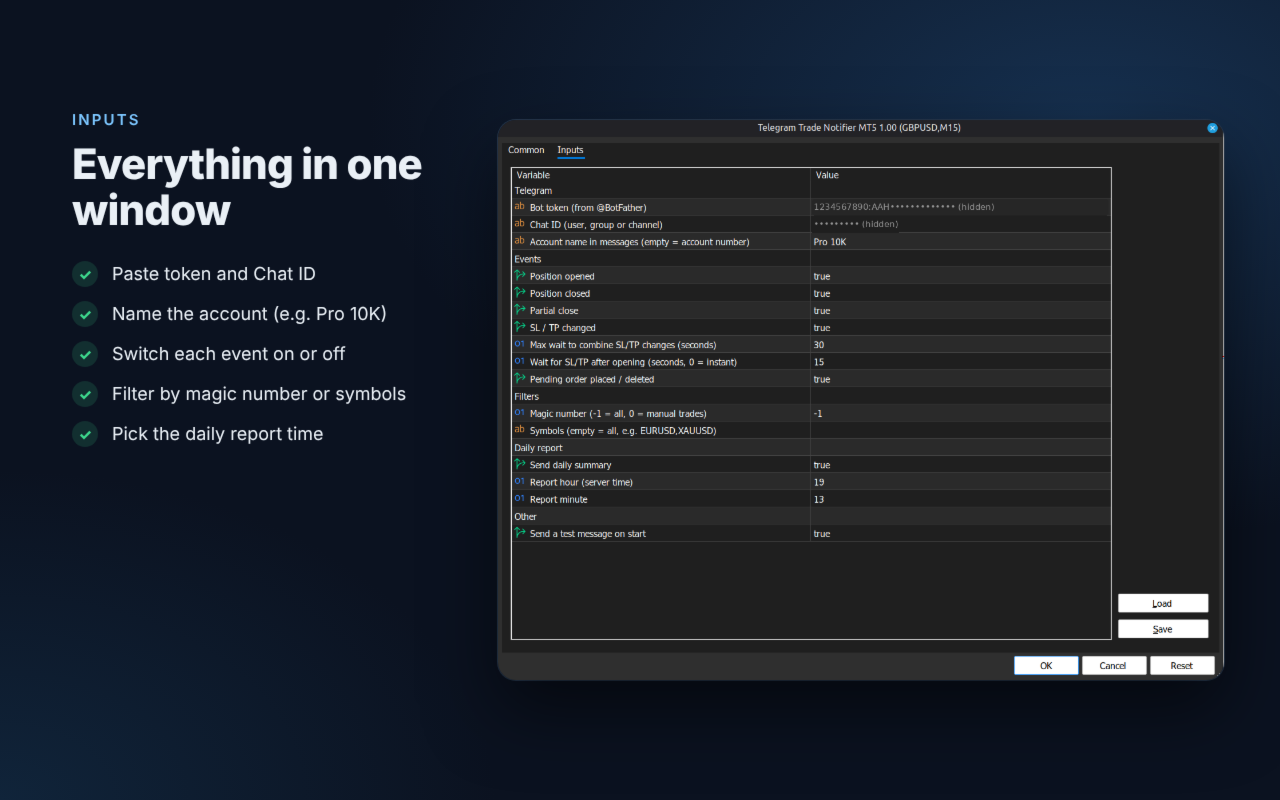
- Bot token: the token from @BotFather
- Chat ID: your user, group or channel ID
- Account name in messages: a label such as "Prop 100k" (empty = account number)
- Position opened / Position closed / Partial close / SL / TP changed / Pending orders: turn each event on or off
- Max wait to combine SL/TP changes (seconds): several SL/TP changes are combined into one message with the final values. Trailing stops send at most one message per this period
- Wait for SL/TP after opening (seconds): SL/TP set right after opening are included in the OPEN message. Default 15, 0 = send OPEN instantly
- Magic number: -1 = all trades, 0 = manual trades, any other value = that Expert Advisor only
- Symbols: empty = all symbols, or a comma-separated list
- Send daily summary / Report hour / Report minute: daily report at the chosen server time
- Send a test message on start
NOTES
- One chart is enough for the whole account. Do not attach it twice, or you will receive every message twice.
- The utility does not open, modify or close any trade.
- In the Strategy Tester no messages are sent, because Telegram is not available there.
Questions or suggestions? Send me a private message on MQL5. If the utility helps you, a short review is very much appreciated.