New MetaTrader 5 Platform Build 6180: More AI Features
My MT5 platform stopped working on android, after the update. No brokers are displayed on Search and no live account opening options is available. How to fix this problem
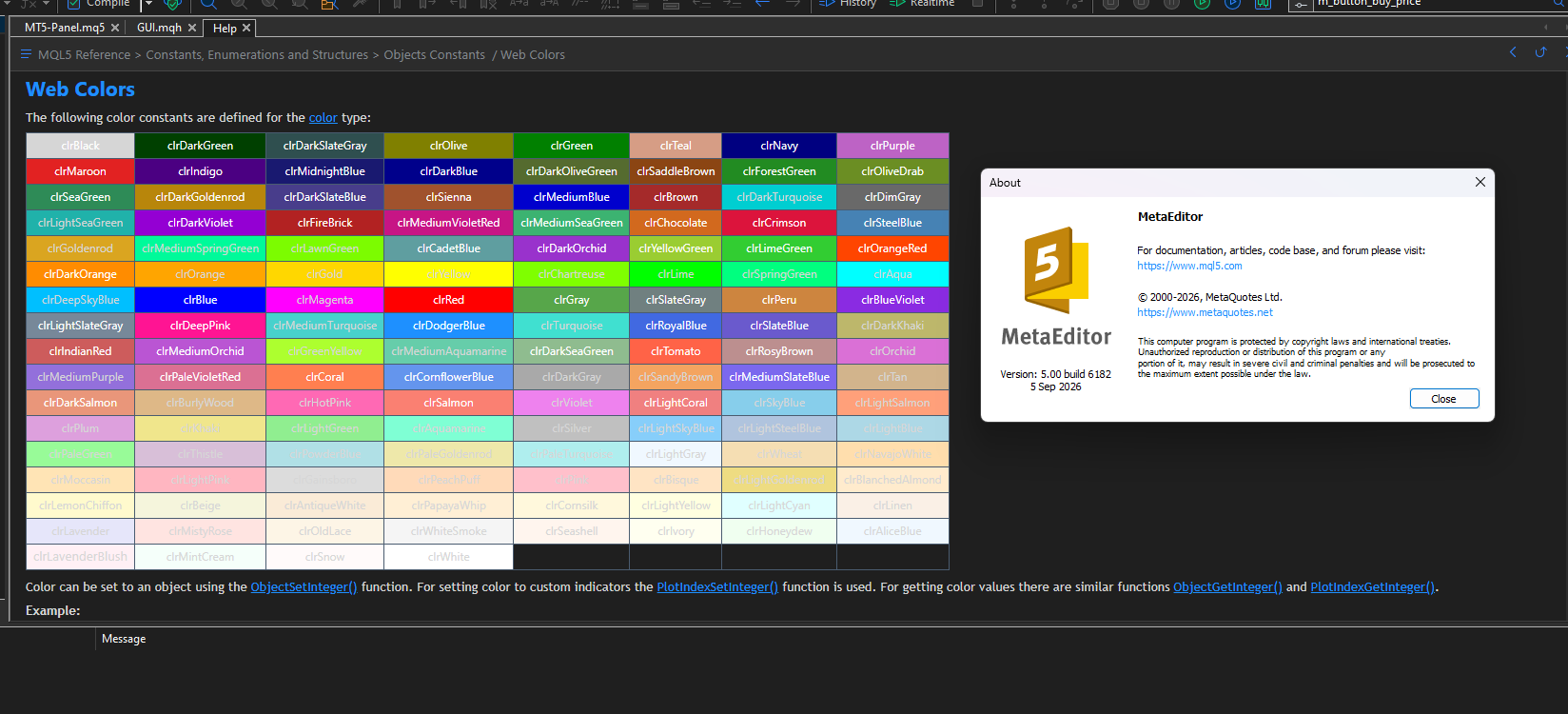
Build 6182: The web color table does not display the correct colors.
I removed the mql5.help file and loaded it again, but the issue was not resolved.
The expanded Strategy Tester capabilities look very useful for systematic EA research. In particular, being able to retrieve tester reports, inspect settings, and run optimization from the AI Assistant could make the research workflow much more efficient.
One important consideration is maintaining a strict separation between parameter selection and final out-of-sample evaluation. It would be useful if the AI Assistant could explicitly track the optimization period, frozen parameter set, untouched OOS period, and transaction-cost assumptions so that the resulting evaluation remains reproducible and avoids selection bias.
Trading forum, automated trading systems, and trading strategy testing.
New version of the MetaTrader 5 platform build 6180: more AI features
Antonio Charbel Jose Zaib , 2026.09.10 01:38
In this version, conversations with the AI have become quite difficult because it doesn't recognize the Portuguese language (pt-br). It constantly switches to Spanish, hindering the creation of EAs and manuals, as it inserts Spanish terms in the EA, comments, and manual. You need to fix this! Thank you.I created an AI interface directly in MQL5 as an Expert Advisor. However, voice interaction currently requires an external browser or application to access the microphone.
Would it be possible to add native microphone support to MetaTrader 5/MQL5, so an EA could directly capture and process voice input?
This would make it possible to build fully integrated AI voice interfaces directly inside MT5, without requiring a browser or an external application.
I created an AI interface directly in MQL5 as an Expert Advisor. However, voice interaction currently requires an external browser or application to access the microphone.
Would it be possible to add native microphone support to MetaTrader 5/MQL5, so an EA could directly capture and process voice input?
This would make it possible to build fully integrated AI voice interfaces directly inside MT5, without requiring a browser or an external application.

- Free trading apps
- Over 8,000 signals for copying
- Economic news for exploring financial markets
You agree to website policy and terms of use
On Friday, September 4, 2026, an updated version of the MetaTrader 5 platform will be released.
We have significantly expanded the capabilities of the AI Assistant for working with the trading platform and Strategy Tester. The assistant can now retrieve and analyze tester reports and logs, check its current settings, help launch optimizations, add indicators to charts with specified parameters, and work with terminal and Expert Advisor logs. This allows you to delegate more complex tasks related to testing, optimization, and analysis of trading robots directly to the MetaTrader 5 agent.
For developers, we have expanded the capabilities for working with complex matrices and vectors in MQL5. Support for additional methods simplifies the processing, conversion, and validation of complex data in mathematical and analytical tasks.
The web terminal now provides improved handling of stop levels on netting accounts. When placing a new trade for an instrument that already has an open position, the terminal preserves the position's current Stop Loss and Take Profit levels, preventing them from being accidentally removed. We have also fixed data loading and quote display issues in Market Watch.
MetaTrader 5 Client Terminal
The following capabilities have been added:
MetaTrader 5 Web Terminal
The update will be delivered through the Live Update system.