Algo Trading / AutoTrading is enabled on the VPS
AlgoTrading is always ON in MQL5 VPS.
===================
You can check the opened positions by using the Metatrader's journal and MQL5 VPS journals.
Besides, you can check it in your Metatrader by connecting to your trading account - but do not press allow Algo Trading.
---------------------------
Launching MetaTrader VPS: A step-by-step guide for first-time user
step by step guide: https://www.mql5.com/en/articles/13586
---------------------------
Forum on trading, automated trading systems and testing trading strategies
Sergey Golubev, 2017.03.31 09:53
Yes, you can monitor it.
Just watch the following videos here, and the article here: Working with the Virtual Terminal
-----------------
how to check if vps is running - the thread
-----------------
Forum on trading, automated trading systems and testing trading strategies
Eleni Anna Branou, 2019.07.08 12:12
After the synchronization of the trading environment with the MQL5 VPS, trading is performed in the VPS server, not locally in your MT4/5 platform.
So, you only have to check the MQL5 VPS (right click) >> Journals, to see the message that says that everything (EA, indicators or signals) runs normally.
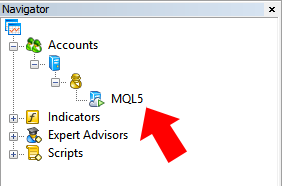
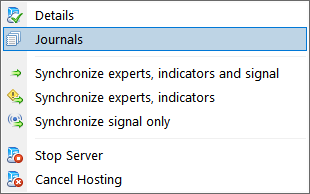


- 2023.10.17
- www.mql5.com
Forum on trading, automated trading systems and testing trading strategies
Eleni Anna Branou, 2025.02.05 12:00

- Free trading apps
- Over 8,000 signals for copying
- Economic news for exploring financial markets
You agree to website policy and terms of use
After migration/synchronization from the local MT5 terminal, Algo Trading/AutoTrading was disabled.
Now, how do I check or verify whether Algo Trading / AutoTrading is enabled on the VPS?
What particular message is expected (to check) in the VPS Expert and Journal tabs?