EA not working even the synch was succesfull
Can someone advise how to check the issue why my EA is not working after synching in the VPS? do i need to disable the Algo Trading from my Local Terminal?
Will the orders (if EA is executed) in the VPS can be viewed in my local terminal too?
check your server/vps logs for errors. And if your ea requires a dll, then the vps is not appropriate for your use as dlls are not supported on the mql5 vps.
Note check the first link below your post. and search this site. There are many similar threads where you may find similar issue to yours.
Should I close the local terminal? Or keep it open? Because I want to know if it's placing an order
You can check the opened positions by using the Metatrader's journal and MQL5 VPS journals.
Besides, you can check it in your Metatrader by connecting to your trading account - but do not press allow Algo Trading.
---------------------------
Launching MetaTrader VPS: A step-by-step guide for first-time user
step by step guide: https://www.mql5.com/en/articles/13586
---------------------------
Forum on trading, automated trading systems and testing trading strategies
Sergey Golubev, 2017.03.31 09:53
Yes, you can monitor it.
Just watch the following videos here, and the article here: Working with the Virtual Terminal
-----------------
how to check if vps is running - the thread
-----------------
Forum on trading, automated trading systems and testing trading strategies
Eleni Anna Branou, 2019.07.08 12:12
After the synchronization of the trading environment with the MQL5 VPS, trading is performed in the VPS server, not locally in your MT4/5 platform.
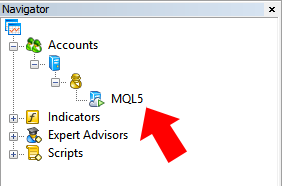
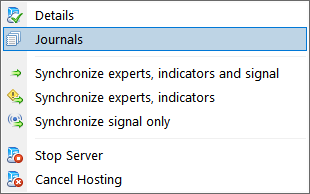
So, you only have to check the MQL5 VPS (right click) >> Journals, to see the message that says that everything (EA, indicators or signals) runs normally.


- 2023.10.17
- www.mql5.com

- Free trading apps
- Over 8,000 signals for copying
- Economic news for exploring financial markets
You agree to website policy and terms of use
Will the orders (if EA is executed) in the VPS can be viewed in my local terminal too?