Signal Server is Disconnected whereas the Realtime Copying is Enabled
Latest Screenshot after restarting my MetaTrader

From instruction -
---------------------------
How to Subscribe to MT5 Signal - the instructions
https://www.mql5.com/en/forum/336422 (MT5)
WARNING!
After you finished with the synchronization of the signal subscription to the MQL5 VPS, DO NOT TICK AGAIN the: Enable realtime signal subscription option in your local computer’s MT5 platform, because that way you will copy the signal twice and this is extremely dangerous !!!
When you use a MQL5 VPS in order to copy a signal, you IGNORE the MT5 Journal tab, down in the terminal window and you only check the MQL5 VPS (right click) Journals, for useful information about your smooth signal copying.
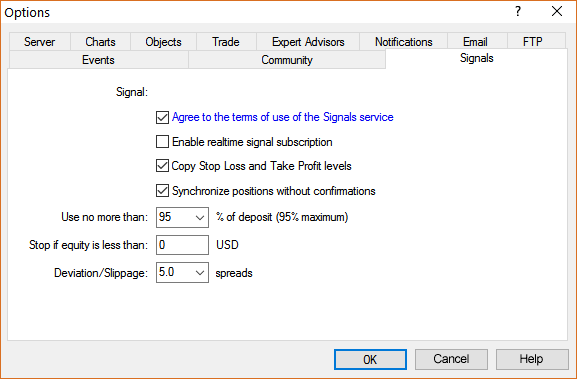
So after the synchronization of your signal subscription with your MQL5 VPS, the MT5 >> Tools >> Options >> Signals, tab must look like below:

- 2017.04.10
- Eleni Anna Branou
- www.mql5.com
From instruction -
---------------------------
How to Subscribe to MT5 Signal - the instructions
https://www.mql5.com/en/forum/336422 (MT5)
WARNING!
After you finished with the synchronization of the signal subscription to the MQL5 VPS, DO NOT TICK AGAIN the: Enable realtime signal subscription option in your local computer’s MT5 platform, because that way you will copy the signal twice and this is extremely dangerous !!!
When you use a MQL5 VPS in order to copy a signal, you IGNORE the MT5 Journal tab, down in the terminal window and you only check the MQL5 VPS (right click) Journals, for useful information about your smooth signal copying.
So after the synchronization of your signal subscription with your MQL5 VPS, the MT5 >> Tools >> Options >> Signals, tab must look like below:
Hi so it resolved itself. I already did that youve mentioned above after going through the past threads of those that had he same issue as me. So, I went back to my broker page and it seems that they had a maintenance period at the time the signal server was disconnected. Could that have been the reason?
Yes, because it is the weekend, and some brokers are making the maintenance of their servers.
Besides, the forex market is closed for weekend.
----------------
Besides, as I see - your realtime signal subscription is enabled in your home/local Metatrader, and you are looking at Metatrader journal for possible error ...
But if you are using MQL5 VPS so your home/local Metatrader (together with Metatrader journal) has nothing to do with the signals anymore ...
So once again (from the instruction):
Forum on trading, automated trading systems and testing trading strategies
Signal Server is Disconnected whereas the Realtime Copying is Enabled
Sergey Golubev, 2025.07.05 18:20
From instruction -
---------------------------
How to Subscribe to MT5 Signal - the instructions
https://www.mql5.com/en/forum/336422 (MT5)
WARNING!
After you finished with the synchronization of the signal subscription to the MQL5 VPS, DO NOT TICK AGAIN the: Enable realtime signal subscription option in your local computer’s MT5 platform, because that way you will copy the signal twice and this is extremely dangerous !!!
When you use a MQL5 VPS in order to copy a signal, you IGNORE the MT5 Journal tab, down in the terminal window and you only check the MQL5 VPS (right click) Journals, for useful information about your smooth signal copying.
So after the synchronization of your signal subscription with your MQL5 VPS, the MT5 >> Tools >> Options >> Signals, tab must look like below:
Yes, because it is the weekend, and some brokers are making the maintenance of their servers.
Besides, the forex market is closed for weekend.
----------------
Besides, as I see - your realtime signal subscription is enabled in your home/local Metatrader, and you are looking at Metatrader journal for possible error ...
But if you are using MQL5 VPS so your home/local Metatrader (together with Metatrader journal) has nothing to do with the signals anymore ...
So once again (from the instruction):
Thank I appreciate the help. Its working perfectly now with it copying the signals.

- Free trading apps
- Over 8,000 signals for copying
- Economic news for exploring financial markets
You agree to website policy and terms of use
Hello.
In my MetaTrader VPS Scetion it states that Signal Server: Disconnected whereas the Realtime Copying: Enabled.
It was working until i uninstalled my MT5 and resintalled it.
Why did it happen? and anyone knows how to solve this?