
You are missing trading opportunities:
- Free trading apps
- Over 8,000 signals for copying
- Economic news for exploring financial markets
Registration
Log in
You agree to website policy and terms of use
If you do not have an account, please register
@Alain Verleyen
"Use symbol custom settings (change the sessions settings to keep them open at midnight)."
Is this possible with an existing symbol or do I need to create a custom symbol to do that?
In my case the availability of tick data is not congruent with trading time changes because of daylight saving time. Analysis of this problem:
https://www.mql5.com/en/forum/369755#comment_22469922
Yes it's possible, just change the settings of the symbol in the Strategy Tester.
Hello
I've noticed that compiling my Indicators and EAs using build 2940 generates .ex5 files that are roughly half the size of pre 2940 builds. What's the reason for this?
Thank you.
Hello
I've noticed that compiling my Indicators and EAs using build 2940 generates .ex5 files that are roughly half the size of pre 2940 builds. What's the reason for this?
Thank you.
MT5 works with 64-bit Windows only for now, and that is why the size of compiled files was reduced (it was 32-bit + 64-bit compilation in the past builds).
This is from official announcement:
For Metatrader 5 only, limitations:
----------------
Forum on trading, automated trading systems and testing trading strategies
New version of MetaTrader 5 platform build 2875: Improvements and fixes
Renat Fatkhullin , 04/10/2021 12:51 PM
...
Compilation time, on the contrary, decreased along with the size of EX5. We abandon the last remnants of compatibility with 32 bit versions and removed the generation of the second copy of the program specifically for 32 bits. This of course made compilation faster.
anyone else having issues with more than 12 mt5's running after the update?
program 13 not even opening untill i close all else...
https://www.mql5.com/en/forum/370496
testers build supposedly I downloaded from my broker!
Errors in memory and no memory to run optimization!
used up all my memory caused me PC to need rebooting
I have observed a bug with the calculation of M1 bars on synthetic instruments, using non-live data (whilst the terminal is not running).
This was not happening before the latest build.
Repro steps:
You should now clearly be able to see that all the M1 bars that were calculated from non-live data have no wicks, whilst all the bars that are being calculated live do have wicks.
Expected behaviour: all candles should have wicks calculated correctly, not just those from live calculations
Screenshot: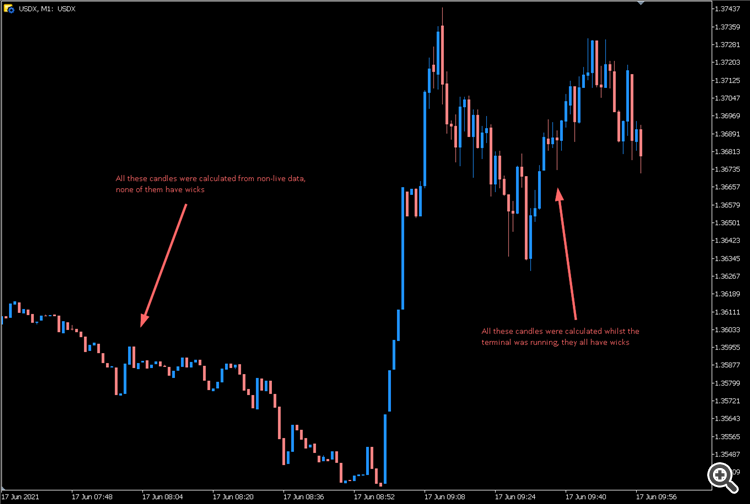
Many thanks
If this is not the correct place to have someone from the MT team acknowledge a bug report, can someone please direct me to who I need to contact?