Libraries: Symbol
Пример
When running a backtest on crosses, the tester pulls not only the main symbol, but also an auxiliary symbol, which allows converting the profit currency of the main symbol into the account currency. Pulling the auxiliary symbol, generating its ticks and synchronising them with the main symbol takes up such precious computing resources (and time) in Single Run and, especially, Optimisation modes. However, such precision is almost always unnecessary. Therefore, I would like to bypass this obsession/imperfection of the MetaTrader 5 tester. In MetaTrader 4 it is easy to do this - there is a possibility to change the account currency right in the tester. MetaTrader 5 does not have such an option.
The demo script shows an attempt to bypass this limitation of the tester - to remove unnecessary calculations. To do this, a copy of the symbol for backtest is created, but the profit currency is set equal to the account currency. That is, there will be no need to reconvert the trade results. And the profit will actually be calculated in pips, which can be very clear in some situations.
It works!
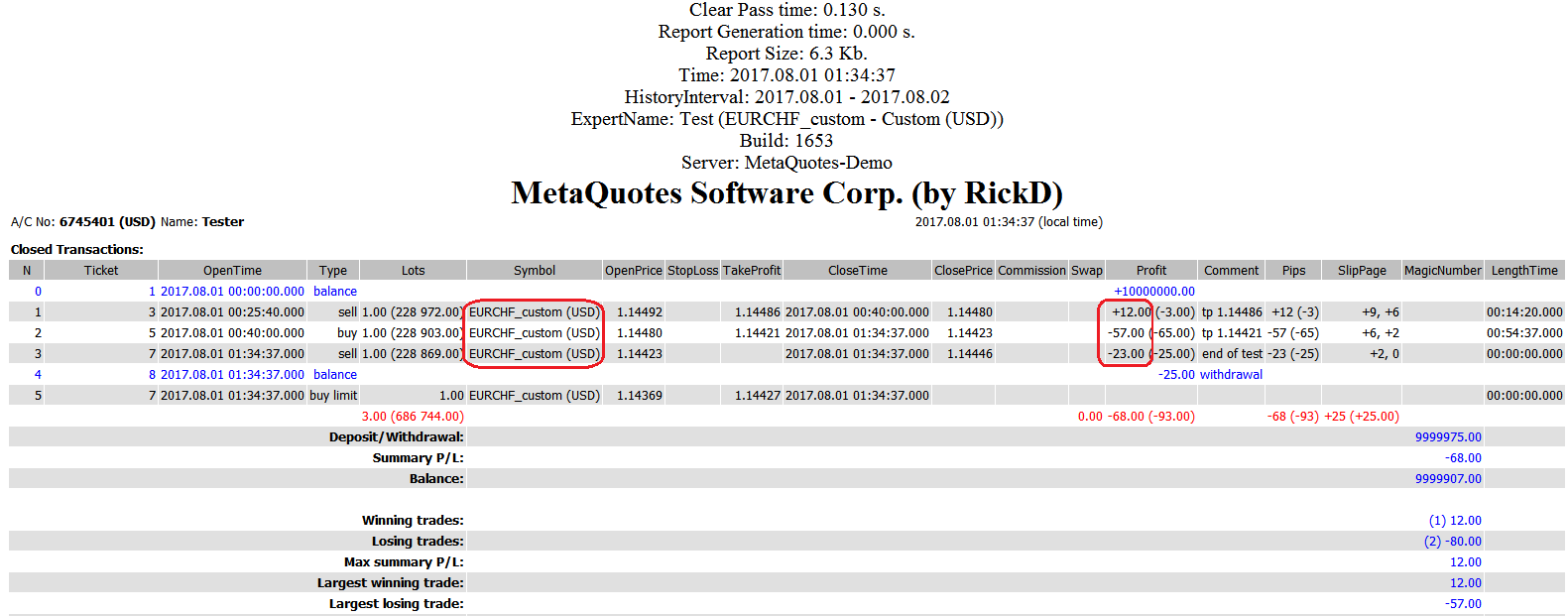
And this is the easiest way to make the tester work faster and logically.
ZЫ I hurried. The new cross counts correctly - it does not convert profit. But for some reason it drags major with it when it is not used anywhere else
2017.09.04 14:46:43.062 Core 1  EURCHF_custom: generate 975389 ticks in 0:00:00.063, passed to tester 3210 ticks
2017.09.04 14:46:43.062 Core 1  EURUSD: generate 979976 ticks in 0:00:00.062, passed to tester 8696 ticks
Slightly edited the script code. In the lines :
const SYMBOL Symb(_Symbol + PostFix); // Created a symbol
Symb = _Symbol; // Copy all properties and bar history from the main symbol - clone.
Replaced _Symbol with "SBER".
I ran the script on the chart of VDSB share.
After running the script, the SBER_custom chart opened, and instead of SBER bars the bars of VDSB share were displayed. This is not logical. I expected to see SBER..... bars on the chart
During the execution of this line Symb = "SBER"; for some reason an object with the value Name="VDSB" is created, i.e. with the name of the symbol on which the script is run.
Unfortunately, I have not managed to fix this error. Could you please fix the code.
Unfortunately I have not been able to fix this error. Could you please fix the code?
Even running the script without changes on "SBER" Metaquotes-Demo is enough to see that the result is not what you expect.
Found out that CustomRatesReplace doesn't work correctly for some characters (seems to be for all non-Forex characters), so the developers need to fix the bug.
Even running the script without changes on "SBER" Metaquotes-Demo is enough to see that the result is not what you expect.
Found out that CustomRatesReplace does not work correctly for some symbols (seems to be for all non-Forex symbols), so the developers need to fix the bug.
I ran it on a real BCS account. The original script on the SBER chart works. The SBER_custom chart with SBER quotes is displayed. What does it mean that the CustomRatesReplace function does not work correctly? If necessary I can explain how to create a real account on BCS with zero balance.
I ran it on a real BCS account. The original script works on the SBER chart. The SBER_custom chart with SBER quotes is opened. What does it mean that the CustomRatesReplace function is not working correctly? If necessary I can explain how to create a real account on BCS with zero balance.
Thanks, and I have a bug! In Symbol.mqh line 126
// return(this.CloneProperties() && (this.CloneHistory() != -1)); // Was
return(this.CloneProperties(Symb) && (this.CloneHistory(Symb) != -1)); // Stahl
Another scenario of using custom symbols (not necessarily with the help of this library).
It is possible to fully automate the regular backtest of the Expert Advisor on fresh historical data and transfer the test results to the combat Expert Advisor to synchronise the real picture with the tester. This allows to realise such trading logic without writing your own tester.
strategy tester (MT4), to its work on a real account.
My reasoning:
In the tester, the Expert Advisor works not only in ideal trading conditions, but, in fact, in another mode - in real time mode, i.e. for one tick it manages to calculate the TS, send an order and get a response, but when it is actually used on a trading account it is not so. It turns out that we have two different robots - one real-time, the other not. Sending /modifying an order (even one!) to a real account = ping + execution time, etc. = at best 100-500ms, and at the same time ticks are coming and they need to be counted - and we are standing, waiting.... and then we get into the stream randomly (where the price has gone during this time relative to our tick averages , I don' t know. + we must have missed some of the fastest and, as a rule, the most important ticks). It turns out that in the end there may be nothing left of our strategy, which we used in the tester.
That is why, after thinking about it, I came to the following:
- In the combat mode, the trading logic in the Expert Advisor is switched off, and it works, in fact, as a copying tool.
- The trading system is transferred to the indicator and it generates commands for opening and closing, and it does not wait for the Expert Advisor to execute these commands, but simply executes the TS embedded in it under ideal conditions , almost like in a tester. As far as I know, the indicator should not miss ticks, although I doubt that this is technically possible, but at least it should miss them less than the Expert Advisor, which has this feature inherently and described in the documentation. + Even due to the separation of errors of TC calculation there should be less errors because there are no interruptions for any operations secondary to the TC logic.
Another possibility of using this scheme:
A free demo-version of the Expert Advisor from the Market is taken and chased in the tester on fresh quotes, the copier takes data from the result of the tester. Accordingly, the paid version is not required.
Perhaps it is necessary to prohibit Market Expert Advisors backtest on custom symbols....
In the code there is a line like this
const int Size = ::CopyRates(Symb, PERIOD_M1, 0, ::Bars(Symb, PERIOD_M1), Rates);
I haven't checked your script, but I'm writing a script for mass copying of characters. The CopyRates function and the Bars function cannot return more than what is specified in "Settings->Graphics->Max. bars in window", so most of the history will not be copied.
What do these colons mean in your code?
I haven't checked your script, but I'm writing a script for mass copying of characters. The CopyRates function and the Bars function cannot return more than what is specified in "Settings->Charts->Max. bars in window", so most of the history will not be copied.
I copy exactly what is already on the charts. Otherwise it will take a long time - paging.
What do these colons in your code mean?
Forum on trading, automated trading systems and testing trading strategies.
MQL5 How to know if a trade has closed at stop loss or not?
fxsaber, 2017.02.14 20:00
Roughly speaking, the name of the class, from where the corresponding method is called, is specified before the colon.
If there is nothing before the colon - the class is global.
In this case, all colons can be erased. And it is convenient to use them for the reason that different classes may have the same methods (including the virtual one). And in order not to make a mistake, a colon can be used to specify which method should be called.
We should add something like:
  bool Template(const string Symb = NULL) const
  {
    return(this.CloneProperties(Symb));
  }
Otherwise sometimes only properties are needed and bars are not.

- Free trading apps
- Over 8,000 signals for copying
- Economic news for exploring financial markets
You agree to website policy and terms of use
Symbol:
Author: fxsaber