Discussion of article "Ready-made Expert Advisors from the MQL5 Wizard work in MetaTrader 4"
To the author Thank you!
MT4-users will install MT5 at least for the sake of Wizard - clever marketing? Only partly.
Now the article satisfies the curiosity of programmers - how is it implemented? But not users.
Marketing requires another article of another level, where it will be described step by step what to press to make Wizard work in MT4.
Then users will start sharing their experience in this business with others like them. Or I don't understand anything in marketing.
To the author Thank you!
MT4-users will install MT5 at least for the sake of Wizard - clever marketing? Only partly.
Now the article satisfies the curiosity of programmers - how is it implemented? But not users.
Marketing requires another article of another level, where it will be described step by step what to press to make Wizard work in MT4.
Then users will start sharing their experience in this business with others like them. Or I don't understand anything in marketing.
Writing is not a problem. But it is unlikely to be an article. In fact, this information is already in the article and takes a couple of paragraphs.
For the sake of accuracy, I would like to point out that the wizard will NOT work in MT4, such a wizard is available only in MT5. Generated Expert Advisors should work, but probably not all of them.
For comparison I suggest to take a trial of Tick Data Suite (Compatible: MT4 build 940 - 1052).
In MT5-tester select the "by real ticks" mode. Save them and feed them to MT4-tester via TDS.
Then quotes in both testers will coincide 100%, which will allow to compare them not only by trades, but also by speed.
We could then compare the conversion/creation of EAs in both directions.
There is such a phenomenon as publishing EAs in kodobase as a result of MT4 -> MT5 conversion via SB.
It seems that the article can be used by such authors for self-checking. If the conversion is correct, then the reverse conversion via MT5Bridge should give an identical result to the MT4 original.
There is such a phenomenon as publishing EAs in kodobase as a result of MT4 -> MT5 conversion via SB.
It seems that the article can be used by such authors for self-checking. If the conversion is correct, then a reverse conversion via MT5Bridge should give an identical result to the MT4 original.
Forum on trading, automated trading systems and testing trading strategies
fxsaber, 2017.05.08 15:12
Converted your code to MT4 via MT5Bridge. MT4build1072
EURUSD,M1: 1865415 tick events (7292 bars, 1865515 bar states) processed in 0:00:07.645 (total time 0:00:08.362)
EURUSD,M1: 1865415 tick events (7292 bars, 1865515 bar states) processed in 0:00:03.744 (total time 0:00:04.493)
The results after conversion are identical! The speed dropped by half.
My MT5 EA (generated, but with its own implementation of CExpertSignal instead of standard indicators) with your includes compiled and tested on MT4 without problems, thanks!
But now I sent the Expert Advisor to real, and it turned out that it does not trade at all. No errors, nothing shows. It just doesn't trade. I spent a long time digging in the code and found the reason - the function bool CTrade::FillingCheck(const string symbol) in Trade.mqh.
This check is triggered for market orders.
// get possible filling policy types by symbol
  uint filling = (uint)SymbolInfoInteger(symbol, SYMBOL_FILLING_MODE);
  // check execution mode again
  if(exec == SYMBOL_TRADE_EXECUTION_MARKET)
  {
    // for the MARKET execution mode
    // analyse order
    if(m_request.action != TRADE_ACTION_PENDING)
    {
      // in case of instant execution order
      // if the required filling policy is supported, add it to the request
      if(m_type_filling == ORDER_FILLING_FOK && (filling & SYMBOL_FILLING_FOK) != 0)
      {
        m_request.type_filling = m_type_filling;
        return(true);
      }
      if(m_type_filling == ORDER_FILLING_IOC && (filling & SYMBOL_FILLING_IOC) != 0)
      {
        m_request.type_filling = m_type_filling;
        return(true);
      }
      // wrong filling policy, set error code
      m_result.retcode = TRADE_RETCODE_INVALID_FILL;
      return(false);
    }
    return(true);
  }
In my case both m_type_filling and filling are equal to zero, so the function returns false.
filling by the logic of the code should not be equal to zero, but according to the help SymbolInfoInteger(symbol, SYMBOL_FILLING_MODE) is not supported for MT4. That's why in the tester the check passes for some reason, and maybe in some brokers in real trading too. But it didn't work for me, so far I just changed the function to skip all the code and return true from the function.
This check works for market orders.
In my case both m_type_filling and filling are equal to zero, so the function returns false.
filling by the logic of the code should not be equal to zero, but according to the help SymbolInfoInteger(symbol, SYMBOL_FILLING_MODE) is not supported for MT4. That's why in the tester the check passes for some reason, and maybe in some brokers in real trading too. But it didn't work for me, so far I just changed the function to skip all the code and return true from the function.
Thanks for the message. I hadn't come across this. This method is left unchanged. Apparently, it is necessary to set all filling variables to specific constants depending on the type of order and/or instrument (probably, this cannot be pulled out through the API in any way, and the tester uses some defaults). If someone knows how MT4 selects filling internally, please share.
If someone knows how MT4 internally selects filling - share.
Forum on trading, automated trading systems and testing trading strategies
Peculiarities of mql5 language, subtleties and techniques of work
fxsaber, 2017.02.25 16:12
ENUM_ORDER_TYPE_FILLING GetFilling( const string Symb, const uint Type = ORDER_FILLING_FOK )
{
const ENUM_SYMBOL_TRADE_EXECUTION ExeMode = (ENUM_SYMBOL_TRADE_EXECUTION)::SymbolInfoInteger(Symb, SYMBOL_TRADE_EXEMODE);
const int FillingMode = (int)::SymbolInfoInteger(Symb, SYMBOL_FILLING_MODE);
return((FillingMode == 0 || (Type >= ORDER_FILLING_RETURN) || ((FillingMode & (Type + 1)) != Type + 1)) ?
(((ExeMode == SYMBOL_TRADE_EXECUTION_EXCHANGE) || (ExeMode == SYMBOL_TRADE_EXECUTION_INSTANT)) ?
ORDER_FILLING_RETURN : ((FillingMode == SYMBOL_FILLING_IOC) ? ORDER_FILLING_IOC : ORDER_FILLING_FOK)) :
(ENUM_ORDER_TYPE_FILLING)Type);
}
Thanks, can this code be slightly modified to get an analogue of SymbolInfoInteger(symbol, SYMBOL_FILLING_MODE) for MT4. The function should return not ENUM_ORDER_TYPE_FILLING but (SYMBOL_FILLING_FOK | SYMBOL_FILLING_IOC).
ORDER_FILLING_FOK = 0, ORDER_FILLING_IOC = 1, while SYMBOL_FILLING_FOK = 1 and SYMBOL_FILLING_IOC = 2, so you can just increment the result by 1.
//funtion returns symbol filling mode, aka SymbolInfoInteger(symbol, SYMBOL_FILLING_MODE) for MT4.
//Parameter Type - order filling type
uint GetSymbolFilling( const string Symb, const uint Type = ORDER_FILLING_FOK )
{
  const ENUM_SYMBOL_TRADE_EXECUTION ExeMode = (ENUM_SYMBOL_TRADE_EXECUTION)::SymbolInfoInteger(Symb, SYMBOL_TRADE_EXEMODE);
  const int FillingMode = (int)::SymbolInfoInteger(Symb, SYMBOL_FILLING_MODE);

  return ((FillingMode == 0 || (Type >= ORDER_FILLING_RETURN) || ((FillingMode & (Type + 1)) != Type + 1)) ?
         (((ExeMode == SYMBOL_TRADE_EXECUTION_EXCHANGE) || (ExeMode == SYMBOL_TRADE_EXECUTION_INSTANT)) ?
           ORDER_FILLING_RETURN : ((FillingMode == SYMBOL_FILLING_IOC) ? ORDER_FILLING_IOC : ORDER_FILLING_FOK)) :
          (ENUM_ORDER_TYPE_FILLING)Type) + 1;
}
And then call the code in the function bool CTrade::FillingCheck(const string symbol)
uint filling = GetSymbolFilling(symbol, m_type_filling);
//instead of
//uint filling = (uint)SymbolInfoInteger(symbol, SYMBOL_FILLING_MODE);
But actually it is just a code adjustment to make it work. It's better not to do this and find a correct solution.
Good day Mr Stanislav Korotky, I hope you are doing good.
I have find you article very interesting and I have try to follow your instruction on how make a ready-made MT5 EA be compatible to run in MT4.
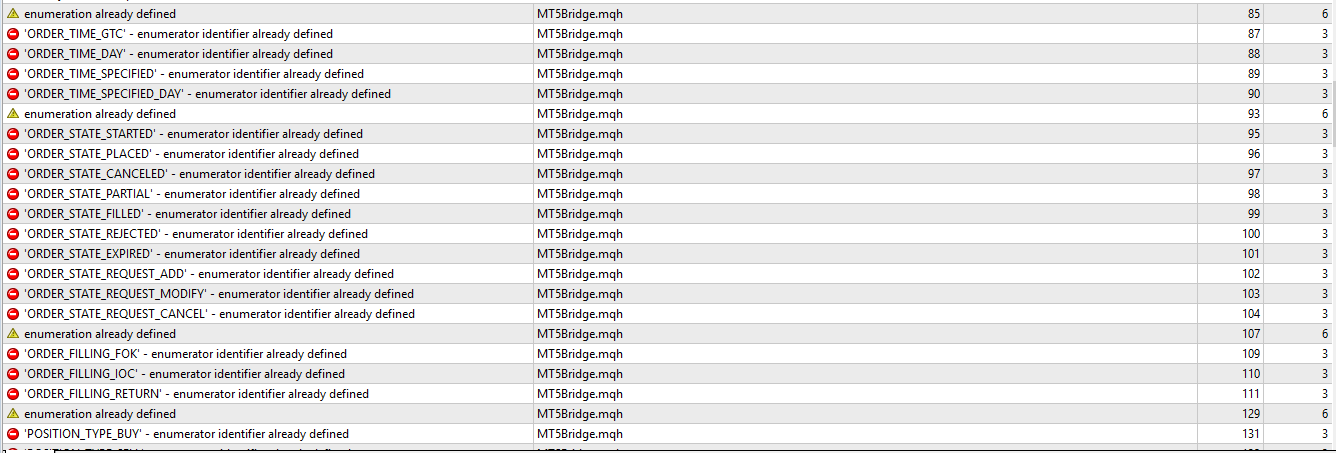
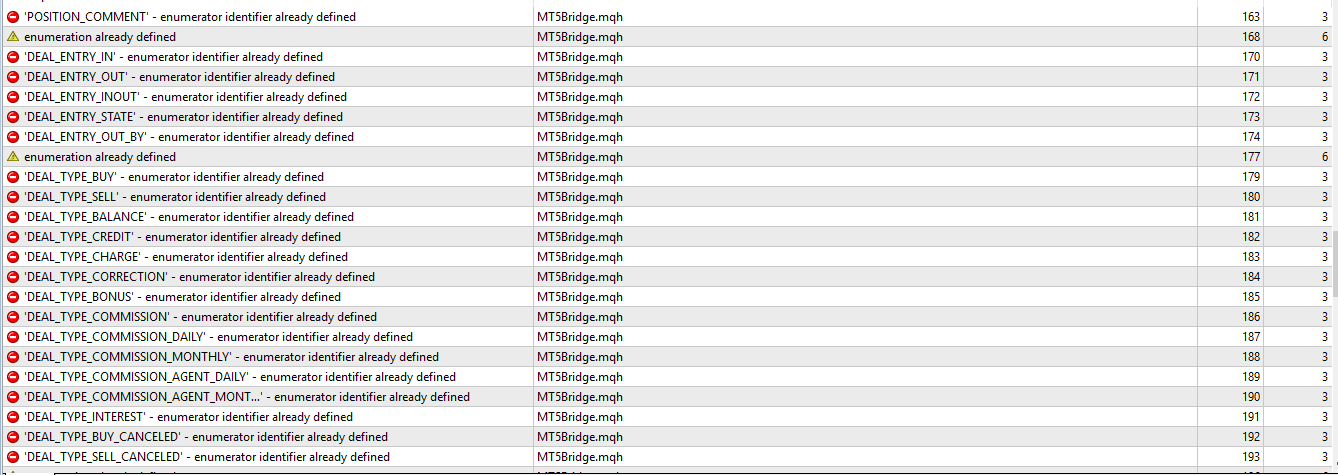
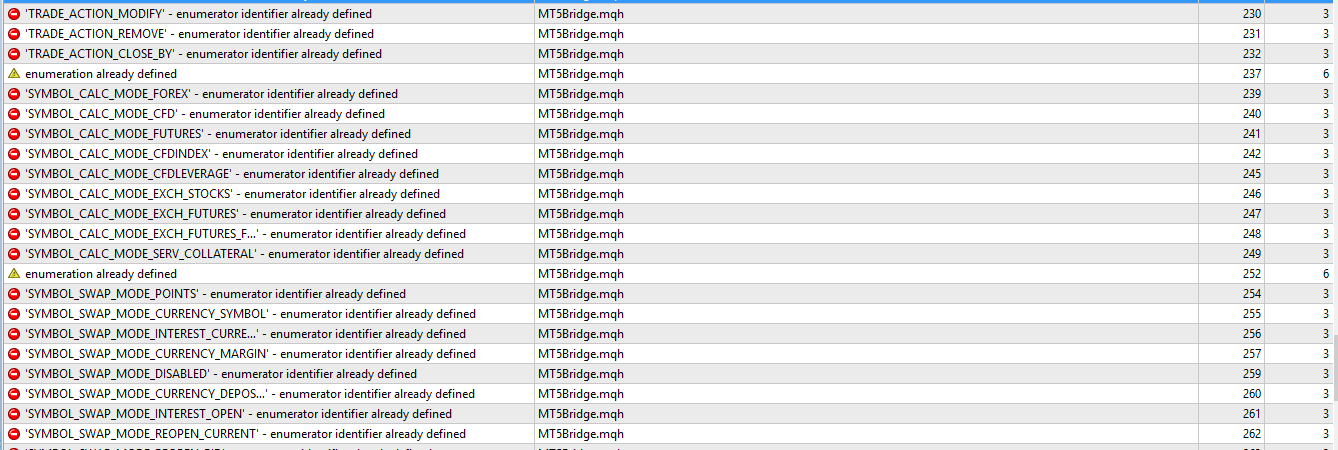
But I getting the following error, could you please guide me on how to resolve the error?
what I did after following your instruction was: I just copy the MQL5 source file and the MQL5 Program then follow by pasting it into the main directory of Expert folder
and I got so many error.
Could you tell me how can I proceed on making the generated EA of MQL5 work in MT4?
Bellow are the attached error images.




- Free trading apps
- Over 8,000 signals for copying
- Economic news for exploring financial markets
You agree to website policy and terms of use
New article Ready-made Expert Advisors from the MQL5 Wizard work in MetaTrader 4 has been published:
The article offers a simple emulator of the MetaTrader 5 trading environment for MetaTrader 4. The emulator implements migration and adjustment of trade classes of the Standard Library. As a result, Expert Advisors generated in the MetaTrader 5 Wizard can be compiled and executed in MetaTrader 4 without changes.
On the EURUSD M15 chart, the Expert Advisor trading looks good, including the way it sets the stop loss and take profit levels.
A chart window, demonstrating the work of an EA from the MetaTrader 5 Wizard in MetaTrader 4
Author: Stanislav Korotky