 MetaTrader 5
 Experts
 Indicators
 Scripts
 Libraries
 Storage
Join our fan page
- Published by:
-
Mykyta Samoiliuk
 I make indicators and Expert Advisors for MetaTrader 5 and write the tools around them in Python. Everything I publish comes with a way to check that it works, so you do not have to take my word for it. I convert TradingView indicators to MQL5 so they show the same values as the original, and I
 - Views:
- 2228
- Rating:
- Published:
- Updated:
-
 You are missing trading opportunities:
- Free trading apps
- Over 8,000 signals for copying
- Economic news for exploring financial markets
Registration Log inYou agree to website policy and terms of use
If you do not have an account, please register -
 Need a robot or indicator based on this code? Order it on Freelance
Go to Freelance
Need a robot or indicator based on this code? Order it on Freelance
Go to Freelance
This is the Expert Advisor half of a SuperTrend port. The indicator it trades is published separately as SuperTrend TV, where the whole point was matching TradingView value for value. Here the strategy itself is deliberately plain, it buys when the line flips up and sells when it flips down, because the interesting part of wrapping an indicator into an EA is never the strategy.
The part that goes wrong is timing. An EA that reads its indicator on the bar that is still forming picks up signals which exist for a few seconds and then disappear before the bar closes. On the chart everything looks convincing, the tester report comes out optimistic, and the trades that actually happen are not the ones anyone saw. This EA reads closed bars only, and it ships with the audit that proves it.
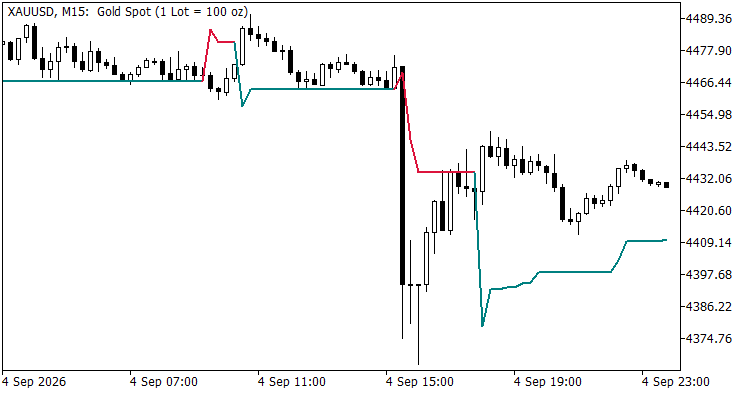
SuperTrend TV on XAUUSD M15. The EA enters at each flip of the line and holds one position at a time
What it does
It reads the direction buffer of SuperTrend TV through iCustom, acts once per finished bar, and keeps a single position. Every order carries a magic number, so the EA never touches anything opened by hand. The stop goes on the SuperTrend line itself, with an optional buffer in points, and the position is closed and reversed when the line flips the other way.
One case deserves a mention because it is where a naive version places an order the server has to refuse. The line is computed on the close of the finished bar while the entry happens at the next available price, so price can already have travelled past the line by the time the order goes out. The stop would then sit on the wrong side of the entry. Nudging it across would open a trade one point away from being stopped out, so the signal is dropped instead and the log records it. On EURUSD H1 over eight months that happened once in a hundred and seventeen signals.
The indicator is compiled into the expert as a resource, so once built it runs on its own and does not need the indicator sitting in the terminal beside it. That does mean the indicator has to be compiled first, since the resource is taken from its .ex5 at build time.
How the trades are checked
The EA writes the indicator value on every closed bar into a log, not only on the flips. A Python script then reads that log and checks the trades against the series, so the claim is not that the EA looks right on a chart but that every flip produced exactly one order of the correct side, and that no order appeared without a flip behind it.
| bars: 6616 (2026.07.31 .. 2026.09.03) flips: 185 entries: 185 signal with no trade : 0 trade with no signal : 0 two trades on one bar : 0 wrong side : 0 RESULT: one trade per flip |
Why the log records every bar
The first version of the audit compared the trades against an indicator file exported from the live terminal, and it reported ninety three trades with no signal behind them. The EA was fine. The live terminal was missing three and a half thousand of the M5 bars that the tester builds from minute data, so half of the signals had no bar to be matched against.
Comparing two things computed on different data is the easiest way to produce a bug report about code that works, and it is worth knowing that it happens even when you are looking for it. Recording the series inside the run removes the problem entirely. The audit still accepts an external export as an optional second opinion, and on the bars the two sources share the direction agreed every time.
Inputs
- ATR period and factor, passed straight through to the indicator
- lot size, fixed
- extra points beyond the line for the stop, zero by default
- magic number and slippage
- decision log on or off, and its file name
What it does to an account
The obvious question about any published expert is whether it makes money, so here are the numbers instead of an opinion. Both runs start from ten thousand, use the default inputs and a fixed tenth of a lot, and were taken from the strategy tester on real history. The counts are positions, matching the Total Trades line of the report, so the Total Deals line shows roughly twice as many because it counts every entry and every exit separately.
| Run | Period | Total trades | Final balance |
|---|---|---|---|
| XAUUSD M5 | one month | 185 | 10 662 |
| EURUSD H1 | eight months | 116 | 9 736 |
The gold month was a trending one and that result belongs to the trend rather than to the system. The loss on the euro is close to what the reversals themselves cost, because the expert is always in the market and pays the spread twice every time the line flips. A plain trend flip with no filter has very little left after that, which is the normal outcome and not a defect in the port.
That is the honest state of it and it is exactly why this publication is about signal handling rather than about a strategy. What is checkable here is that the port matches the original and that the trades match the signals. Profit is not claimed, and anyone who assumes it will be disappointed by the same arithmetic that produced the table above.
What is not in here
There is no money management. The lot is fixed, there is no risk percentage, no daily loss limit and no drawdown shutdown, because this publication is about signal handling and adding those would blur what it demonstrates. Anyone using it as a starting point should add them before it goes anywhere near a live account.
One more thing worth stating plainly. The magic number keeps the EA away from manual trades on a hedging account. On a netting account the terminal merges everything on a symbol into one position by design, so if you trade the same symbol by hand while the EA runs, the separation stops being possible and that is a property of netting rather than of this code.
 Any Indicator Alert - alerts, push notifications and multi-timeframe for any custom indicator, no source code needed
Attach it to a chart, type the name of any custom indicator, and it alerts you on that indicator's own buffers - popup, sound, push notification to your phone, or email. It reads the indicator through iCustom, so no source is needed: a compiled .ex5 you downloaded is enough. It can also read that indicator from a higher timeframe, and it re-checks closed bars to tell you whether the indicator repaints or merely lags. It opens in EXPLORE mode, which lists every buffer the indicator has and what is in each one, because "which buffer holds the signal" is the question that stops most people using iCustom at all.
SuperTrend TV
A SuperTrend that returns the same values as TradingView's ta.supertrend, shipped with the tool that proves it bar for bar against the Pine reference
 TrueCostReport
Cost is the one input to a trading system that is knowable exactly, and it is almost always estimated wrongly - always in the direction that flatters the strategy. This EA measures what one round trip really costs on YOUR broker: the live spread sampled from ticks, the swap for both sides including the triple-charge day, and the commission read from your own deals. Most spread figures come from the bar's "spread" field, because that is the easy one to reach. It is a per-bar summary, not the quote at any instant. Measured on XAUUSD: 20 points live across 60 readings against a bar-field median of 6. A factor of 3.3. So a filter set to "skip if spread > 15" never fires - it lets through exactly the moments it exists to block. Swap is the half most custom simulators do not charge at all. It is asymmetric, one side pays while the other collects, and one weekday counts three times. Read-only: it never opens, closes or modifies a position.
GDS Renko Donchian Demo EA
A small educational Expert Advisor showing how a classic Donchian breakout can be applied directly to completed Renko bricks.