OrderBook Cumulative Indicator

49 USD
Demo heruntergeladen:
564
Veröffentlicht:
25 Juli 2018
Aktuelle Version:
1.4
Keinen passenden Roboter gefunden?
Geben Sie Ihren Eigenen in Auftrag
auf Freelance!
Gehen Sie zu Freelance
Geben Sie Ihren Eigenen in Auftrag
auf Freelance!
Wie man einen Roboter oder Indikator kaufen kann
Starte Deinen EA im
Virtual Hosting
Virtual Hosting
Teste einen Indikator/Roboter vor dem Kauf
Möchtest Du Geld im Market verdienen?
Wie man Produkte richtig präsentiert

Sie verpassen Handelsmöglichkeiten:
- Freie Handelsapplikationen
- Über 8.000 Signale zum Kopieren
- Wirtschaftsnachrichten für die Lage an den Finanzmärkte
Registrierung
Einloggen
Sie stimmen der Website-Richtlinie und den Nutzungsbedingungen zu.
Wenn Sie kein Benutzerkonto haben, registrieren Sie sich
Nice Job
I would welcome the ability to:
- select color of each level
- select font size of each level
This will allow me to have better visibility in the charts that I use.
Cheers
I would welcome the ability to:
- select color of each level
- select font size of each level
This will allow me to have better visibility in the charts that I use.
Hi, currently the colors are calculated as a gradient between 2 main colors, according to volume size. Would it be ok if you'll get these 2 colors setup? I think it would be a bit oversized and hard to use settings if it seperately mention every color.
The font size is also calcuated between 1 (minimal allowed by MT) and 5 (maximum allowed by MT) value. This is not a font actually, but indicator buffer width. All I can do is to allow to select minimal and maximal width. Then if you select both 5, they marks will be all large. And, for example, if you choose 1 to 3 they will be smaller than now. Will it be sufficient?
Hello,
In my terminal, the indicator aren't storing data. Can you help me to set up this ? Do I have to create the books folder ?
How do I make the indicator look like the first image?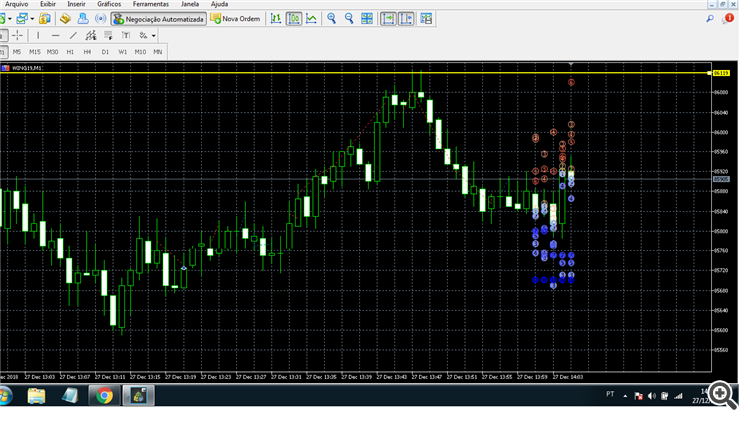
How do I make the indicator look like the first image?
You may try any preferred Wingdings symbol in the CharCode parameter, for example, 108.
You may try any preferred Wingdings symbol in the CharCode parameter, for example, 108.
You may use OderBookRecorder to write live data into hob-files, and then load it in this indicator.
Could you also add opacity to the dots? The hide the candle.
Also, the ability to carry over the data if the chart is closed (like auto save).
Thanks!
Could you also add opacity to the dots? The hide the candle.
Also, the ability to carry over the data if the chart is closed (like auto save).
Hi, since this is just an indicator, I'm not sure opacity is supported in indicator buffers. AFAIK, it's supported only on canvas. Try to open chart properties -> Common -> Chart on foreground.
To preserve the data you should keep OrderBookRecoder running - it'll write the data continuously, so the indicator could read the files and restore the picture after it's closed and reopened.
But if you close all charts (including that with OrderBookRecoder) then nothing will help. MT does not provide built-in API to get historical book events.
For ethusd, I am getting this error message under the Experts tab 'zero divide in 'OrderBookIndicator.mq5' (154,102)'
For btcusd, I am getting this additional error message 'MarketBookAdd failed: 4901'
Nothing showed up on the chart for these symbols.
For ethusd, I am getting this error message under the Experts tab 'zero divide in 'OrderBookIndicator.mq5' (154,102)'
For btcusd, I am getting this additional error message 'MarketBookAdd failed: 4901'
Nothing showed up on the chart for these symbols.
The first error is caused by the fact that the symbol information is not somehow provided -- please, download the attached script, compile, and run on ethusd chart, then send its output to me.
The second error is the system error -- ERR_BOOKS_CANNOT_ADD -- it's generated by the terminal and I can do nothing with this. It most likely means that your broket does not provide books for btcusd.
For crypto, I got these in the experts tab
symcheck (ETHUSD,H1) = 1.0
symcheck (ETHUSD,H1) = 0.01
For currency pairs, the first value is 100000.0. Second value remained the same.
Please, upgrade to new version 1.4.