
75 USD
Demo heruntergeladen:
6 985
Veröffentlicht:
2 Februar 2012
Aktuelle Version:
26.326
Keinen passenden Roboter gefunden?
Geben Sie Ihren Eigenen in Auftrag
auf Freelance!
Gehen Sie zu Freelance
Geben Sie Ihren Eigenen in Auftrag
auf Freelance!
Wie man einen Roboter oder Indikator kaufen kann
Starte Deinen EA im
Virtual Hosting
Virtual Hosting
Teste einen Indikator/Roboter vor dem Kauf
Möchtest Du Geld im Market verdienen?
Wie man Produkte richtig präsentiert

Sie verpassen Handelsmöglichkeiten:
- Freie Handelsapplikationen
- Über 8.000 Signale zum Kopieren
- Wirtschaftsnachrichten für die Lage an den Finanzmärkte
Registrierung
Einloggen
Sie stimmen der Website-Richtlinie und den Nutzungsbedingungen zu.
Wenn Sie kein Benutzerkonto haben, registrieren Sie sich
What's the mechanism of trying to close the deals? One by one, or can be closed at the same time? Suppose I have 300 little deals to close at a sudden time.
It seems one by one, could it be faster?
Thanks.
200% 500% 1000% etc. could be done by judging and closing the nearest neighbor deals (up or down).
Too float value (above below), no universal value.
Each button on the chart is responsible for one trade on the chart.
Thank you very much for your consideration. as for " It is advised that the stoploss line be set transparent,because it shadows the recent price. and the yellow line be more thinner, to let the price bar be more visiable. " I guess it might be easier to adjust. Just do not shadow the recent price bars.
All lines are standard. Transparency cannot be done. Transparency only on canvas. But my panel is drawn by standard means and does not support line transparency.
To hide all lines instantly, you can use a new button:
All lines are standard. Transparency cannot be done. Transparency only on canvas. But my panel is drawn by standard means and does not support line transparency.
To hide all lines instantly, you can use a new button:
panel for MT4 “showinfo” does not work.
panel for MT4 “showinfo” does not work.
Try
please check it.
It automaticly deleted BTC oders limit since yesterday.
work fine with XAU. weird.
please check it.
It automaticly deleted BTC oders limit since yesterday.
work fine with XAU. weird.
Hello. You have written that this is a cancellation on your server. Open the History tab and see the reason for the cancellation.
I know the problem.
I dont know why the lifetime is 1.
I fixed this.
Thanks
I know the problem.
I dont know why the lifetime is 1.
I fixed this.
Thanks
Hello, . . .the "ORDER" tab shows some more settings for the grid which is not there in the user guide pdf.(dist/lots/lifetime) & (steps/coeflot/grids) can you please elaborate a bit more on that ?
Thanks.
Hello, . . .the "ORDER" tab shows some more settings for the grid which is not there in the user guide pdf.(dist/lots/lifetime) & (steps/coeflot/grids) can you please elaborate a bit more on that ?
Thanks.
---- "LifeTime" button - Order lifetime in minutes!
------ Lifetime in minutes works virtually for all pending orders.
------ After the LifeTime expires, the order will be deleted.
------ Attention! Works separately with DayToExpiration option (Expiration time in days).
---- "Step" button - Step of each next order in the grid!
------ Used in conjunction with the Grids parameter.
------ Allows you to set the step for the grid from the first pending order in the grid.
Attention! Distance parameter - This is the distance from the current price to the first pending order.
---- Button "CoefLot" - The CoefLotForGridOrders parameter from the parameters has been moved to the panel.
------ Multiplication factor of the next lot in the grid of pending orders when used on the Orders tab
Example: "CoefLot" = 2, Grid = 5, then lots will be opened like this: 0.1, 0.2, 0.4, 0.8, 0.16
Não consigo fazer o download, como deve proceder?
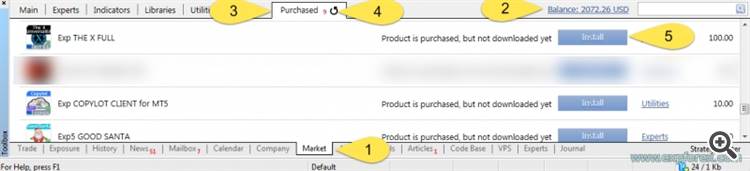
Installation and activation of the purchased adviser in the terminal.
After purchase, you can install an Expert Advisor in any terminal.
1 activation = 1 computer.
If you change the system or reinstall Windows, you need to re-enable (New Activation) the Expert Advisor on your computer.
You can activate the Expert Advisor 1 time on the computer and install the Expert Advisor in other terminals on the computer without activation.
Copying an Expert Advisor from one terminal to another is prohibited.
Our advisor will appear in your Navigator! Move it or double-click on the EA and install it on any currency pair, which will be an adviser to trade, for example, EURUSD.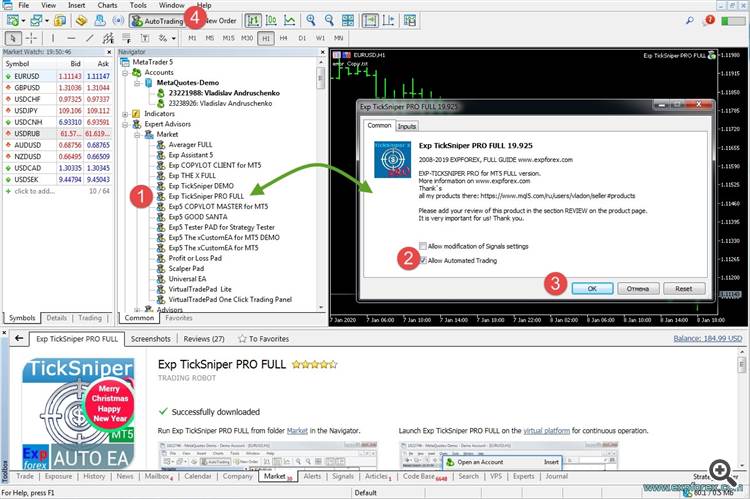
After successful installation, you will be shown on the chart, our adviser with a green smiley:The same actions for updating the Expert Advisor.
Добрый день! Я приобрела данный продукт, но не могу понять как его установить к уже существующему открытому счету на mt5
Здравствуйте.
полная инструкция по установке:
🏬🏬🏬 Вы можете установить любой советник из терминала, вкладка маркет, покупки: 🏬🏬🏬
МАРКЕТ MQL5.COM: КАК установить советник из терминала и РЕШЕНИЕ ПРОБЛЕМ: https://www.mql5.com/ru/blogs/post/674860
Установка и Активация купленного советника в терминале.
После покупки Вы можете установить советник в любом терминале.
1 активация = 1 компьютер.
При смене системы или переустановке Windows, Вам необходимо заново активировать советник на Вашем компьютере.
Вы можете активировать советник 1 раз на компьютере и установить советник в другие терминалы на компьютере уже без активации.
Копирование советника из одного компьютера в другой - запрещено. Иначе будет ошибка
Те же самые действия для обновления советника:
Еще раз добрый день, а торговля с данным советником возможна только от 3000 долларов на депозите?
Нет, вы можете торговать хоть от 1 цента, главное чтобы брокер разрешил.
А можете пожалуйста выслать файл пдф с инструкцией, тет что есть у меня по какой то причине не открывается, спасибо
самая полная инструкция с постоянным обновлением здесь: https://www.expforex.com/publ/ea_from_expforex/exp_virtualtradepad_polnaja_instrukcija/4-1-0-162
Hello. This is new elements, all updates I posted to the whats new section.
---- "LifeTime" button - Order lifetime in minutes!
------ Lifetime in minutes works virtually for all pending orders.
------ After the LifeTime expires, the order will be deleted.
------ Attention! Works separately with DayToExpiration option (Expiration time in days).
---- "Step" button - Step of each next order in the grid!
------ Used in conjunction with the Grids parameter.
------ Allows you to set the step for the grid from the first pending order in the grid.
Attention! Distance parameter - This is the distance from the current price to the first pending order.
---- Button "CoefLot" - The CoefLotForGridOrders parameter from the parameters has been moved to the panel.
------ Multiplication factor of the next lot in the grid of pending orders when used on the Orders tab
Example: "CoefLot" = 2, Grid = 5, then lots will be opened like this: 0.1, 0.2, 0.4, 0.8, 0.16
Thank you Vladislav,
I have another doubt regarding partial closing of orders.
The partial closing deal tab should appear when moving cursor over the current open position as I understand from the user guide.
It is not appearing in my case, am I missing something ? or are there some input parameters that I should know.
Thank you.