
75 USD
Demo heruntergeladen:
6 985
Veröffentlicht:
2 Februar 2012
Aktuelle Version:
26.326
Keinen passenden Roboter gefunden?
Geben Sie Ihren Eigenen in Auftrag
auf Freelance!
Gehen Sie zu Freelance
Geben Sie Ihren Eigenen in Auftrag
auf Freelance!
Wie man einen Roboter oder Indikator kaufen kann
Starte Deinen EA im
Virtual Hosting
Virtual Hosting
Teste einen Indikator/Roboter vor dem Kauf
Möchtest Du Geld im Market verdienen?
Wie man Produkte richtig präsentiert

Sie verpassen Handelsmöglichkeiten:
- Freie Handelsapplikationen
- Über 8.000 Signale zum Kopieren
- Wirtschaftsnachrichten für die Lage an den Finanzmärkte
Registrierung
Einloggen
Sie stimmen der Website-Richtlinie und den Nutzungsbedingungen zu.
Wenn Sie kein Benutzerkonto haben, registrieren Sie sich
Comprei a ferramenta Virtual Trade Pad e, após um período de utilização, embora ativa, não está mais realizando a negociação de compra / venda. Quando posiciono o mouse nos botões do VTP, ele mostra os parâmetros no gráfico, mas não realiza as operações. Solicito ajuda. Glauco de Andrade Antunes (altopar@gmail.com).
Hello,
Hello,
I'm running into a problem when I use CLP to close all positions in loss and close terminal after all positions are closed. I'm using an EA to trade, and my EA will take new positions before CLP closes them all if there are many positions to close, leading to additional losses and not enabling CLP to close the terminal so that all trading will stop.
In your CLP manual, you explain the "ClosingCurrentTicketOnly" parameter, but you don't mention close in loss, only close in profit in the explanation. Does this parameter not work for closing loss?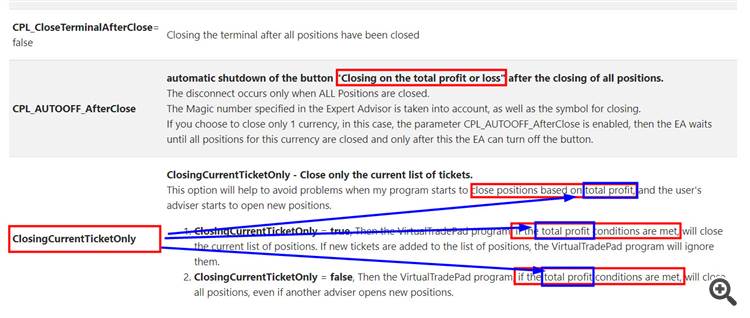
Hello,
I'm running into a problem when I use CLP to close all positions in loss and close terminal after all positions are closed. I'm using an EA to trade, and my EA will take new positions before CLP closes them all if there are many positions to close, leading to additional losses and not enabling CLP to close the terminal so that all trading will stop.
In your CLP manual, you explain the "ClosingCurrentTicketOnly" parameter, but you don't mention close in loss, only close in profit in the explanation. Does this parameter not work for closing loss?
I haven't tried setting this parameter yet. I was not aware of it until reading through your manual recently.
Just to clarify, if I set this "ClosingCurrentTicketOnly" = false, then all positions will be closed, even newly opened positions by the EA, and the terminal will close if set to "CloseTerminalAfterClose" = True?
I haven't tried setting this parameter yet. I was not aware of it until reading through your manual recently.
Just to clarify, if I set this "ClosingCurrentTicketOnly" = false, then all positions will be closed, even newly opened positions by the EA, and the terminal will close if set to "CloseTerminalAfterClose" = True?
Nope! It happens while in the chart mode, only VTP dashboard works when clicking on buy and sell and then after that keyboards key’s returning to works...
Attached the logs...
May I send you the logs privately ?
what you mean as the graph “out of focus”...?
the keyboard is the events of the graph. Therefore, buttons can only be processed when the graph window has focus. for example, you can click on Market Watch and the focus will be on the Market Watch. or you can click where you have trades and the focus will be there, but not on the chart.
Ok! No the keyboard stop working without leave or any click out of the chart...